Whole House Backup

74 comments started 2024-04-15 last 2024-07-28
GivEnergy ProductsAC Coupled
#1 Icarus

Today around 09:33 we had our first power outage since firmware upgrade of our All-in-One
The outage was brief, but it was a disconcerting experience of the "whole house backup".
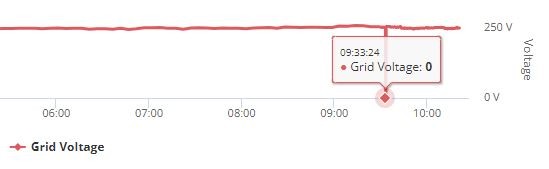
I'd be interested to know if what follows is the expected behaviour of the system.
FYI I have a SolarEdge SE5000H ac coupled. Sunny morning, battery over 90%
I was certainly not expecting lights to go out, computers to reboot and TV to switch off, however briefly the interruption to grid.

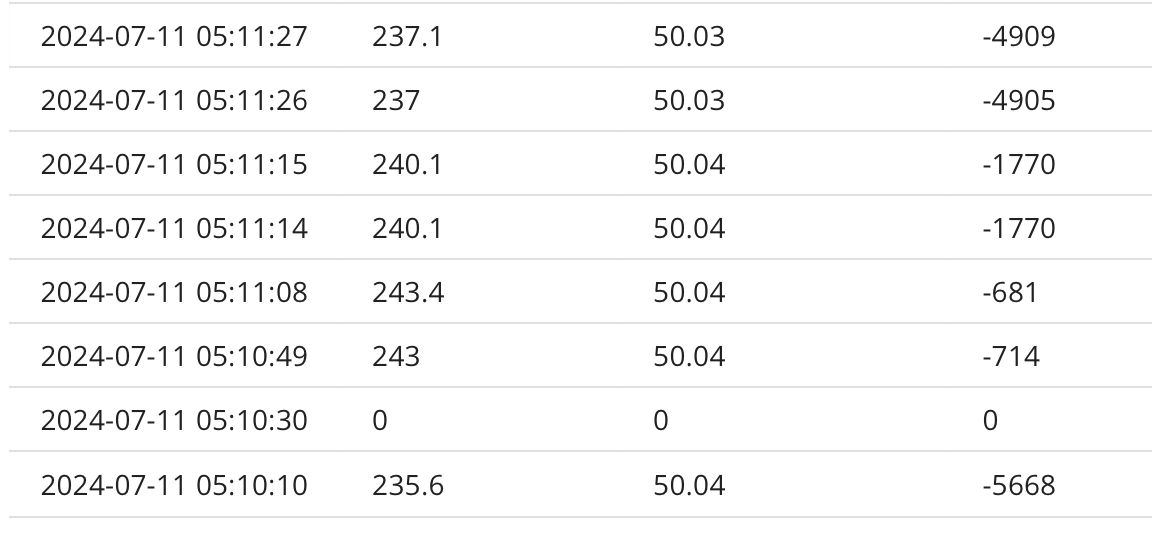
Looking at the logs, Inverter Data shows the frequency bumps up to 54Hz
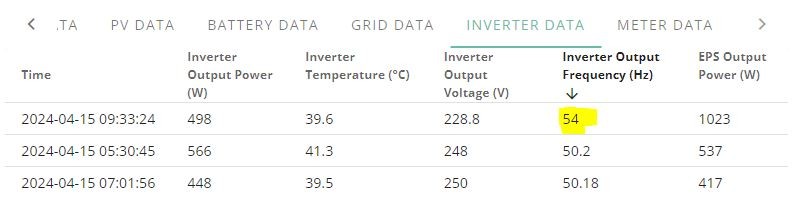
This appears to switch off the SE5000H but recovers after about a minute
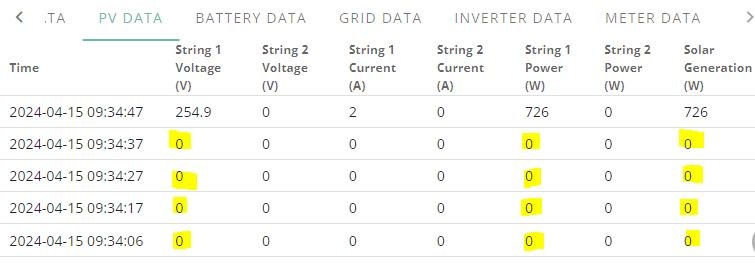
The PV generation being switched off is not unexpected as we don't want any chance of grid export during a grid fault.

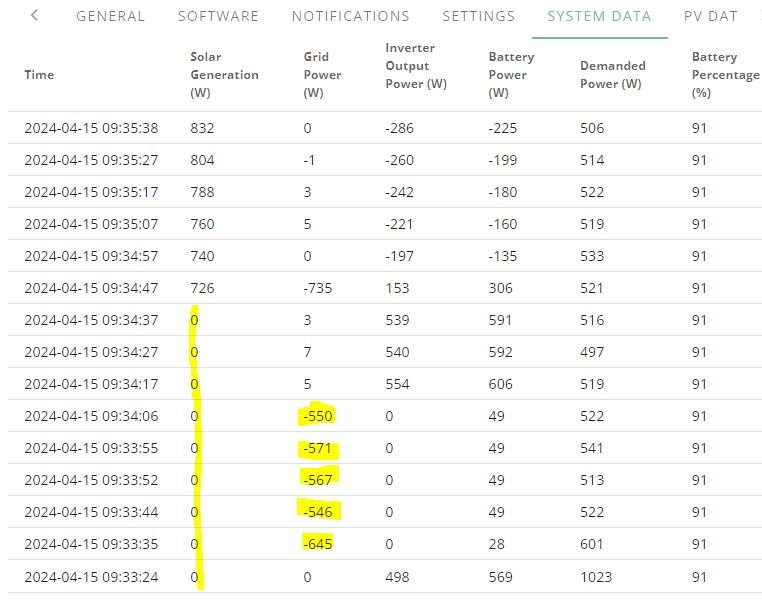
What I did not expect is that the house load (around 0.5 kW) was not immediately supplied by the battery.

The evidence from the logs is that following the brief grid interruption, the house load was supplied by the grid for at least 30 seconds, before the PV inverter recovered.
PV subsequently carried on charging the battery and supplying the house load.
But I was under the imperession the house should have gone into an island mode protecting the house from the grid failure.

I have no idea if this is a faulty installation or some new behaviour of recent firmware upgrade.

S
#2 SteveCook

i think there is power break in normal setup.
it is an Essential Power Supply EPS, not an Uninterruptible Power Supply UPS.
I think you have to contact GivEnergy if you want it configured for UPS.

#3 Icarus

SteveCook
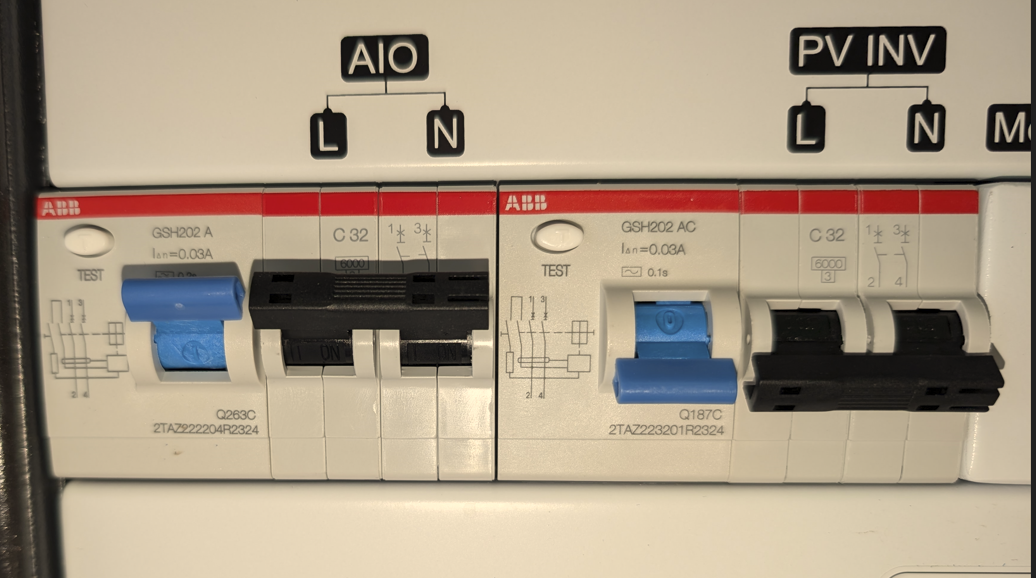
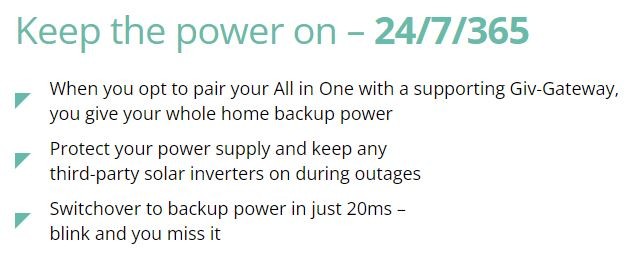
The All-in-One + Giv-Gateway are specifically designed to act like a whole house backup

I was expecting a minor flicker of lights but we lost all power.
Suggests that it is not an EPS or a UPS.
Something definitely wrong.
Have currenly opened a fault request with my Installer, though I suspect they will be disinterested.

D
#4 DreadorUK

I have had a few power cuts and it for me also acts like a EPS its not fast enough to catch the outage and isolate it seems so sometimes things stay up other times they reboot.

I guess I haven't been too peeved as I used a a Anker power station as a POC before committing to AIO so my office runs off that not the AIO.

S
#5 SteveCook

Icarus
Sorry my mistake.
I have Hy5.0 Gen1 with EPS setup and just accept router and skybox rebooting.
Gives my a "warning" that something has happened

#6 hoggy

Suspect you don't' have "EPS" mode enabled (0 sec switching). This seems to be a common theme with the AIO and i'm unsure as to why it's not simply set as default given the majority of users bought the AIO for just that reason.
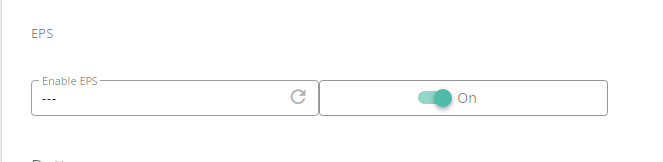
I don't have an AIO but believe you can check via the portal > Inverter > Remote Control > untick "Hide Potentially Unsupported Registers" > scroll down to EPS and then click the circular arrow to check it's state.

Couple of other things:
If your AIO battery is > 90% then when it drops into off grid mode it will bump frequency to 54Hz to shut down your other solar inverter.
Once your AIO gets below 90% ish then it will drop back to 50Hz and your solar inverter should boot back up (if the sun is out) and recharge - cycle repeats over and over.

This jump to 54Hz on Grid Fail isn't quite a seamless as a grid fail when it is still at 50Hz as it's trying to do 2 things in the very tiny ms window (it has to achieve both off grid & frequency jump as opposed to just off-grid).

Resync on Grid restore can take a long while, especially if the supply is a bit volatile on restoration.


#7 Tenkaykev

hoggy
Just followed your instructions with regard checking the Inverter registers and mine says " Read Successfully - Enable EPS - ON.

#8 hoggy

Tenkaykev whelp that's that idea out the window then.
I guess you could try forcing it off grid and see if it still drops out with / without your battery being >90% to narrow down if it's related to that.

#9 PianSom

Tenkaykev
This is little more than half-informed speculation but ...

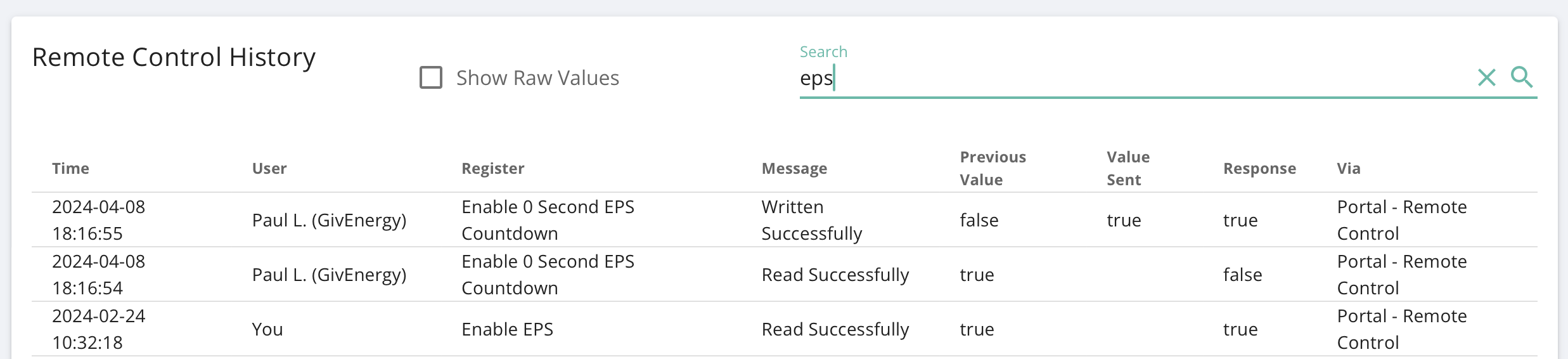
I think the register that need to be set is "Enable 0 Second EPS Countdown". Search for that in your logs. For me the last setting has that set to "True".

This is different from the "Enable EPS" setting.

That sound right to you hoggy ?

#10 hoggy

PianSom something along those lines yes, although i suspect only the installer can change it (however, given that should just be a mouse click they might be more inclined to do it rather than something that involves a visit)

#11 Icarus

Thank you all for the suggestions to my lack of backup with the AIO.

I can confirm that "Enable EPS" is set to ON.

I really don't want to play with "Force Off Grid" because I suspect it will NOT seemlessly switch my home to the battery.
I got enough grief from other household members this morning when we had a genuine grid interruption!

In the meantime I've raised a support request with GE as well as my Installer, but I won't hold my breath.

#12 Tenkaykev

PianSom
I searched hither and thither and can't see any further registers apart from the one I mentioned.

#13 PianSom

Tenkaykev
On the Inverter tab, go to Remote Control, the Jump to Logs. Search for "EPS".

On mine I can see references to both registers, with the "0 Second" one being set to True for me by GE staff.

J
#14 Jellybaby

PianSom all I have in mine is this

#15 PianSom

Jellybaby
Click the “Jump to Logs” button. Or simply scroll down to the logs section.

At the top you will find a “Search” field. Enter “EPS” as a search term and hit Enter.

#16 Tenkaykev

PianSom
I have done that and I only have the single line . I've also tried with " show hidden registers " enabled.

#17 PianSom

Tenkaykev
"Show Hidden Registers" is irrelevant here, I think. Sounds like you may want to reach out to Support.

Here's my log entry from a week or so ago, when Paul was investigating something for me (on the beta forum). You can see he had to reset the setting for me, and that it appears to be distinct from the "Enable EPS" setting.

J
#18 Jellybaby

PianSom ah

#19 Icarus

Well that's interesting: looks like GivEnergy deliberately left mine as 'false' after reading the value.
Maybe it's not applicable to AIO?

No evidence in the log subsequently of setting it to 'true'.

#20 PianSom

Icarus

Icarus Maybe it's not applicable to AIO?

I have an AIO. As does Jellybaby and Tenkaykev

In any case, only the AIO has EPS atm I think.

#21 Icarus

hoggy

I think the fact that the AIO set 54Hz to turn off the PV inverter, indicates the AIO is not working in island mode.
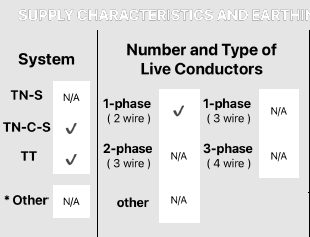
As per picture above, a key feature of AIO is:
"Protect your power supply and keep any third-party solar inverters on during outages"

I would be dissapointed if this is accidental new behaviour brought on by the D0.611-A0.611 firmware for AIO and/or A0.005 firmware for the Gateway.

I wonder if anyone else has had a power cut (or deliberately provoked one by switching the isolator in the meter cupboard) since upgrading firmware?

#22 hoggy

Icarus it moving to 54hz is as per design. The Tesla Powerwall does the same.
If the AIO battery is above 90% then it does this on purpose to shut the PV inverter down - otherwise it risks overcharging the battery as the excess PV has nowhere to go if the grid is down.
(other brands call it Frequency Shift)

If you had the same power cut with 40% battery then the frequency would stay at 50Hz (with your PV Inverter staying on)
There is literally no other way they could force a completely separate, different branded PV inverter offline without doing this kind of thing hence this "trick" is used as all PV inverters should go into fault/stop at 54Hz.

T
#23 TX200

PianSom Ac3 and Hybrid Gen3 have EPS mode too. I've had it enabled on both of my systems.

#24 PianSom

TX200
Do they have the “0 second” register too?

That’s what I thought was unique to the AIO (even though that’s not what I said!). I may be wrong about that.

T
#25 TX200

PianSom ah, got ya

No, Hybrid Gen3 doesn't appear to have that register. Just an on/off.
But GE can do something in the background to enable zero (or close to zero) seconds UPS mode.

Otherwise EPS is available but not fast enough to be considered UPS.

#26 Icarus

James from GivEnergy updated the setting for me:

I can conclusively say this has solved the problem for me, since I (tentatively) switched the isolator in my meter cupboard to disconnect the grid.

ISLAND MODE WORKED!

Thanks to all for the hints about what to do.
Really think this setting should be the default for AIO/Gateway installs.

#27 nophead

TX200 Otherwise EPS is available but not fast enough to be considered UPS.

Why would anybody want it not to be a UPS? Yes you could run your freezer with a short outage but any IT stuff needs UPS.

#28 hoggy

nophead It was introduced some time after I had mine installed in 2020. It simply wasn't possible to switchover without the delay before in the firmware until some point in 2021 if I'm remembering right (I recall testing it, then turning it back off given my changeover is manual anyway.)
It is apparently quite hard on the relays (on the normal inverters not the AIO) hence why I think it is by default not simply enabled for everyone.

D
#29 Daveb01

I tested my AIO for UPS on the 1st of every month, to make sure it works, no issues so far.

I have now gone to once a quarter. 🤞

#30 PianSom

Testing mine trips all my RCBOs on my consumer unit. And keeps them tripped until power is restored. 🙁

Paul L suggests issue likely is a potential leakage somewhere. Now waiting on my installer ...

#31 Icarus

My RCBOs were fine but I did notice a couple of Raspberry Pi's rebooted.
That's the only thing in the house that didn't like the change to split phase 120-0-120.

Admitedly these devices are not powered from an official 5.1v / 3A power supply.
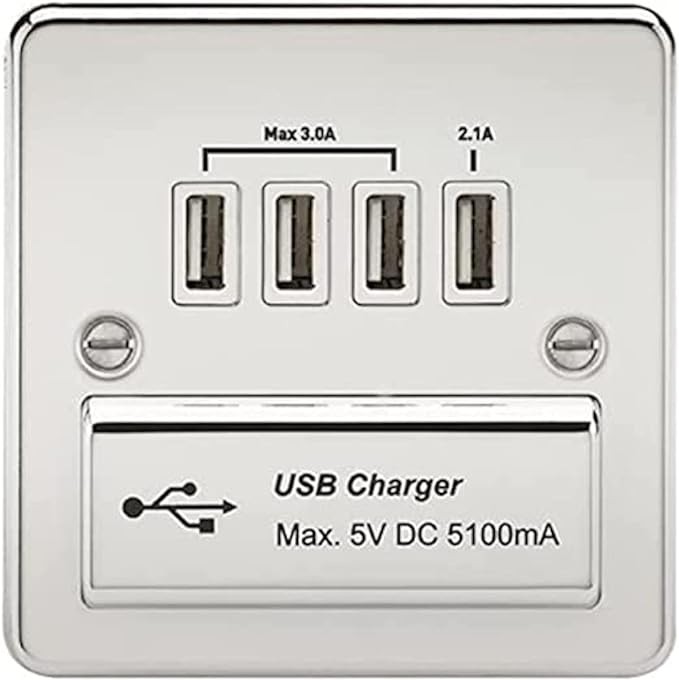
Instead they have been happily running from a USB wall outlet, of this type:

Evidently this particular wall outlet did not take kindly to the 20mS interruption into island mode.
While the voltage is a little low for running PI 4's, both are not being stressed and so their current demand is minimal.

All the other larger appliances around the house had no issue.

There is a mention about RCBO issue on the beta forum:
https://community-beta.givenergy.cloud/t/rcd-trips-in-aio-off-grid-mode/1049

#32 PianSom

Icarus
Thanks - I will pass on that discussion.

That's not the sort of device that I would have imagined would have an issue with a momentary change. Shows what I know.

#33 26Left

PianSom I suspect you have a neutral to earth leakage on a circuit - probably some outdoor lights or similar. That was my issue - it’s goes unnoticed by the RCBOs in normal operation, but immediately causes an issue when in Island mode due to split phase delivered by the AIO.

See this thread more the reason why & my experience fixing it
https://community.givenergy.cloud/d/3478-type-a-and-type-ac-rccbrcd-experience/35

#34 PianSom

26Left
That is extremely interesting - thank you! I will point my installer towards that post, and ask his views. I'd rather pay him to sort it out than try and find a knowledgeable, technical and suitably interested local electrician.

S
#35 SteveCook

I have a Gen1 Hy5.0 and EPS is only single phase.
I had a crossed neutral between my 'normal ' consumer unit and my EPS consumer unit. In normal conditions there was not any issue as everything was cross connected.
When grid failed the normal consumer unit went 'dead', so the RCD detected an imbalance and would trip.
I spent ages tracing every circuit, labelling and using a meter to find the stray neutral and then sorted it.
All been fine since.

It was not a problem caused by my installer as the original wiring was circa 2012 and the stray neutral was there before I installed the PV kit in 2020.

K
#36 kram

Icarus

I imagine the 5V conversion circuit doesn’t have the capacitance to hold up at 5V for the time period covering the drop and moving to split phase.

I imagine others would, but best thing to try first would be an assortment of USB adaptors to show which work.

Admittedly PW not AIO, but the Hager ones held up through power loss with zero issues.

#37 Icarus

kram
I think you're right. Had I used an official R.Pi power supply designed for 5.1v at a decent continual current load, I suspect I would not have seen the issue. The wall outlet is closer to 5v and unlikely to have been designed to cope with a split-phase transition and momentary loss of grid. In contrast, I've noticed with the latest R.Pi 5 official supply there must be a fair amount of capacitance because it runs for several seconds after being unplugged.

#38 26Left

PianSom yeah it’s a tricky one because if I was your installer, it’s not really my job to rectify house faults that are nothing to do with what I’ve installed - they were there before I even turned up.

HOWEVER the fact that the AIO runs split phase in island mode was not apparent to me, and possibly not to most installers. And two different domestic electricians that I’ve had do work at home haven’t come across a split phase system before so it seems quite usual. Most don’t even have equipment that can do test trips for example because what they have expects standard {0,240} not {-120,120} across {neutral, live} - so effectively won’t test from what their kit thinks is a faulty setup to start with.

V
#39 Vestas

26Left It doesn't run split-phase, its IT earthed, which for a domestic situation in the UK is a rather bold/foolhardy decision.

That's why the trip tests will all fail.

Its also why it doesn't (IMHO) appear to comply with domestic wiring regs for generation/storage systems which operate in "island mode".

Supposedly a "new" gateway is being designed to address this, pretty sure that's what @hoggy said on another thread.

V
#41 Vestas

26Left If you read one of his later posts you'll find it works in IT earthed mode.....

#42 hoggy

Vestas yes correct. IT earthed in island mode (although that does show itself as 120V L/N to earth still)
The split phase thing catching on was actually my fault (I naively assumed nobody would be mad enough to not have an N-E bond so the logical reason for seeing this 120V was that it was running split phase)

The error of the way has apparently been resolved in FW 611 it appears, which now can enable this N-E relay it seems without having to physically swap out the gateway. But it'd be a brave installer to simply load this remotely and not actually test in person. It is not unknown however that this fix may introduce tripping when transitioning on/off grid though so beware.

Quite how it can get this far down the line before people noticed the RCDs don't trip in island mode is a failing on both sides really. GE for not telling installers the intended earthing method clearly & putting out a product that is nearly impossible for an installer to make comply with regs. And also installers, for not actually testing the RCDs work in island mode (so not following the regs either)

Newer gateways I believe resolve this NE bond issue from factory.

#44 26Left

hoggy ok so I think that explains why my electricians could see 120 on Live and Neutral.

Is there a diagram or similar that some can point me to please to explain IT and what changes between normal operation and island mode with the AIO?

V
#45 Vestas

hoggy So lots of happy installers with lots of unpaid visits to make.

Or ex-GE installers who just load the f/w and then blame GE for any consequences.

Lovely... 🙁

#47 hoggy

26Left I think I've done it somewhere on here but I'll try and explain it.
It's used extensively in Norway (which if memory serves me is down to Geology not allowing much in the way of a good earth path there) but is very unusual elsewhere.

The basic premise is that you don't actually have an earth as such, more that any earthing becomes bonding.
When in island mode the earth is not actually connected back to the source (aio) and therefore there is no path for "earth" faults back to the aio. Therefore you can't get a shock. (This is also why your RCDs don't trip because no current flows (via the earth) back to the AIO which would cause an imbalance that trips the RCD.
All sounds magical in a "why bother with earth at all then" however, once you do have 1 fault (like a short) between L or N to earth (a first fault) what happens is - nothing - because as we've already said no current will flow. Still sounds magical? Yep, but because nothing happens, you don't know there's a fault - appliances will carry on as normal, no RCD will trip at this first fault. What you have now done though is actually create essentially a neutral-earth bond in a random location. What was L 120V / N 120V to E will now be back to 240V 0V & Earth and more importantly you now actually have a fault path back to the source via earth. If you have a further fault in this state then you do have to rely on your RCDs tripping. Which again if the first fault was a dead short you'll probably be fine and they'll trip in time.

Now that still sounds a bit like a storm in a teacup - first fault = nothing, second fault = rcd trip (and the AIO is RCD protected so what's the problem)
Well two things, 1 - modern tech can be quite leaky, things have suppressors to earth and so on which kind of create a middle ground via capacitive impedance where its "sort of IT, sort of TNC-S" so you have to be careful with not letting it raise touch voltages to the point where simply touching an appliance is enough to shock you. There are all sorts of extra kit needed & rules around IT earthing and constantly monitoring for faults, which the AIO and gateway simply doesn't have.

Secondly - it's all a moot point given the reg below, which says it should bond N-E and that's that.

#48 26Left

Thank you for the taking the time to explain this, really helpful.

V
#49 Vestas

hoggy To add to that - IT earthing is the sort of thing you have in operating theatres/critical infrastructure where you can't have the supply drop even for milliseconds and fault modes as listed above are of secondary concern.

Hence it was an interesting choice to have as default for a domestic install in the UK 🙂

Tempted to say this is what happens when you develop offshore/rush it/don't know what local standards are but that'd be maybe a tad harsh 😉

#50 hoggy

26Left no worries. Its been an interesting sleuthing trying to work out what was going on.

#51 hoggy

Vestas I honestly don't know the reason behind it, maybe it made them less susceptible to tripping or something. I don't even think it's the norm in China either to be fair.
The fact that it can be enabled in firmware would suggest that it was atleast thought about at design stage but for whatever reason not enabled? (as opposed to having to physically retrofit a new relay which would be bad times for profits this year!)

V
#52 Vestas

hoggy Its probably been left disconnected as default in f/w. Which to be fair is probably the "least harm" state given local wiring in some markets may not even have an earth prior to install.

The rest - rush because of Powerwall, supply issues, etc etc.

Shows how easily things go wrong though....

#53 26Left

hoggy The error of the way has apparently been resolved in FW 611 it appears, which now can enable this N-E relay it seems without having to physically swap out the gateway.

So does this mean that having just taken the plunge to 611 today, I might see a different behaviour next time we got into island mode?

#54 PianSom

hoggy
Just to add a redundant +1 - thanks for taking the time to make such an informative post.

Now I am even more uncertain what the solution to my tripping RCBO issue will be ...

#55 hoggy

26Left I think the installer still needs to turn on the relay (I think a few weeks back a bunch of people were getting something new in the remote control logs along the lines of "neutral earth relay toggle" which I think was GE polling the entire fleet for status?
I'm not sure what, if any, user facing visibility you have (given i don't have an AIO) even if you uptick the "hide potentially unused registers" thing in the remote control page.

The easy way woudl be to simply force an off grid and check voltage between N and E if your comfortable with doing so. If not then give it a miss until things become more clear with how this will all work itself out.

#56 hoggy

PianSom you might find it goes away. The N-E relay being on puts you back to pretty much "normal" 240V so provided it doesn't trip on grid (which would suggest things are not right anyway) then it shouldn't in theory do it while in island.
It might trip going in or coming out of island though which I have a feeling may be down to timing in the relay logic (a bunch of relays all need to fire at the same time when doing that and I think that a slightly slow relay would cause a millisecond imbalance the RCD thinks is a fault)

#57 PianSom

hoggy
Sadly ....

The relay was switched on for me on 8 April by Paul L. On 17th I had a momentary power cut (storm related) - all was good, no trips for either RCDs or RCBOs!

But on the 18th at around 1pm there was a local high voltage cable fault which caused a power out for the entire region. And my RCBOs all tripped. Including the ones powering the freezer. While I was out of the country. Talk about unlucky. These are the only two power events I have had in the 9 months I have lived here.

(Oddly, Paul checked the relay state on the morning of the 18th - it was off. Goodness knows what is going on.)

#58 hoggy

PianSom there is an early version of 611 and the "correct" version of 611 (no I don't know why you'd have 2 versions same number either)
The wrong version doesn't hold the setting for some reason so it turns the relay back off.

#59 PianSom

hoggy
😮

I will see if I can persuade Paul to update me to the "new" 611, as I was on the beta program and went from beta 610 to 611 as soon as I saw it, so assume I am on the early one. Not that there seems to be any way of checking.

T
#60 T-M

hoggy I've just done a check on my AIO running latest Inverter Firmware D0.612-A0.612 and Battery Firmware 10 following a big hiccup when updating overnight last Thursday which borked my system (now fixed). Apparently, the N-PE bond relay is not enabled, which is obviously why I'm getting 118vac N-E and 109vac L-E, and my socket tester does not trip the circuit when in Island Mode. Oh, and it also looks like Enable 0 Second EPS Countdown might be off as well. Time for a call to GE I think

#61 hoggy

T-M oh dear, sounds like it's reverted back to factory.

T
#62 T-M

So GE have now enabled the N-PE relay and confirmed that "Enable 0 Second EPS Countdown" is also enabled. Time to do another check.
Flipped Grid to OFF in Gateway and nothing untoward happened, with house now operating off battery in Island Mode
L-N => 229vac
N-E => 12vac (Higher than I might have liked, but it's a 25m run of SWA cable to the shed)
L-E => 227vac
Socket tester shows correct LED lights and test button trips shed CU, which is good news

Now the fun part!
Flipped the Grid back to ON in the Gateway, and the PV and AIO RCDs & MCBs tripped (and I don't even have any PV yet).
Clock flashing on oven and Amazon Echo lost wifi connection, so there must have been a short interruption of supply. Luckily, I have a 550VA UPS to keep my Router, ONT, NAS & Home Assistant server running for 20 mins or so.
However, if this were to happen while I was on holiday, and the Grid went down a second time, the whole house would be then be off, which is the whole point of having whole house backup!

Back to GE I think for what to do next

#63 hoggy

T-M yeah people find that after the N-E relay gets enabled, they can get that happening - too much earth leakage when it flicks back to grid (I don't think the AIOs inbuilt N-E relay can act quick enough/ in sync with the gateway relays.)
Only real solution for that is a new Gateway which has this N-E relay built into the gateway instead.
All a bit of a fudge / mess really.

If your systems never had a working N-E relay (I.e your installer left it disabled) then Givenergy really shouldn't just be enabling it remotely. It fundamentally changes earthing arrangements so your installers testing certs are invalid. (Nobody has checked your RCDs tripping in the correct timeframe and so on in island mode)
Obviously the installer should have questioned the whole lack of N-E bond in the first place but as the manufacturer was (at the time) adamant it running as IT was fine (it isnt) then I understand why many would back down despite it being impossible for an RCD test to be carried out successfully.

#64 PianSom

T-M However, if this were to happen while I was on holiday, and the Grid went down a second time, the whole house would be then be off, which is the whole point of having whole house backup!

Back to GE I think for what to do next

Yup, this exact holiday thing happened to me

hoggy Only real solution for that is a new Gateway which has this N-E relay built into the gateway instead.

My replacement Gateway is currently sat in my garage waiting for my installer's (and my) availability. Hopefully in the next two weeks I will finally be sorted out.

T
#65 T-M

hoggy Wierd that doing so doesn't trip any of the RCBOs in my main CU, or the RCD in my shed CU. Only the ones in the Gateway itself. Maybe they are faster acting, or it's something to do with being closest to the incoming supply. It's not a great choice during Island mode though, is it. 110vac on the neutral or the possibility that you could lose CCTV cover and everything in your freezers while on holiday.
I'll see what GE have to say.

T
#66 T-M

PianSom Sorry to hear that. Hope you didn't lose your freezer contents. My Gateway is a 2330 unit (wk 30 of 2023 I believe) and already has a N-PE bond relay in it (I thought they all did). Perhaps they changed some aspect of the design in later units.
Hope it all works properly for you when you do get it installed.

T
#67 T-M

hoggy Follow up. I've just checked the EIC that was completed at the time of installation (see screenshots), and you may well be correct about what the installer set up at the time. I know they checked that the Gateway changed over to Island mode, but I don't recall them doing any actual circuit tests while in Island mode (I was closely following what they were doing), and there's no Island mode tests listed on the EIC. Also, you have previously mentioned that it isn't a TT system when in Island Mode, but an IT Earthed system, which is different. Either of these being correct means that the installer incorrectly completed the EIC, possibly because they were unaware what the Gateway was doing.

#68 PianSom

T-M
No freezer disasters ... so far! I have begged favours and got someone around to reset the AIO each time it has happened when I am away. I am a 2316, atm.

I used to have CU RCBO trips before they enabled the N-PE Relay Toggle was written. Since then I seem to have AIO trips instead.

One surprising challenge is working out reliably if the grid has failed. I monitor the grid frequency in HA, but have had several false alarms in the last few weeks (co-incidentally or otherwise since I have been on 612 firmware).

#69 hoggy

T-M I was lead to believe that its gateways before 2346 are the ones affected / don't have the relay (the one they are likely engageing currently is the one in the AIO itself - which seems to cause nuisance tripping either going into or coming out of island mode - not ideal. I think the "better" gateways also have type A RCD fitted not type AC like the early ones.)
I'm curious how people with multiple AIO on an old gateway before 2346 are getting around this. Hopefully only 1 N-E bond relay is being enabled not both AIO devices.

Yes your installer will have put it down as TT as it will not have been known back then it was IT (there still nothing in writing from Giv admitting this mistake) & enabling the NE bond actually makes your island mode TN-S (as opposed to IT if you leave the relay off)

Nearest RCDs to the source (the AIO) trip first, which lead me to believe its the AIO relay being slow on resync with the grid.

T
#70 T-M

Though it's a 2330 unit, it wasn't installed until February this year. I ordered it just after the 0% VAT change came into force. I wonder where it was for 6 months as it's hard to believe it was just sitting in a warehouse somewhere waiting for me to order it? Maybe I'll have to ask GE about that as well?

Looks like my Gateway has one of each RCD type (Type A for AIO and Type AC for PV (unused ATM))

Yes, I have copies of the IET CoPs for both EESS and PV (I trained as an Electrical Engineer many years ago and it never quite leaves you) to bone up on the subject when I started looking into PV & Batteries a year or so ago, so was expecting it to be TN-S in island mode

T
#71 T-M

PianSom I also monitor the Grid Frequency and send out a Grid Down/Grid Up email. I also have a 550VA UPS on my ONT, Router, NAS, & HA Server - just in case.
This is my automation if you want to compare:
`alias: Grid Loss Notification
description: Notifies loss / restoration of grid supply to AIO battery storage system
trigger:

  • platform: state
    entity_id:
    • binary_sensor.grid_status
      from: "on"
      to: "off"
      for:
      hours: 0
      minutes: 0
      seconds: 10
      id: grid_down
  • platform: state
    entity_id:
    • binary_sensor.grid_status
      from: "off"
      to: "on"
      for:
      hours: 0
      minutes: 0
      seconds: 10
      id: grid_up
      condition: []
      action:
  • if:
    • condition: trigger
      id:
      • grid_down
        then:
      • service: notify.smtp_send
        data:
        title: Grid is DOWN!
        message: >-
        Grid DOWN - House now running from battery storage only! Current
        load is : {{ states('sensor.givtcp_CH2330XXXX_load_power') |
        int }}W Current SOC is : {{
        states('sensor.givtcp_CH2330XXX_soc') | int }}% Estimated battery
        life : {{
        ((states('sensor.givtcp_CH2330XXX_discharge_time_remaining') | int)
        / 60) | int }} hours
  • if:
    • condition: trigger
      id:
      • grid_up
        then:
      • service: notify.smtp_send
        data:
        title: Grid is UP!
        message: >-
        Grid UP - House now running from grid/battery storage! Current load
        is : {{ states('sensor.givtcp_CH2330XXXX_load_power') | int }}W
        Current SOC is : {{ states('sensor.givtcp_CH2330XXXX_soc') | int
        }}%
        mode: single`
T
#72 T-M

PianSom With this Template sensor (forum is messing up format):

`binary_sensor:

# Detect grid outage by means of grid frequency drop

  • name: Grid Status
    unique_id: grid_status
    icon: mdi:sine-wave
    state: "{{ not states('sensor.givtcp_ch2330xxxx_grid_frequency') | int(default=50) < 49 }}"`
#73 PianSom

T-M
Yes, that's the sort of automation I am using. And if you get a grid reading like the below (which is a false failure - there was no power interrupt as far as I can tell) then it works just fine. But is useless, and causes marital disharmony!!

I actually get my phone to give an urgent alert, so I get notified even if on mute, rather than smtp.

      - service: notify.mobile_app_XXXXXXXX
        metadata: {}
        data:
          title: POWER CUT
          message: >-
            MESSAGE LIKE YOURS
          data:
            persistent: true
            push:
              sound:
                name: default
                critical: 1
                volume: 0.5

PS if you post code here then it's best to use three back ticks before and after - like this ```

then you get code
T
#74 T-M

PianSom Looks like a screenshot from the portal. Is that zero due to a loss of comms to the Gateway/AIO maybe. I've got mine hard-wired now.
I considered doing a push notification to my phone, but AFAIK you either have to keep HA Companion running, or use a paid service, so I figured smtp would be good enough.
Three back ticks - I gave up at two so should have been more persistent!

#75 PianSom

T-M
I have always been hard wired, and have never used wifi. Paul from GE reckons this is a "duff data packet". I have had two of these events in the past two months.

You don't need anything running all the time on your phone, I believe. Just have to have the app installed and configured, and then it just uses an iOS (in my case) push service.