One battery not discharging

21 comments started 2024-05-02 last 2024-05-14
GivEnergy ProductsHybridBattery
S
#1 sponev

We have a pretty stable system but today both batteries showed empty when they were actually full. I didn't actually notice for a few hours as there was a fair amount of solar around covering the house load and a fair amount of export. I managed to get them both showing full in the app again by switching them on and off - red light on the batteries went to green with four green capacity lights. All good i thought but now one of the batteries is not discharging, it's sat there showing available at 100%. I also saw several over voltage alarms in the main portal - this doesn't really happen on our system.

Any thoughts please? We are on 3.12 as I wasn't convinced about the performance of 3.15. Thanks.

T
#2 TimHutchings

sponev Probably best to give Support a call in the morning. Obviously something not right. Not really what you want coming onto a bank holiday weekend! You could try your installer if nearby.

S
#3 sponev

TimHutchings yes inconvenient but one battery is going to cover us for most of the time now the ASHPs are off. I'll charge everything up to 100% tonight and see if it recovers, I have seen something similar once before and it sorted itself without intervention. But if not, I'll call GE tomorrow. Cheers.

#4 hoggy

Probably just out of alignment with each other and will join back together at next full charge to work normally.
3012 FW has a tolerance of 0.5V difference or one pack won't play with the other. 3015 pushes this up to 2V difference.

S
#5 sponev

hoggy not resolved overnight unfortunately. I charged what I hoped would be fully but the working pack (secondary) only reached 94% for some reason. The primary is still stuck at 100%. Overall, displayed pack voltages and individual cell voltages look very similar. Anything else to try please before I call the installer/GE?

#6 hoggy

sponev other than trial and error turning each pack off and trying to either force one down or the other up, I can't think of much else?
Support forcing a calibration would most likely work but would mean dumping them (although they can cancel them if needed)

S
#7 sponev

hoggy yes, that's pretty much where I'm at. I could try a firmware update to 3.15 but I'm not convinced about that version to be honest. Solar is crap today too, plus the bank hol so I don't want to risk too much today. We can just about manage on one battery over the weekend. I'll call support and see what they recommend. Any idea what time they open please? Can't see any times on the website.

S
#8 sponev

Spoke with first line support who guided me through the login on the main portal (chuckle) and then to the big green update firmware button. Having explained I knew all about that having worked through two previous failed updates, and also having expressed my concerns about the questionable performance of 3.15, they said I need to do it anyway. The nice support chap tried to explain the voltage overshoots on 3.15 as being down to "poor installations", however he couldn't elaborate when pressed. Sounded a bit BS to me but who knows.

So some time over the weekend I guess I need to press the update button. Support are working tomorrow and bank holiday Monday, not totally convinced I won't need them.

P
#9 Pete UK

sponev

Hi,

How did you get on with the “one battery stuck at “full”?

I’ve had this a few times now since the latest inverter firmware update (307) a few weeks ago. It was one of the secondary batteries getting stuck at 100% in our case. It happened again last night during our usual “discharge the batteries to “empty” at 7pm routine; the secondary stayed at 100% (55v plus) while the primary discharged “normally” to “empty” (51.7v) but showed up to over 78 deg C in the app at one point which is far higher than normal.

In both previous cases it recovered by itself after 24 hours (or at least that’s when I could tell it had recovered because it’s been a good few days for solar production and all batteries have been full all day !)

Going back to your problem; FYI I think 3012 showed the batteries as “0%” when there was some kind of error (even though they may be full), but this was changed in subsequent updates - a note to remove the “showing 0%” to reflect the actual percentage is in the firmware update notes.

I’m wondering if this one battery getting stuck at 100% is a common issue for others with the new inverter firmware (307) or not?

I’ve been on the 3015 battery firmware for a while. Seems to have been fairly stable and it’s got some improved fault logic, so I wouldn’t worry about updating from 3012 at all.

(2x Gen3 Hybrid 5.0 inverters, 4x 9.5 batteries)

S
#11 sponev

Pete UK Sorry, I updated in another post but should also have updated here. Basically my issue was caused by high voltage and one of the batteries tripping (primary). I didn't spot the trip as the battery lights remain active even when tripped. This prevented the recalibration part starting when i updated to 3.15, however when I finally spotted it the recal started. Interestingly the recal only ran for two hours before showing successful completion, but it certainly didn't complete an empty/full cycle.

Since the update I've had a couple of BMS over voltage issues but no trips and no battery hang ups I'm aware of. However the SoC balance between the batteries is definitely worse than on 3.12 and the secondary never gets above 94% full. Cell voltage appear OK. I've emptied to 15% once since the update and no sudden SoC drops. So 3.15 is "OK" but still issues with odd over voltages and the secondary showing not full - although voltage indicates is likely is.

V
#12 Vestas

sponev support chap tried to explain the voltage overshoots on 3.15 as being down to "poor installations"

That's a straight lie.

S
#13 sponev

Vestas agreed! First line support fob off.

O
#14 Ortwin

I've been told that second line support say the BMS OV error is not a problem as it will reset itself. However in my case the primary battery has to discharge and then charge to 100% SOC for the secondary battery to kick back in. Not what I would call a error resetting itself.

P
#15 Pete UK

Ortwin

Same here. Except it happened without a BMS over voltage for me.

O
#16 Ortwin

This is what GE Technical say on my issue: -
Your batteries being purchased at different times wouldn't be the issue as they would have been calibrated to line up the soc. It is perfectly normal for the batteries to differ in soc due to the time of install. There are no bugs in 3015 which would directly effect this issue. Due to the batteries being installed last year, eventually the cells will begin to differ in voltage but this will have to be rectified by calibrations. Changing the generation of the inverter wouldn't rectify the gradual difference in the batteries' soc's. The 'Overvoltage' notifications are nothing to worry about as they clear themselves once the voltage gets full.
Strange it happens on your system without the OV notification.

#17 hoggy

Because the packs all run in essentially the 'dead band' of the LFP voltage curve (which mostly is the reason behind SOC jumps issues) they don't (didnt) ever reach "full" and reset to accurate 100%.
3015 appears to address this by allowing the pack voltage to go higher than before so therefore resetting to 'true' 100%.
If you combine this with some of the newer inverter firmwares the inverter itself slows charge down when it starts getting high (so your less likely to trip the OV alarms) and gives the balancer a chance to work so you'll likely have a better experience.
Older Gen1 kit can't take the firmware and so doesn't slow down as it reaches near full so you start seeing the alarms pop up. It can be 1 cell going high or a number of them.
This will likely show up if you've been moved to 3015 recently as the pack will not have been taken to these levels much before, so you'll have a fair chance of some runner cells that the balancer will need to sort out. This process could take months if they are badly balanced hence the slow calibration option is suggested (although equally a slow AC charge would do much the same if repeated enough)

Ideally for Gen 1 the alarm probably should be interpreted as 'topping off battery alarm' if your cells are all well aligned. But because you can't see them without 3rd party software there's not a lot the average user can use to judge how genuine they are.
I do wish Giv would bring back the cell voltages into the consumer portal.

V
#18 Vestas

hoggy Ideally for Gen 1 the alarm probably should be interpreted as 'topping off battery alarm'

I'm not entirely convinced that multiple cells over 3.7V should be called anything other than an overvoltage, otherwise I agree with the rest of the post.

GE saying its down to "poor installations" however needs calling out. Just as well they didn't try that on with me because I'd involve the installers who by all accounts are on the verge of binning GE entirely for "lack of consistency on product and service"....

#19 hoggy

Vestas I did caveat with ' if your cells are all well aligned' but because you can't find that out without going looking for it in other apps it's far from ideal.
Assume yours has been much better since new FW now?
(Re: installers - the AIO gateway N-E bond thing was another own goal that didn't go down to well either.)

V
#20 Vestas

hoggy Assume yours has been much better since new FW now?

Still the occasional excursion into unwanted territory but its a massive improvement. Interestingly the portal doesn't issue a notification now when the occasional overvoltage situation occurs - where the same cells are higher than previous occasions and remain so for longer.

Basically all its doing differently is ramping down the charge rate between 90-100% and this could easily be done without enabling "fast response". That being the case ALL liability for failed/failing batteries (on v3015) on G1 inverters should revert to GE. No installer should touch this with a bargepole and GE should eat the cost themselves as they've clearly decided the cost of new f/w outweighs the cost of new batteries.....

G
#21 geoffreycoan

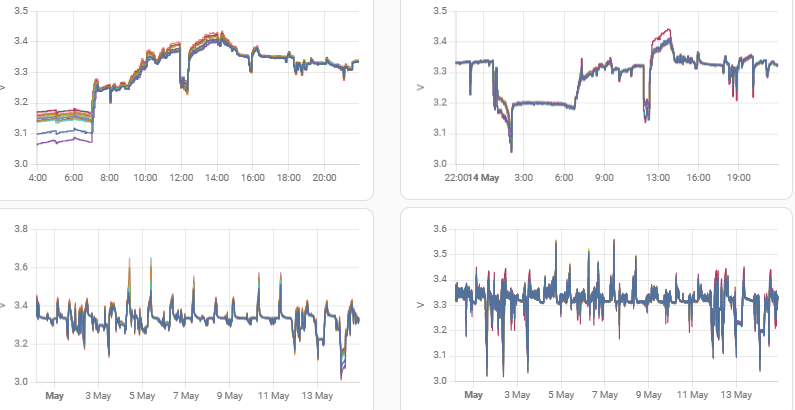
I have added some graphs to my Home Assistant dashboard to show battery voltages. Interesting seeing how little range there really is.

First column is my 9.5, second column the 5.2. Both on BMS3015 connected to separate Gen 1 hybrids on 191/193.

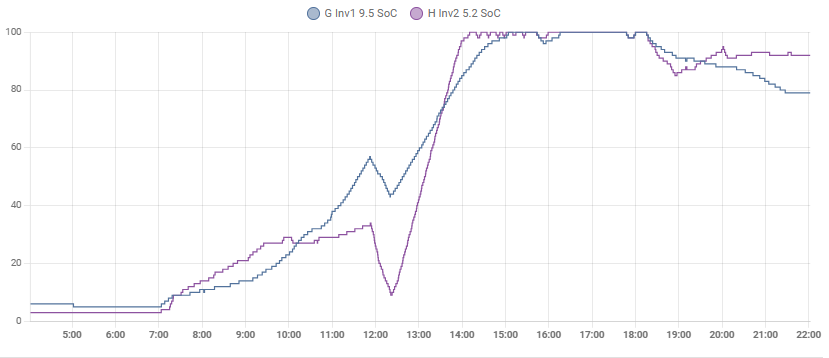
Top row is today's voltage range. Can see the batteries empty, being filled to 100% by about 2pm. Voltages then drift down a bit even though SOC remained almost full until 6pm.
Second row is the voltage range over the last month.
All 16 cells are shown on all 4 graphs