I have solar panels, hybrid inverter and dc coupled battery. I've recently set up a timed export automation in HA to discharge my home battery for a period each evening until it reaches 50%. This works well, and I've configured the automation to set the inverter to 'eco' mode as a final step at the end of the automation in case eco mode is dropped. I've noticed though that once the automation ends the battery sits at 'zero' (as if eco is not enabled), leaving imported energy solely providing power to the house. A couple of times I've noticed that although the app shows eco as being on, in the givenergy portal eco is off! However re-enabling eco on the portal still has no effect on forcing the battery to start feeding the house. I've tried doing a 'soft' and hard restart of the inverter but this has no effect, and its only after an overnight battery recharge that things start operating normally again.
Has anyone come across this issue please, any advice? Have attached a screenshot of the
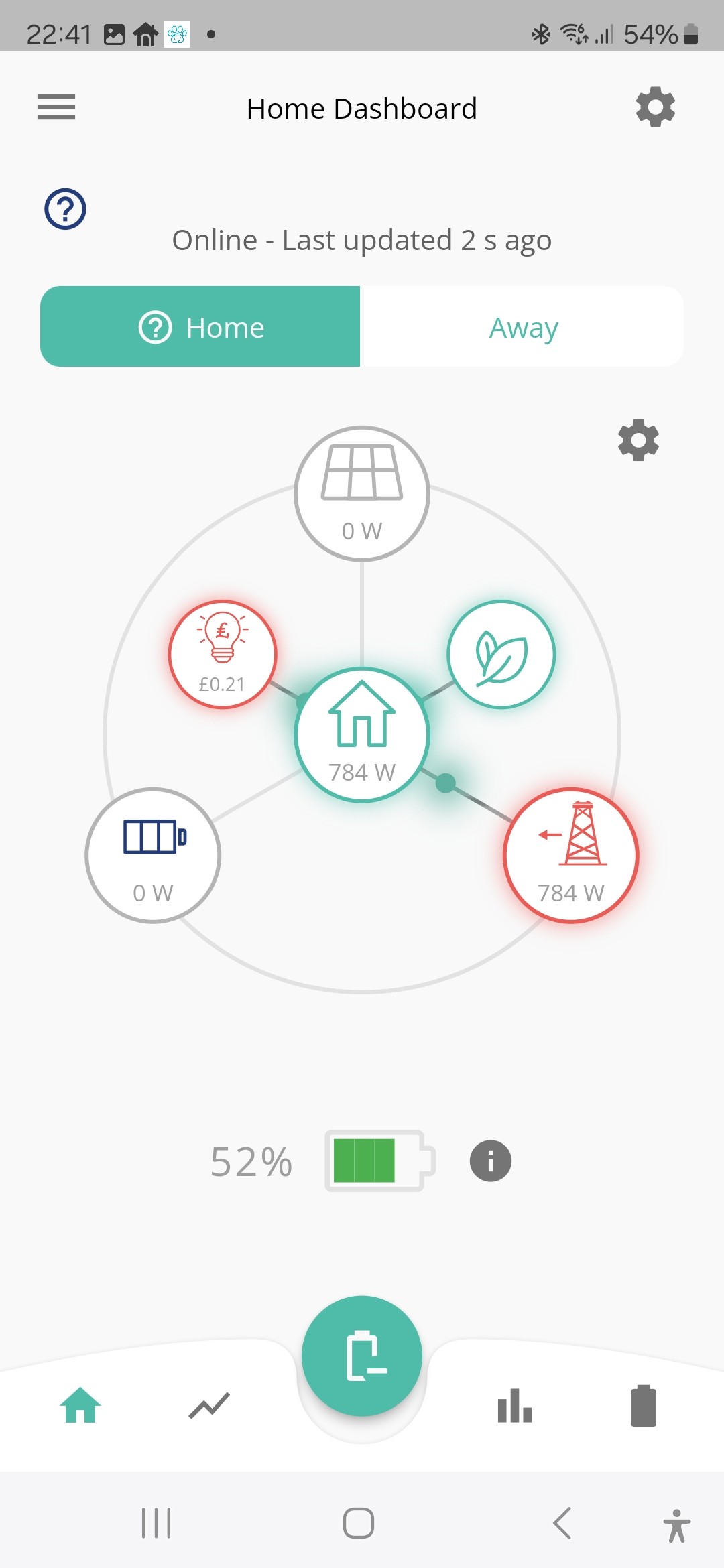
app..
Timed export via Home Assistant issue
Can you share your automation? It might be that you’ve missed setting a control.
I have a suspicion though that the issue is the way you are doing the export. If you set an export with a lower limit of 50% and end time of 19:00 but the battery reaches 50% before then, then the discharge will stop and the battery will be held at 50% until the end of the discharge period and you will start importing until the export time period ends.
Your automation either needs to cancel the export and set the mode to Eco, or you need to start the discharge at a time such that this doesn’t happen.
Thanks for the reply Geoffrey. Here's my automation. It's a bit 'messy' as it was originally doing other things. I've stopped using the solar forecast as it wasn't always working properly abd didnt really need it. The automation stops my Eddi and Zappi while the export is happening to stop energy being diverted to them, then they are switched back on. I can't find an a option to 'stop' the 'givenergy_local.activate_mode_timed_export' at 9p.m. so have set 'turn off battery discharging'. I have tried disabling this step and the automation still 'works' (export stops at 9p.m or 50%) but i still have the issue of the battery doing nothing after 9p.m. Last night I kept checking and there was nothing at all coming out of the battery from 9p.m. until I went to bed after 11p.m. One other thing I noticed - if I changed the app quick setting to 'discharge' or 'charge' during this time nothing happened, whereas normally the quick setting works as expected..
Many thanks for helping me!
alias: "Octopus Go discharge "
description: ""
trigger:
- platform: time_pattern
minutes: /1
condition: - condition: time
after: "16:58:00"
before: "21:05:00"
weekday:- mon
- tue
- wed
- thu
- fri
- sat
- sun
- mon
- condition: numeric_state
entity_id: sensor.battery_percent
above: 50 - condition: numeric_state
entity_id: sensor.forecast_tomorrow
above: 15
enabled: false
action: - if:
- condition: time
after: "16:58:00"
before: "21:05:00"
weekday:- mon
- tue
- wed
- thu
- fri
- sat
- sun
then:
- device_id: f7eb62e6cf54e45acb8836a74da0b121
domain: select
entity_id: 6b87721f57b5f18d9d55bedd3a00e6b3
type: select_option
option: Stopped
enabled: true - device_id: e1a3fd227ef7fc74fd45e77c7c9ff196
domain: select
entity_id: 701d6f94c0d390f6fb22a5b87ce38395
type: select_option
option: Stopped
enabled: true - service: givenergy_local.activate_mode_timed_export
data:
device_id: 7084bc7d41921f7c4b93c974c5514ae2
start_time: "17:00:00"
end_time: "21:00:00"
else: - type: turn_off
device_id: 7084bc7d41921f7c4b93c974c5514ae2
entity_id: 8810cb05aed0532f5c594fa521a3ce2b
domain: switch
enabled: true - service: givenergy_local.activate_mode_eco
data:
device_id: 7084bc7d41921f7c4b93c974c5514ae2
enabled: true - device_id: f7eb62e6cf54e45acb8836a74da0b121
domain: select
entity_id: 6b87721f57b5f18d9d55bedd3a00e6b3
type: select_option
option: Normal
enabled: true - device_id: e1a3fd227ef7fc74fd45e77c7c9ff196
domain: select
entity_id: 701d6f94c0d390f6fb22a5b87ce38395
type: select_option
option: Eco+
enabled: true
mode: single
- mon
- condition: time
J1m OK so your are using givlocal not givtcp that I’m familiar with, and you are using device_id’s which makes it a lot harder to read the script …
Top tip, when choosing what the select/switch etc act upon in a HA Automation, just choose an entity id not a device id then you can read the script a lot easier.
Anyway, I think the problem is in your else code, I think what it’s doing is set Eco mode, and then set the inverter option to Eco+. Eco+ is I think Eco (Paused) on GivTCP which will set the inverter paused.
My script to resume Eco mode look like this (xxx is the inverter id), they are lot more belt and braces and reset all the controls to a ‘known’ state, but I think you would resolve the issue with yours by setting Eco not Eco+ mode on the select, putting in a short delay (say 10 seconds) then setting activate_eco_mode. I suspect the Eco+ is what’s causing your issue as it’s the last instruction it overwrites the previous Eco switch.
- service: select.select_option
data:
option: Normal
target:
entity_id: select.h_xxx_force_charge
- delay:
seconds: 20
- service: select.select_option
data:
option: Eco
target:
entity_id: select.h_xxx_mode
- service: switch.turn_on
data: {}
target:
entity_id: switch.h_xxx_enable_discharge
- service: number.set_value
data:
value: "2600"
target:
entity_id:
- number.h_xxx_battery_discharge_rate
- number.h_xxx_battery_charge_rate
- service: number.set_value
data:
value: "4"
target:
entity_id: number.h_xxx_battery_power_reserve
- service: switch.turn_off
data: {}
target:
entity_id:
- switch.h_xxx_enable_charge_schedule
- switch.h_xxx_enable_discharge_schedule
- service: select.select_option
data:
option: "00:00:00"
target:
entity_id:
- select.h_xxx_charge_start_time_slot_1
- select.h_xxx_charge_end_time_slot_1
- select.h_xxx_discharge_start_time_slot_1
- select.h_xxx_discharge_end_time_slot_1Thanks Geoffrey. I shall take a look at your settings later, but just to clarify - it's my Zappi which is being switched back to Eco+ at the end of the automation, not the inverter. As I mentioned before, I have found on occasions that eco was disabled on the portal but still showing as set on the app after the automation finished, but I have tried manually to toggle eco off and on several times and it still doesn't kick the battery into life!
J1m I've recently set up a timed export automation in HA to discharge my home battery for a period each evening until it reaches 50%.
What model/firmware is your inverter? For modern systems, using HA seems overkill since the inverter is quite capable of doing this with static configuration (and built-in timer). But gen-1 inverters do need this kind of external help (except maybe the very latest firmware).
A couple of times I've noticed that although the app shows eco as being on, in the givenergy portal eco is off!
The (official) app and portal ought to be in sync, since the app should get the info from the cloud. The 3rd-party app, on the other hand, does get it straight from the inverter.
Note that because HA plugins speak to the inverter directly over modbus, rather than using the cloud, the portal is not kept aware of changes. It just remembers the last thing it sent, rather than actually asking the inverter. (Though I have noticed that when using the API to query settings, it does seem to query the inverter each time.)
On the portal, in the remote-control section, there's a button to force it to fetch the setting from the inverter - it's always worth doing that when also using modbus-based direct control.
DD
Thanks for the message DD. My inverter is a gen 1 GIV-HY5.0, firmware is D0.450-A0.451. I did try using the timed export/discharge option in the app but of course this doesn't seem to work on the gen 1? I can't see the button in the remote control section that you mentioned? I can only see an 'enable eco mode'?
J1m I can't see the button in the remote control section that you mentioned? I can only see an 'enable eco mode'?
You're probably not in the remote-control section... in the top-right of that screen, there should be a row of icons. The gears/cogs one (possibly 3rd from left) should pop-up with remote-control, and that's the page you want.
See also the second image in the first post at https://community.givenergy.cloud/d/3650-understanding-the-settings-on-your-app-and-portal - it's the cicrular arrow beside 'read successfully'.
But yeah, I'm guessing your inverter probably does need help getting between eco and export.
DD If its G1 on the 450/451 f/w then "Timed Export" will require GivTCP/HA to implement.
Basically use the graphical automation editor (its very simple) to either -
"Force Export" at a certain time if you only want to export for 2 hours or less.
If its longer than 2 hours then have a preset "Discharge Start/End Time" set and toggle the "Enable Discharge Schedule" five minutes before/after that time period. eg - Start 1600/End 1900 would need an automation which starts at 1555 and ends at 1905. Five minutes is just what I chose for DFS sessions in case it didn't work so anything more than a minute is fine.
Edit - its the quickest way to test things out for G1 inverters as a basic HA/GivTCP install can sit on a USB stick/memory card....
Edit2 - and if its on that f/w then there's no CRC checking on comms so you may want to introduce some delays/checks between writes to be VERY sure things are as expected. The dongle isn't great at having commands fired at it without delays, especially if on f/w with no CRC checks. YMMV....
Thanks for that. Could you please give me some guidance as to how to set "Discharge Start/End Time" set and toggle the "Enable Discharge Schedule" in an automation, as I can't see how to implement this? Also how do you introduce time delays into the commands? I'm sorry, I'm a real novice at all of this!!
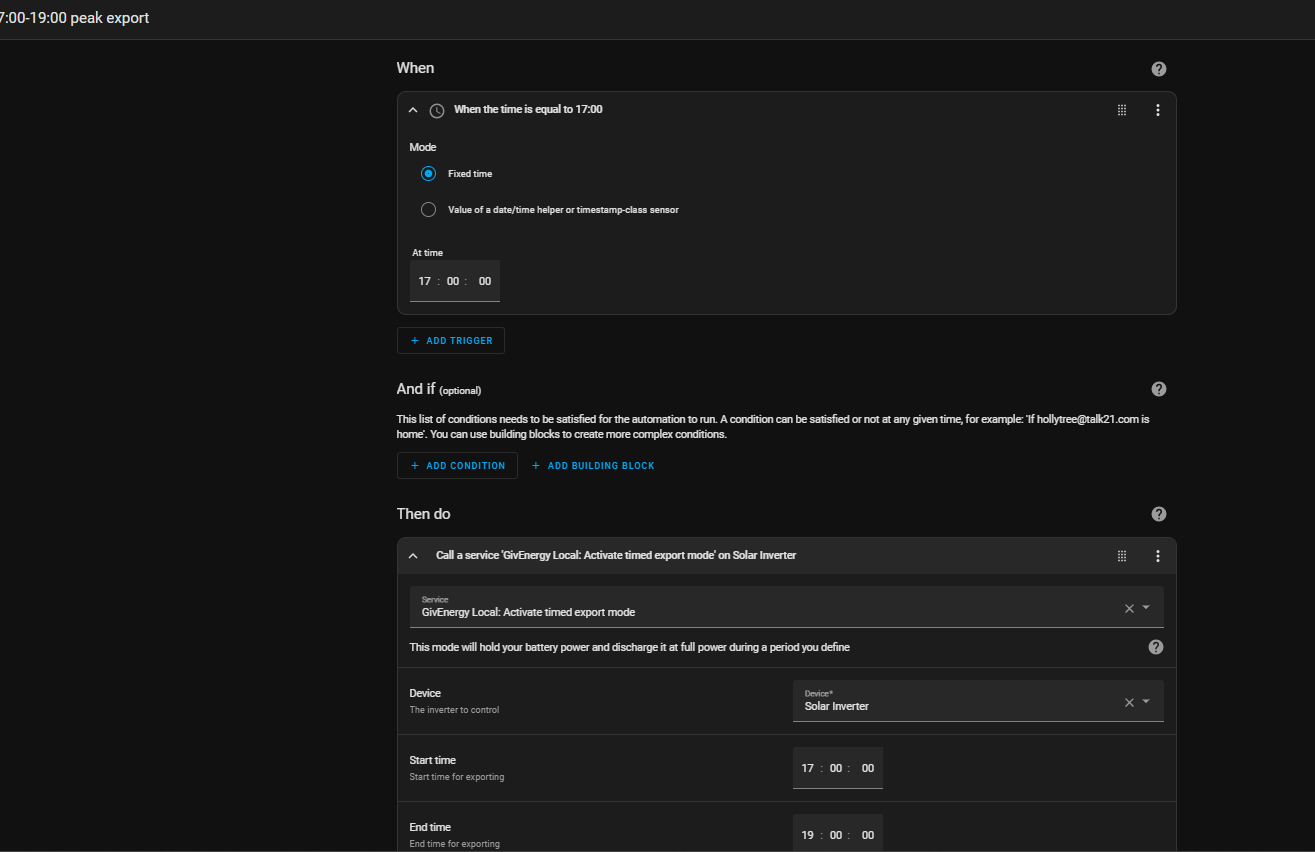
I use HA automations like these.


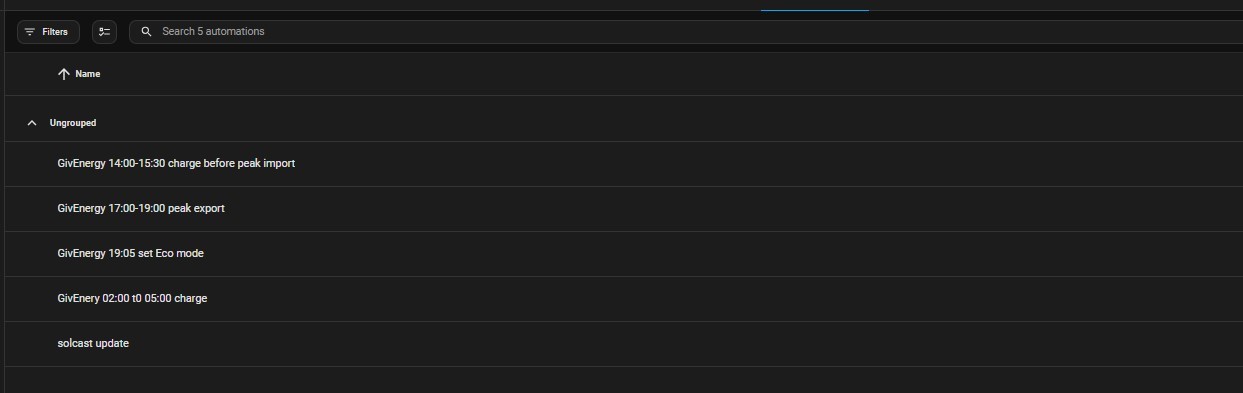
I'm struggling to find how to set the 'ungrouped' options that you have Steve, could you advise further please?
I'm not sure though that any of this is going to work for me. When last night's export finished at 9p.m the battery remained 'idle' with all power being drawn from the grid whilst a late meal was being cooked etc., despite hard/soft resetting the inverter and batteries plus toggling the eco mode off and on several times. The app quck settings, the only one that worked was 'charge now' - switching between the 'discharge now' and 'normal operation' quick settings had no effect (the battery remained idle even when set to discharge).
I would have thought that if my HA automation had caused the problem the hybrid registers would all be reset to normal operation when I rebooted it?
Is this something I should flag with GE support?
J1m
i just kept clicking "create automation" and playing with dropdowns to find something that i thought might do what i wanted
i made up the names myself so i could delete them if they did not work.
i pretty much started each one with a "when", picked a time and then went onto "then do" and found a "service" such as "GivEnergyLocalEnableTimedCharging" for "device" picked solar inverter and then put a start and end time and a battery % and hit save
SteveCook Thanks for the clarification Steve. Much appreciated..
The "ungrouped" options are just the individual automations I created for the scenarios i thought I might want.
Off peak charge
Charge just before peak export time (mainly to make sure I never imported at peak rate
1.5 hours peak export - so i still had enough battery to get me through until off peak charge time. Bit of a guess with Hy5.0 Gen 1 and 9.5but seemed to work.
Reset to Eco after peak export, just to make sure it went back to Eco.
This all ran fine for about a year and since then I have got predbat working. But I just leave them there in disabled mode, jut in case I screw up predbat.
The Solcast poll is there to update Solcast predictions for predbat 4 times/day though there is stuff out there suggesting I may not need that, but I am not smart enough to risk turning it off whilst it works.
This month my Octopus bill for gas and electricity they gave me £100, so predbat seems to be doing a great job
SteveCook
Thanks Steve, I've not heard of Predbat! Looks like I have some learning to do here!!
Can you give me any pointers on the use of Predbat please? Is there a guide available?
Many thanks!
https://community.givenergy.cloud/d/3696-first-night-live-on-predbat.
Start reading, but best thing to do is watch the Trefor youtube videos
https://www.youtube.com/watch?v=AcDdpaIPm7I&ab_channel=TreforSouthwell
https://github.com/springfall2008/batpred
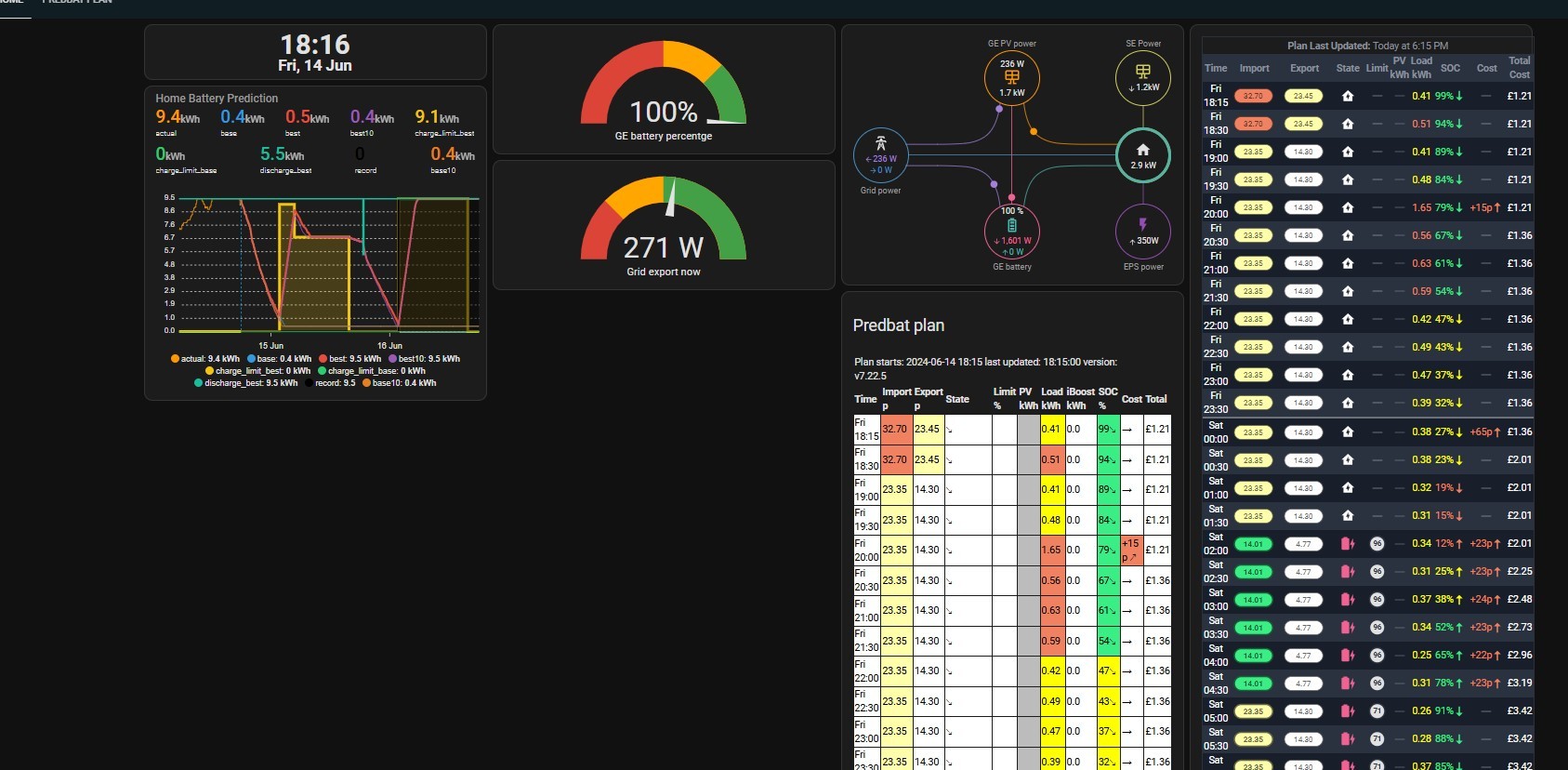
My dashboard. Predbat imports my tariff (in my case Flux), looks at the weather, looks at my use history and state of battery charge and estimates/applies the best commands to my inverter

J1m Thanks Steve, I've not heard of Predbat! Looks like I have some learning to do here!!
Here’s the link to the main documentation for predbat https://springfall2008.github.io/batpred/
It’s open source software that runs within/alongside Home Assistant to manage your inverter and battery, optimising charging and discharging to maximise your income (or minimise your CO2 grid consumption). It incorporates solar forecast predictions and historical house load usage (plus EV charging).
As @SteveCook has highlighted, there’s a long thread of info on getting used to using it on this forum.
You’ll need to dedicate something to run Home Assistant on, that could be an old PC, a network storage device, a raspberry Pi, etc. There is a cloud service available for subscription as well.
geoffreycoan
Geoffrey is the expert on this!!!

J1m
SteveCook has inadvertently left off the manual! I'd suggest that is the best place to start
https://springfall2008.github.io/batpred/
Many, many kudos to @geoffreycoan for all his work on the docs and supporting users new and old.
Thanks to Geoffrey and PianSom.
I admit to just blundering about and following other people's advice and help
Many, many thanks to Steve, Geoffrey and Piansom for such quick and useful info! I shall get cracking!! Just one query at the moment - does Predbat work with Gen 1 Inverters? (here's hoping!) Cheers!

J1m
Short answer - yes
Longer answer - The standard way that Predbat communicates with inverters is via a library. See the second section of https://springfall2008.github.io/batpred/install/#inverter-control-integration-install-givtcpsolax-modbus , where you will see that for GE inverters GivTCP, which is what I suspect most people use, or GE cloud access is needed.
PianSom
Thank you for that. I should be okay then!
J1m does Predbat work with Gen 1 Inverters? (here's hoping!)
As PianSom says, yes using the GivTCP add-on to Home Assistant. I have Gen 1 hybrid inverters (two of them), as I think does the author of Predbat, Trefor. At least one person on the Predbat user group (Rob) has a Gen 1 AC coupled inverter.
geoffreycoan
Many thanks once again Geoffrey 👍
PianSom
I have Gen1 Hy5.0 and all works OK.
i followed the Speak to the Geek vids a while back.
I may have installed more than I now need, but it all works
https://www.youtube.com/watch?v=NQ84z_Wa19k&t=166s&ab_channel=SpeaktotheGeek
I installed GivEnergy local plus GivTCP and MQTT to make the connection (at least that was what the videos told me)
There was some info that GivEnergy local was broken which is what I kept GivTCP and MQTT, but it now seems to be fixed and entities all work
SteveCook
Thanks Steve, very useful info...
I've posted a new thread on this Geoffrey but wonder if you can advise please? I've had a look at my GivTCP log whilst checking stuff for Predbat and found it's spewing out these errors...
client.subscribe(MQTT_Topic+"/control/"+GiV_Settings.serial_number+"/#")
AttributeError: type object 'GiV_Settings' has no attribute 'serial_number'
2024-06-15 09:00:55,430 - Inv1 - read - [ERROR ] - 10 failed inverter reads in a row so removing regCache to force update...
2024-06-15 09:03:46,895 - Inv1 - read - [ERROR ] - 10 failed inverter reads in a row so removing regCache to force update...
2024-06-15 09:06:47,287 - Inv1 - read - [ERROR ] - 10 failed inverter reads in a row so removing regCache to force update...
I can't see any option in the set up to enter a serial number in the settings.
Any advice would be appreciated!
J1m I’ll reply on the other thread https://community.givenergy.cloud/d/4601-givtcp-log-errors