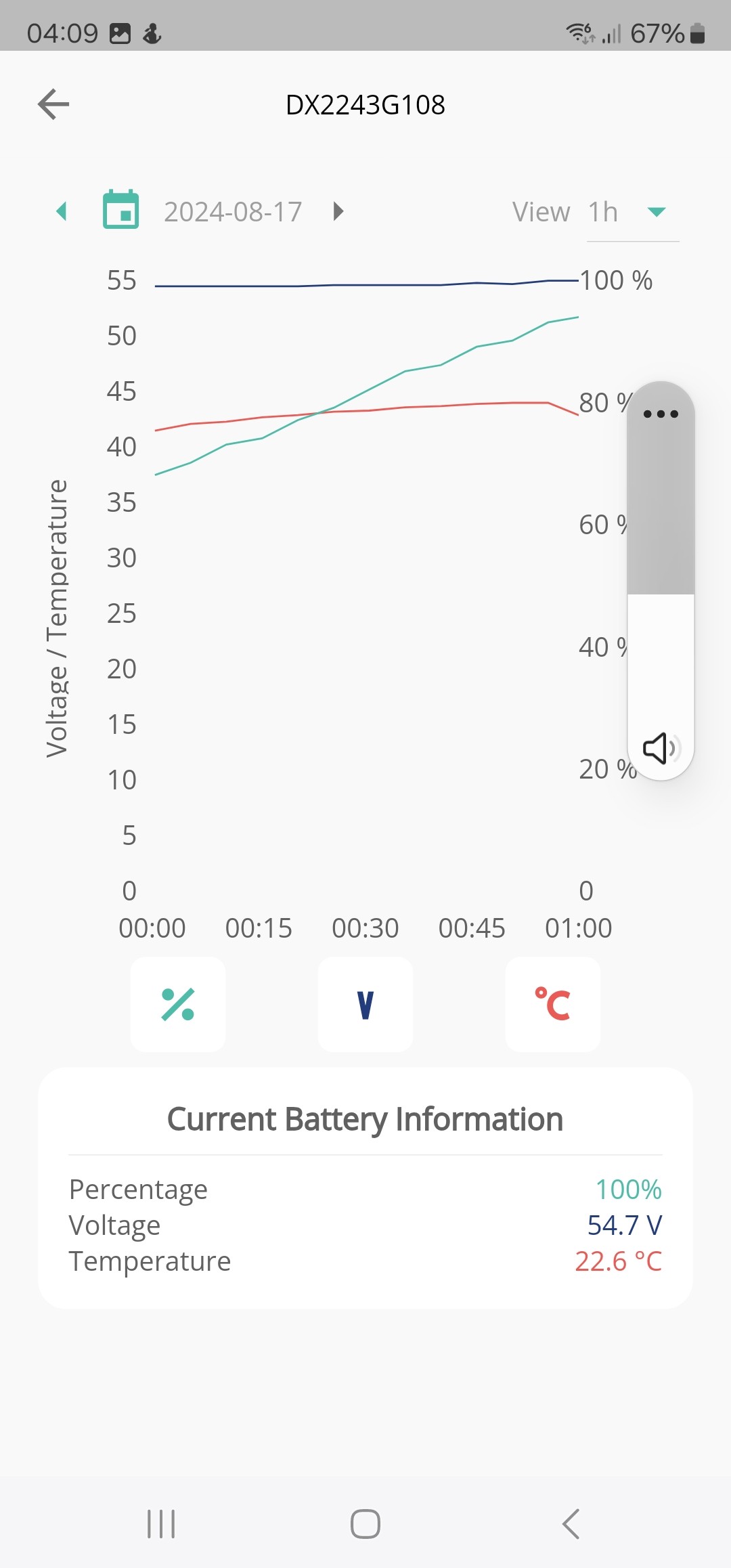
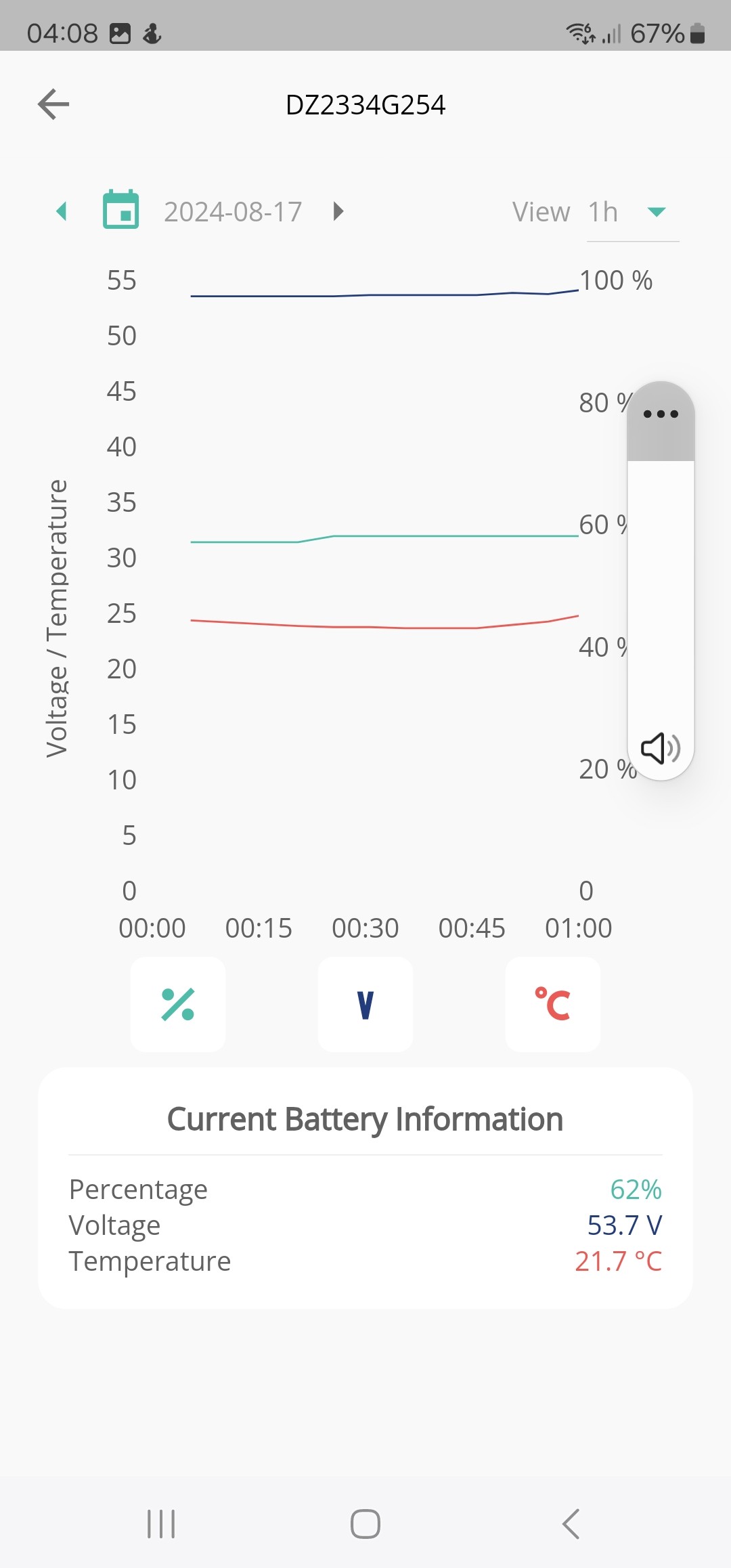
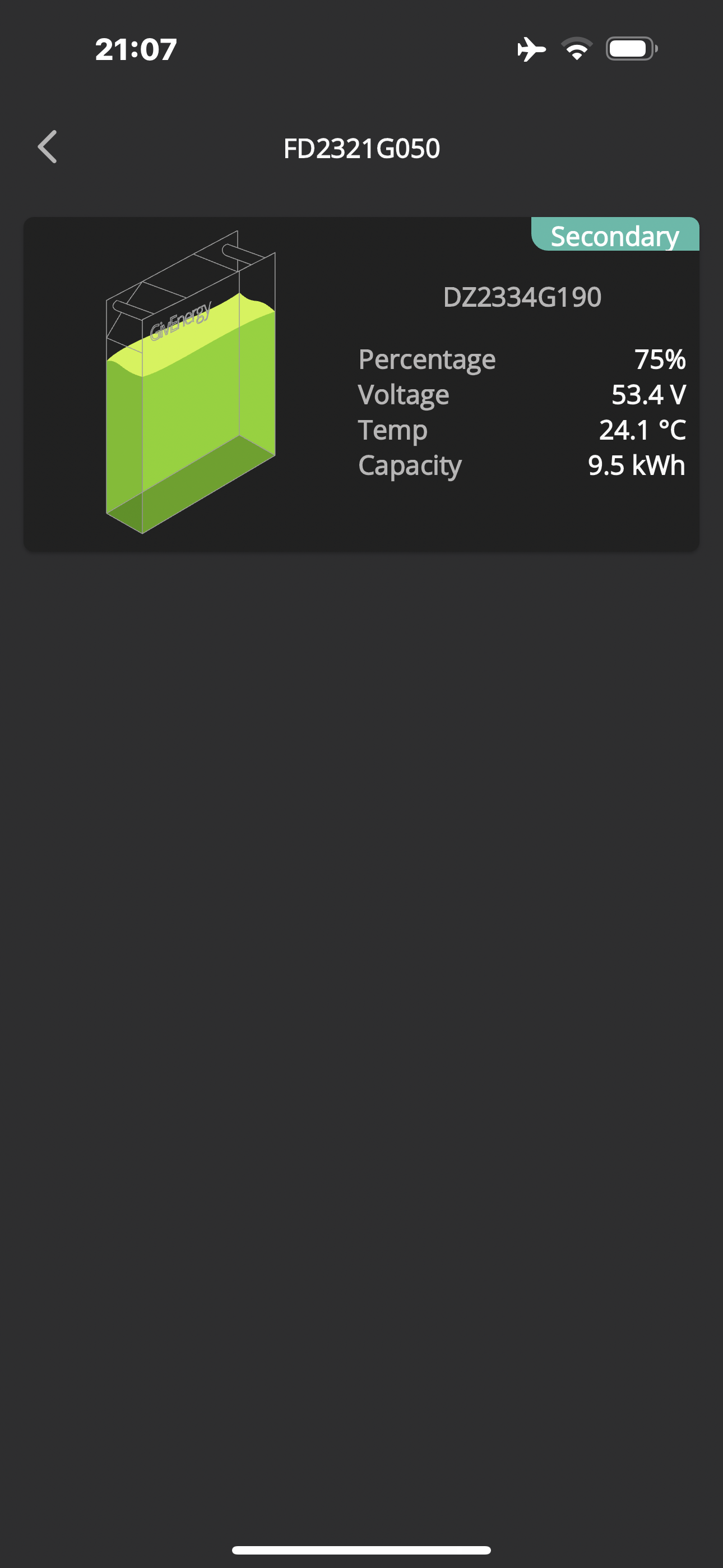
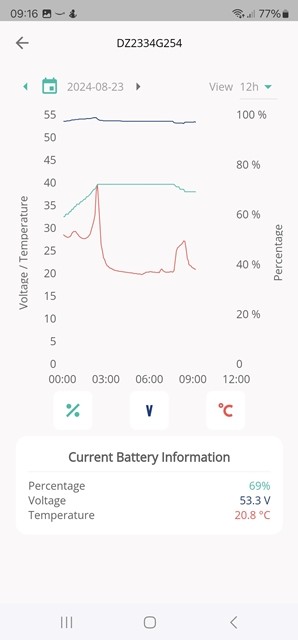
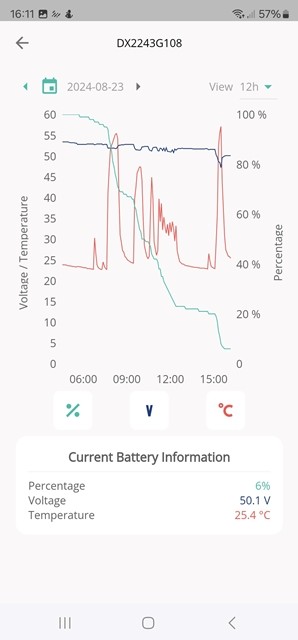
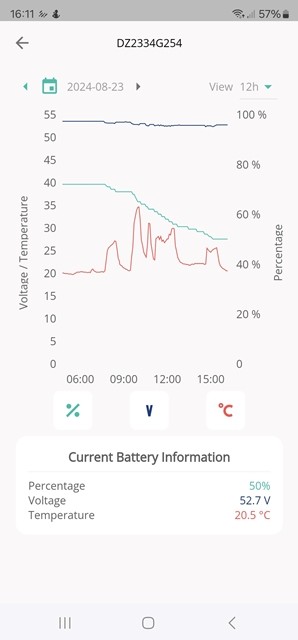
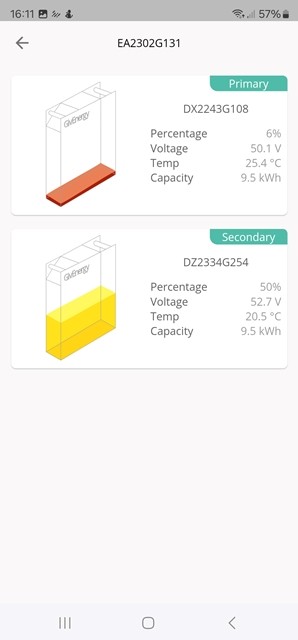
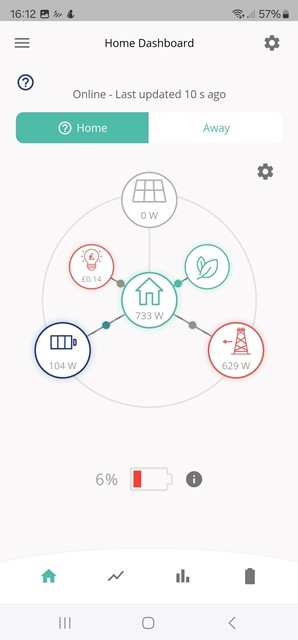
Added second 9.5 kwH battery, does not charge past 66%

113 comments started 2024-08-15 last 2024-11-03
GivEnergy ProductsBattery
P
#1 pmcg

System installed with Hybrid Inverter 3.6 & a single 9.5 kWh battery, all working OK.

Added second battery and system was re-commisioned again (seemed weird) but the second battery is not charging, does not go past 60 odd percent.

My 19 kWh batteries are only giving me access to about 15 as the second battery is not charging fully.

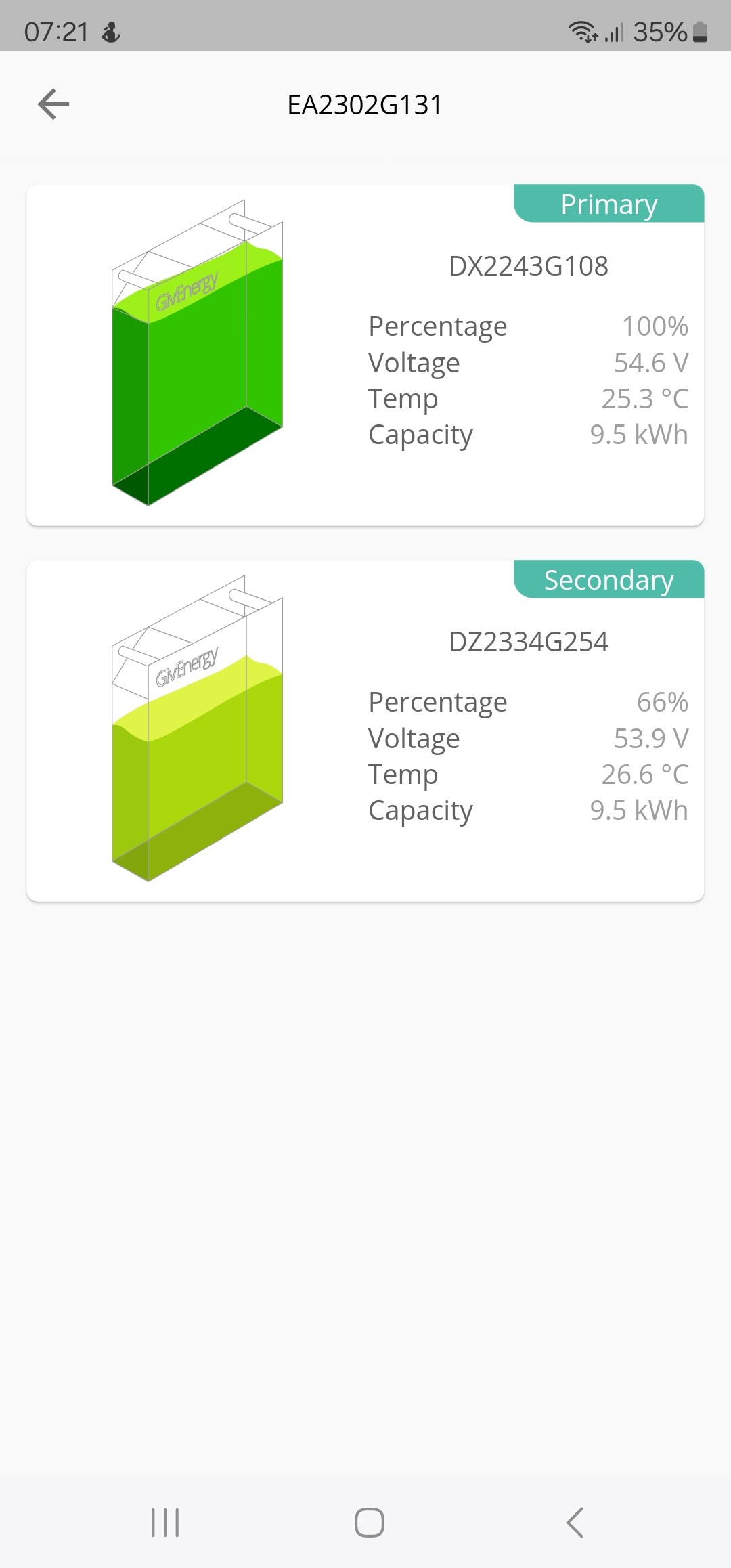
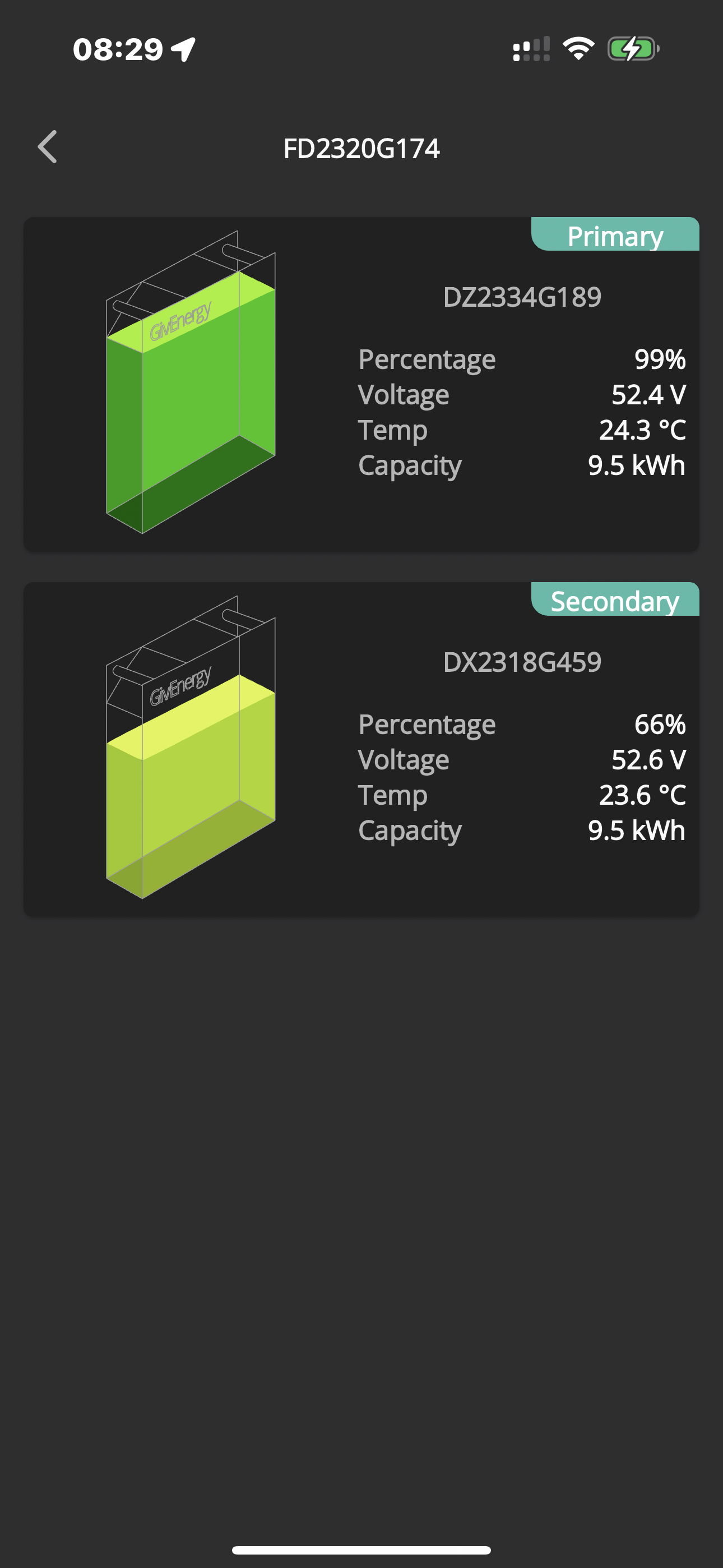
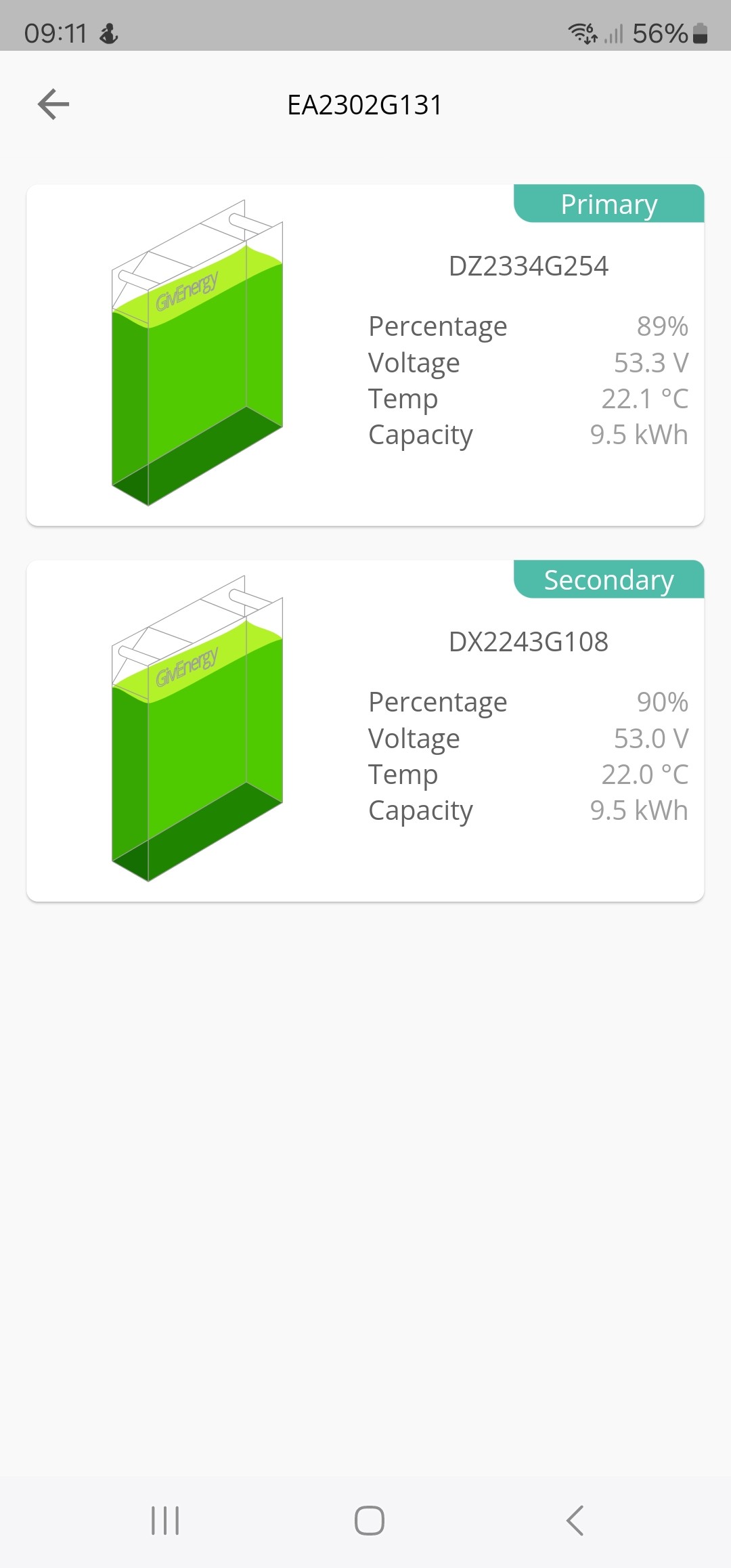
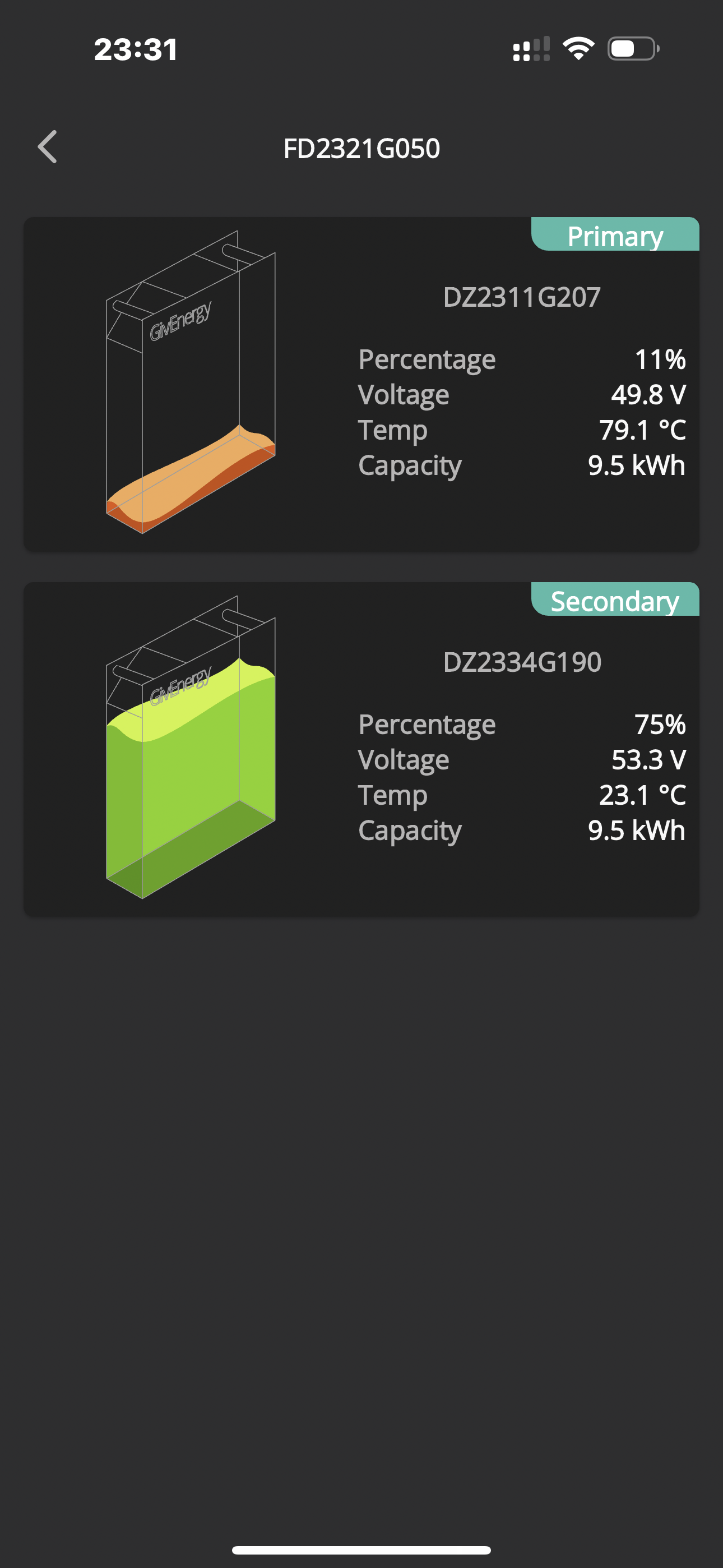
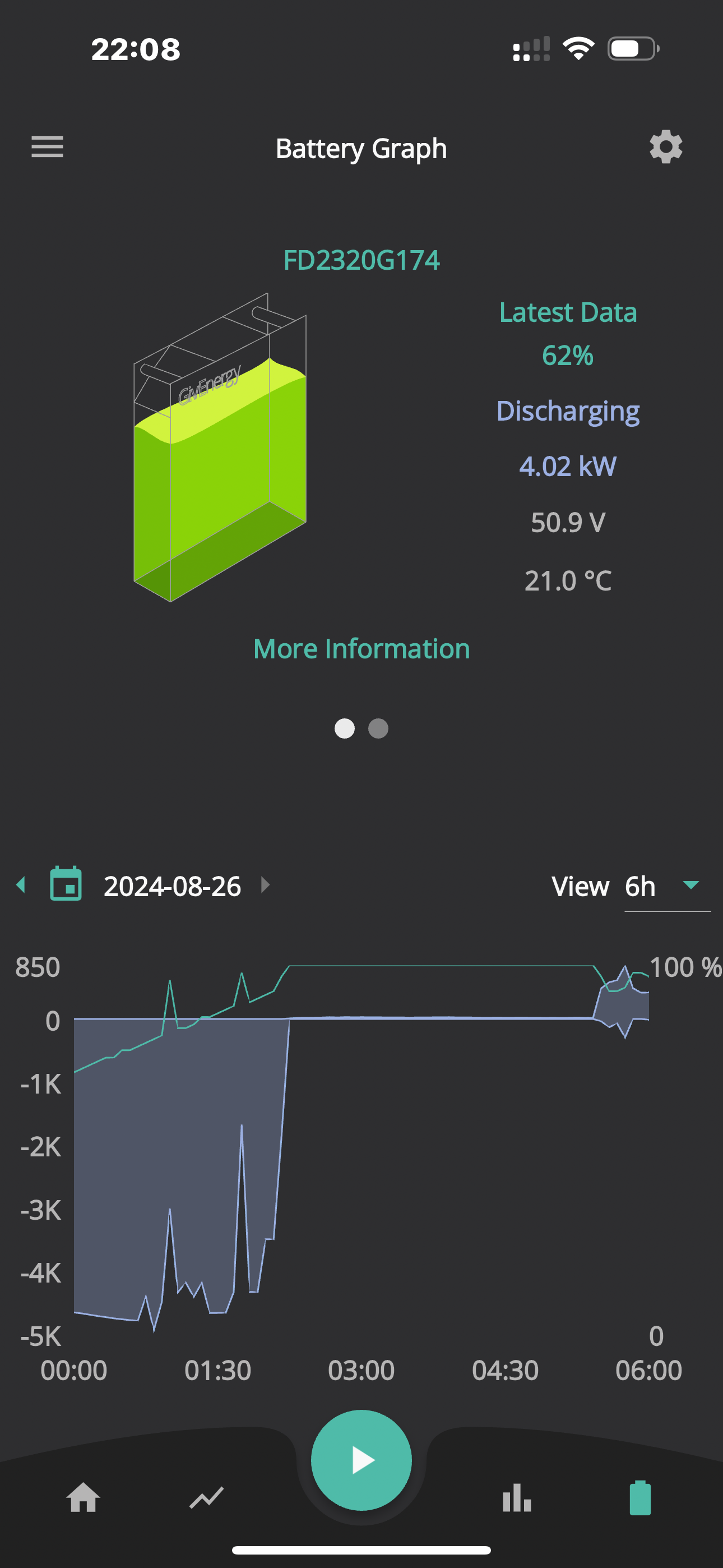
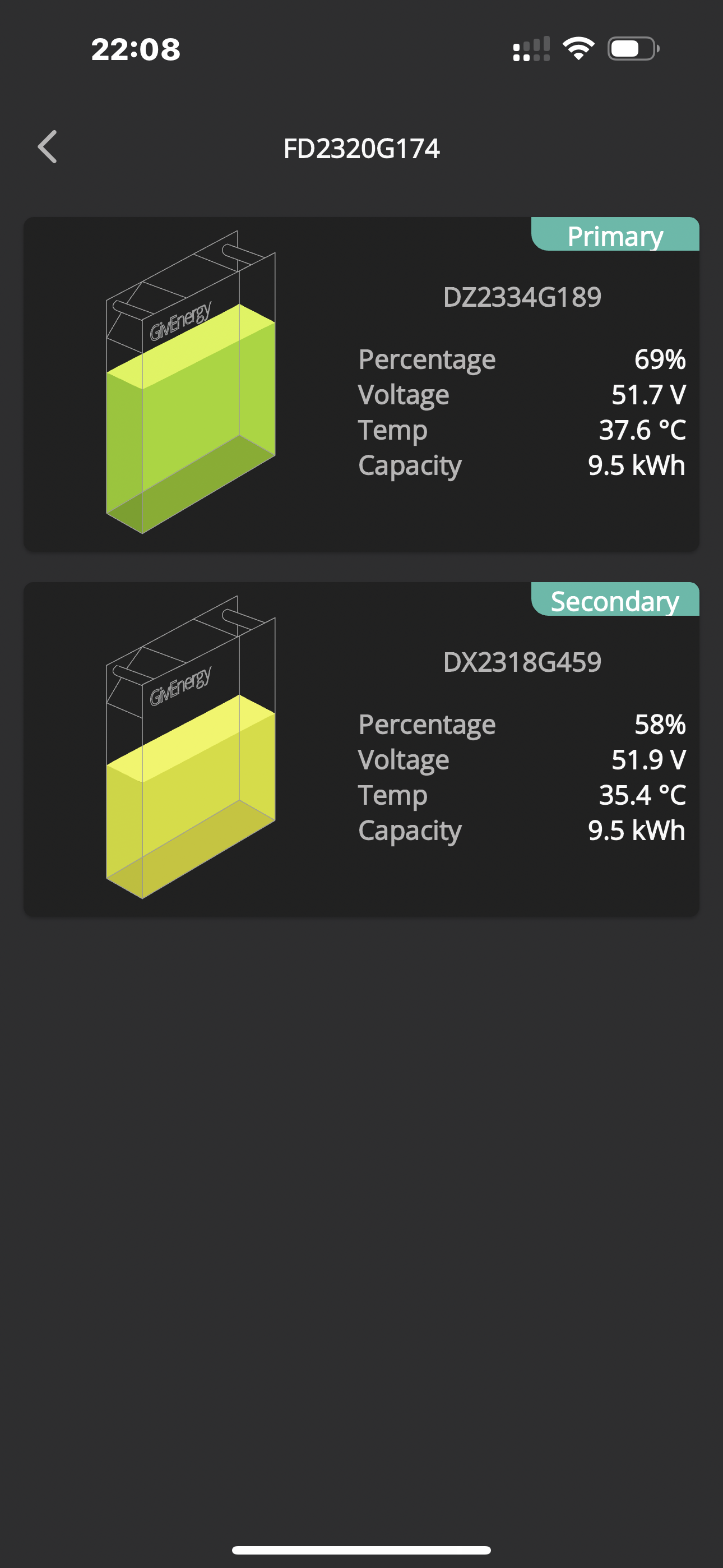
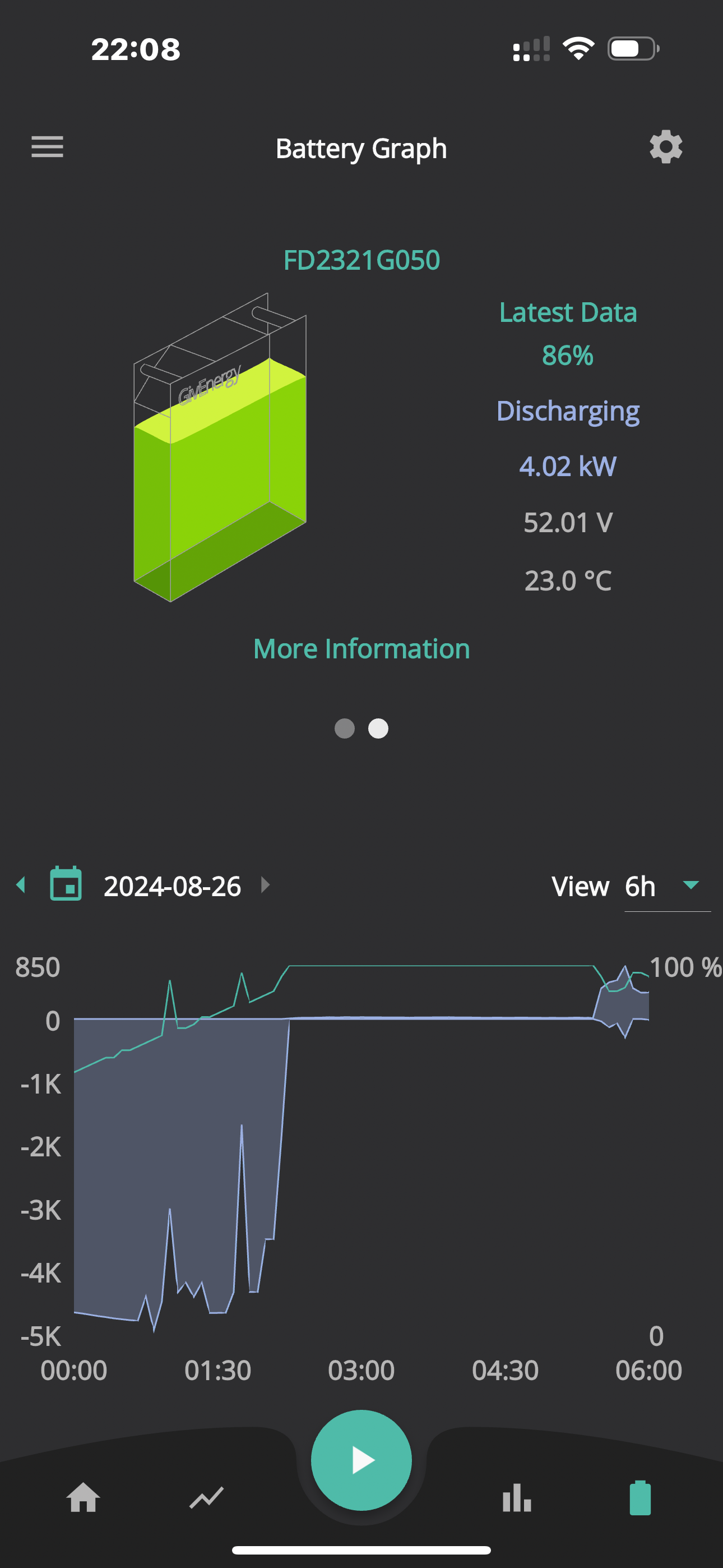
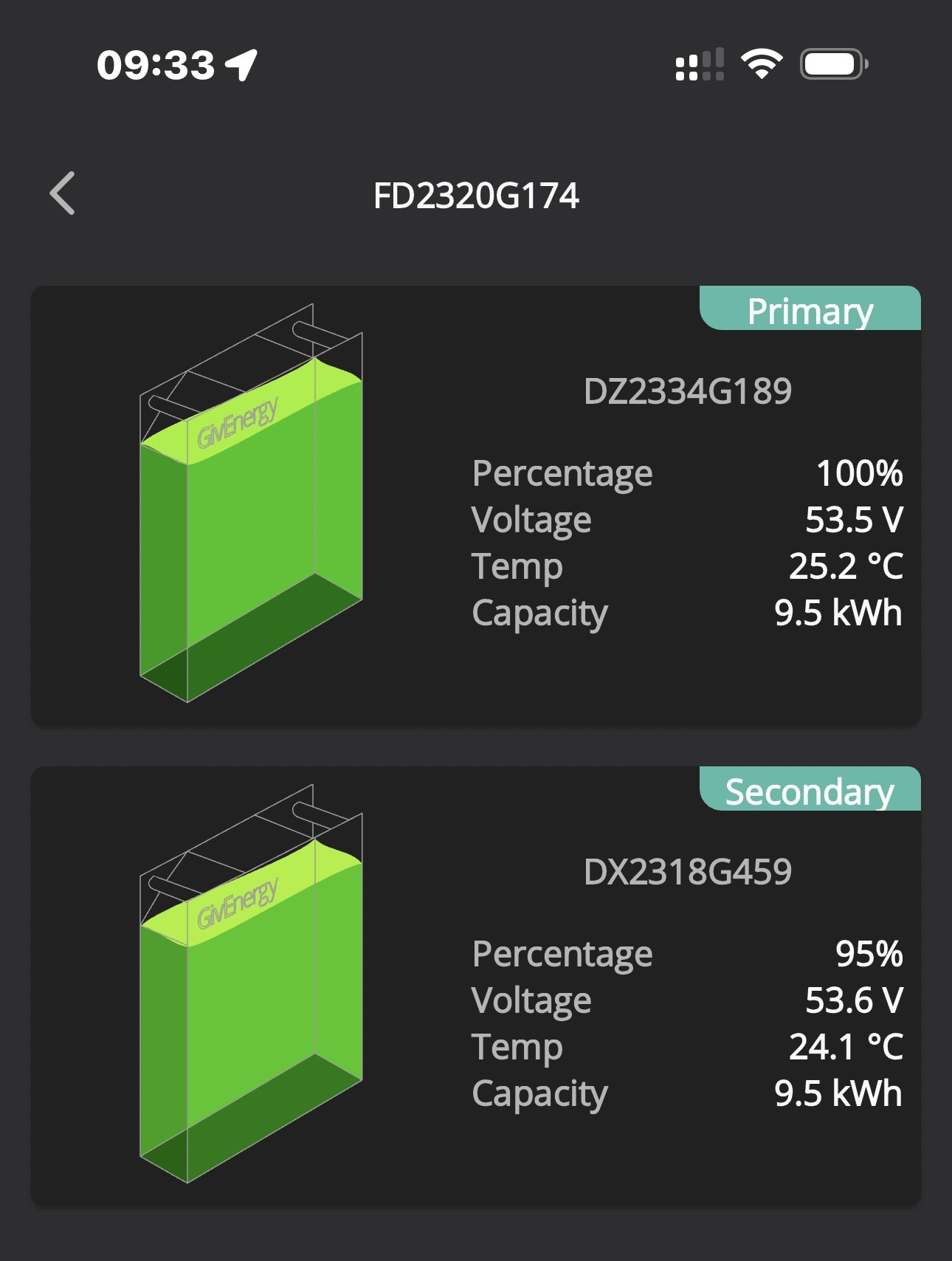
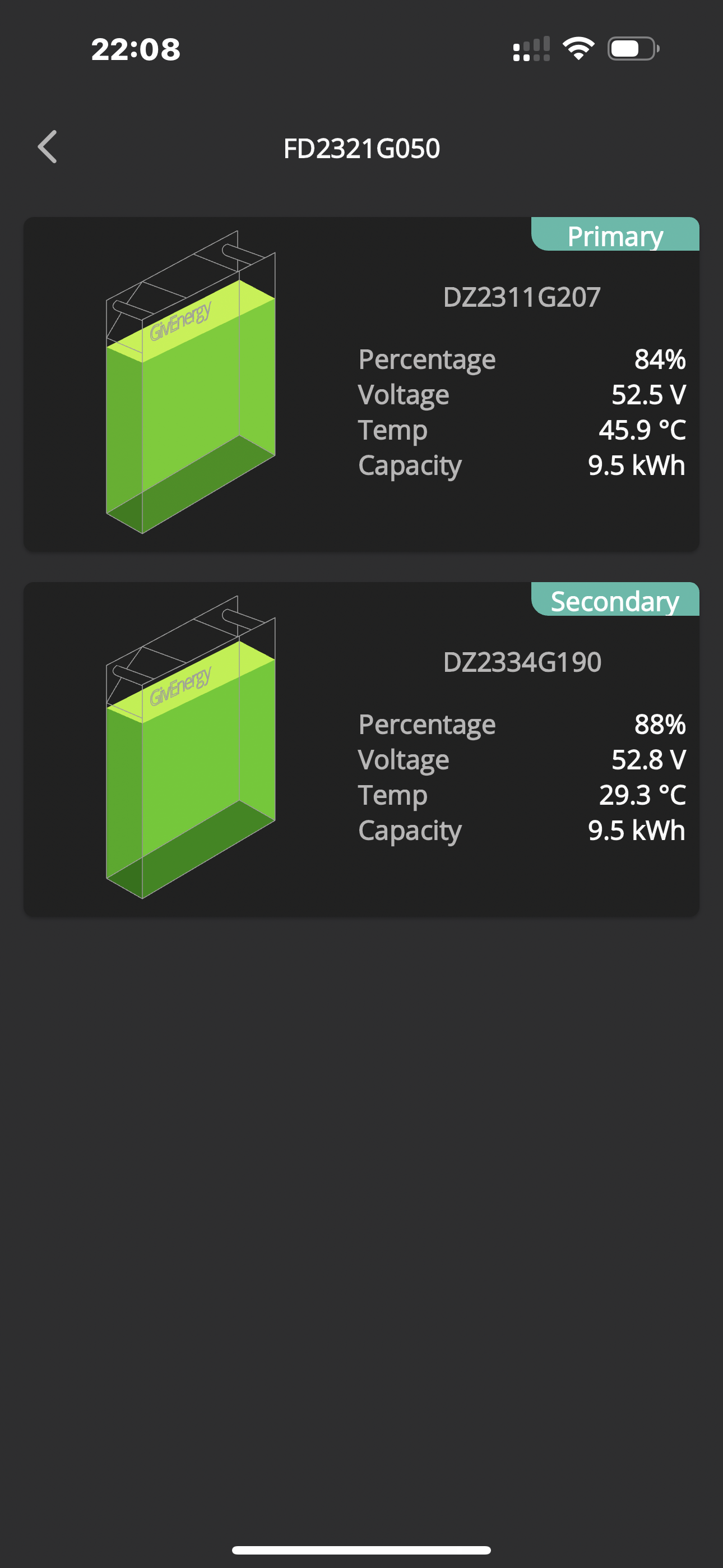
If I look in the App just now (02:10) it shows the battery as 100% but when I drill down to the battery it shows Primary at 98% and Secondary at 64%!
Secondary has been sitting at around 60% for past 24 hours, just does not want to charge.

Have asked Givenergy support but no one ever gets back to me!

D
#2 DD

pmcg Have asked Givenergy support but no one ever gets back to me

Perhaps try your installer? I think they should be first port of call with early problems?

P
#3 pmcg

DD

Something seems to have happened more overnight, second battery went up to 80% but with very slow charge rate/current.

Maybe Givenergy are doing something with it, was told the problem had been escalated.

Not much the installer can do unless the battery is confirmed as faulty other than ring Givenergy.

G
#4 geoffreycoan

pmcg My 19 kWh batteries are only giving me access to about 15 as the second battery is not charging fully.

If I look in the App just now (02:10) it shows the battery as 100% but when I drill down to the battery it shows Primary at 98% and Secondary at 64%!

I’m afraid this is normal behaviour - see other threads on the forum. When the batteries are chained together on one inverter, once one gets to 100% or empty at 4%, they all stop charging/discharging. A drift in SoC of 20% seems to be quite normal as well.

Have a look for other threads on this topic. You unfortunately are only ever going to get the full capacity when a recalibration is done, as soon as the SoCs drift apart you won’t be able to fully charge or discharge both batteries.

O
#5 Ortwin

I have this with my two 9.5Kw batteries. My SOC can vary by up to 20% and each time I have had an update and or recalibration it improves for a while. The last calibration was a slow one (23 hours for discharge and calibration) helped. I've been told the battery voltage being closed (within 0.5v) is a more reliable indication than SOC. Get technical to carry out a slow discharge and calibration and see what happens. Is your existing battery the primary and new one secondary as I'm trying to get GE technical to swap mine round (new primary and older secondary) to see if the SOC variations improve, But no response so far.

P
#6 pmcg

Thanks all.

Wow, this is not good then.
I was also told on the phone by support about the 0.5v thing and they did a re-calibration that took quite some time.

My old battery (bought 2023, installed with inverter July 2024) is the Primary, new battery bought August 2024 is the Secondary.

Currently at 82% Primary and 74% Secondary assuming these are correct with overall showing 79%.

V
#7 Vestas

pmcg Your installer should have run a calibration on BOTH batteries after installing the second one.

N
#8 Newman

pmcg Do you have the Rubik App? If so, check the battery software is the same on both. Check that each cell voltage is within 0.01 Volts on each battery and that both battery voltages are similar. At this stage Ignore the SOC.

D
#9 DD

Newman Check that each cell voltage is within 0.01 Volts

Is that specified somewhere? I have a couple of cells that can get further adrift than that, though usually only under load.

V
#10 Vestas

DD The balancer is only accurate to 20mV so I dunno where this 10mV is coming from.....

N
#11 Newman

The 0.01 V is the normal variance on 16 cells within each of my batteries, not aware of balancer accuracy.

P
#12 pmcg

Vestas

Installer did, in fact he had to recommision the entire system (according to Givenergy on the phone) again.
I even lost access to the App, my system was renamed etc.
Took a couple of days till I got someone at Givenergy who said they had no idea why a new account had been created (I was standing next to installer who was questioning this with Give) and my old account had been disabled so they enabled.
The Givenergy service person on the phone did introduce themselves as a "trainee" so I guess they were a it green.

P
#13 pmcg

Newman

Not sure what the Rubik App is sorry.

P
#14 pmcg

I had a reply from Givenergy yesterday saying that:

"The capacity on the batteries is looking good now, continue to monitor this, as long as the voltage for the batteries are in line they will be using the full capacity."

They seemed to have about the same or simialr state of charge.

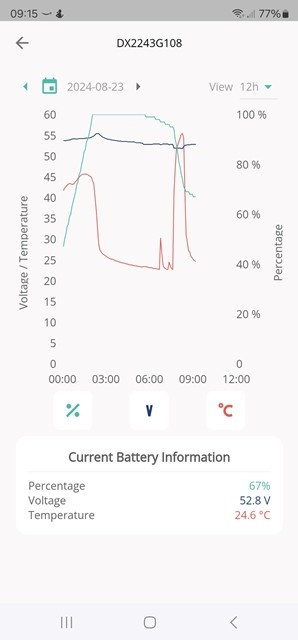
Overnight though and the Primary charged to 100% and the secondary to only 66%.

We have an identical system installed (all at same time) at another location and both batteries charge to 100% OK!

Today I'm now told by Givenergy that:

"This is looking like it is an issue that will be corrected in the next firmware update, we are currently waiting on beta testing and it will be released soon."

These are the things that EV doesn't tell you about the system, quite dissapointed to be honest, it's a lot of money to pay for something that I can only use two thirds of!

R
#16 Robgy

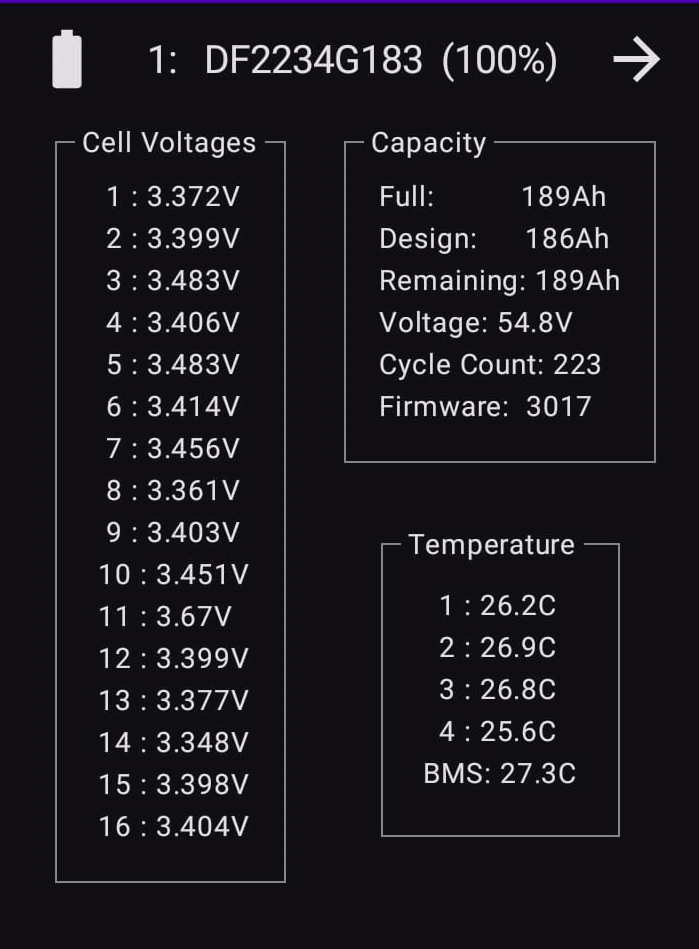
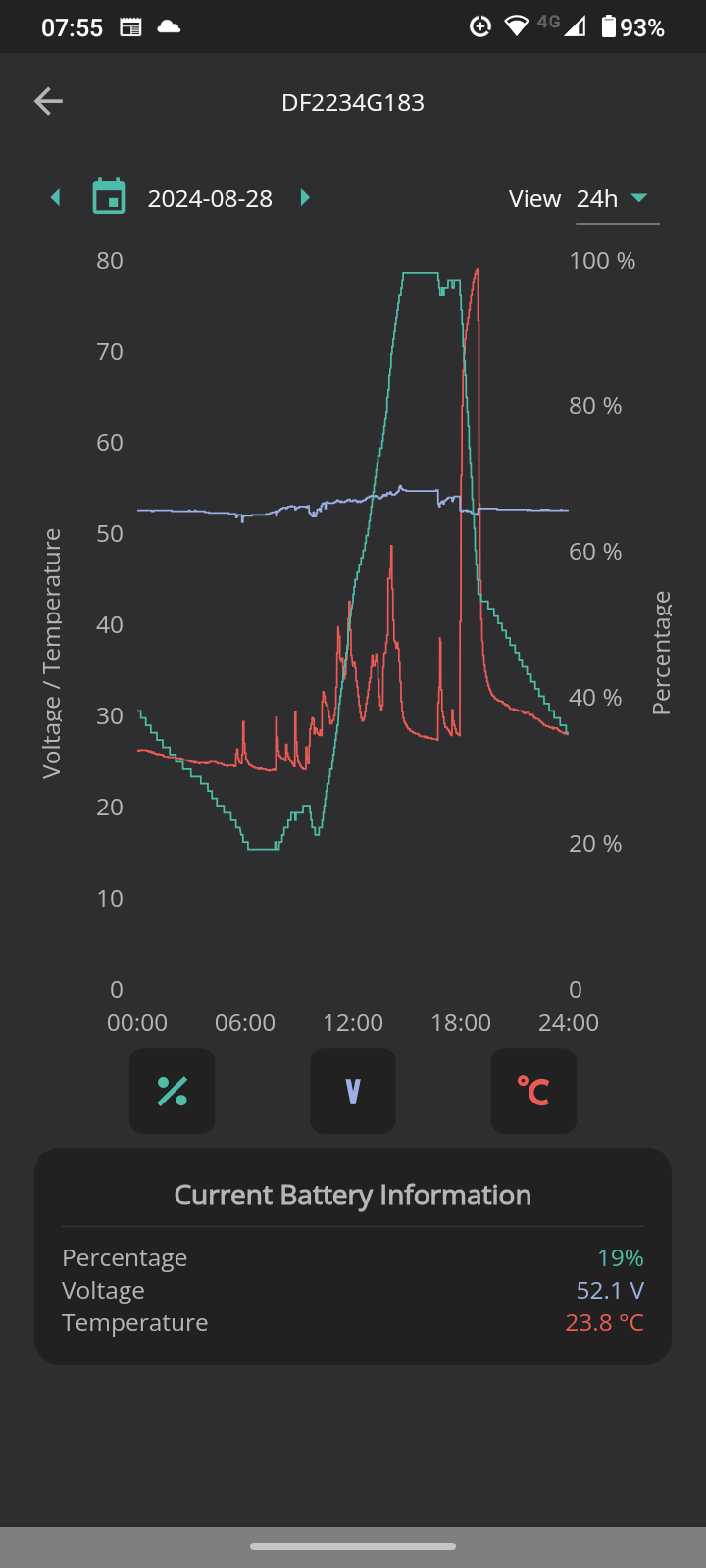
Just took a screenshot so you could see the battery cell details and it looks like cell 11 on mine is higher than the others
not sure if it's anything to worry about?

R
#17 Robgy

also just noticed the capacity of Full @ 189Ah is higher than the design 186Ah

I'm wondering if I should bother GE support about that?

R
#18 Robgy

Newman Check that each cell voltage is within 0.01 Volts

What happens or could happen to the battery if the cell voltage is not within the tolerance you mention?

D
#19 DD

Robgy Just took a screenshot so you could see the battery cell details and it looks like cell 11 on mine is higher than the others
not sure if it's anything to worry about?

I'm not an expert, but that does seem high... is the battery charging at that instant ? (Charging tends to pull voltages up, discharging pulls them down.)

There's a chart linked from https://community.givenergy.cloud/d/1931-sudden-battery-discharge/13 which shows typical cell voltages.

AFAIK when charging it has to stop when the highest cell reaches the maximum permitted, and similarly when discharging when the lowest cell (typically the same weak one) gets to the bottom. So you may not get full capacity from the battery.

From what I've read on here, the BMS can rebalance the cells, but tends to do so when the battery is idle and at fairly low state of charge. I posted recently to show my battery SoC drifting up when idle:
https://community.givenergy.cloud/d/4841-state-of-charge-soc-drops-of-nearly-50/4

(I have tools to record individual cell voltages, but I've never got round to actually doing that overnight - I really ought to do so...)

R
#20 Robgy

DD is the battery charging at that instant ?

No, the battery was idle at 100% and still is.

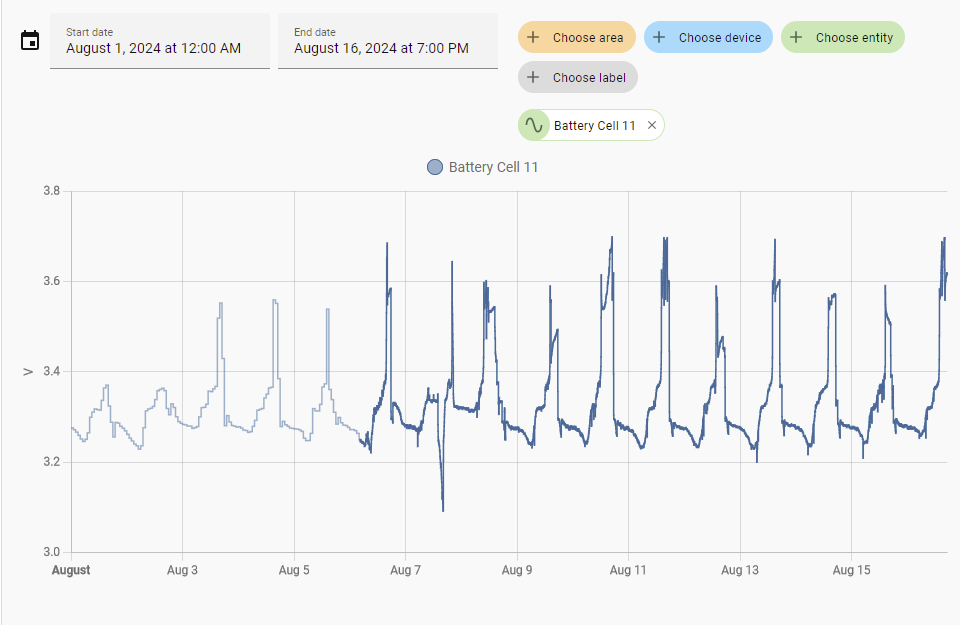
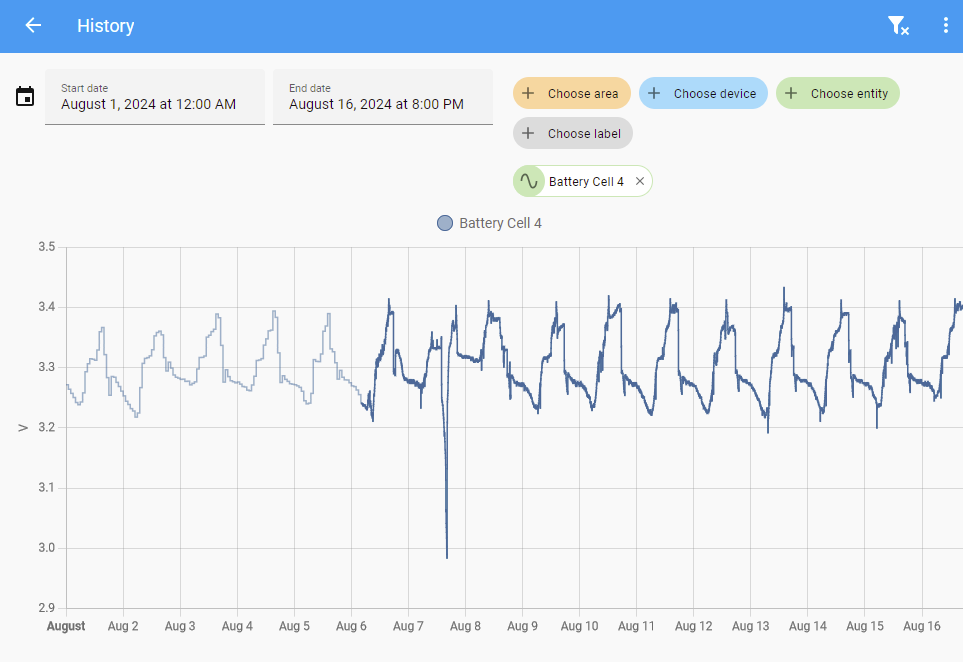
I can see in home assistant that voltage for cell 11 this month is creeping up.
The thing is, I can see loads of data like this in HA but I don't really know how to interpret it.
the phrase (all the gear and no idea) springs to mind 🙂
Any pointers would be very much appreciated.

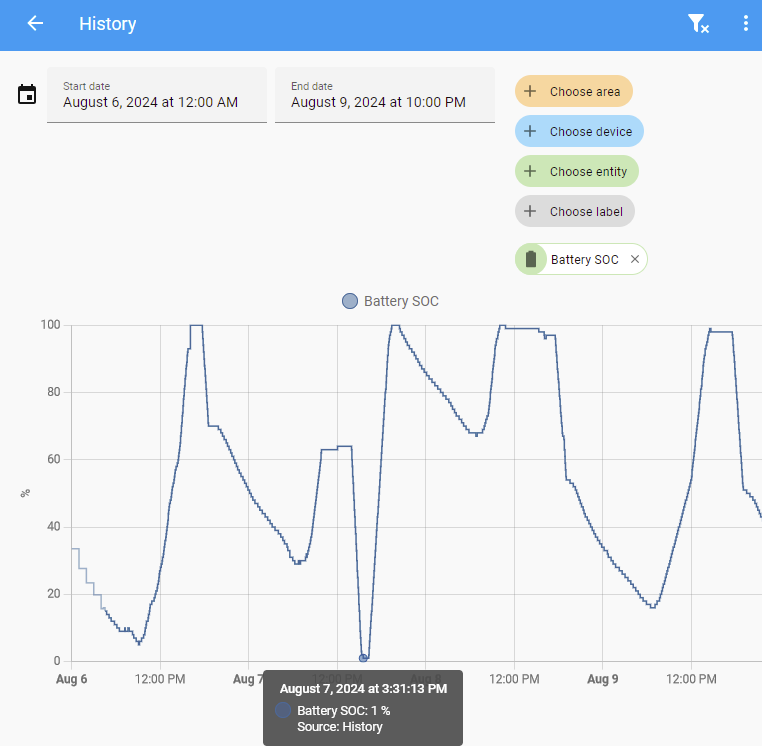
I had an issue with battery on the 7th Aug (it stopped) and GE support upgraded the FW followed by a full calibration and all was well again, apart from ruining my stats and a nice 5 month flat line octopus import graph. 🙁

R
#22 Robgy

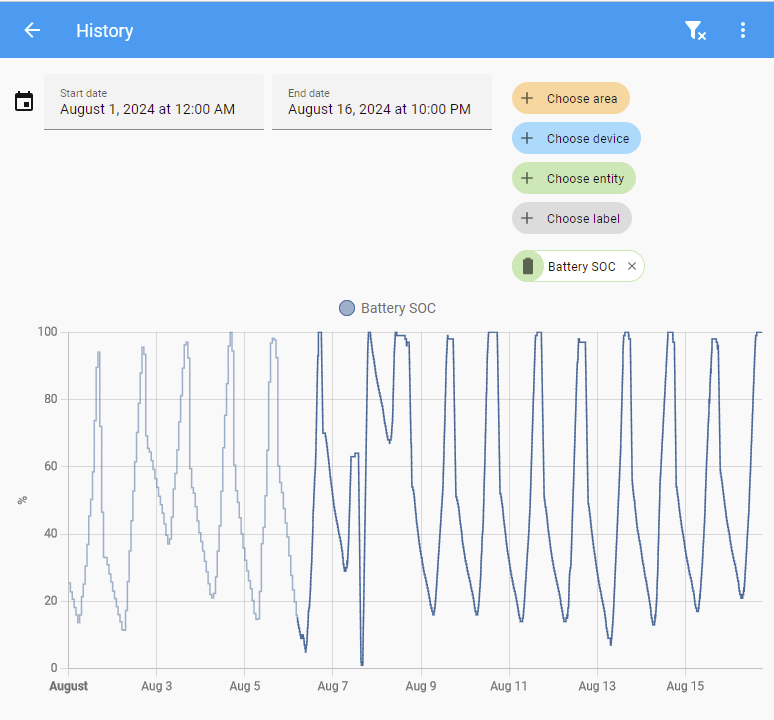
Yes, most mornings SOC start around 15% and it's fully charged again by 1pm apart from the 7th Aug when GE did the calibration and took it down past the reserve to 1% SOC

R
#23 Robgy

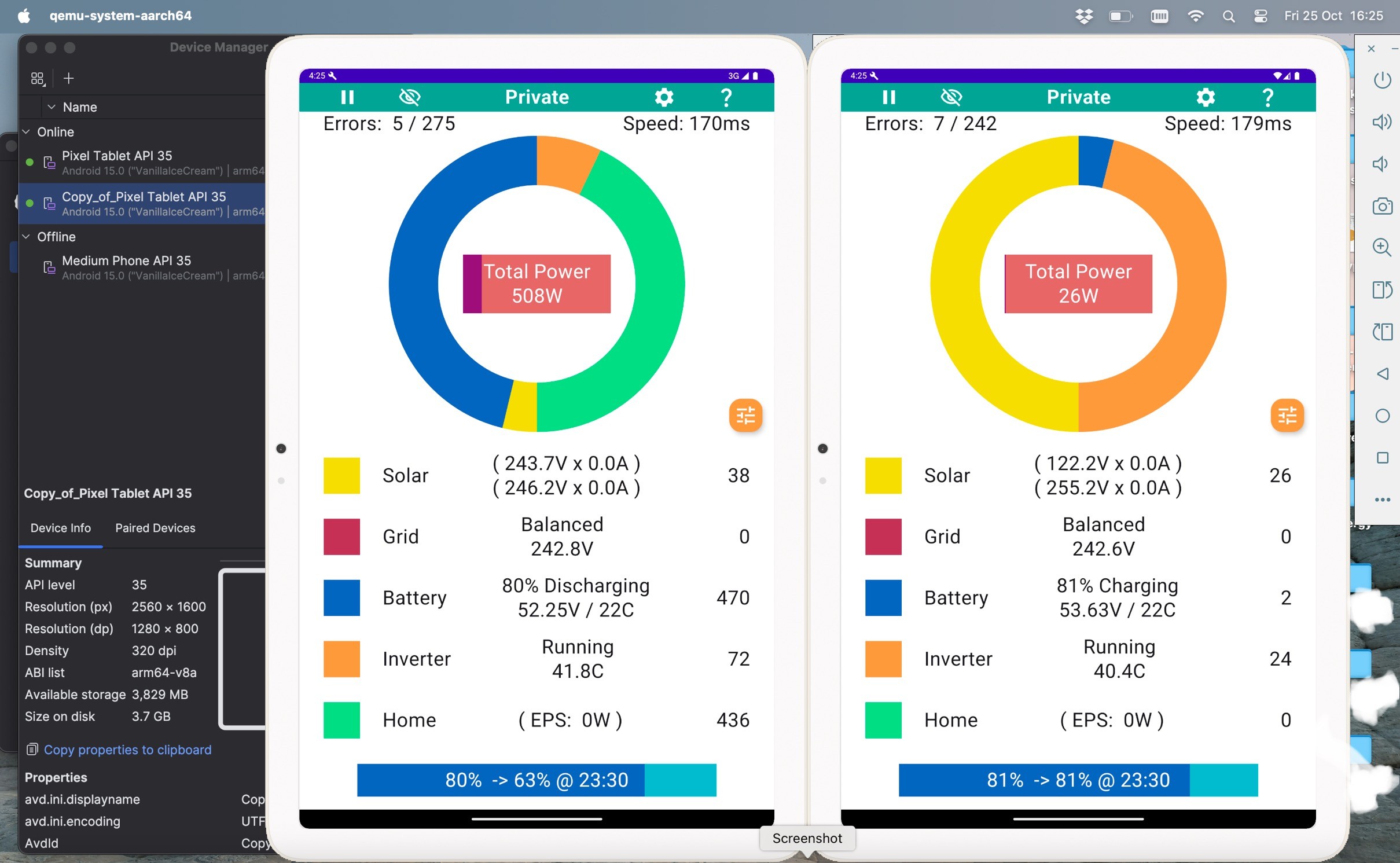
DD Do you ever allow the battery to run low? (As now "suggested"

I wonder if this is sufficient exercise for a 9.5kWh battery?

D
#24 DD

Robgy I wonder if this is sufficient exercise for a 9.5kWh battery?

Dunno... I generally go slightly under 10%, and then allow it to idle for an hour before recharging. Absolutely no idea if that makes the slightest difference.

On the individual cell chart, might be interesting to include a second, more typical cell as a reference.

R
#25 Robgy

DD On the individual cell chart, might be interesting to include a second, more typical cell as a reference.

This is Cell 4

R
#26 Robgy

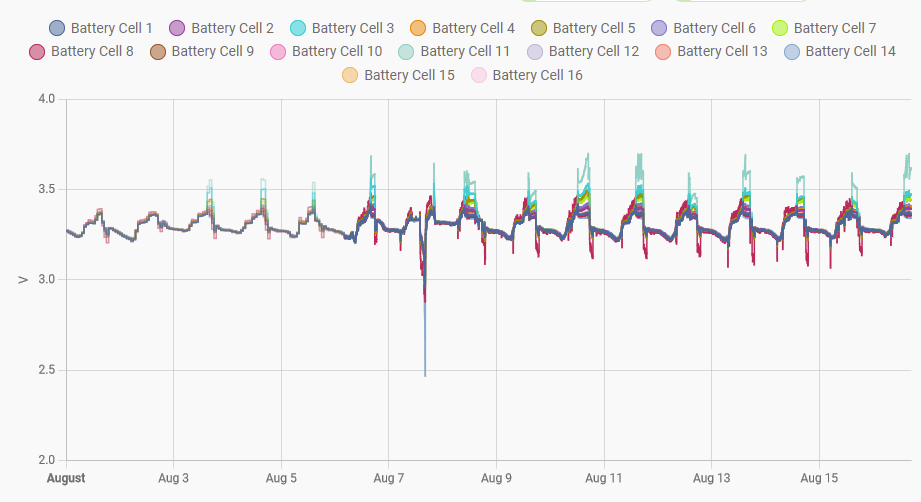
Also all the cells
It looks like cell 11 goes the highest at 3.699 v
and cell 8 the lowest at 3.131v

To my untrained eye it looks like the cells were more in-line before the upgrade to 3017 on the 7th Aug

R
#27 Robgy

Sorry, just realized I'm going off topic, and would be better suited to other threads, I do apologize.
Although the reason this thread caught my eye is because last week 7th Aug my single 9.5kWh battery stopped working at 66%

P
#28 pmcg

Just installed the Inverter monitoring App.

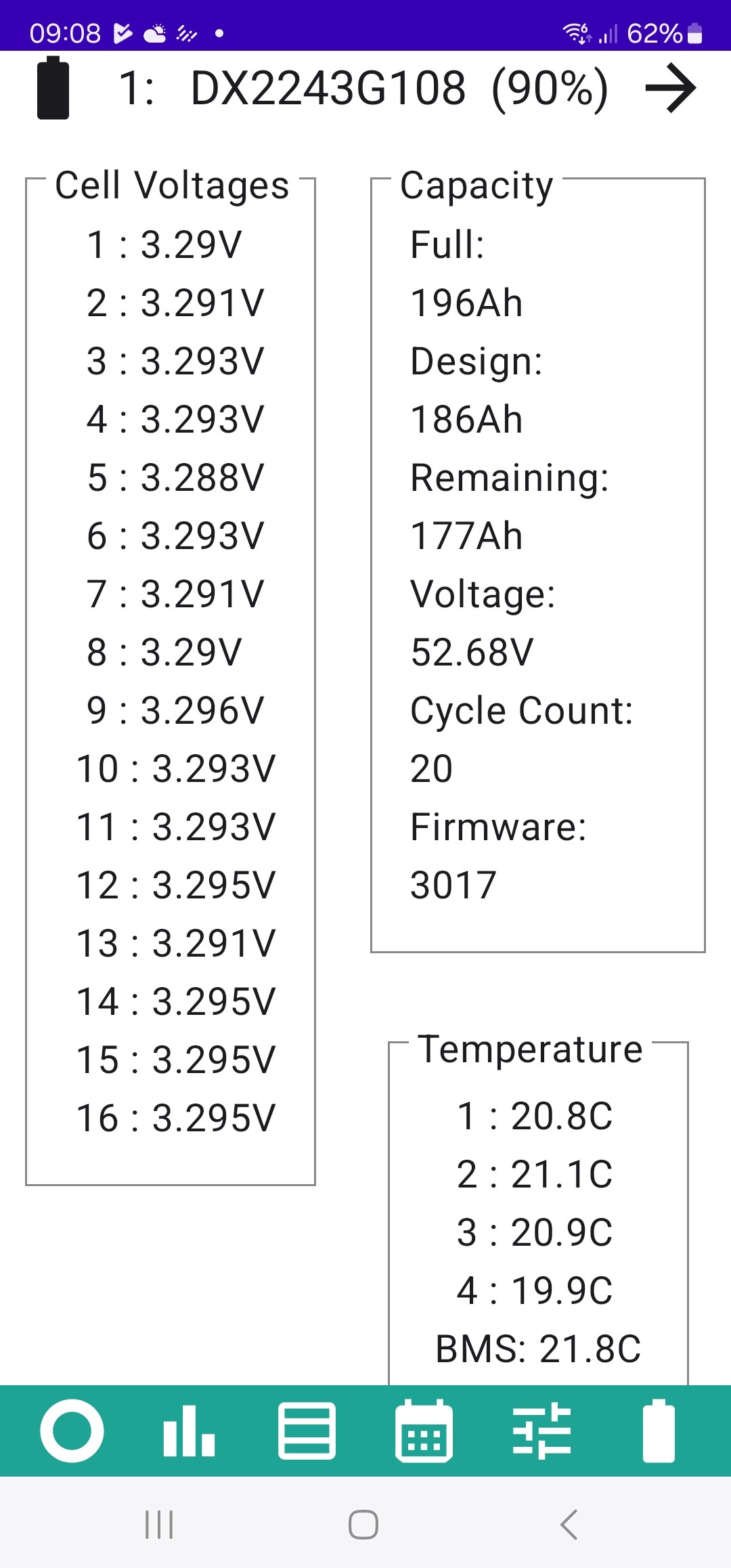
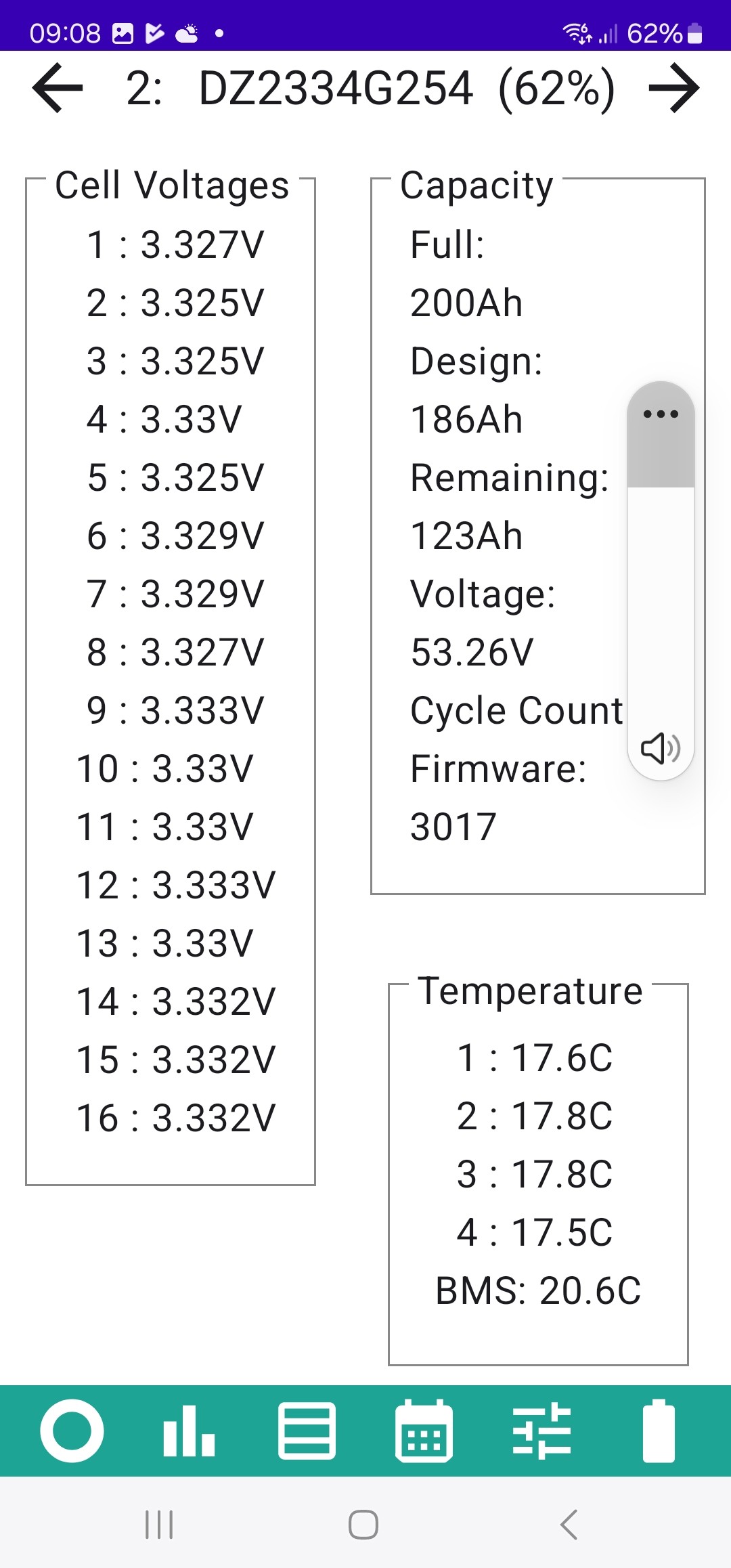
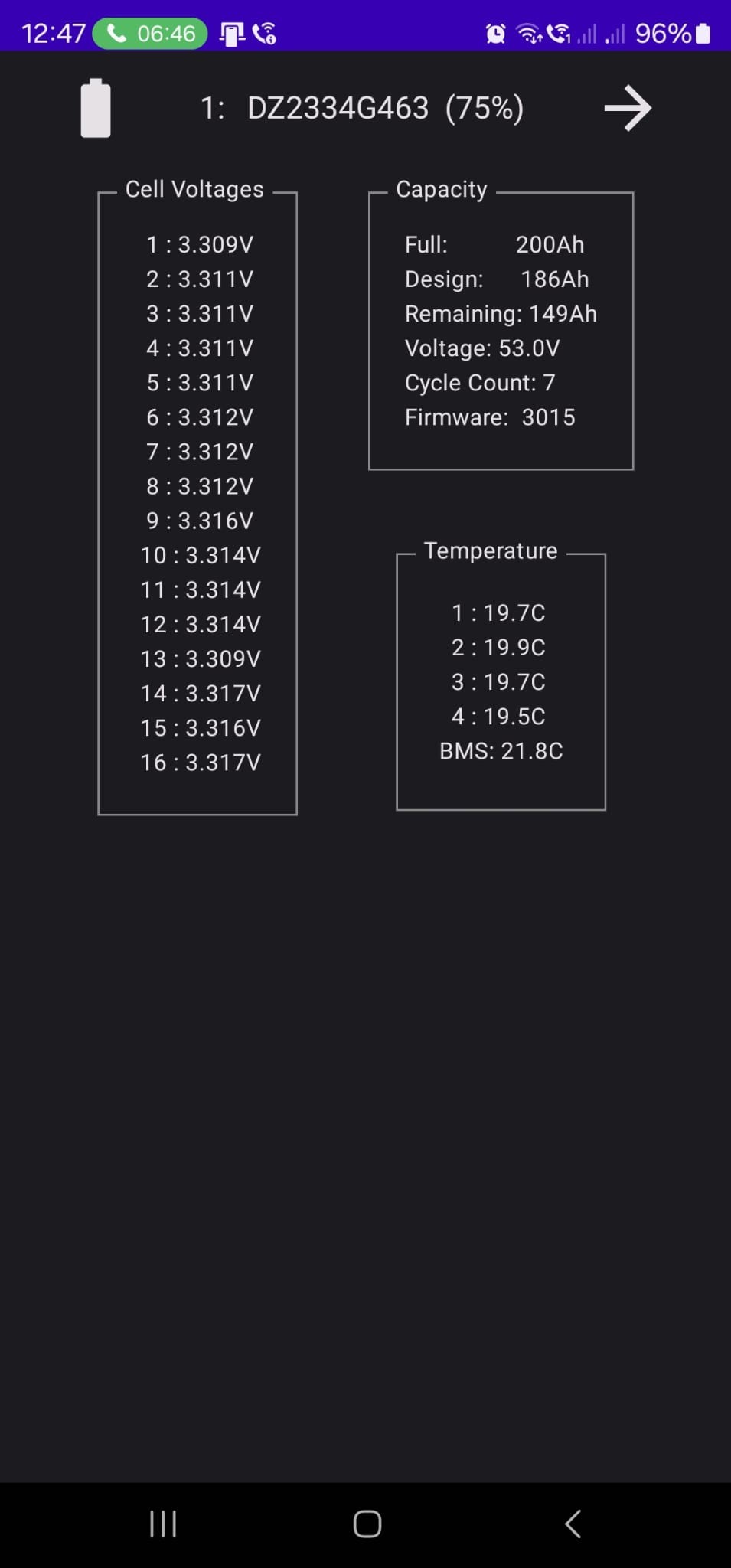
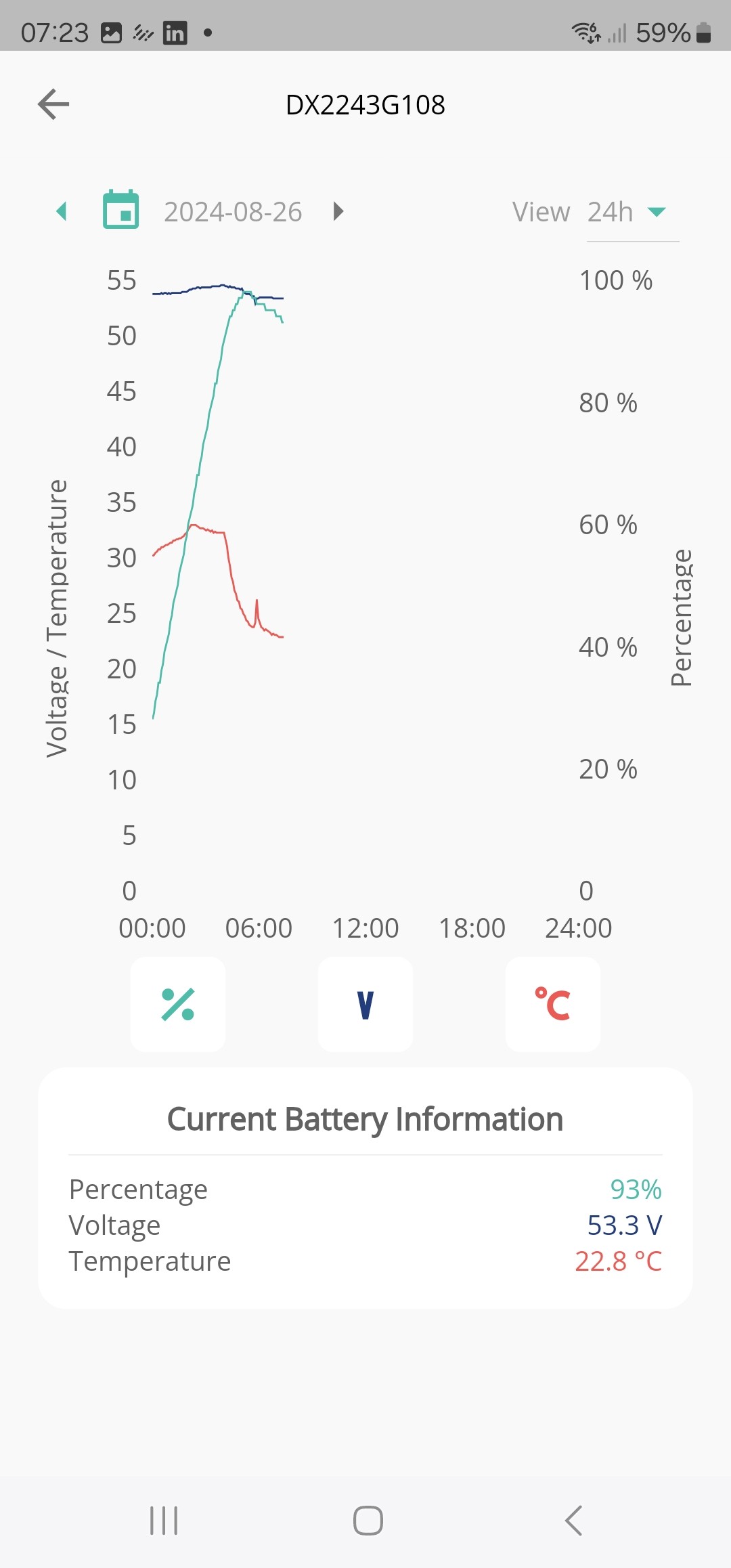
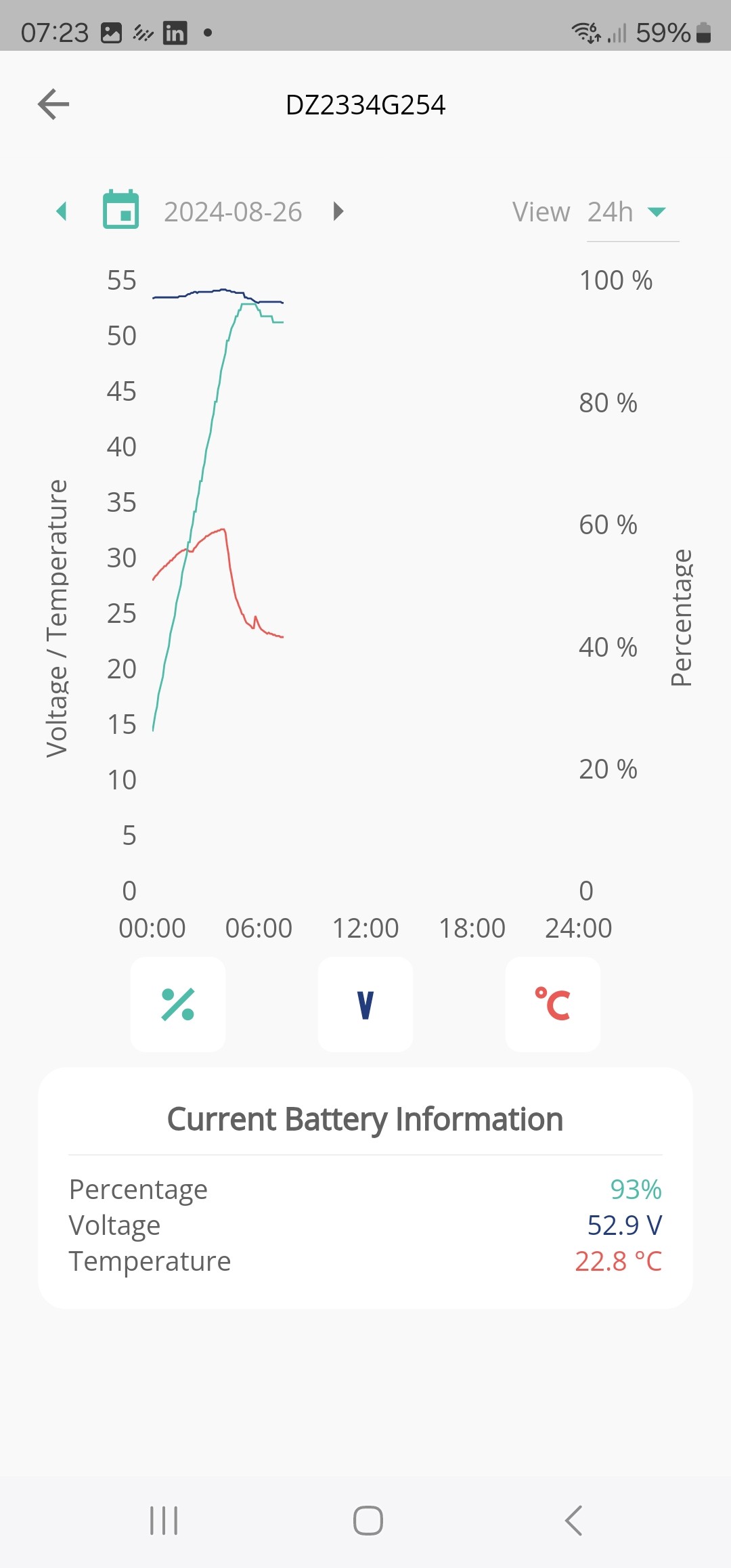
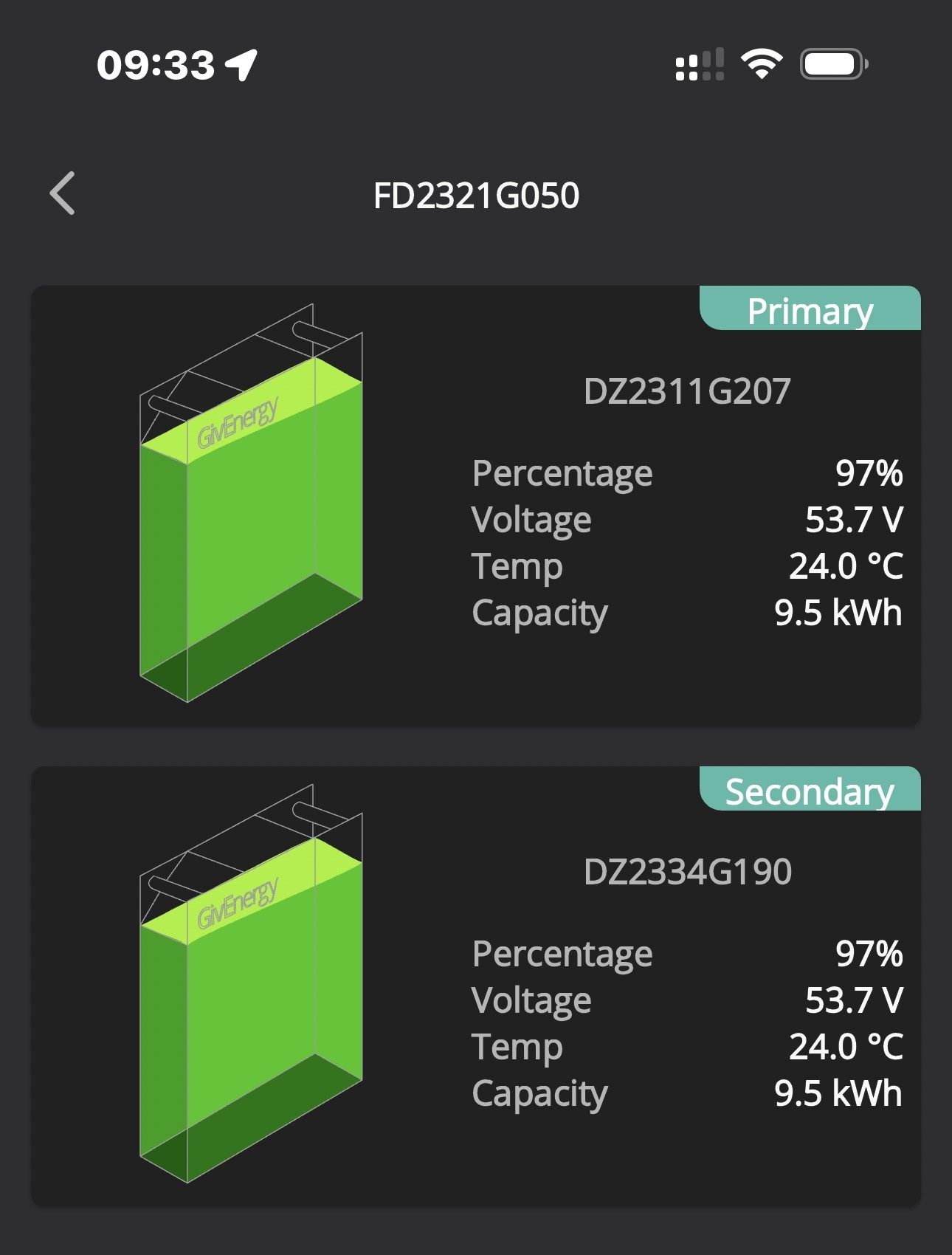
My two batteries look like this:

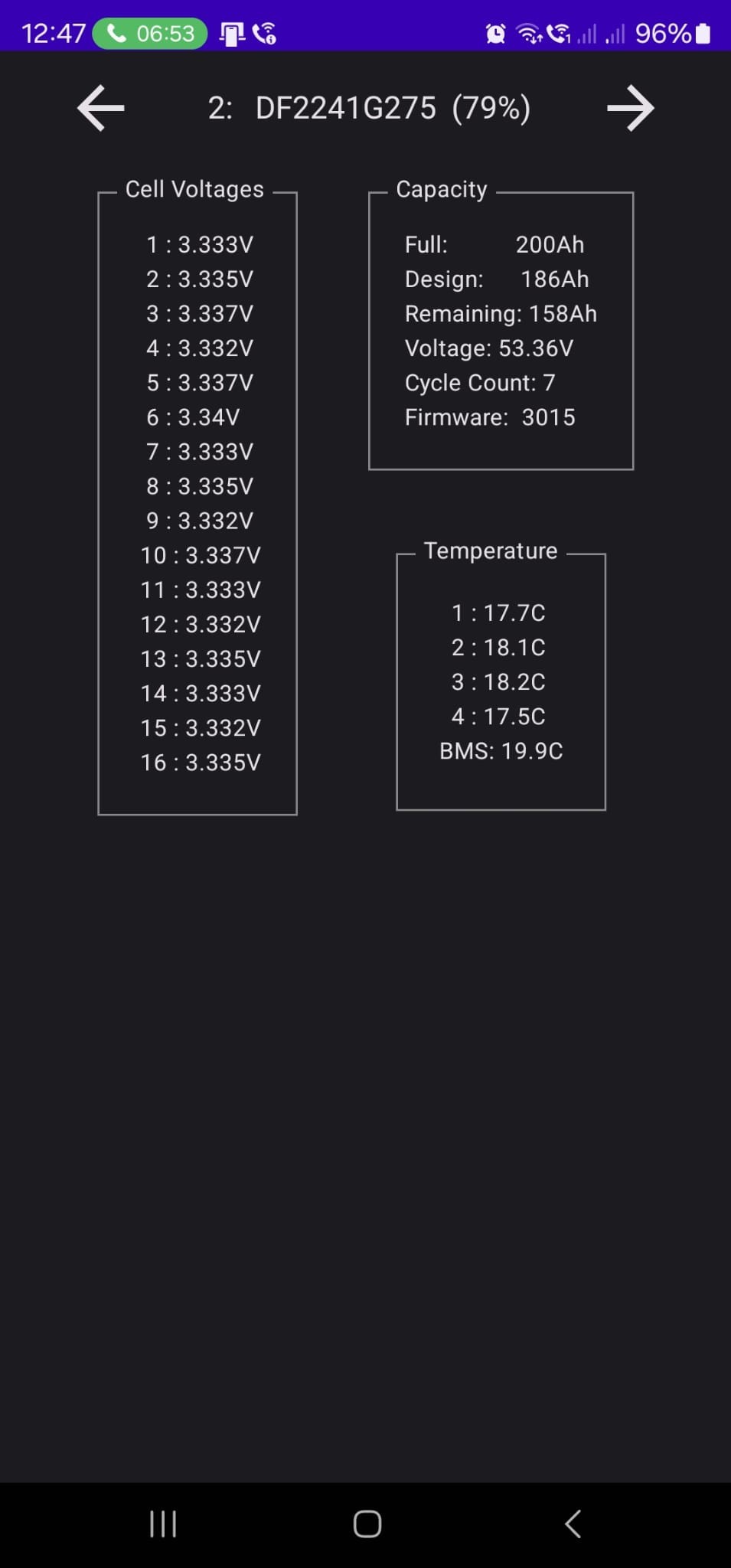
Volatges look good but the second battery states it has a capacity of 200Ah !

Again overnight I have had the same issue, battery 1 charges fine, battery 2 just does not want to play.

I really do not get why Givenergy would tell me it is a firmware problem when we have another identical installation where both batteries charge fine.
Sounds to me that they do not know why and thus just fob me off!

R
#29 Robgy

pmcg we have another identical installation where both batteries charge fine.

How does the Rubicube inverter monitoring app data compare with your other identical system which is working?

P
#30 pmcg

Robgy

Haven't checked that, would have to go to other other place but it's a bit of a drive

A
#31 anthonypar

Check that the battery serial number and capacity is being recognised correctly (battery icon, more information tab). I have had this problem over the last couple of days and it messes up SOC. GE are aware of this problem.

P
#33 pmcg

Robgy

Had an idea, install the App on another device at other place. 😉
Other batteries are on Frimware 3015.

P
#34 Pete UK

pmcg

I’ve got this exact problem as well on both pairs of 9.5’s on both of my inverters. (All 4x 9.5’s !).

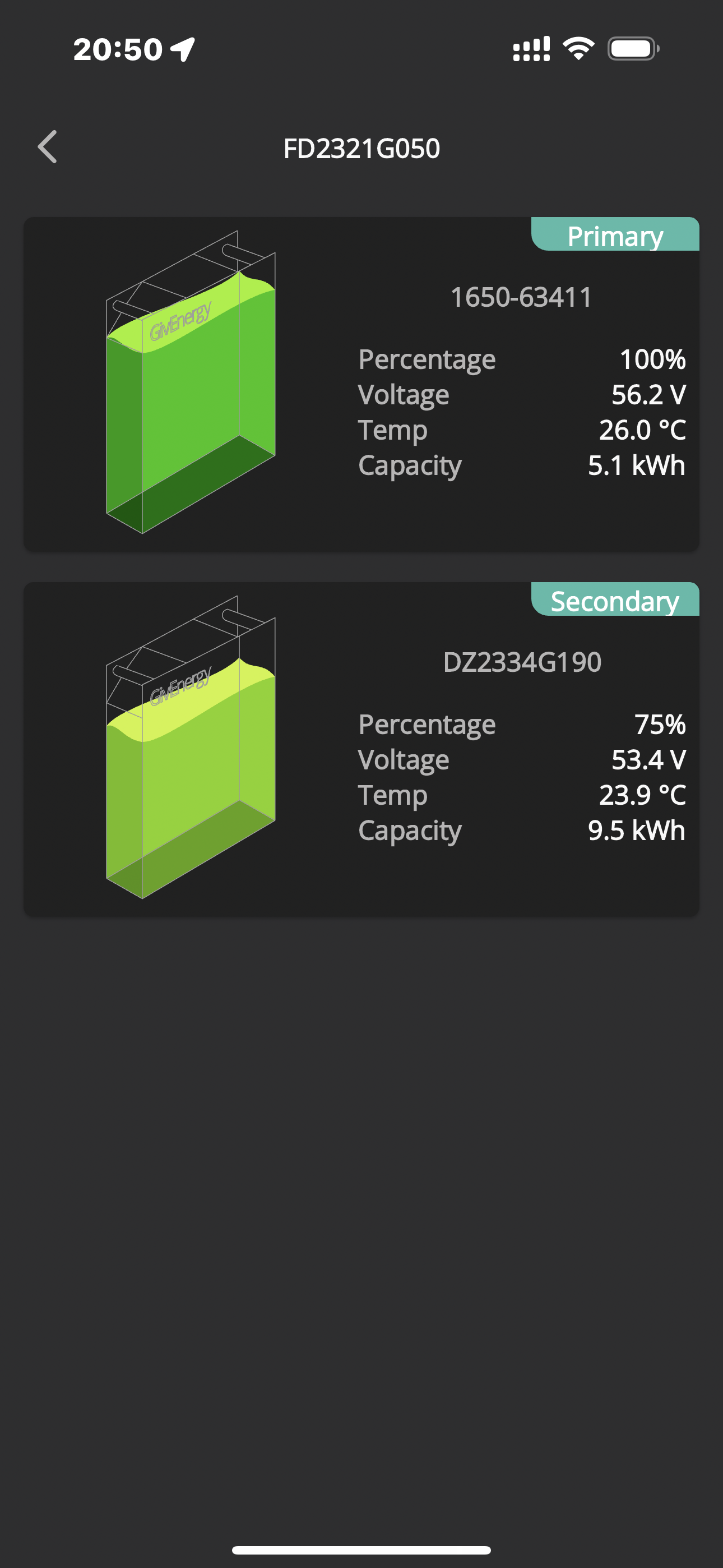
On one inverter’s pair the primary battery is no longer visible. It’s vanished now (apparently the vanished one is the good one). I seem to be able to use that primary, although I have no indication it’s there any more. The primary displayed a weird serial number “1650-xxxxx” for a while, and max capacity 9.4kW or 5.2kW or 2.6kW or 9.5kW randomly. Then the correct serial number returned for maybe a day and then the whole battery vanished (although seems to be working).

The other inverter’s battery pair just charges and discharges extremely slowly with the primary at “100%” and the other flatlined at 50% or 75% or whatever it feels like displaying ! When they are supposed to be charging or discharged to the grid it does its own thing from 200w to 800w max usually. Charging or discharging at “200w” or so all by itself irrelevant to what’s being commanded by the settings.

I was told that it was because the secondary battery of the pair didn’t take the update to 3017 so that was the problem. That was all I heard for over a month until very recently. And that was only on this forum after zero replies to my emails for 6 weeks !

As you can’t see which firmware each individual battery is on; just one display of “version 3017” displayed for both batteries, as a customer you’d never know if one didn’t take the update (until something misbehaves and even then maybe not).

It sounds like you’re experiencing the same. Possibly ask GE if both batteries are on the same firmware? If they ever answer you.

It’s pretty frustrating. They have hardware issues and software issues it seems. And when one battery of a pair misbehaves it buggers up both batteries; Rendering the whole system effectively unusable. Frustration then is compounded by having to wait for at least a month for a rectification visit. Only for this to repeat and repeat.

One faulty battery shouldn’t render both useless but it does right now. Extremely extremely annoying. I’ve been trying to get my system operating correctly for over a year. It’s in hand with GE and I’m expecting an imminent visit for 2 “rigorously tested” replacement batteries but they aren’t testing them together as a pair and one will replace the primary on inverter “A” and the other will replace the secondary on inverter “B”. So even if they did test them as a working “pair” together on an inverter at Give headquarters they will be separated when installed (I assume?), so I don’t expect miracles when they are replaced but time will tell.

It’s unbelievably frustrating. Give need to get a grip on this. The batteries are sold as being able to be stacked and plug and play but they just don’t seem to work as advertised in pairs or triples.
Also they need to get a grip on the terrible rectification times. Having to wait months and months with your system effectively unusable or just barely usable with NO communication or replies to your emails is not acceptable at all. This just increases the anger level.

Do post back how you got on.

Rant over - good luck.

P
#35 pmcg

Sounds like a very similar problem you have to mine Pete.

Yes, Givenergy need to have this sorted as like you say the system is sold as being able to add extra batteries.

Really frustrating that there is no simple way to force the second battery to charge.

My batteries were aligned at around 58% earlier but now the Primary is at 50% and the Secondary 57%.

Fully expect the Primary to charge to 100% overnight and the Secondary to once again get stuck at 60% or thereabouts after very slowly charging.

Come on Givenergy surely this is not acceptable?

If it continues I might end up having the system pulled back out.

N
#36 Newman

pmcg Both batteries are on 3017 and all cell voltages are similar.
Battery 1 is at 90% SOC with a voltage of 52.68
Battery 2 is at 62% SOC with a voltage of 53.26
These numbers are not logical. GE says it is firmware - cycle the batteries and see if it corrects.
If not, why is Battery 1 voltage low?

P
#37 pmcg

Newman

No idea, current state is that Battery 1 is 53.7V 26% and Battery 2 is 53.37V 42%.

How would I cycle the batteries other than charging/discharging them?

Has me wondering if they should perhaps be calibrated again!

P
#38 Pete UK

Newman Both batteries are on 3017 and all cell voltages are similar.

  • They may not both be on 3017 - no way for the customer to tell BOTH are. But I suspect that may be a red herring anyway, as mine worked ok for a week or so being on different firmware. (3015 on one allegedly and 3017 on the other allegedly).

This is NOT just how they work @geoffreycoan. This is Defcon 9 where there is a faulty battery. The other issue that you’re mentioning is where there is a massive SOC variance between the two paired up batteries. This is present too but this time it’s because; ones effectively “stopped charging and discharging indicating ~ “60%” +/-40% “ and the rate of charge and discharge is sub 800w on a battery pair (at max power). The secondary not really shifting in voltage or SOC whilst the primary may go up and down from 4-100%. Secondary doesn’t really shift (with the occasional exception).

Remember in the earlier thread I was staying two months back that the 3017 calibration seemed “kinder” but actually I realised it wasn’t that at all, it was that the ones they replaced were likely faulty as well because they wouldn’t charge or discharge at normal rate like before (half rate or 1/4 rate).

  • this is what mine looked like on Sunday. I think @pmcg has a faulty battery same as the two I have.

If you look at mine I’ve got the same issue. This is pretty much how they’ve been since I had 2 batteries replaced on 10th June. And subsequently complained straight away. They did work normally for a few days but then reverted to this behaviour:

Needless to say I waited a month for those two replacements to be swapped and now I’ve waited a further (over) two months and counting, for these “imminent” replacements - which I still don’t have a date for yet.


Look familiar?

P
#39 Pete UK

Then this…. (Note weird serial number and capacity !)

And now this…. (Where’s it gone…?)

D
#40 DD

Pete UK They may not both be on 3017 - no way for the customer to tell BOTH are

Yes there is, though not using the official products. Any of the tools that access modbus directly can get this information - the 3rd-party android app, or givTCP for example.

N
#41 Newman

DD Thank you for confirming that we can trust the Rubik App.
pmcg Cycle the batteries means use them and allow the firmware to learn.
SOC is only an indication, it should improve with use (assuming good equipment and good firmware).


P
#42 Pete UK

DD

Fair comment. Thanks for the input. I should have said using their official software.

I personally don’t have any android devices or Home assistant. I presume to access Give TCP you would need Home Assistant? I would say it’s likely the majority of GE owners are not using Home Assistant. Quite a few are but it’s likely a small minority.

I did try and install Home assistant on an older
Mac-mini but there was a file missing and it didn’t install - couldn’t locate it anywhere on the internet
So gave up after a few hours.

I could buy something with HA pre-installed and go down that route but why should I spend more money when the native GE portal should just display the firmware version of each individual battery on the portal? Also I’m on the balancer software for dual inverters so it’d be “view only” in HA because GE are already blasting my inverters with commands to keep the pair of inverters from cross charging.

Also I work abroad and my time at home in the UK is limited. So it would be a lot of wasted time, money, effort just to confirm the firmware version of each battery. Then I’d just be staring at it and getting frustrated waiting for a fix still.
I’d update the USB’s myself if that had been suggested but it wasn’t and my emails were not being responded to.

Is there any apple based software that can access give TCP? So that I could check what firmware it’s on? If there is I’m all ears.

C
#43 CW

I've been following this thread with interest. Does anyone know whether the behaviours described here (like stopping/starting charging based on one battery level) applies to a second AIO? I would have thought it would, but oresumably there are 2 inverters so maybe the behaviour would be different?

D
#44 DD

Pete UK I personally don’t have any android devices or Home assistant. I presume to access Give TCP you would need Home Assistant?

From another thread, givTCP can run standalone, but still requires some setup. I actually run the lower-level modbus library code directly, without givTCP. That's just python, and should run on anything with an up to date python package.

There's aliso a BBC basic package. As-is it doesn't show cell voltages, but might be possible to extend it. (Long time since I've used, and the language seems to have evolved a bit since my day, but looks okay.)

P
#45 Pete UK

DD

I’ve got the BBC “inverter” app for the iPhone. Doesn’t reveal any extra info from what I can remember and you have to be local. So not good for remote viewing.

I’m not sure my programming is good enough to use python alone !

What do you need to set up Give TCP standalone?

#46 PianSom

Pete UK
Apologies for jumping in. I haven't been following this thread, so I may be about to offer a solution to an XY Problem (https://en.wikipedia.org/wiki/XY_problem).

You can install GivTCP without using HA. Here is a link where Hoggy uses Proxmox and Portainer - https://wiki.terravolt.co.uk/docs/givtcp-installation-version-2-0/

But if you just want to try it out without buying any new hardware AND have a few hours to spare (and are reasonably technically able!) then here's what you could do: install Docker on your Mac (including Docker Compose); use Hoggy's yaml (amended as needed; in particular to use the container's own MQTT broker) to spin up GivTCP; then use a tool like "MQTT Explorer" to connect to the MQTT broker and see what info is being collected.

From a standing start, this is quite an effort just to get cell voltages. There must be a better solution.

P
#47 pmcg

Emailed Give today to ask about having the second battery returned/replaced.

They've replied saying it is most certainly a Firmware issue.
I'm not quite sure what that means, regardless of what the issue is the system does not work so I'm really not interested if it is firmware, microcode, hardware, software or anything else.
I simply want it to work to some sort of acceptable level.

At the moment I have an extra £4k battery that is useless.

I've suggested a revert to older firmware and a re-calibration to see if this can sort things.

Tonight the system makes no sense at all.

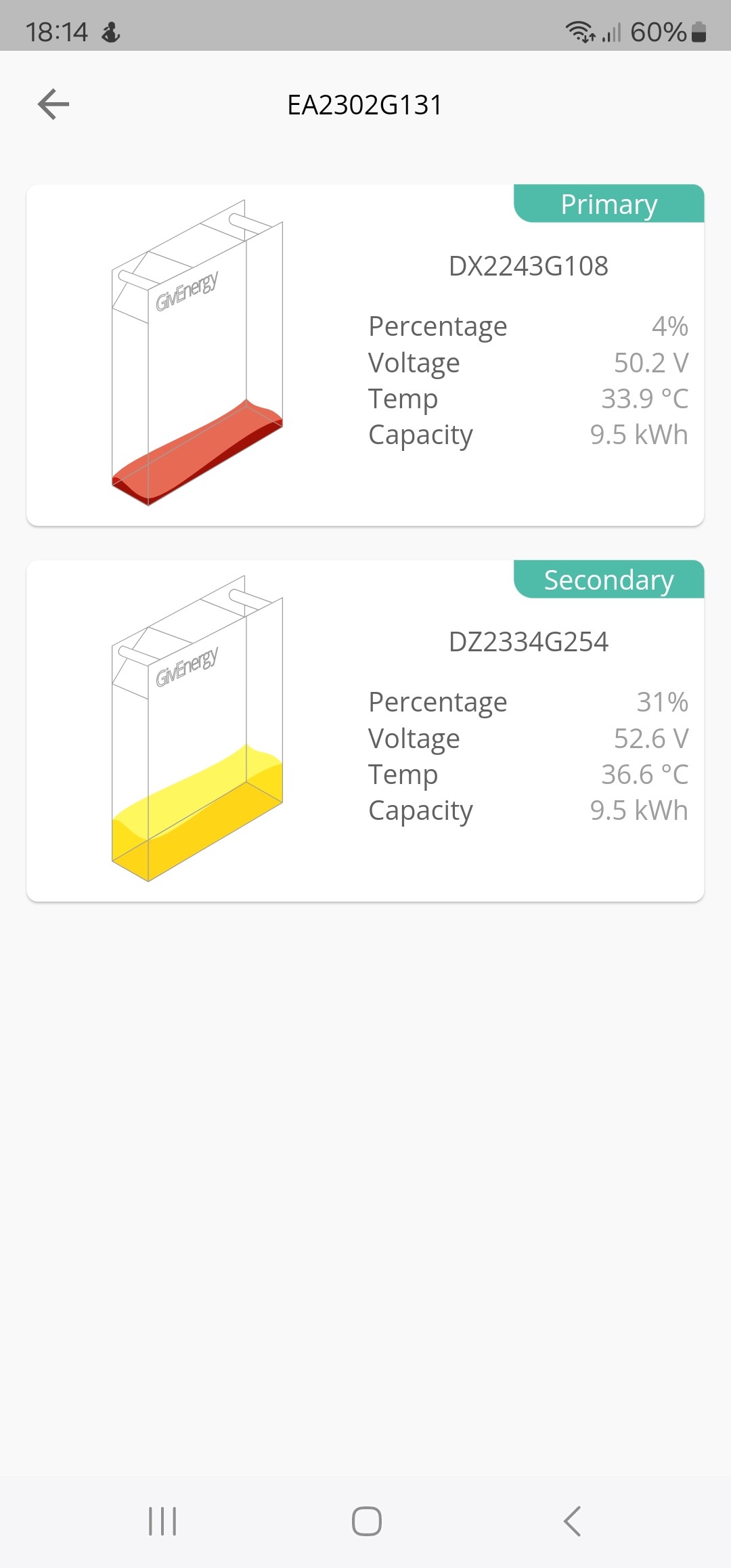
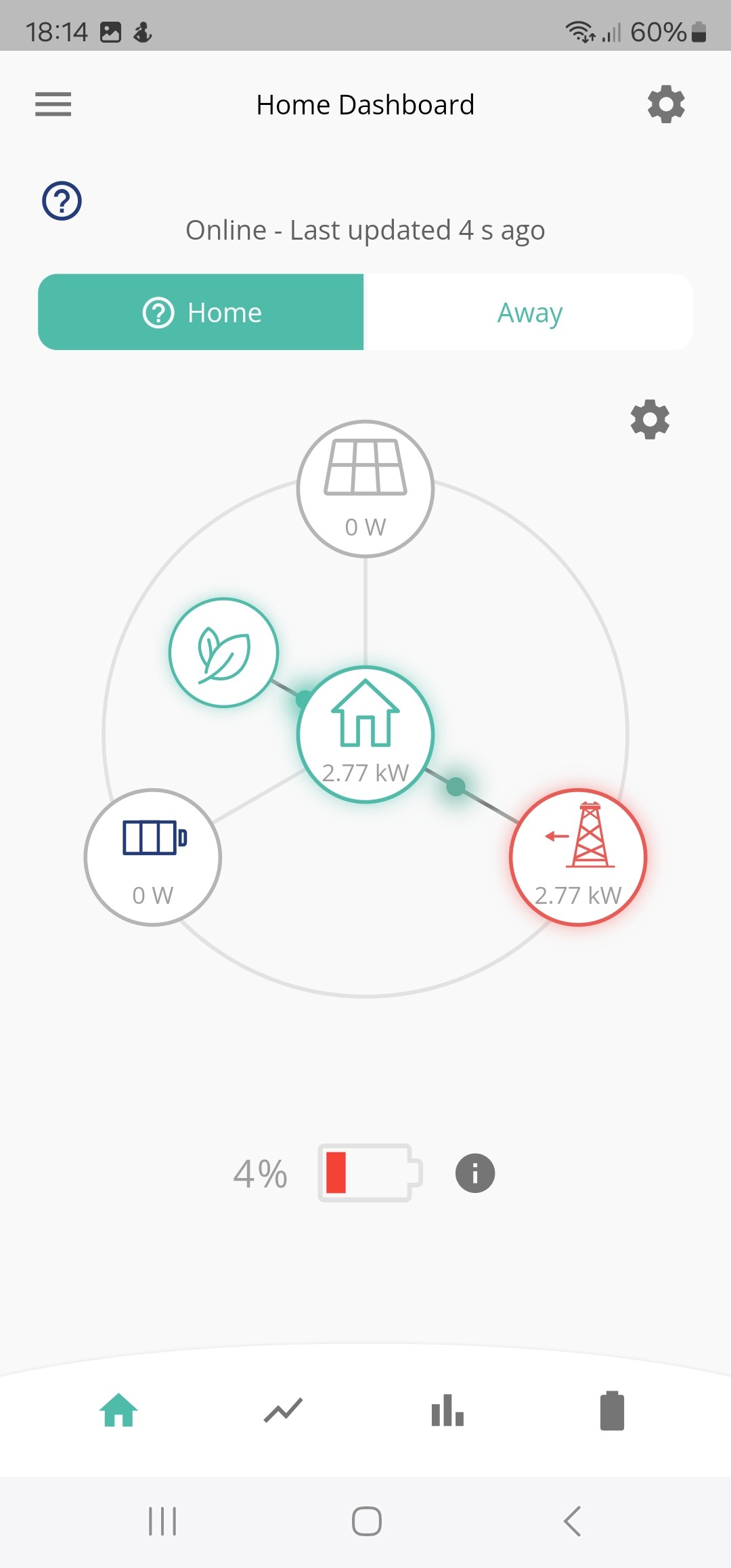
Overall Battery says 4%, Primary has 4%, Secondary has 31% but not using the battery, now drawing from the grid!


P
#48 Pete UK

pmcg

I feel your pain. It’s pretty disgraceful. I’ve had over a year of this. I’m pretty sick of the whole thing to be honest. Especially the slow repair times and lack of response/ explanations.
Most of the last year plus has been waiting months at a time over and over again for someone to attend to fix the problems.

It seems the way it’s designed both batteries have to be completely in sync for them to work as advertised. If one goes slightly out of tolerance or has a fault then they both stop working properly and you can’t even get the proper use out of one of them. That shouldn’t happen. Thats a terrible design !

My two pairs have never been completely in sync (within 10%) for any decent length of time; maybe for a few days after it’s been fixed but thats about it. The primary ALWAYS gets much hotter than the secondary under load and seems to be doing all the work at first, then when it declares its nearly empty (or full), the secondary starts to do some real work to catch up. But by then it’s too late and the primary declares “I’m empty - therefore both stop - you’re both empty” (or full). And as for the recent changes when the charge rate slows to a trickle when one “thinks” it’s full but the other is miles off; well that doesn’t help at all. That decreases the usable capacity of both even more !

Like you and as a paying customer; I’m not interested what the problem is, what the individual cell voltages are, what the inverter temperature is, what the battery temperature is, what version the firmware is, how a pair of inverters is balanced, what the BMS is up to, etc, etc… I shouldn’t have to be !

I just want to be able to charge and discharge the full capacity (as advertised) at the stated rates that I paid for without it breaking and being unavailable all the time. If I could charge and discharge the full 38kW, I wouldn’t care too much about what the exact SOC is displaying.

I hope they can get to the bottom of the problem and fix it.

Maybe I’ve been unlucky, maybe? but it seems loads of people are experiencing similar problems. It’s excruciatingly slow and painful to get a timely resolution.

It seems a problem gets pushed from pilar to post ending up with an engineers visit to replace something but without someone at the top level
looking at the bigger picture as to why it actually happened and how to actually fix the real issue.
Is it a quality control problem with the batteries, is it a design problem, is it communication problems, is it the software? Is it all of the above?

I’ve got dual inverters and 4 batteries. It was installed and commissioned fine. All the GE software is set up for this plant installation, so why do the inverters cross charge each other out of the box? Why did I need to get on a “beta trial” for them to work “normally”. Where’s the EMS? Why wasn’t it available at the time of my install? When will
It be available? What does it do and how? Ask and you get no reply. They must know. So why not say?

I’m so so exasperated.

What’s going on at GE HQ?

P
#49 pmcg

Further problem with the Customer Service is for example, I reply to Bill, then Edd replies to me so I reply again, then Ian replies to me, rinse and repeat.
Never a good point for Customer Service.

If my second battery is not working by the time I come back from holiday it will be coming out.

We design and built bespoke security products and we would all be out of business (no OEM customers) with service/products like this.

This is basic stuff that should be simple as pie.

For me it simply looks like the calibration on the second battery is way out or has never happened.

But......this is of no concern to me, It's up to Givenergy to get it working and if they cannot then best they hold their hand up and say so.
That's what Customer Service is about, being honest with the answers rather than blanket statements such as, "we are commited to our customers, it's a firmware problem".
If it is firmware then fix it, it's hardly a new issue.

Very frustrated to the point I will soon start to get angry.

G
#50 geoffreycoan

Pete UK I’ve got dual inverters and 4 batteries. It was installed and commissioned fine. All the GE software is set up for this plant installation, so why do the inverters cross charge each other out of the box? Why did I need to get on a “beta trial” for them to work “normally”. Where’s the EMS? Why wasn’t it available at the time of my install? When will
It be available? What does it do and how?

Absolutely understand your frustrations, I think there is a definite lack of understanding of the multi-inverter and multi-battery systems with the installer and wider givenergy community.

My system was specified as two gen 1 hybrid inverters as I had more solar capacity than a single inverter could cope with, and it was only afterwards that I found in the GivEnergy FAQ’s that ‘plant’ setups like this weren’t a “recommended solution”. I was somewhat surprised to find this as this is what the installer had specified and you trust them to come up with a decent fully working solution.

Looking just now the FAQ’s that were much more prominent on the inverter page have moved, but if you search the FAQ’s you can still find the warnings that such setups are not recommended https://givenergy.co.uk/faq/my-electrical-consumption-is-high-what-are-my-options-ac-plant-systems/?asp_highlight=multiple&p_asid=3 and https://givenergy.co.uk/faq/can-i-have-more-than-one-battery-inverter/?asp_highlight=multiple&p_asid=3

This leaves those of us with these multi-inverter systems waiting for the EMS to come out. Somehow I doubt it will be offered free of charge to us. And regardless of the cost and availability I anticipate it will only resolve the inverter cross charging and won’t have any effect on the multiple chained battery problems that seem intrinsic to the inverter design.

P
#51 pmcg

Have had a re-calibration started today.

Primary battery discharged fully, Secondary reported it had 48% and had stopped discharging.
Now charging which does not seem right since the Secondary did not discharge!

P
#52 Pete UK

geoffreycoan

Yep agree with all of that.

P
#53 Pete UK

pmcg Have had a re-calibration started today.

Primary battery discharged fully, Secondary reported it had 48% and had stopped discharging.
Now charging which does not seem right since the Secondary did not discharge!

Sorry to hear that. 😞

Yes. I think it’s safe to say you’ve got some sort of fault with your battery. This is exactly what I’ve experienced. And am still. The calibration doesn’t do its job and one battery gets left out of the process likely due to a fault.

I highly doubt a calibration will fix this (at least they never do for me). No calibration I’ve had done (fast or slow) has ever permanently fixed any of the faults I’ve had.

It’s just jumping through hoops I’m afraid. You’ll probably be told to leave it a few days to settle down. Then eventually after a week or so they’ll say it’s faulty. Then you’ll be in the queue for a replacement.

P
#54 pmcg

Calibration was started today at 11:34 am

Primary battery was discharged by around 14:15 then started charging, completed around 18:15.

Secondary battery discharged to 48% around 13:15 then starting charging very slowly around 15:00, is now (at 23:45) showing 93% (primary still on 100%) but only charging at 435w.

P
#55 pmcg

01:08 it was when got the notice that Battery Calibration had finished.
12 hours and 34 minutes to complete.

For the first time this morning I am seeing 94% overall, 95% in Primary, 90% in Secondary.

Will be interesting to see how the Secondary takes a charge and how far it discharges.

P
#56 pmcg

Quiet day, 70% overall showing, 58% on Primary and 79% on Secondary.

No response from Givenergy to my email yesterday!

P
#57 pmcg

Primary charged to 100% with good rate of charge.

Secondary stopped at 87% after very slow rate of charge then flatlined.

Will end up back in same position as before when Secondary discharges more.

R
#58 Robgy

Unfortunately, reading this post and other issues like it are putting me off getting another 9.5 battery.
I can imagine how frustrating it would be.

P
#59 pmcg

It really is, I've now had an answer but saying they are now waiting on a response from "senior colleagues".

It's clear the second battery is not doing what it should and if it goes back to not charging at all after dropping down, (suspect it will) then it will have to come out and get returned if Give cannot offer a solution.

Really shouldn't be this difficult.

G
#60 geoffreycoan

pmcg I’d guess that they have decided that the battery is faulty and needs to be replaced, but the replacement has to be approved in the management chain.

I had the same sort of message when my inverter stopped working, it was waiting for “senior colleague approval”.

Fingers crossed this is what’s happening. In my case the approval came through the next working day

P
#61 pmcg

Nothing back yet.

Again overnight Primary charged fully, Secondary charged to 69% and stopped.

Primary discharged ok throughout the day but secondary stopped again at 50%.

Been using the grid since mid afternoon even though have a battery with a reported 50% in it!

Getting rather annoyed now. 🙁

Z
#62 Zakalwe

Contact your installer. Advise them in writing that it is not fit for purpose, not sold as described and not of adequate quality. Tell them that you want a replacement within 14 days or removal of the item with a full refund.
It's down to the installer to sort- your contract exists with them.
If you continue with this back and forth farce then you will be at it for months.

P
#63 pmcg

Zakalwe

We supplied the equipment and the installer only done the install so they are not resposible for the equipment.

I'll give it some days and if no further forward will contact the battery supplier, good thing I paid on a card maybe. 😉

D
#64 DD

pmcg (Apologies if all this has already been said - I've not been following very closely.)

The primary seems to charge and discharge significantly faster than the secondary, which means it reaches 100% or 4%-ish long before the secondary gets close, and (as has been noted) all charging / discharging stops when either gets to the limit.

G108 took about 2 hours to go about 45% to 100%, which would be over 2.5kW ? (0.55 * 9.5kWh / 2h). Now the inverter's battery interface has a limit of 3.6kW (assuming gen2/3), which means the primary is taking most of the power, and the secondary is getting less than its fair share. G254 from about 60% to 70% in the same 2 hours, which is roughly 0.5kW.
(Rate of change of reported SoC is only a proxy for power flow, but it's all we have.)

Would there be any merit in switching the places of the two batteries, as an experiment?

P
#65 pmcg

DD

Might try that and see what happens, will let you know.

P
#66 pmcg

DD

Will leave it for now as the installer has everything neatly cable tied and in trunking.
Would not want to mess with his installation at this point.

D
#67 DD

pmcg I notice G108 didn't slow its charge rate as it approached 100%. I think newest firmwares do that, to avoid over voltage, but don't know if it's the inverter or BMS that actually does it. If it had slowed down, might have given the other battery a chance to catch up a bit. But if it's the inverter that implements that, probably wouldn't t help.

G
#68 geoffreycoan

DD I think its the inverter firmware that slows the charge rate near peak full and empty as my Gen 1’s started doing this much more noticeably when I upgraded from 450/451 to 191/193, but remained on BMS 3015 throughout.

#69 hoggy

BMS is on or off, it has no current limiting capability beyond that. (It can however either signal to the inverter to back off, likewise the inverter can look at some of the BMS readings and decide what to output.)

P
#70 pmcg

Well this has surprised me!
I made a small change and this is the result.

Special like to anyone that notices what has changed?

Ran the batteries all the way down yesterday to see how they would charge overnight.

Very surprised, anyone got an explanation?

One thing that happened during the installation of the second battery was that the Givenergy people on the phone had the installer connect the Secondary battery up as the Primary for a short period so that they could update this.
We questioned this as it was all installed and cabled but the support person was adament this had to be done!

P
#71 Pete UK

You swapped the primary and secondary.

Anything else?

P
#72 pmcg

Pete UK

Yes, that's all and it seems to work!

R
#73 Roberto

I tend to run my two 9.5s flat every night just before the 7p rate from octopus kicks in. I get 6 hours worth in that gets them to about 85%. Primary always gets flat and gets to 100% first. To be fair, I don't need 19 units worth to keep me running from when the sun stops until 23:30 each night, but if I did......
The change to 3017 ? appears that the batteries no longer go offline and cal themselves ?

V
#74 Vestas

Roberto appears that the batteries no longer go offline and cal themselves ?

Yes, the calibration is fixed and immutable on 3017.

IMHO its likely there will (once again) be huge SoC changes associated with that decision but we'll see what happens once winter approaches....

That's one of the reasons I'm not touching it until its forced on me.

P
#75 Pete UK

pmcg

So you changed the cables from the inverter to the primary and secondary around and the battery dip switches. Thats all? And did you do that or your installer? any firmware updated at the same time or not?

  • so what was the exact problem that caused it?
    Batteries on different firmware? Or something else?
P
#76 pmcg

Pete UK

Just swapped cables and dip switches by installer.

Nothing else, batteries are both still on 3015.

No idea on cause but I suspect when Givenergy commisioned the system after second battery was added something was done wrong.
None of us understood why the Secondary battery had to be connected as the Primary to do this and why a complete new install had to be done, even created a new user/system name.

Have to say support is poor, have just had a reply:

The system may not have calibrated when the second battery was added, if that's the case of no calibration being ran when the secondary battery was added that could explain why there has been some slight issues with the batteries.

Same person downgraded the battery firmware on 20th from 3017 to 3015 and ran a calibration!

P
#77 Pete UK

pmcg

Glad you got it up and working.

It’s a bit of a mystery, yes. Unless only the primary battery can be reliably be updated over the air?
So putting the new battery in the primary spot means that it’ll get updated to the same version as the secondary (the original primary) when commissioned? Then it works. Thats a bit of a guess though. And still leaves a potential problem of what happens when the next firmware update is pushed out.

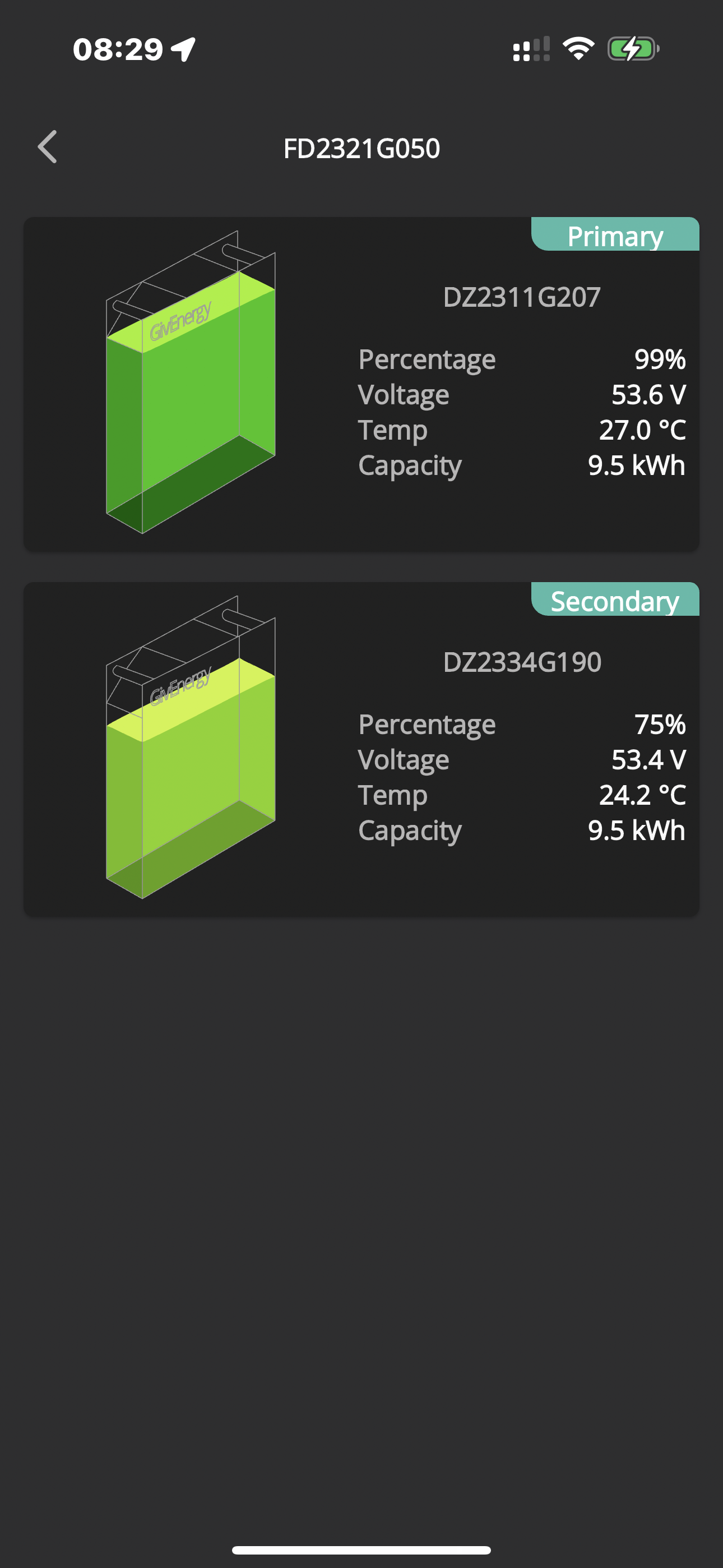
I’ve been told my secondary battery (on inverter B) didn’t take the 3017 update. But no second attempt to update it was made or even suggested. Why’s that exactly? Can I do anything? Should I turn it off? I keep asking but it falls on deaf ears. Just no answer to a direct question. Radio silence. If that’s the case then fair enough, I’d know where I stand and I’d know to update it manually or not update it. As it stands for me I’ve been told the primary on one inverter has a cell problem and the secondary on the other inverter “may be frozen”. Still waiting for the two to be replaced. They say they’ll replace it if they can’t get it working. They say G207 had perfectly balance cells (the only battery that is working) but it’s indicating a very high temp when under load now.
Should I be concerned about this one as well???

Or is this just the temp of one of the circuit boards.

V
#78 Vestas

Pete UK That's the BMS temperature rather than cell temperature.

Having said that, I've never seen one that high so its clearly under significant load.

P
#79 Pete UK

Vestas

Ok thanks, thought it might be the BMS, as the battery itself didn’t feel that hot.
(Helpful if it said “BMS Temperature” there !)

So what’s the temperature on the app listed on the level above? (The one where the title is the inverter number and below it is a picture of one battery only with the average SOC) - is that the average battery temperature of the two packs?

#80 hoggy

Battery FW works in a cascade format, so any hiccups along the way do cause problems:
Dongle fetches FW > inverter passes FW to Bat 1 > Bat 1 updates > passes FW to Bat 2....
What triggers the inverter reboot command at the end I'm unsure (it comes from the server, but unsure if that is just a simple timer thing or something more sophisticated) but I guess if a reboot is triggered while it's still updating the packs 1 by 1 then it messes the above daisy chain process up.
Similarly if there's corrupt files on one of the USB sticks internal to battery that messes the above chain up.

If you've a frozen battery then all the load is being carried by whichever battery is left running, hence the BMS gets very hot as its shouldering the full 80A / 4kW rather than shared.

P
#81 Pete UK

hoggy

Great, thanks for taking the time for that explanation. Makes sense.
This high BMS temp was at the end of my evening discharge to the grid at 4kW on that inverter (for only 2.25 hours while I’m down to 1 pack) from the only remaining battery that’s working properly.

Guess that’s what’s happened with the update and is happening with the BMS temp then. Strange that GE never suggested a manual update to and swapping the USB stick if it was corrupted. I could have done that quite easily myself 2 months ago (glue removal excepted).

So if you only have 1 battery does the BMS get that hot normally if you discharge at max power? What would make it super hot like that, as there is no power coming from the secondary(?). It’s just one pack discharging at normal (max) rate.

When both packs were running on each inverter I never saw that high a BMS temp (as in theory, (if all is working correctly) each would be discharging at 2kW) but I did usually see the primary battery BMS temp way higher than the secondary temp (like 20c+ hotter) when discharging and charging since install day. Then it backed off and the secondary BMS temp shot up as the primary reached empty. This was queried on day one (along with the large split in SOC indications). I’m still scratching my head as to wether I’ve just been really unlucky or if this is just how it works due to the implementation of dual packs with a primary and a secondary chained off it.

#82 hoggy

For manual update: it depends how borked the BMS is. If its fully locked up / stuck then no manner of usb meddling will get it going. It needs manual severing of power from the cells to force it to reboot (the buttons and switches on the battery never truly kill the power from the cells to the BMS, its permanently wired to those- if there's voltage in the pack it'll just keep sitting there.

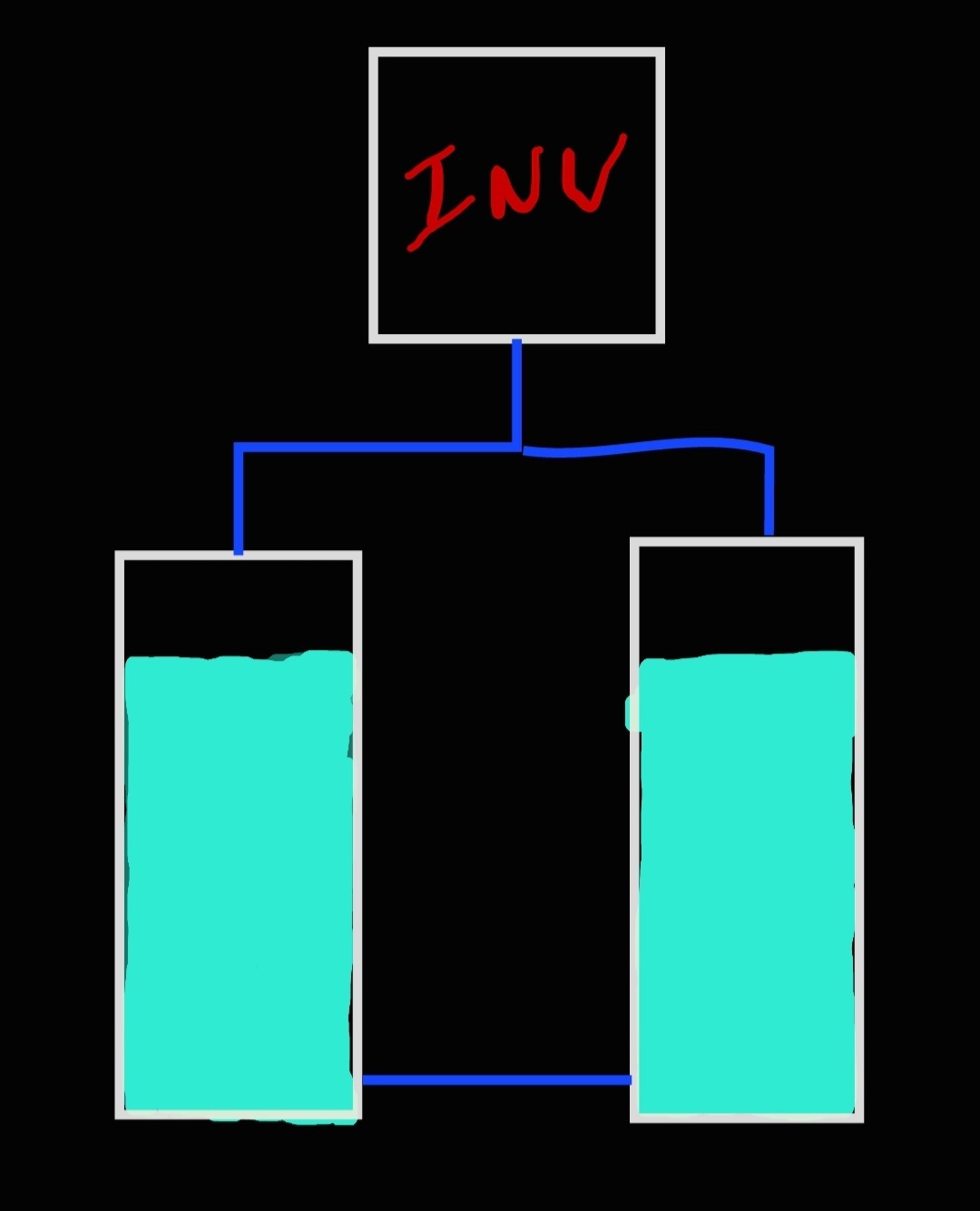
The balance thing I've been through before but over simplified it boils down to the way they are wired in a chain rather than a ring or bus setup.
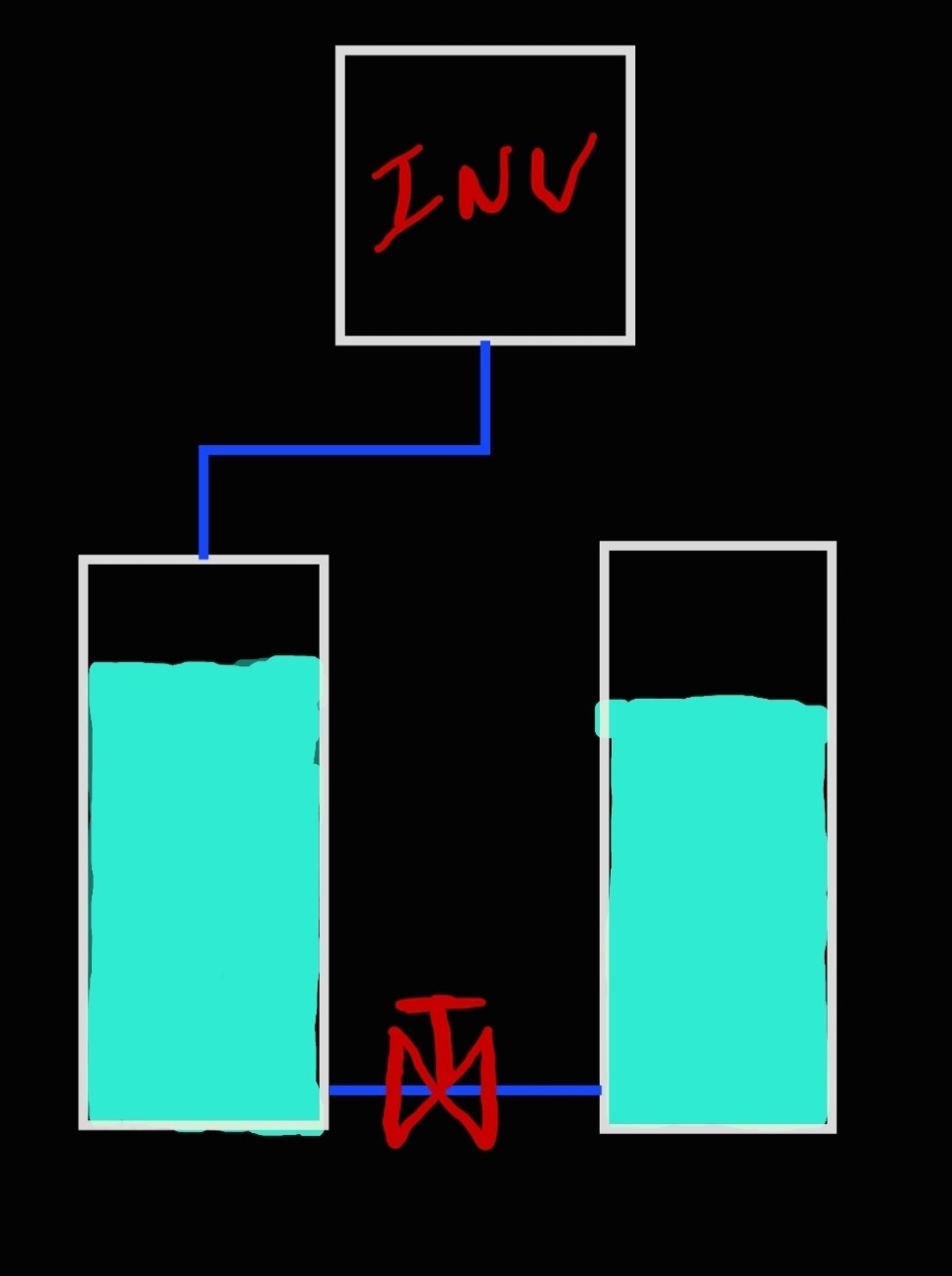
Each hop from pack to pack creates an extra bit of resistance the previous pack doesn't see (like a valve restricting flow between 2 connected tanks). The more packs, the greater the cumulative resistance the further you get from the inverter. (This analogy then falls apart as water would in time fully equalise - in this case however once pack 1 hits 100% the inverter stops (adding "water") and the "valve" between packs snaps shut)

What would have been better would be to wire them as either a ring or a bus (depending on how many packs there are), so each pack essentially sees the same resistance from the inverter, so they all charge and discharge equally.

I don't know what 3017 brings although I believe it is supposed to try and fix this kind of thing, but you can't fight physics, so other than soft switching off pack 1 once full (essentially putting a bypass in) to then allow pack 2+ to keep charging I'm unsure what else could be done without fundamental changes to installation.

(Note, if you have added packs on in stages (I.e a year apart) there is probably some merit in putting the newest one first/master, such that it should theoretically have greater capacity than the older one, which would probably reach 100% a bit earlier had it been first given it will have degraded / lost some capacity.) <--- Theory not tried however may explain why switching them around made a difference.

P
#83 Pete UK

Well this is weird….

So I’ve done a bit of mild tinkering:

I turned one of the secondary batteries off with the button, then the breaker, then the primary same, turned them back on again in reverse, then reset the inverter, (I think I did the last bit in that order). Tried various combinations of that and then the same with the other inverter. In between tries, I toggled the quick play button to discharge to grid and back to play(eco) a few times to see if anything changed. And again after the second inverter and battery tinkering. Something has changed…

For the last hour, I now seem to be able to discharge to the grid at full power (8kW) and it seems to be discharging both batteries on each inverter !
Inverter A; the BMS temps are similar (+5c on the primary). Inverter B; the primary BMS is about +17c.

Not sure how long this will continue or if any of them will come back into alignment wrt SOC or voltages. But I’ll monitor and see how it progesses and see if they charge normally overnight.

Early days but I should have tried that 2 months ago !


Z
#84 Zakalwe

I seem to remember something about the battery SoCs having to match when adding a second battery to an existing system to prevent this type of SoC problem. Or did I imagine this?

T
#85 TX200

Yes, before the second battery is connected, it needs to match the soc of the first.

I presume a manual charge e.g. outside of giv system. Then when it is close enough, hook it up to the system.

If I recall correctly the batteries come out of the factory at 50% charge.

P
#86 pmcg

My two have charged again correctly overnight.

P
#87 Pete UK

And this morning….

Looks like I’ve somehow “unfrozen” the frozen secondary battery. And the other inverters primary seems ok for now (although I was told it has a cell problem).

  • will see how they discharge and recharge tonight to measure the capacity I’m getting, as they didn’t start charging from empty or equal amounts yesterday.

Now I’m a bit confused about the “being on different firmware caused/ is causing the issues” statement given to me earlier.


#88 hoggy

If you look at the firmware changelog page you'll see they've been tweaking pack balance and so on. Used to be >0.5V or 20% difference in SOC then packs would not run in sync and stop. I guess by turning them off and on + fw updates it's unstuck itself?

P
#89 Pete UK

I have no idea now. Didn’t do any firmware updates since they stopped working properly and no record of one being done. Just the cycling on and off of the batteries a few times and a few inverter resets cured it (for now).

Very strange that both secondarys came back to life and the very much reduced charging/ discharging seems to have gone away as well on the other inverter. Looks like one battery is still a bit duff though. But I’m able to use the system again now, which effectively has been severely hobbled for over two months.

Do you know if holding the small battery power button in for an extended period does anything? (I mean apart from turning the batteries on and off). One thing I did was hold the power button in for lat least 10 seconds plus. I was wondering if it did some kind of reset function as well as just on and off, which might have cured something. 🤷🏼‍♂️

P
#90 Pete UK

Update:

The “bad” secondary has reverted back to not charging/ discharging much and hanging around at 45-70% ish. It’s not frozen for now, it’s ‘hampered’ shall we say.

The other inverters pair is kind of working okish still.

P
#91 Pete UK

Meh, now it’s stuck at 76% again. And when I do my evening discharge, the primary is going all the way to almost empty, but then it’s stopping all four batteries discharging to grid even when the other inverters battery pair has 50%+ left in both. So my tinkering was only a temporary reprieve.

Back to square one again. Grrrrr. 😡

#92 Judith

Pete UK thanks for the update

P
#94 Pete UK

Quick further update….

Ok, so I had the 2 replacement batteries swapped out for new ones yesterday after just under 3 months of waiting since the last replacements were fitted and didn’t work properly; (one bad primary on one inverter and one (frozen) bad secondary on the other inverter). I asked for the two new ones to be installed together as a pair on one inverter and the (only) original battery of the four and a previous replacement to be installed on the second inverter, which the GE engineers very kindly did. (My reasoning for this was so that all the new and ‘enhanced tested’ equipment would be together - and hence should function perfectly). The primary on the second inverter is the only original battery from install (the one that was reporting a BMS temp of 80c under load when working on its own). This was checked during the swap out and the engineers said the temp sensor is in the correct place and looks ok but to monitor it. Previously I was told all the cells in this battery are perfectly balanced.

No calibration performed yet. (Due to being on the beta balancer software, which needs to be turned off for a calibration). I’m expecting the calibration today or at any moment in the near future.

So far so good even without a calibration. At the top end each of the battery pairs were within 2% of each other during the day and at the bottom end (they got down to about 20-25% SOC due to an unexpected bonus Intelligent octopus charge slot last night! - Which messed up my plan for them to visit the lows!) but both primaries and secondaries were all within 11% of each other (both primaries lower). The secondary(s) looked to be starting to close up the gap (as their temps started to increase and the primaries temps started to decrease as they got down into the 20’s % SOC range). But they never got a chance to catch up, as it was 23:30 by then and they all started charging again with the car.

It’ll be interesting to see what happens tonight if a calibration hasn’t been started (or completed).

I’m a little bit wary of what will happened after a calibration, as this is the best they’ve ever worked since install date at end of June last year! I’m actually secretly hoping they forget about doing a calibration to be honest. I know it should be done but I can’t face another extended months of ‘waiting for an engineer visit’ 🤷🏼‍♂️ Any thoughts on this…

Will post another update later for anyone who is still interested if anything significant changes.

P
#95 Pete UK

Update from last night;

So did the regular evening discharge from 19:15 to 23:30; (at 4kW per inverter discharge rate indicating on both inverters)

New battery pair got down to; (at 23:30)
Primary: 9% -51.5v
Secondary: 15% -51.5v - (seems acceptable)

Original battery and earlier replacement battery pair ; (at 21:45)
Primary: 4% - 48.9v (79.2 degrees c)
Secondary: 100% - 56.2v (- stuck at 100%) 😡

3 batteries then charged up ok overnight. The original primary reaching 61c

Stuck secondary battery was at 100% all the time with the voltage decreasing slowly from 55.8v at 23:30 to 54.7v at 06:54. Between 0654 and 0659 the secondary’s voltage dropped from 54.7v 100% to 52.9v 99% and it started to discharge a bit again. The primary had discharged a bit from 53.5v 97% at 05:30 to 54.2v 97% at 0654. At 0659, the primary suddenly dropped to 52.9v 95%, which is when the secondary that was stuck jumped down and sprung back to life at exactly the same voltage values; 52.9v 99% !

So the secondary on that pair recovered and has become unstuck for now. As I mentioned, I’m still waiting for the calibration to be done but got a stuck battery in the meantime. Hopefully it won’t happen again without or indeed after the calibration is done. Guess nothing will happen over the weekend and might need a prod on Monday to action it. Meanwhile I’ll monitor this sticking secondary battery.

I still think there is an issue with this original battery. Surely it shouldn’t be getting to 80c ! It is lower when working as a pair but still doesn’t seem right (also that the secondary is getting stuck).

G
#96 geoffreycoan

Pete UK Surely it shouldn’t be getting to 80c

I don't have chained batteries and there will doubtless be some impact on the primary battery of the secondary battery charge flowing through it, but over the last week the peak temperature on my 9.5 was 54.6 degrees and 62.7 on my 5.2.
I'm on agile with predbat to automate so the batteries get used well

V
#97 Vestas

Pete UK Surely it shouldn’t be getting to 80c !

You were told why it happens earlier in the thread 🙂

hoggy If you've a frozen battery then all the load is being carried by whichever battery is left running, hence the BMS gets very hot as its shouldering the full 80A / 4kW rather than shared.

P
#98 Pete UK

geoffreycoan

Ok, So not too much hotter, but I think 80c is still above the spec. Although it is only the BMS board temp so likely not too much of an issue, unless a BMS over temp shuts something off. (?)

I think I’d be all over HA or predbat if I wasn’t on this (API) balancer beta software. Although, all bar the odd bonus IOG slot or savings session or free elec power up. It’s fairly straightforward on IOG, set the times and use the quick play buttons for the bonus sessions. But you do need to keep a bit of an eye on things.
Agile, I think it’s almost essential to have one or the other. Glad it’s working well for you.

I haven’t looked too closely at either, spent the last year plus just trying to get the 🤬 thing working properly. (Mostly waiting for an engineers visit). All extremely annoying. Especially over the 3 best months of the year, when I was expecting to squirrel away a bit of extra credit to offset against the winter months.

I think if things stay as they are, this dual battery on one inverter set up, is going to see the primary lead mostly (percentage wise) and then the secondary catch up when percentages get below mid 20% ish. (Although mine never completely catch up and never have after numerous calibrations, firmware updates, etc in the past). Guess it is what it is. At least my new replacements seem to be very close voltage wise at the moment and within 11% of each other. Which is good. Hope the other pair can play ball as well either by themselves or after a calibration (which I really hope helps things and doesn’t cause more chaos 😧).

P
#99 Pete UK

Vestas You were told why it happens earlier in the thread 🙂

Yeah, I understand all that but on the other inverter pair, the primary never got to 80c when the secondary wasn’t working ! - maybe 60c (?)

And as far as I’m aware people with a single 9.5 battery aren’t seeing a temp near 80c.

P
#101 Pete UK

Maybe I’m being a bit slow this morning, but why are you pointing to my post with my battery temp at 79c?

R
#102 Robgy

Pete UK I have a single 9.5 battery and when I discharge at full power the GE app shows my battery temperature at 80c
I was told by ge that it's fine.

One thing that does confuse me is that the app shows the battery at 80c but the battery always feels cold, the inverter however is too hot to touch.
Is the BMS in the inverter?

P
#103 Pete UK

Robgy

Ah ok interesting. Thats reassuring.

No, there is a BMS in each battery. It’s a board at the top centre and at the back of each 9.5 battery, there is quite a bit of air space around it to the front and sides. Mine also was not hot to the touch.

On a side note, I’m very happy this morning. 😀

Since install at the end of June 2023. For the first time ever, finally my system is working properly. I managed to fully charge up all 4 batteries last night, in the 6hr IOG slot - put in 38.1kW. 19kW in one pair and 19.1kW in the other.

At 05:30 it looked like this;

Inverter A;
P: 54.9v -100%
S: 54.7v -95%

Inverter B;
P: 54.9v -98%
S: 54.9v - 95%

Started from a low at 23:30 like this;

Inverter A;
P: 50.6v -5%
S: 50.7v -7%

Inverter B;
P: 50.3v -7%
S: 50.6v -12%

Max temp was about 41c on any single battery during the evening discharge and in the 6hr overnight charge window.

Just need to get a calibration done now but in the meantime this calls for a large celebration 🎉

R
#104 Robgy


So in the GE app under battery information, is this the battery temperature or the inverter temperature ?

P
#105 Pete UK

That’s the temp of the BMS board inside the battery. (Not the actual battery cell temperatures or the inverter temp).

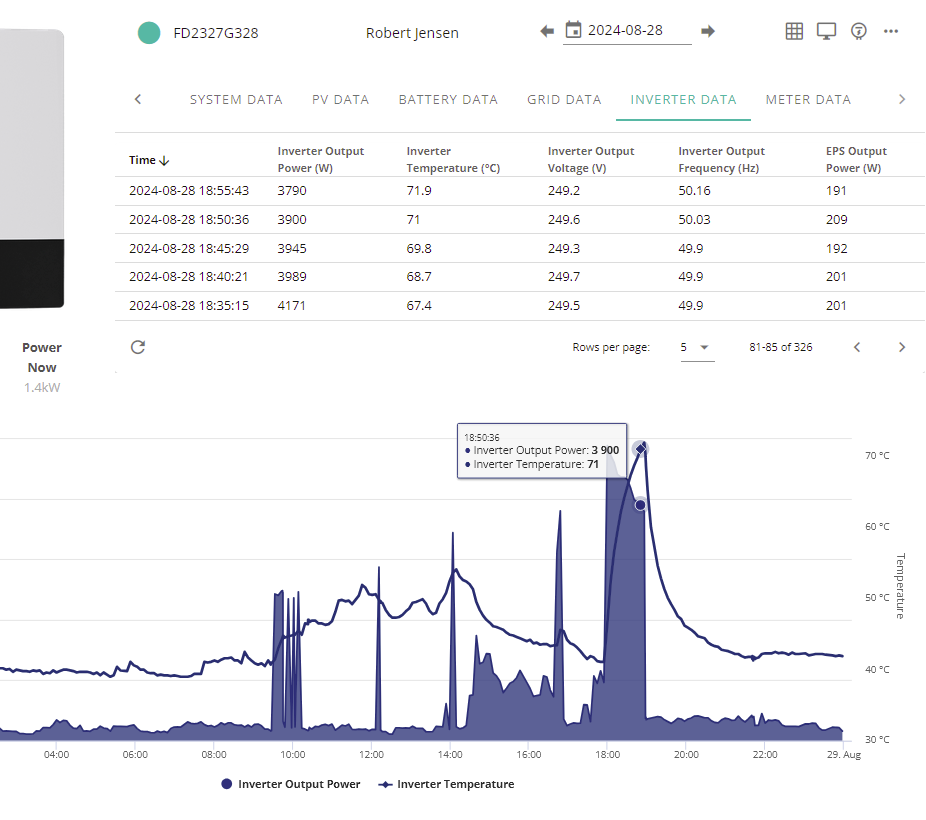
You can see the inverter temp in the web portal.
—> My inverter
—> Inverter data

At the bottom there is also a graph showing the inverter output power and inverter temp.

Mine gets up to 75c under a full load

R
#106 Robgy

Pete UK Thank you for the clarification, makes a little more sense now, it looks like my inverter is relatively cool at only 71.9c for the same date and time.

R
#107 Robgy

Is there anywhere in the portal that shows the temperature of the BMS board inside the battery or is it only in the App?

P
#108 Pete UK

Robgy

Under ‘battery data’ on the portal there is a temp under the battery picture (mine shows 25c right now) and in the data below for each time block below it says 25c. On the APP I’ve got 25c to the right of the top level battery info page, clicking on ‘more info’. I’ve got primary battery showing 24.7c and secondary showing 22.2c. So not sure on the portal if that temp is the highest currently of the two batteries rounded up or some other temp sensor from inside the battery?

On the other inverter I’ve got 25c in the portal and top level on app, individual batteries: 25.1c and 25.3c. Not much help at the moment as they are both full and one pair is at idle, the other pair is discharging at 49w. Probably better to check when under load but on the face of things, I think the temp in the portal and top level value in the app is likely the highest battery temp of the pair rounded to the nearest %

P
#109 Pete UK

Robgy

Scrap that theory - under load (calibration going on so I’m discharging at max rate) I see 25c battery temp still on the portal, 25c battery temp on the app (top level) but I see 38.3c and 34.7c on the ‘more info’ for each battery’s BMS temp. So I guess no is the answer to your question just in the app. I suppose that’s some other temp sensor within the battery. No idea where it is though.

P
#110 Pete UK

PianSom From a standing start, this is quite an effort just to get cell voltages. There must be a better solution.

Bit of a late response but I’ve found a better (more user friendly) work around to not having any android devices !

I’m using “Android Studio” on my MacBook.

Basically you can download this on a MAC, add a couple of Virtual devices (I’ve used two virtual tablets) and download Rubik Cubes inverter app from the Play store; “Monitor for GivEnergy Inverters”.

This is what I’ve got and I can monitor each inverter on each virtual tablet simultaneously. Which is nice. Also and more importantly I can now see each batteries cell voltages.

Might be useful to others, who don’t want to buy additional hardware or faff about for hours with the more techie stuff just to see cell voltages.

Also I see in the app for a £10 one off fee you can access the advanced controls (for multiple timed charge discharge slots, etc) which I will definitely look into once I’ve got my CEMS installed and am no longer reliant on the beta balancer software.

R
#111 Rubikcube

Pete UK I’m using “Android Studio” on my MacBook.

Well done! Android Studio is, in my opinion, the best way to run Android apps on a Mac.

The app isn't really designed for multiple inverters, but works well enough the way you have done it. Don't expect miracles for £10. The premium feature allows you to change settings, that's all really. There is also a scheduler so you can change settings at a set time, but for that to work you would have to leave the MacBook on 24/7.

P
#112 Pete UK

Rubikcube

Just wish I’d found Android Studio earlier !

Great app by the way. It’s nice to actually be able to see the individual cell voltages now, it’s what I was needing since July 2023! I do have an old Mac mini, which I could leave running 24/7 if/ when the time comes so that could be a good option.

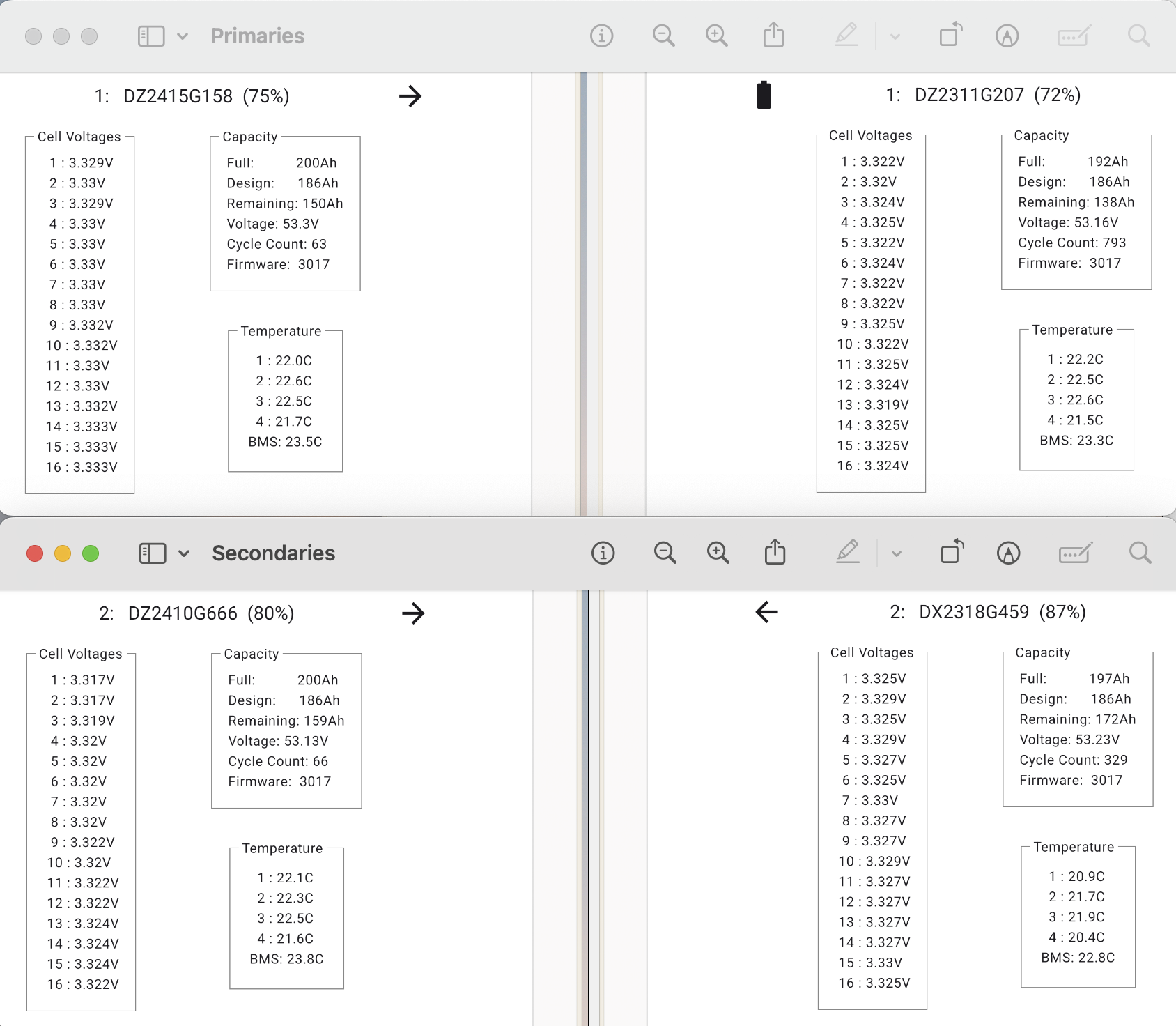
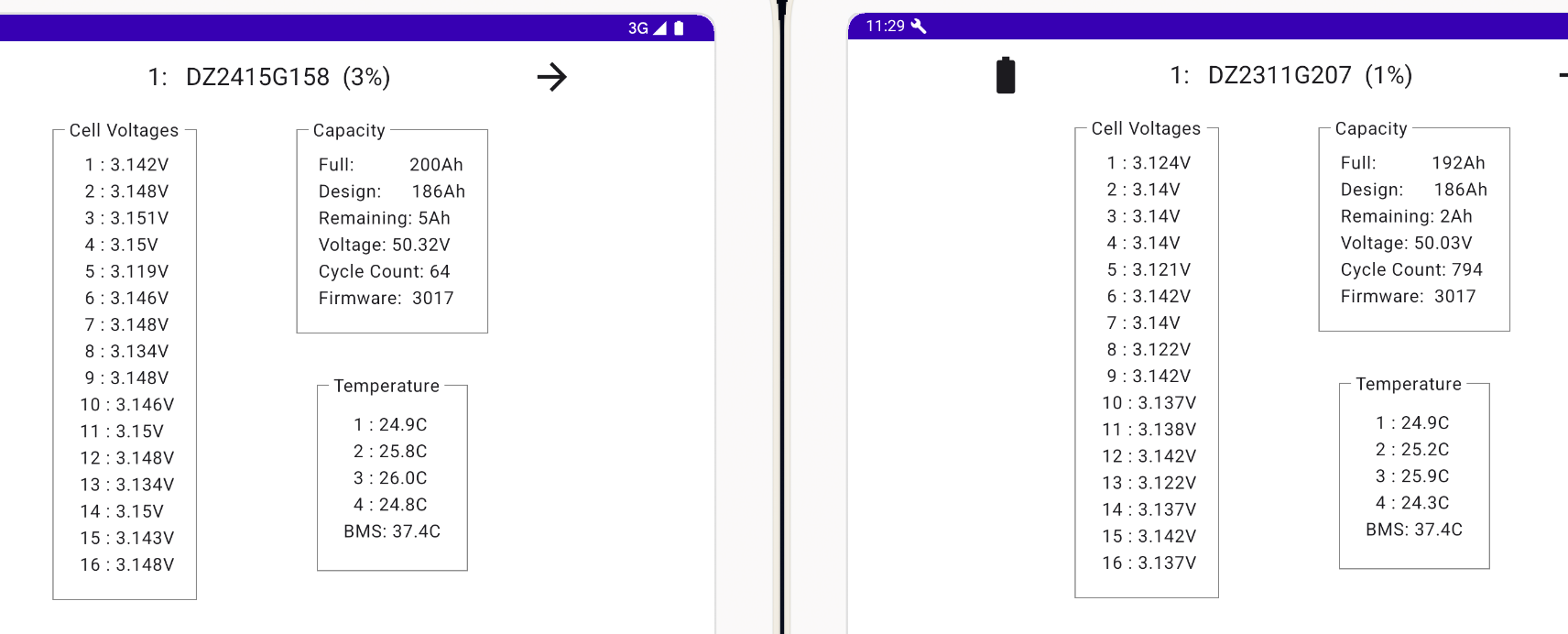
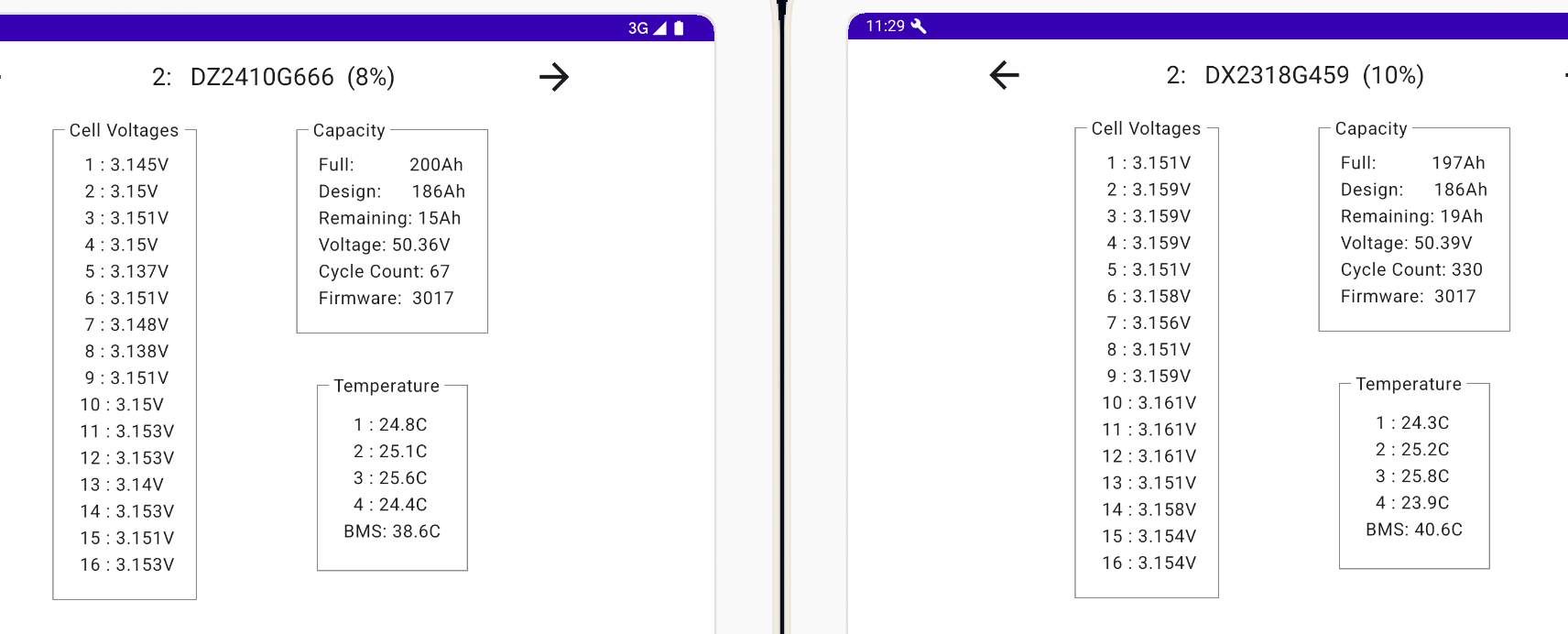
I’ve got this (first pic upper mid range, next one(s) (blue headers) are the low end after discharging to the grid at max till 23:29) for my cell voltages. Looks reasonably healthy…??


R
#113 Rubikcube

Pete UK All the voltages and temperatures looks fine to me, but I'm no expert on batteries.

As you probably appreciate, android is running in a VM. Running VMs is no issue on any reasonably modern Mac or Windows machine, but it does need quite a bit of memory.

P
#114 Pete.J

I'm a bit late reading all this but have similar experiences to share.
I'm running one Hybrid 5kW inverter and two 9.5kWh batteries, with a PV array into the inverter. I use Home Assistant and GivTCP to view the GE system data (and run Predbat to manage the batteries, on the Octopus Agile tariff).

When my system was commissioned I had a problem with the battery SOCs drifting apart by large values - I traced this to cell 16 on the primary battery which was going very over voltage (causing the primary SOC to hit 100% and the inverter to cease charging before the over battery was close to full). GE replaced the BMS in the primary battery and swapped it to be the secondary. The over voltage cell has been well behaved since (although another issue has arisen with a different cell in the same battery that I'm monitoring). It is clear from my experience that the secondary battery doesn't charge as well or as high as the primary, and I believe that a battery-bus (smart BMS) module is needed to allow each battery to be treated individually.

My battery temperatures have never gone over 40C, even under full charge or discharge, and rarely exceed 25C.

My inverter temperature sometimes ran uncomfortably high, so I installed a bank of fans: four 80mm PC fans in a strip fits just right under the inverter rear heatsink and adds a decent airflow to help cooling. Add a temperature sensing switch for an aquarium heater (or in my case a smart switch and use the inverter reported temperature to trigger the fans via HA) and the inverter rarely exceeds 50C these days (fan temp is set to 45C).