Cell Variations and 100%

59 comments started 2024-09-26 last 2024-11-21
GivEnergy ProductsHybrid
Z
#1 Zakalwe

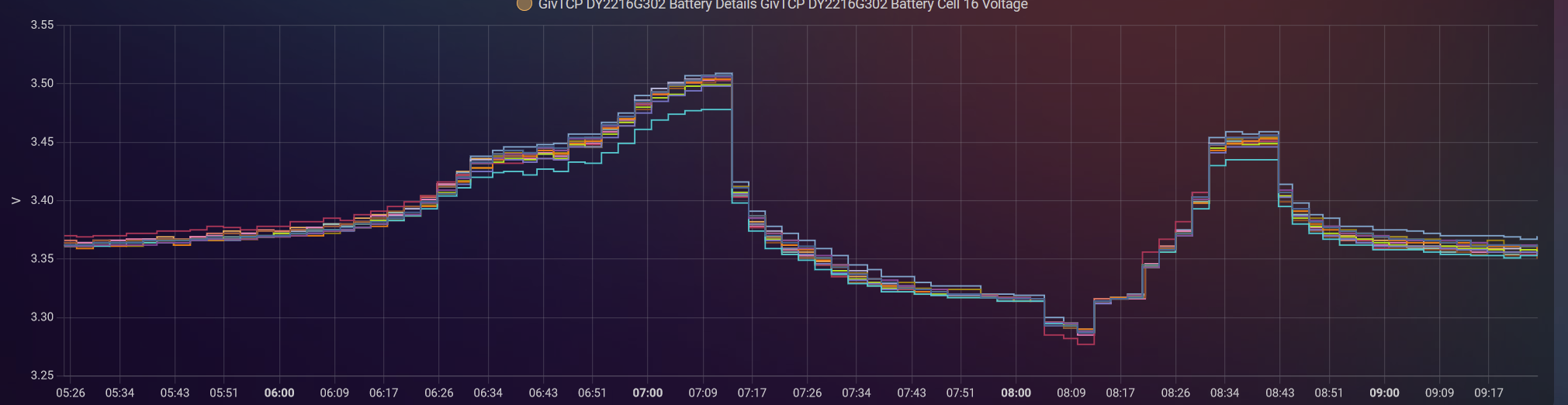
This looks odd to me.
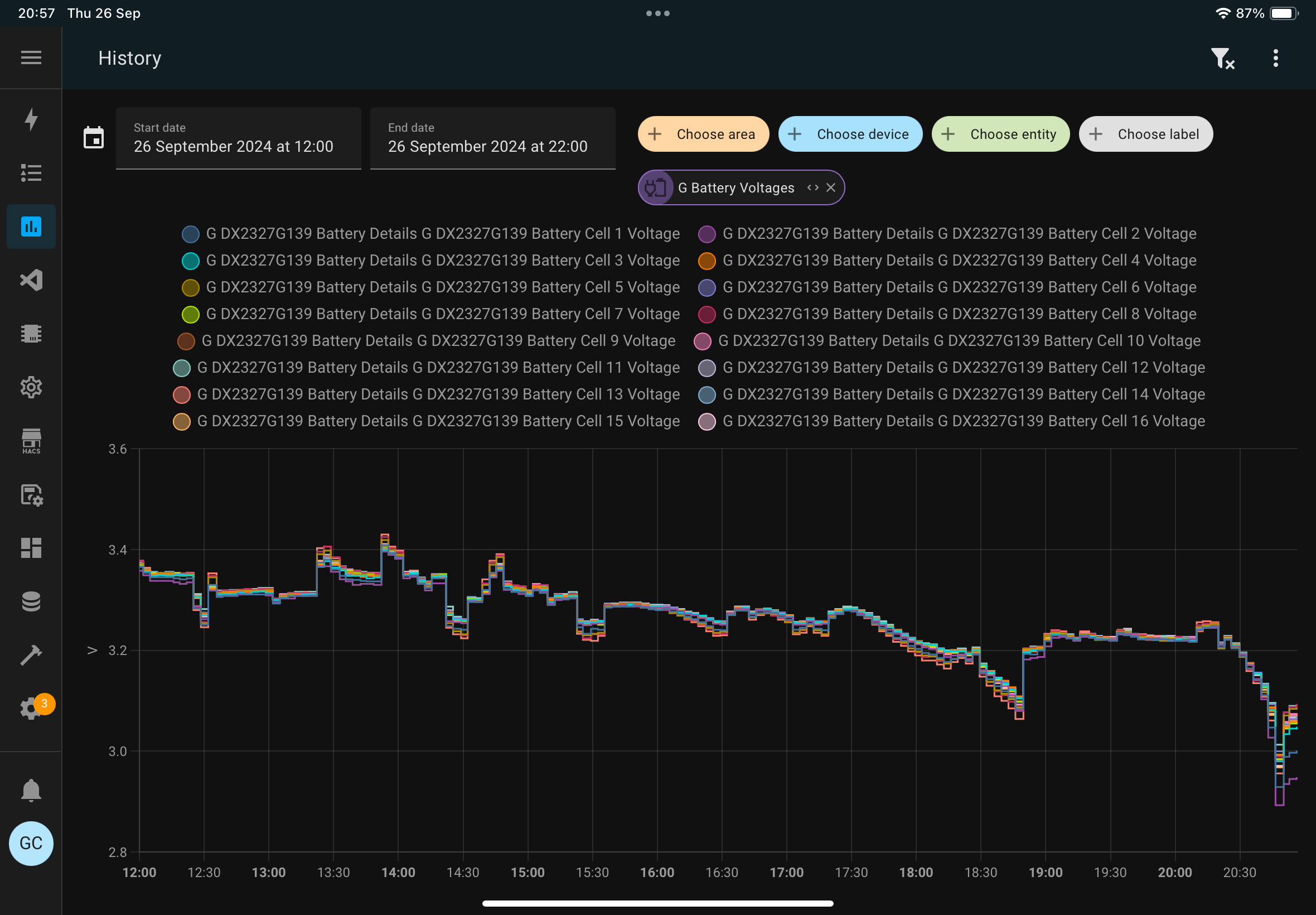
A calibration was carried out 7 days ago as the batteries had recently started to drift by a large amount (2 x 8.5). They usually were 0% apart but started to drift to 40%. I also upgraded the firmware to 3017 a couple of days ago.

This battery is sitting at 100%

This one is sitting at 94%

Thoughts?

V
#2 Vestas

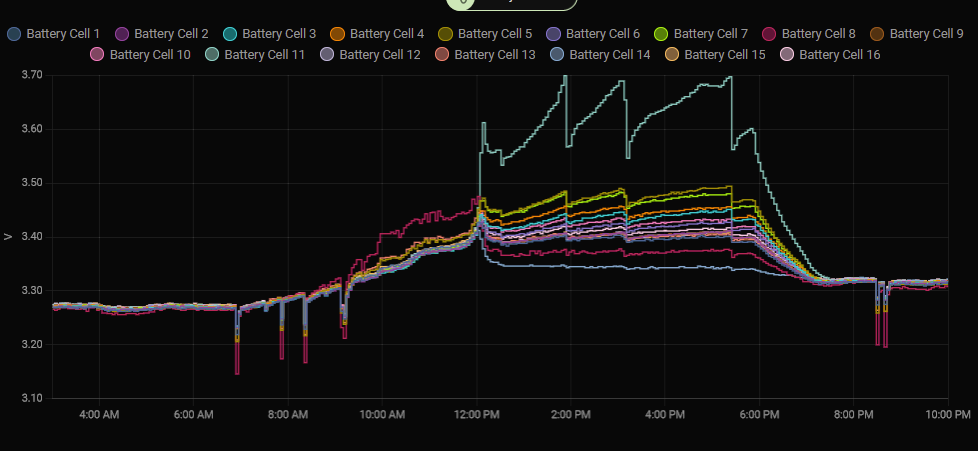
Zakalwe The battery at 100% looks unwell to say the least.

A variation of 200mV between cells is not good.

Z
#3 Zakalwe

Thanks...that what I was thinking as well. Seems to be something that's developed recently too...

#4 Windy Miller

Zakalwe I think that as the battery reaches 100% each individual cell is also at or near its maximum voltage. Some cells lead the others but it is the BMS that should ensure no individual cell is damaged by an over voltage condition. The new calibration may be taking the cells nearer to their limit but I too would be a bit worried by the one that is showing 3.6v. Can you put a limit on the inverter of say 95%? Then have a look at the cell voltages at that limit?

R
#5 Robgy

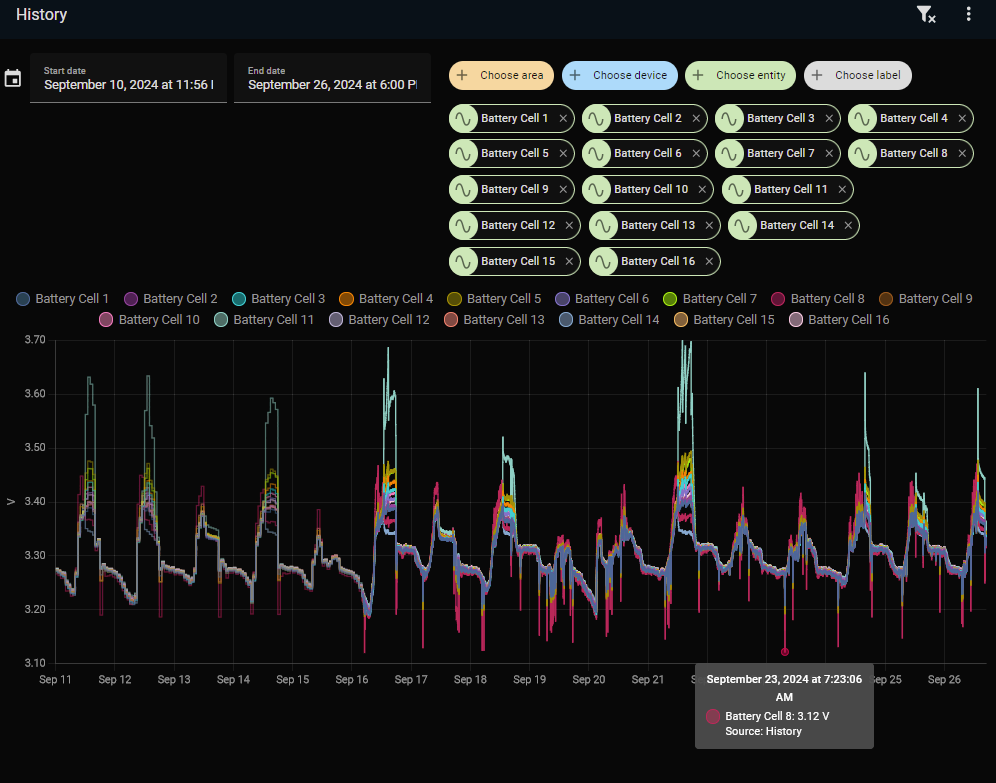
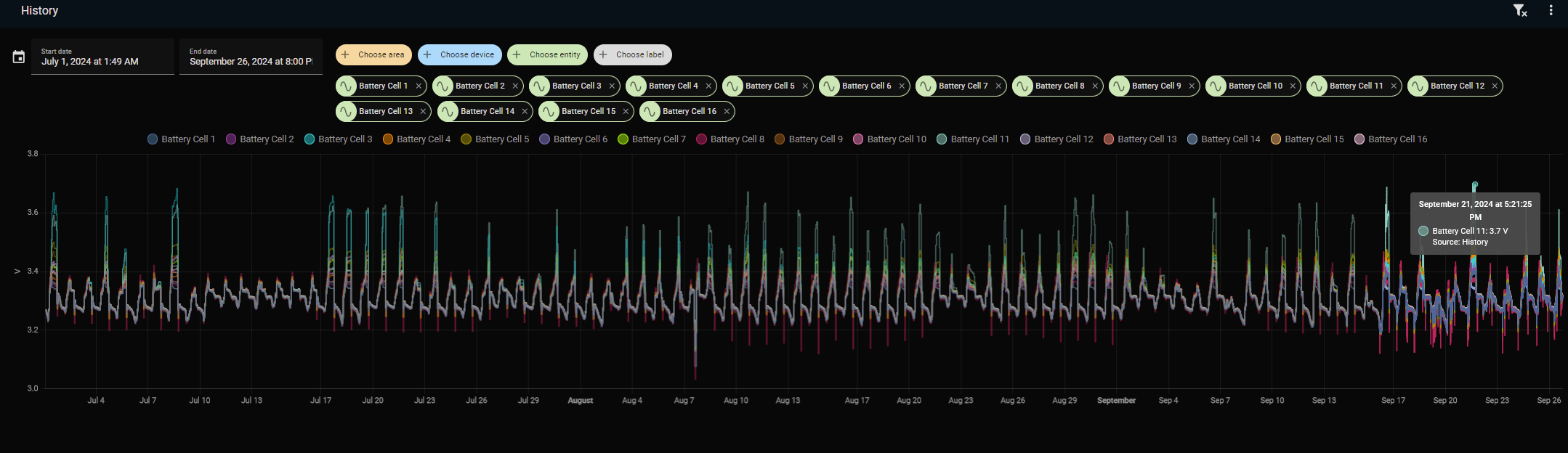
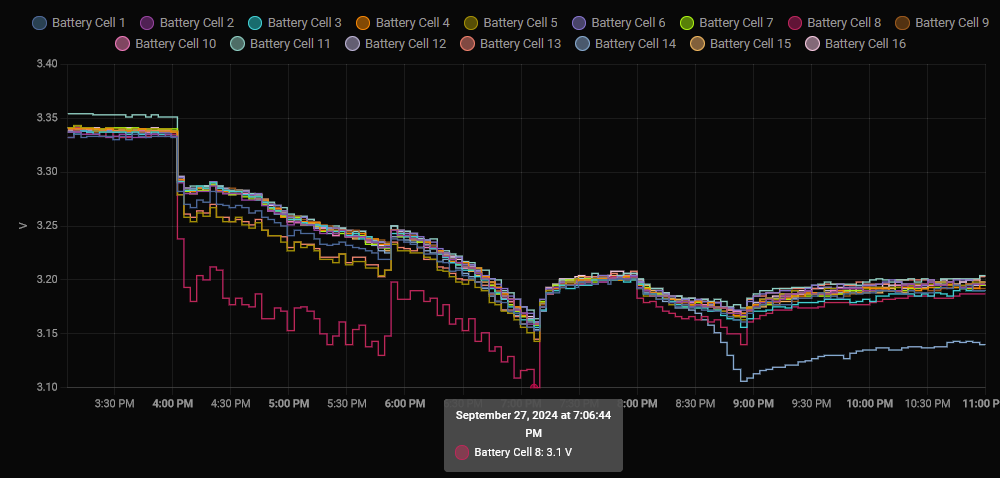
I too would appreciate an opinion on my battery cell voltages for {cell 11 blue} and {cell 8 red}

R
#6 Robgy

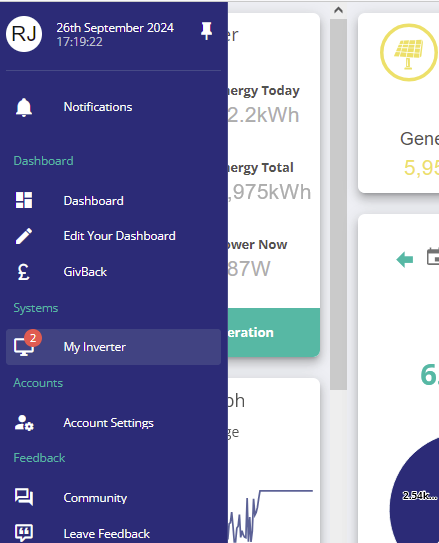
I keep seeing side menu alerts which I'm guessing it over voltage but of course nothing is showing on the My Inverter page.

#7 Windy Miller

Robgy You too are seeing a single cell at 3.6v. Are you also on 3017 firmware? It may be that this firmware is using that voltage as its limit and generating over-voltage notifications which are then being suppressed by the Portal (a behaviour we saw start over the summer).

The response I had from GE in early August to this was

A number of concerns have been raised about a portal update we made last week limiting the volume of BMS overvoltage messages. I wanted to provide some context on this issue.

A recent firmware update we made included more verbose logging of BMS voltages, as a part of this update a large number of information messages have been incorrectly tagged as alarms. These info messages are of no concern to a user & do not imply an issue with the battery. We made a portal change last week to remove the extraneous error messages in the portal as the volume of the messages was understandably causing our users concern about the status of their hardware. These messages are still being generated in firmware so 3rd party users (eg GivTCP) may still see unwarranted errors being logged, additionally they are still being logged in the cloud (just screened from users to prevent unnecessary concerns). In an upcoming firmware update we will add more appropriate granularity to the info/warning/error levels so that this "warning spam" is handled better. For now, we think for the vast majority of users, the portal approach is preferable to the prior status.

I found that a long slow calibration over a 24 hour period at 10% current instigated by GE stopped the notifications. I will add to the thread the voltages I see next time my batteries reach 100% (I can't do cell voltage logging so it will be a snapshot).

R
#8 Robgy

Yes my battery firmware was updated by GivEnergy support to version 3017 last month when my battery suddenly stopped working and they did a calibration which took several hours.
I also asked them about the temperature which often goes over 80c and they said that was OK too.

I can only trust that what they say is correct and yet it somehow feels wrong but I'm not sure so don't like to create a fuss potentially over nothing.

#9 Windy Miller

3.6v is right at the top end but maybe that is what Givenergy intend. Perhaps it's the top cell that defines the 100% point during calibration.

R
#10 Robgy

Looking closer as an example with my battery, on the 21st Sept at 1:54pm
cell 14 = 3.35v
cell 11 = 3.69v

This may sound like a stupid question but is that a 340mV variation between cells?

G
#11 geoffreycoan

I don’t see anything like those sorts of variations on my battery cell voltages

Top tip BTW, use the new labels feature in HA to easily select a whole set of sensors rather than having to choose them one by one on the history chart. This I’ve found is one of the most useful things added to HA recently

#12 Windy Miller

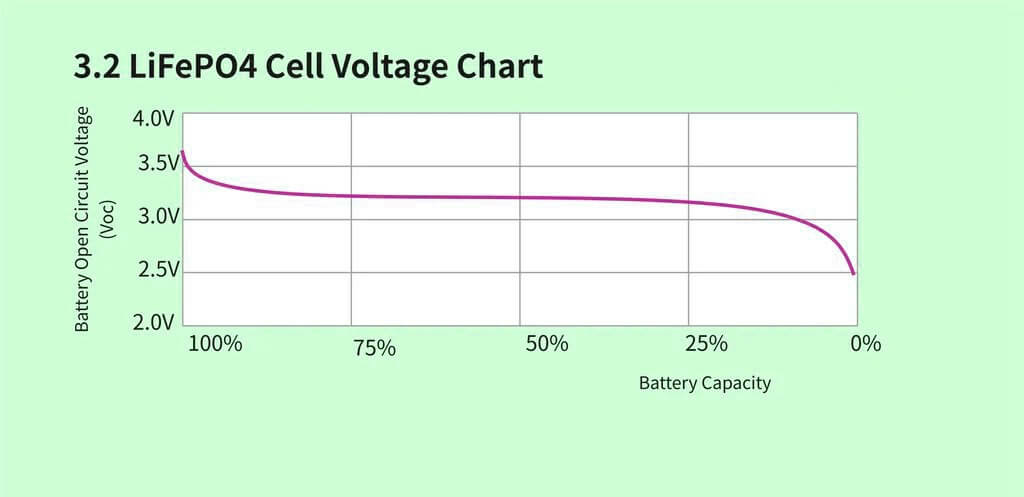
Robgy Yes I think so. I think the rogue cell has a lower capacity than all the other cells so is moving up the 100% part of the curve before all the others. Note how they are together for a lot of the curve. As a result it is hampering the overall battery capacity as the BMS defines the 100% point for the pack at the point this particular cell reaches it's limit. If you could change this one cell it might improve the whole pack but I think the reality is that GE would just put this down to natural aging where some cells age more quickly than others. Can you estimate the actual capacity of the whole pack? If this is significantly below 80% when new then you might be able to convince them you have a faulty battery.

R
#13 Robgy

Windy Miller the battery is only nine months old.
I don't know what the actual capacity was when new, I just assumed it was 9.5 kWh usable capacity with 100% dod because that's what the sales brochure said. It's only recently I've looked into what millivolts are! and it's still not completely clear in my mind hence the silly question.

#14 Windy Miller

Robgy At 9 months old the battery should still be very near 100%. 340mV is the same as 1/3rd volt which for a 3.2v cell is roughly 1/10th of its voltage. The cell voltage varies very little between 10% and 90% charge but varies much more at each end as you reach empty or full. At these extremes the cell can be damaged and it is the job of the BMS to ensure this doesn't happen. The weak cell limits it's ability to present full capacity so could result in the battery no longer giving you 9.5KWh. You could use the GE app to tell you how much charge was delivered when you discharged the battery from 100% to 4% and if it is a lot lower than 9.5KWh ask GE how it is still meeting the specification you purchased.

R
#15 Robgy

Windy Miller You could use the GE app to tell you how much charge

I don't think I've ever gone from 100% to 4% in one go.

#16 Windy Miller

You could try a forced export from the quick buttons on the GE app.

I was concerned about a similar problem with one of my two batteries but at the low end. One cell was getting to 2.6v ahead of all the others during the calibration and I felt this was limiting capacity. When I did the capacity test I got 8KWh. I have 2x5.2KWh batteries but with 80% depth of discharge. So when new I should have 8.32 KWh. 8KWh is 96% which I felt was OK for a 16 month old battery. I stopped worrying about the low cell, learnt to trust the BMS was doing its job, and used as much of that 8KWh as I could in each cycle.

R
#17 Robgy

Windy Miller You could try a forced export

Thats what I was thinking about doing as a test.
Reading some of the issues on here it's a shame that as customers we appear to have to qualify a potential defect when GE can presumably see if something is not quite right, I guess they are too busy to be proactive to small customers.

It looks like the issue with the cell has been going on for a while, at least since I set-up home assistant in July

R
#18 Robgy

geoffreycoan Top tip BTW, use the new labels feature in HA

Thank you, I'll take a look at that.

V
#19 Vestas

geoffreycoan I'm sure one of your batteries had wider variations than that - unless it was one of the two(?) you've had replaced?

V
#20 Vestas

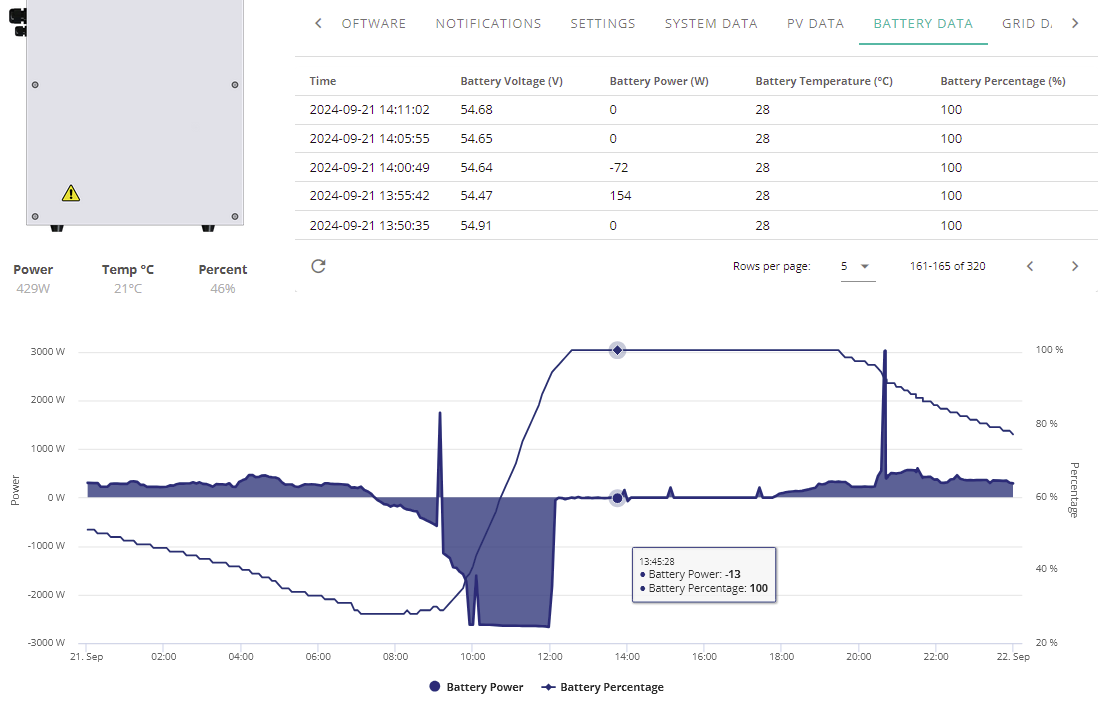
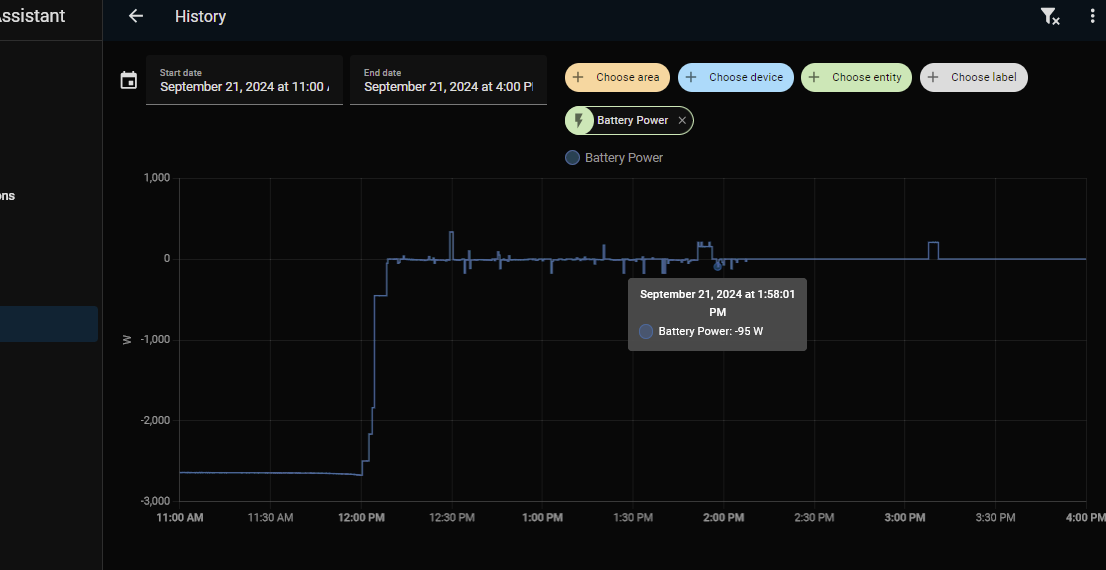
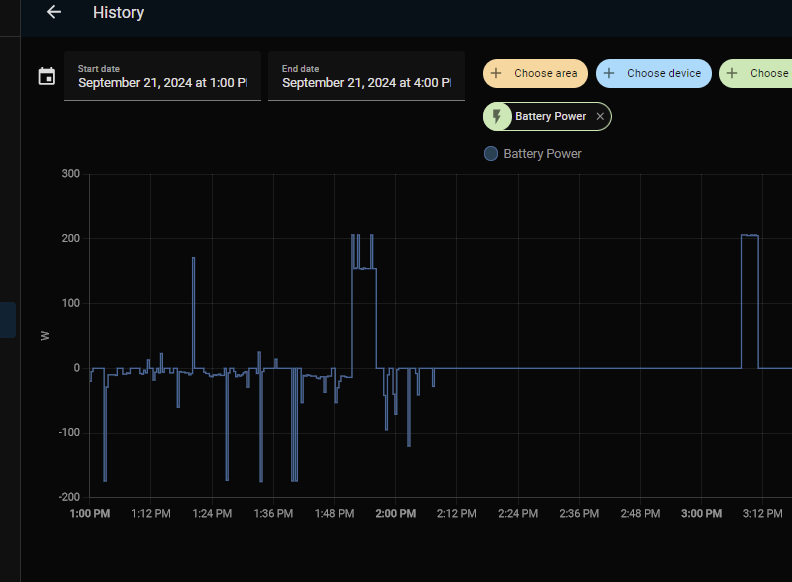
Robgy What does the "Battery Power" graph look like at the same time and are you charging with AC or PV during that time period?

I only ask as if its AC charge then the battery looks like its doing an "emergency" discharge to prevent damage to cell 11.

R
#21 Robgy

Vestas I have only charged the battery with PV since March apart from one day when GE did a calibration.

is this the correct power graph you asked about?

V
#22 Vestas

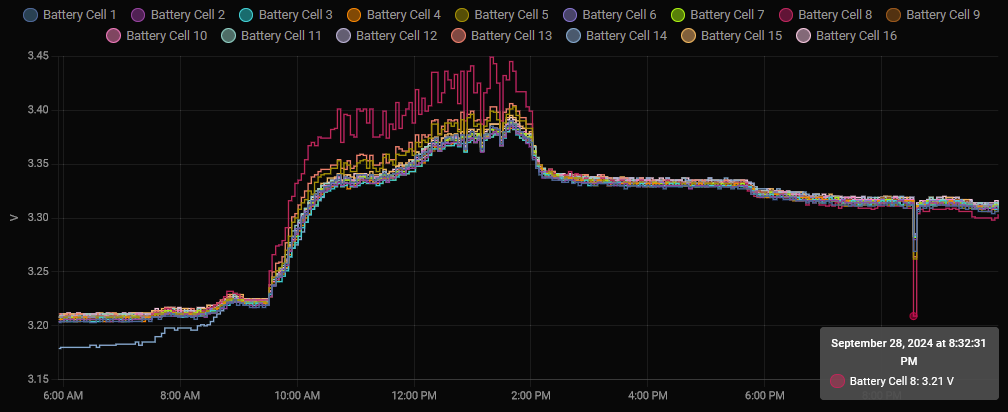
Robgy No, the HA one. The portal graphs are pretty useless, although saying that I can see the inverter is force discharging the battery (those three blips) to prevent damage.

R
#23 Robgy

Vestas I think this may be it.

R
#24 Robgy

I didn't realise there was such detailed data when you drill down into HA,
it's just a shame I don't know how to interpret it all!

Z
#25 Zakalwe

GE are going to kick off a slow calibration to see if this brings my cells back in line.

R
#26 Robgy

Zakalwe slow calibration

Did they say how long it may take?

Z
#27 Zakalwe

Robgy
No. Inverter output will be dropped to 30%, so I am guessing that it will take most of the day to dump the batteries out to the grid.

V
#28 Vestas

Zakalwe It might pull them back in for a short period but I reckon that battery is on borrowed time....

Edit - also worth noting that you can effectively do this yourself, run the battery through a few FULL charge/discharge cycles while rate limiting it to 900W and that'll have much the same effect.

Z
#29 Zakalwe

Vestas

Very possibly!
It has certainly changed behaviour in the last couple of weeks. I work the batteries hard, so I am hoping that this is not the start of a bigger problem.

S
#30 sunnyjoe

How does GE implement cell balancing?

G
#31 geoffreycoan

Vestas geoffreycoan I'm sure one of your batteries had wider variations than that - unless it was one of the two(?) you've had replaced?

No you’re probably thinking of someone else. I have a 9.5 and a 5.2 battery and whilst i did have the 9.5 battery replaced it wasn’t due to cell voltages. It’s another tale that I have yet to tell …

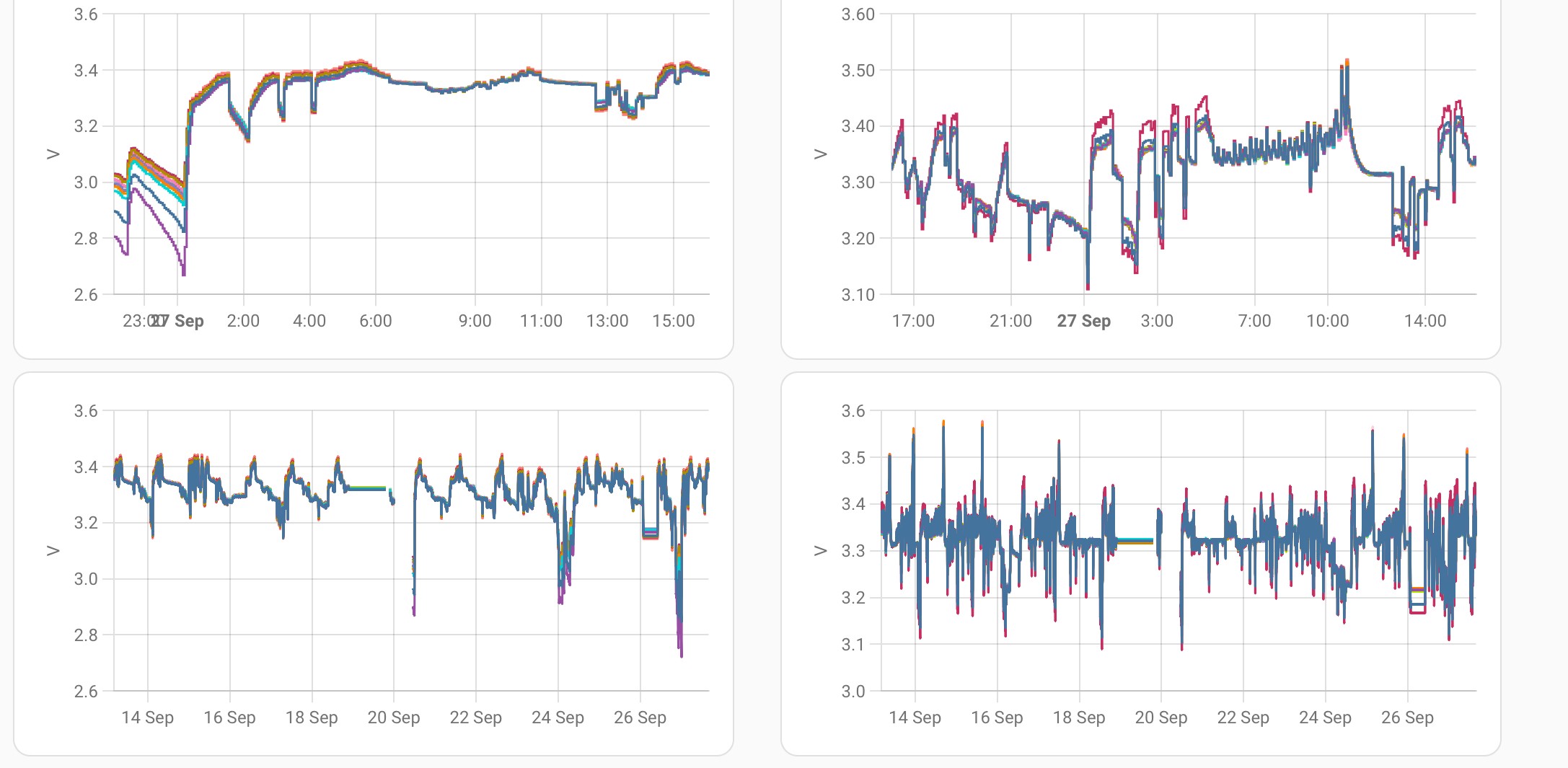
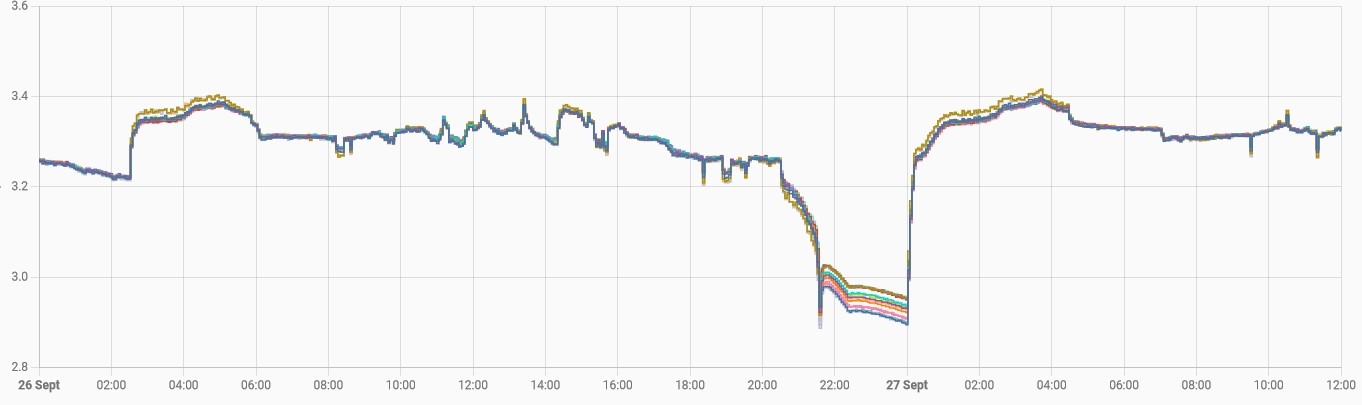
Left hand graphs are my 9.5, right hand the 5.2, top row are the voltages over the last day, bottom row is voltages over the last month.

Cell 1 and 2 of the 9.5 do go to a lower voltage than the others when the battery is fully discharged (as it was early this morning), but when charging and when full (as they are now) they show similar figures. No particular points to note on the 5.2

R
#32 Robgy

I'm in the process of a full discharge to 4% as suggested by @Windy Miller

V
#33 Vestas

geoffreycoan No it's the second image there which I remembered, 20-40mV outliers on charge/discharge. As you run HA and archive data you might want to keep an eye on them & see if they drift more over time.

R
#34 Robgy

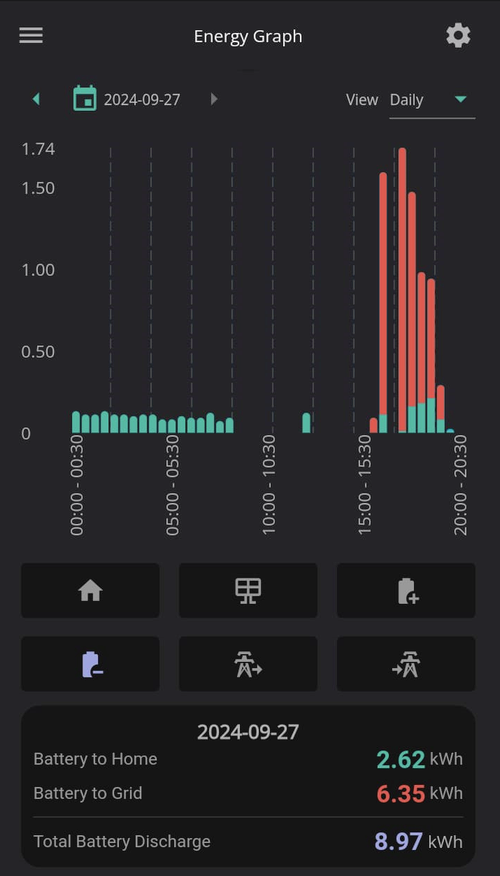
Windy Miller Forced discharge as you suggested to test capacity but when I looked on the app 'energy graph' it's rather irritatingly missing data right in the middle of export!!!!!!!

So I headed over to the web portal but I can't see any equivalent totals
No problem, so I thought... opened HA and the data appears to be there in nice graphs but no totals! then realised I don't know how to add-up in Home Assistant !?!?!%$?£$%*

D
#35 DD

Robgy on the portal there should be some Meter data, which should give a cumulative total for the day.

R
#36 Robgy

DD Excellent, found it thank you.

R
#37 Robgy

GE Web Portal, 'Meter Data' 'Battery Discharge Today'
Start Export 100% 16:00 - 2.8 kWh (cumulative total)
End Export 4% 19:09 - 11.7 kWh (8.9)
Then the battery appears to have found a bit more and went back to 6% 20:08 to 20:36 - 12 kWh (0.3)

So it looks like a total of 9.2kWh usable

R
#38 Robgy

HA graph also shows the bit when the battery was 4% then bounced back up to 6%


D
#39 DD

Robgy End Export 4% 19:09 - 11.7 kWh (8.9)
Then the battery appears to have found a bit more and went back to 6% 20:08 to 20:36 - 12 kWh (0.3)

Yes, my battery does that from time to time - when allowed to idle at low charge, the SoC can creep up. Cell balancing, perhaps?

R
#40 Robgy

I left the battery idle all night which someone on here suggested so it will charge from solar today, it would be nice to have the all cells balanced.

V
#41 Vestas

Robgy That's not going to happen with that battery. No way is the internal balancing circuit fixing that anytime soon. Engineer visit required IMHO.

R
#42 Robgy

Vestas thanks, that's kinda what I was thinking you might confirm but I wasn't sure if I was being fussy over a mV

#43 AlanWells

I also have the issue that the packs differ by 10-20% so I never get the full capacity as it stops charging when one is full.

With regard to the cell variations, I'm waiting for an engineer visit for the below.
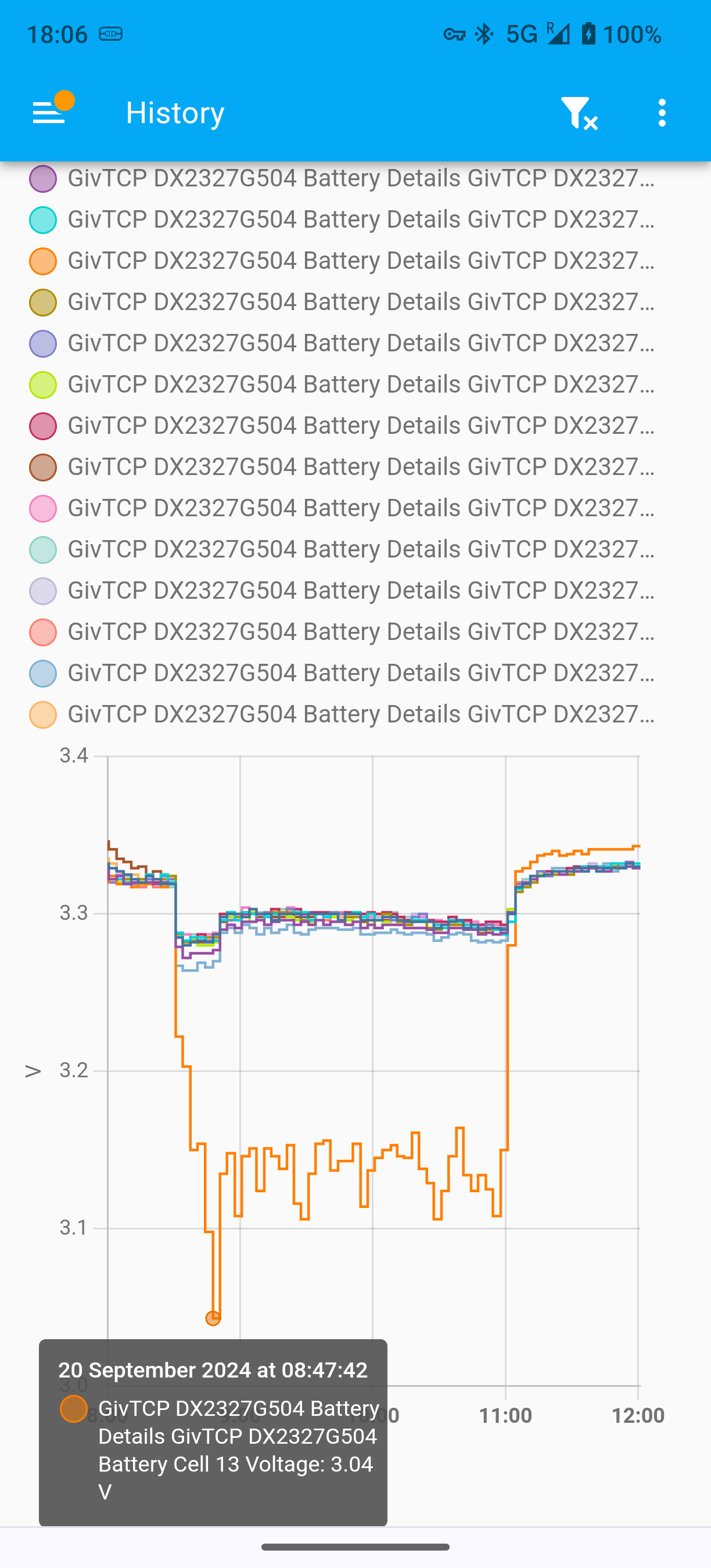
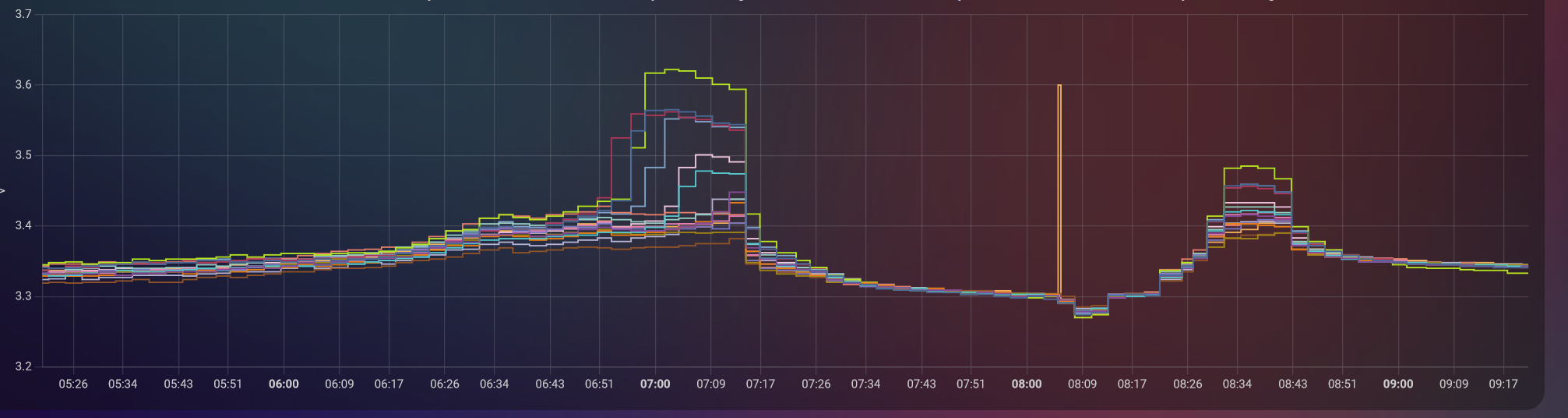
Whenever I start a discharge at any SOC that cell plumets and it derates from 4kW to 2kW, same happens in reverse when charging, cell overshoots regardless of pack SOC and derates from 3.6kW to 2kW charge rate. There may be a problem with a cell on the second pack too as it dropped to 2.2v during calibration and is also an outlier most of the time.

Ive just had these 2 x 9.5's installed by Octopus with a Hybrid Gen3 inverter, install process was good and I was kept up to date with everything. But upon raising concerns with their first line support they repeatedly told me it was fine and I just didn't understand how batteries worked and that I was expecting too much from them, very frustrating from an installer...I asked them to replace the batteries or give me proof that it's normal for them to never discharge at no more than 2kW...call now passed to aftercare team but no contact from them yet.

GE have agreed there is a problem and will schedule an engineer when one is available, but it may take some time apparently.

I'm currently concerned about operating the batteries at all at the moment if there is an issue with them, thankfully I haven't yet seen any temperatures I think I should be worried about.

V
#44 Vestas

AlanWells Cell 13 has a busbar attached, seems to becoming common that its worked loose/wasn't torqued properly. That's probably the fault.

R
#45 Robgy

Battery charged from solar today.
It looks like that cell 8 is struggling on both discharge and charge, so @Vestas appears to be correct.
Thank you all for your help and understanding.

G
#46 geoffreycoan

Vestas I think I will report this 0.1-0.15V voltage drift on discharging on cells 1 and 2 (and a bit on 3) to GivEnergy support. I can see it repeatedly every time the SoC drops towards empty.

The 9.5 battery is only about 6 months old. Design capacity=186Ah but current capacity=182 after 249 cycles, just over 1 cycle a day.

I suspect they will want me to upgrade to BMS 3017 (currently 3015) and do another calibration

V
#47 Vestas

geoffreycoan This is what mine looks like when its gone below the cutoff value - low part of the graph is at 2% battery SoC, 47V.

I'm not entirely happy with cells 5, 8 and 13 which diverge from the rest by 30mV (max) when on a full rate charge/discharge but they're not getting any worse in the last 5 months (this started more or less when the fast response f/w was put on the inverter).

You've had a pretty large drop given the batteries are normally up at about 195 Ah when new....

Edit - I'd consider running your battery through a few full charge/discharge cycles at 900W & see if it helps. Its what GE will end up doing anyway if you push them.

#48 Windy Miller

Robgy Well done for calculating 9.2KWh. If your battery is rated at 9.5KWh and 100% DOD then it is currently at 97% of when new capacity. For 6 months old that may not be unreasonable so I would periodically repeat the capacity test to see how much it is changing over time (say every 3 months). Temperature will play a part if the battery is in an unheated space as we go into the winter and you may find it gives a little more when discharged at less than max rate. It is also true that, as others have said, an issue with one cell or connection might be why this is showing up now but a battery at 97% of when new capacity isn't really faulty.

R
#49 Robgy

Windy Miller I have just emailed GE support to see what they say.

#50 Windy Miller

Robgy Just to clarify my thinking. Say a battery drops to 80% over 10 years if it is linear then that would be 1% every 6 months. Measurement error could easily make up the other 2% but if you retest periodically using the same method you should be able to work out the trend over time to see if it might be significantly worse than 80% after 10 years. The battery will still be under guarantee for the next 10 (or 12) years and you may along the way have a stronger case for a replacement. 10 years is a long time in the battery business so whether GE will still be trading then is anyone's guess.

P
#52 Pete UK

Windy Miller

Hi,

Don’t forget that @Robgy only discharged 96% of his “100% DOD” battery: 100% down to 4%. The 4% left is the ‘reserve’ that is still there.

So, if 9.2kW is 96%, 100% = 9.58kw. So I’d say the capacity still looks ok.

Ignoring the fact that 96% isn’t really “100% DOD” of course.

#53 Windy Miller

Pete UK That's true. GE do say useable capacity so hopefully it allows for the 4% reserve but tracking capacity over time would be what I would do (and indeed am doing as I also think I have a weak cell in one of my batteries).

#54 Windy Miller

With of all this it is worth remembering

Batteries are analog chemical systems, so no two batteries will be identical.

Heat is a major contributor to battery degradation, so having it mounted outside in the hot sun (or in the loft) without any cooling can speed up this process.

The charging levels may also play a role, partly because faster charging generates more heat.

Charging habits can affect battery longevity. The existence of the maximum charging levels and reserve options in the app highlights the extent to which lithium-iron-phosphate batteries don’t like being charged to 100% or discharged to 0% and held there.

But my philosophy is still that I paid a lot for it so I better get back as much as I can as quickly as possible by using it.

PS I run an old Prius hybrid (2015) which has NiMH batteries. The charge levels on the icon report anywhere between 0 and 100% depending on engine/regenerative braking and motor use. But under the hood, Toyota actually only use the pack between the 35 and 65% charge points. As a result the batteries last years. I still see 20 year old Prius's on the road which I assume still run on their original batteries.

#55 AlanWells

Vestas This does seem to have been the problem, engineer visit this week and he hinted that this was the case when asked. The primary battery looks flawless now with all cells really close in voltage throughout most of the cycle.

Secondary still has a cell that wonders around 200mV low during discharge and was a still a whole volt lower at the bottom of the calibration, I'll see what they say as he said someone would be monitoring it remotely.

Z
#56 Zakalwe

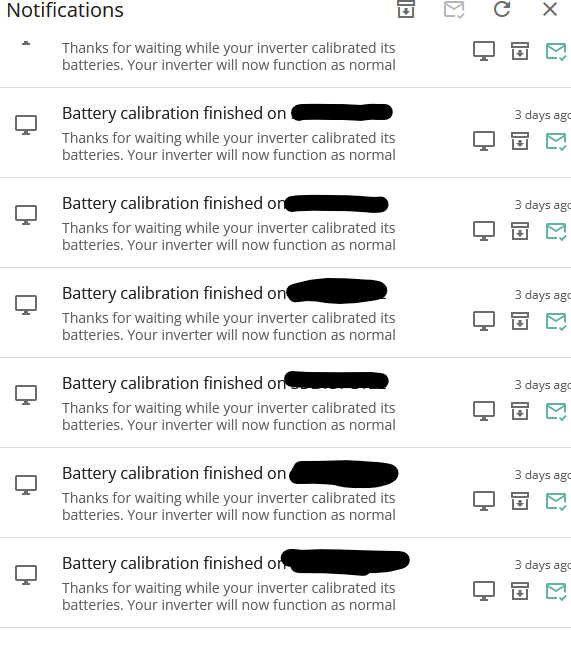
So, on the advice of the help-desk, the packs were upgraded to 3018. This firmware is supposed to handle cell misalignment and SOC drifts. The packs needed calibration after the firmware was installed. Weirdly, it reported that the calibration finished when the packs had only discharged to about 50%. However it continued to calibrate, despite a flurry of repeated notifications that the calibration had completed.

How has it been?
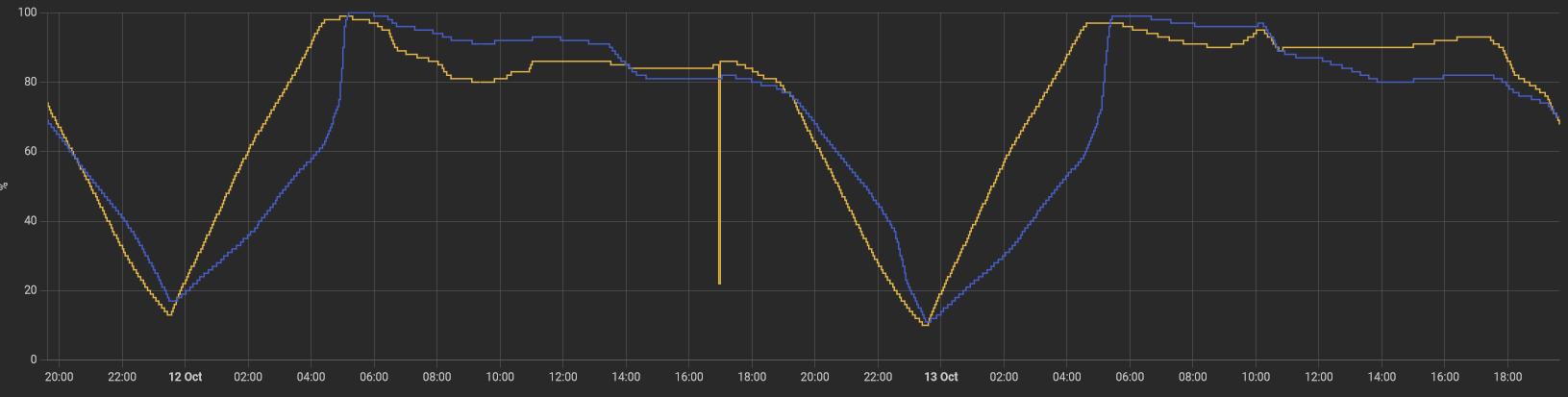
SOC misalignment between the two packs seems to be a bit better on discharge, but is a country mile out on charging.

The secondary (in yellow) seems to charge linearly, but the primary (the "problem child") is a bit all over the place. It lags behind the secondary and then jumps up the last 20% or so.

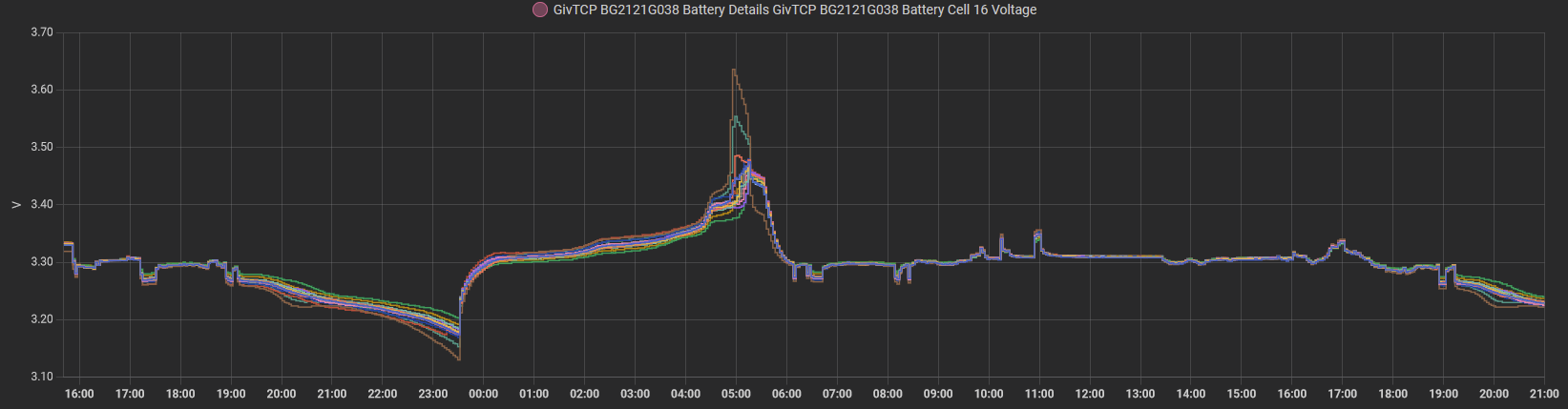
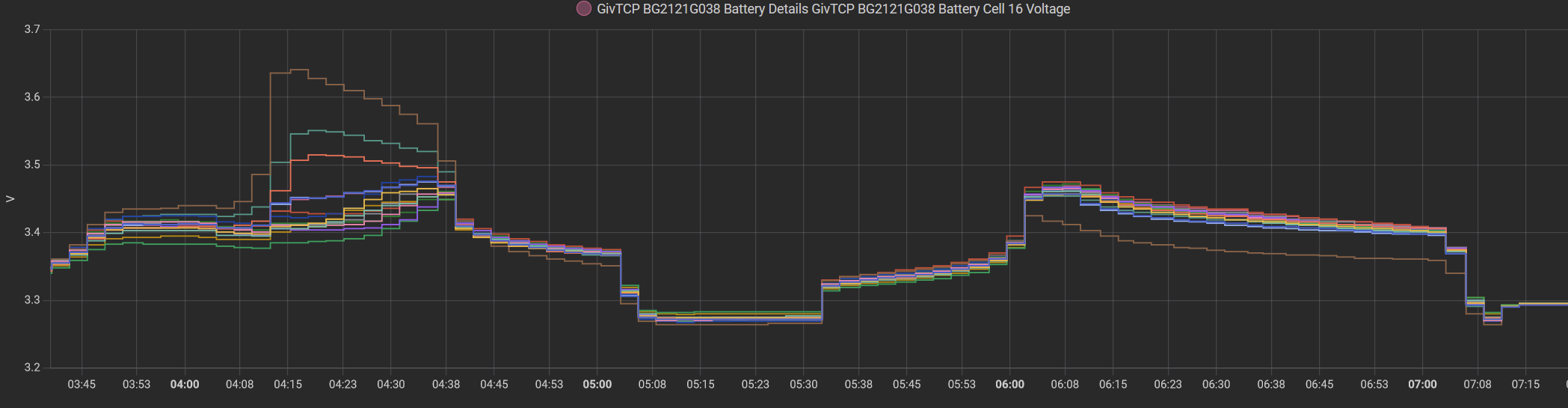
At a cell voltage level it seems a little better behaved, though Cell 7 is still ahead of the rest on charging and discharging. I'm no expert, but it looks to me that Cells 7, 14 and 3 are on their way out?

Z
#57 Zakalwe

After much toing and froing, GivEnergy have finally accepted that this needs an onsite visit

V
#58 Vestas

Zakalwe So that's two months to get on the (apparently) long waiting list for a new battery. Maybe fixed by next year then?

Z
#59 Zakalwe

Vestas
Dunno....I guess I will find out next week.