WiFi dropouts

17 comments started 2025-04-14 last 2025-08-23
GivEnergy ProductsHybrid
G
#1 Gust

Gen 1 5kW hybrid inverter, external WiFi dongle, loses connection for approx an hour twice a day at random times, started doing this about a month ago, no reason that I am aware of, there have not been any network changes, WiFi is setup only to be on 2.4Ghz. Any thoughts? Maybe new dongle time?

Gus

T
#2 The_Engineer

Always difficult. Lots of domestic devices use the same RF band. Includes microwave ovens, DECT phones, Chromecast and similar etc etc. Not impossible, but I would be surprised if it was a faulty dongle. Worth checking it hasn't come loose I suppose.

Could use a phone App to look at strength of signal in normal and fault conditions. There are many - I use WiFIAnalyzer. Keep a record written down of when and how long.

Have any neigbours noticed something similar?
Interference from a neighbour? Someone just taken up arc welding?
Some other domestic device switching and causing RF interference? Heating/cooling devices etc.
Something metal moved into path of radio waves between Wi-Fi and dongle/ or causing a reflection of the signal (but then why only randomly occurring -would anticipate permanent change)?

#3 miffy

Our 5kW Gen 2 hybrid had regular wifi dropouts, despite only being 3 metres from the router and on its own wifi network. I replaced the 3" aerial with a 12" one [from Amazon], which helped a lot but didn't stop them entirely. After about six months, I resorted to hardwiring it via ethernet cable (Cat 6 shielded). Problem gone.
The wifi connectivity just isn't good enough for something that MUST be online all the time.

#4 nophead

My previous ISP kept sending me new routers to fix a problem that was actually up the road. Each one was worse than the last and eventually a Raspberry PI 2m away wouldn't stay connected. I turned the router's WIFI off and just used it as an ADSL modem and got a Google Nest Mesh system for WIFI. Since then all my home WIFI connections are solid and now I have fibre to the home I got rid of the ISP's router altogether and just connect the Nest router to the ONT.

My Gen3 inverter is only about 3m away but it is always connected. I can't turn of 5GHz WIFI but it doesn't affect 2.4GHz devices connecting.

G
#5 Gust

AP is 2m away from the dongle, AP is cat6 to the router, with it being gen 1 no chance of wiring it in, other wireless devices nearby have no issue.

Bit of a head scratcher 🙂

G
#6 geoffreycoan

Gust it is possible that your AP is too close to the dongle and its swamping the dongle with a strong signal.

You might try moving it slightly further away, but I would check the signal strength and channel interference first, maybe move the AP onto another channel might improve things as well

R
#7 Rubikcube

Gust What do you mean by "loses connection" and how do you know? If it's simply gaps in the portal data, how would you know if the data was sent and the portal failed to record it? Have you tried to ping the dongle's IP address from a device on your network? You first need to establish if there is a network issue or if it is something else (like for example your dongle being full of water!).

The dongle has 2 radios so you can connect to it, connect from it, and connect through it (the dongle works as a nat router). Try connecting a device to the dongle and then pinging somewhere on the internet through the dongle. Tell us how well it works?

If you have an android device (or are capable of running an android emulator) download this app which will give you a quantified measure of the error rate and use the response time to guide you as to where the cause of any issue might be.
https://givenergymonitor.wixsite.com/tutorials/getting-started

#8 nophead

@Rubikcube Since the last update your app no longer displays the errors and response time. Is there some way of enabling it again?

S
#9 sparky77

I have informed Giv Energy that there will be significant problems in the future with this dongle, as its security is approximately ten years old and completely outdated for most modern routers.
My iPhone initially complains about weak security because the dongle only supports connections to WPA/WEP.

When inquiring with GIV about the USB dongle receiving an upgrade to the latest Wi-Fi security and LAN connection, their response was: "Connect a Wi-Fi hotspot close to the inverter with low power output; this will ensure safety as the signal will only travel 10 meters."

Sorry not good enough GIV.

R
#11 Rubikcube

nophead Simple answer: Yes, turn off persistent mode in settings.

But before you do, it may be worth understanding what's going on. As I said in the other thread, v3.5 has "Improved error counts in persistent mode". What is happening when you see the counts stuck at 0/0 and the speed at zero is in fact the app is not communicating with the inverter at all. Something else, possibly my same app running on another device, or the official GE app, or GivTCP is doing all the work and my app is just listening to the results. Persistent mode is a bit like a zoom call, everything connected can observe what everything else is doing. So if another app is asking for the figures, my app will hear the answers and can use them rather than asking for itself.

I am reconsidering how this is working and may change it again in the next release.

#12 Windy Miller

Rubikcube The latest version is detecting that the tablet is in Airplane mode and doesn't connect. My tablets are in Airplane mode with Wifi on. I now also have to turn off Airplane mode for the Inverter app to get stats from the Inverter.

R
#13 Rubikcube

Windy Miller Yes, Airplane mode is a new feature in the latest version (v3.5). It was requested here https://community.givenergy.cloud/d/5566-flight-mode-for-the-inverter-app

Why do you have your tablet in Airplane mode if you're not taking it on an airplane? Older versions of android (before 11 I think) didn't allow wifi on in airplane mode. It was added so people could use their smart watches on airplanes or something like that. I never really understood the need.

#14 Windy Miller

Rubikcube Android 6. Put into Airplane mode to turn everything off then just turn Wifi on. Easiest way of reducing power (Bluetooth, Telephony off etc.). But now have to turn Airplane mode off for Inverter app to work. Never been a problem before.

#15 nophead

Why don't you just turn off the phone connection?

Rubikcube WIFI is allowed on planes that use it to replace drop down screens. For example on a TUI 737MAX flight. It connects to the onboard entertainment and the flight stats.

#16 Windy Miller

nophead It's not really a problem. It might be an answer to the original posters question though as it is a changed behaviour in the app.

#17 Windy Miller

Resurrecting an old thread with something that could be pertinent to the OP.

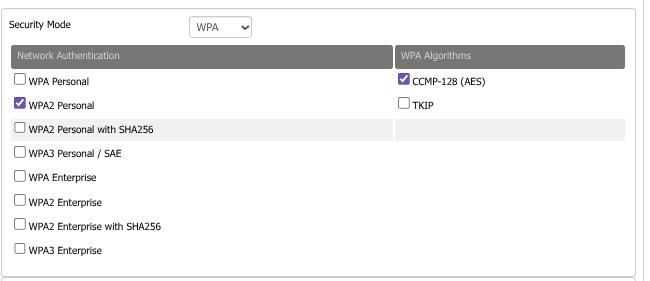
I recently had similar Wifi dropouts having replaced the Wifi router. There were gaps in the logged data of Rubikcubes app of a few minutes 3 or 4 times a day as well as other apps getting random disconnects to other devices. I eventually discovered that I had inadvertently set the security algorithm to TKIP instead of AES. If you google these you'll see that AES is now preferred as TKIP was a temporary solution. My router OS is DD-WRT and I hadn't really appreciated what this setting does. With AES the disconnects have gone.

M
#18 mrand31

I run the dongle of my Gen1 inverter on its own SSID that has no security at all, but is locked to the MAC address of the dongle. Lowest common denominator approach...