Thermal solution for indoor inverters

63 comments started 2025-05-09 last 2025-08-22
GivEnergy ProductsHybridBatterySmart Plugs
#1 norse

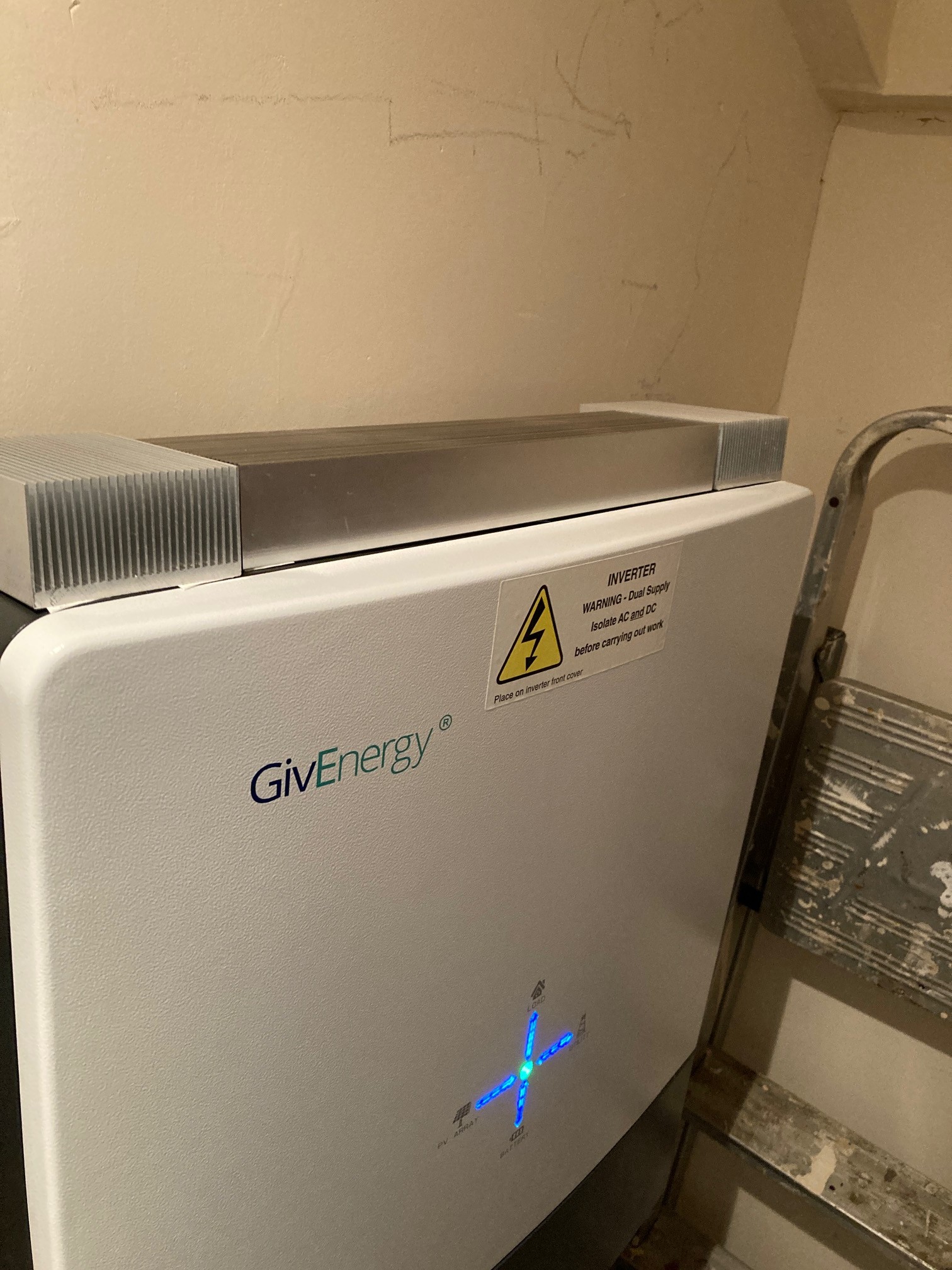
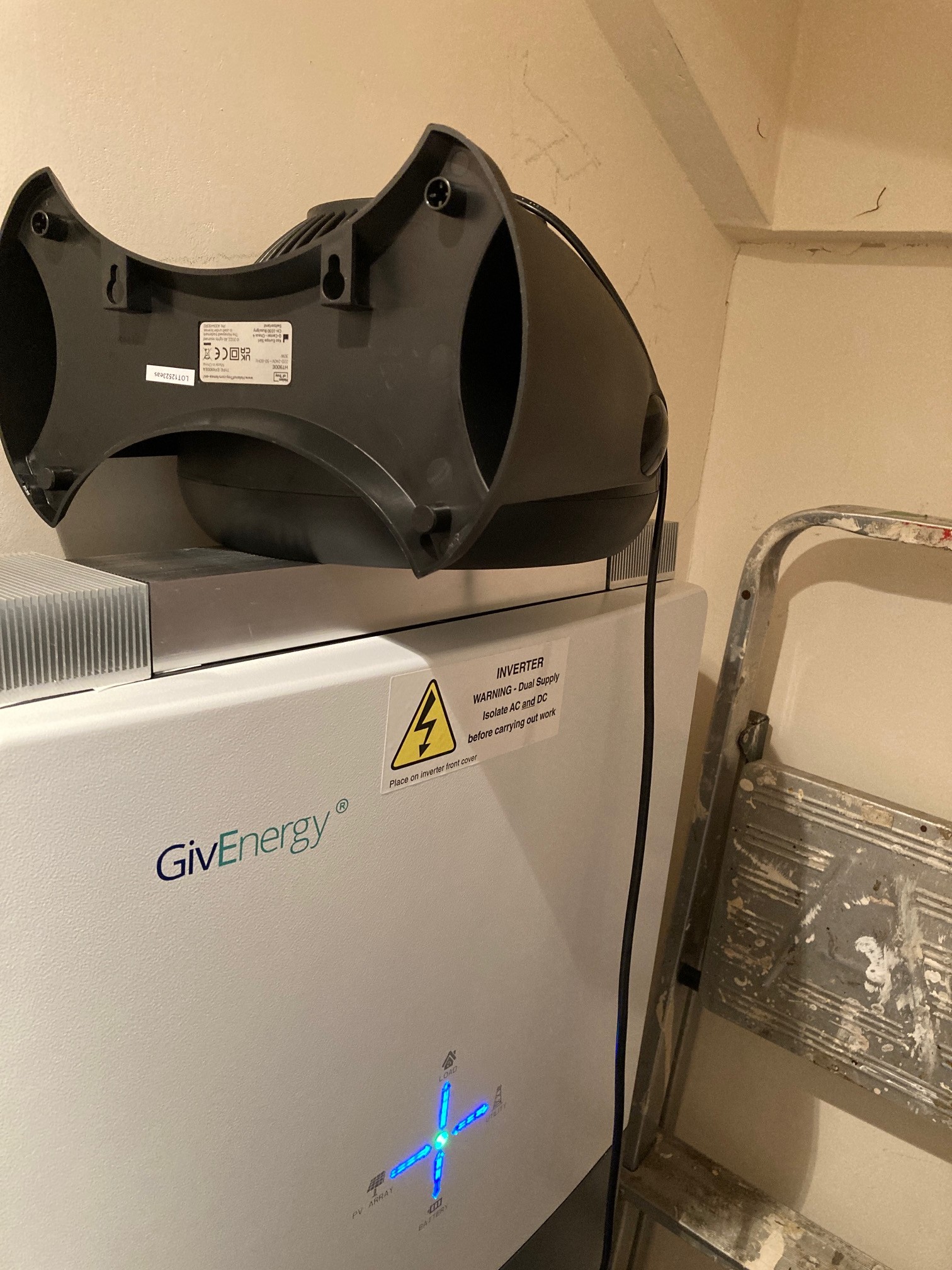
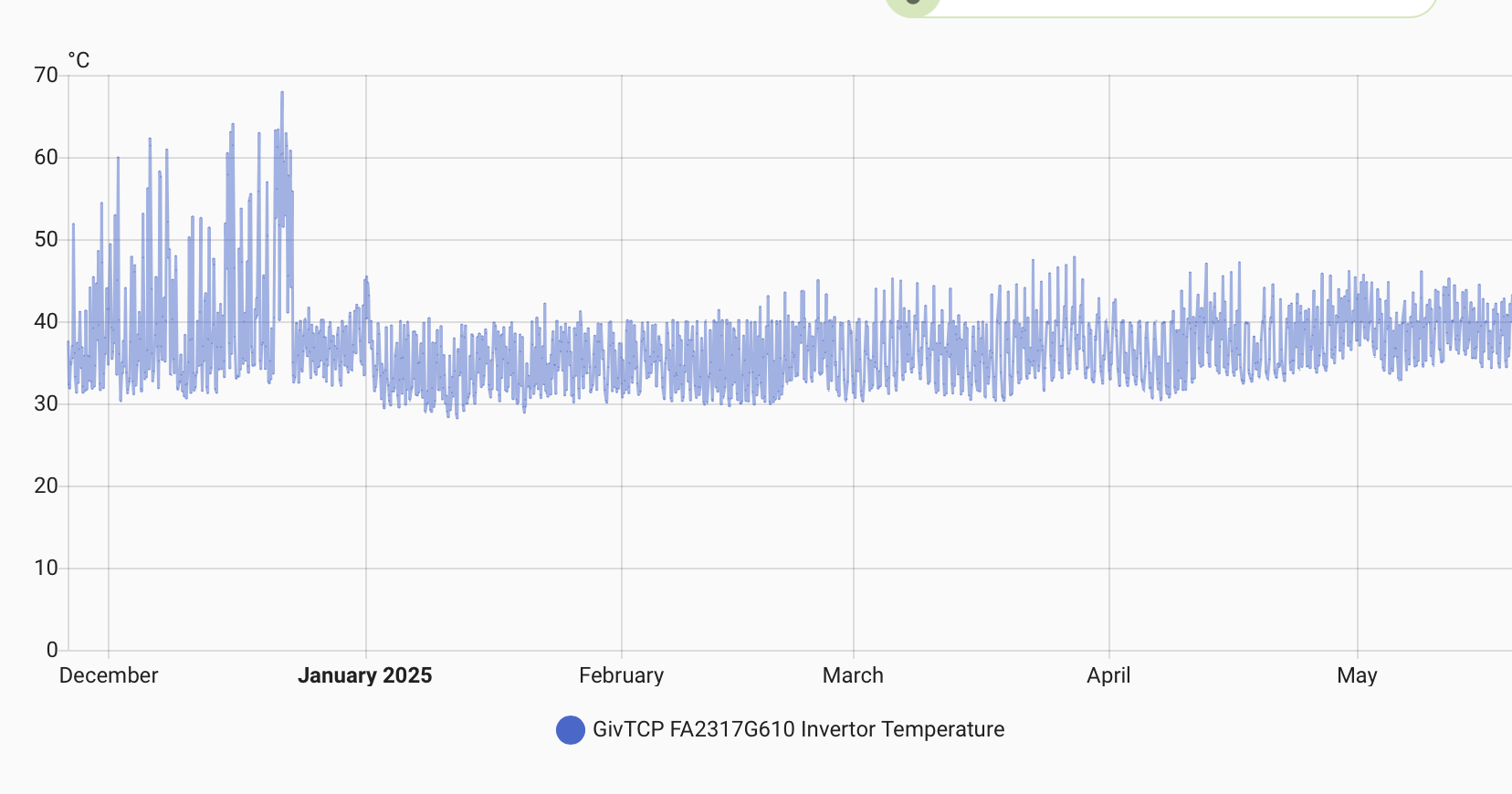
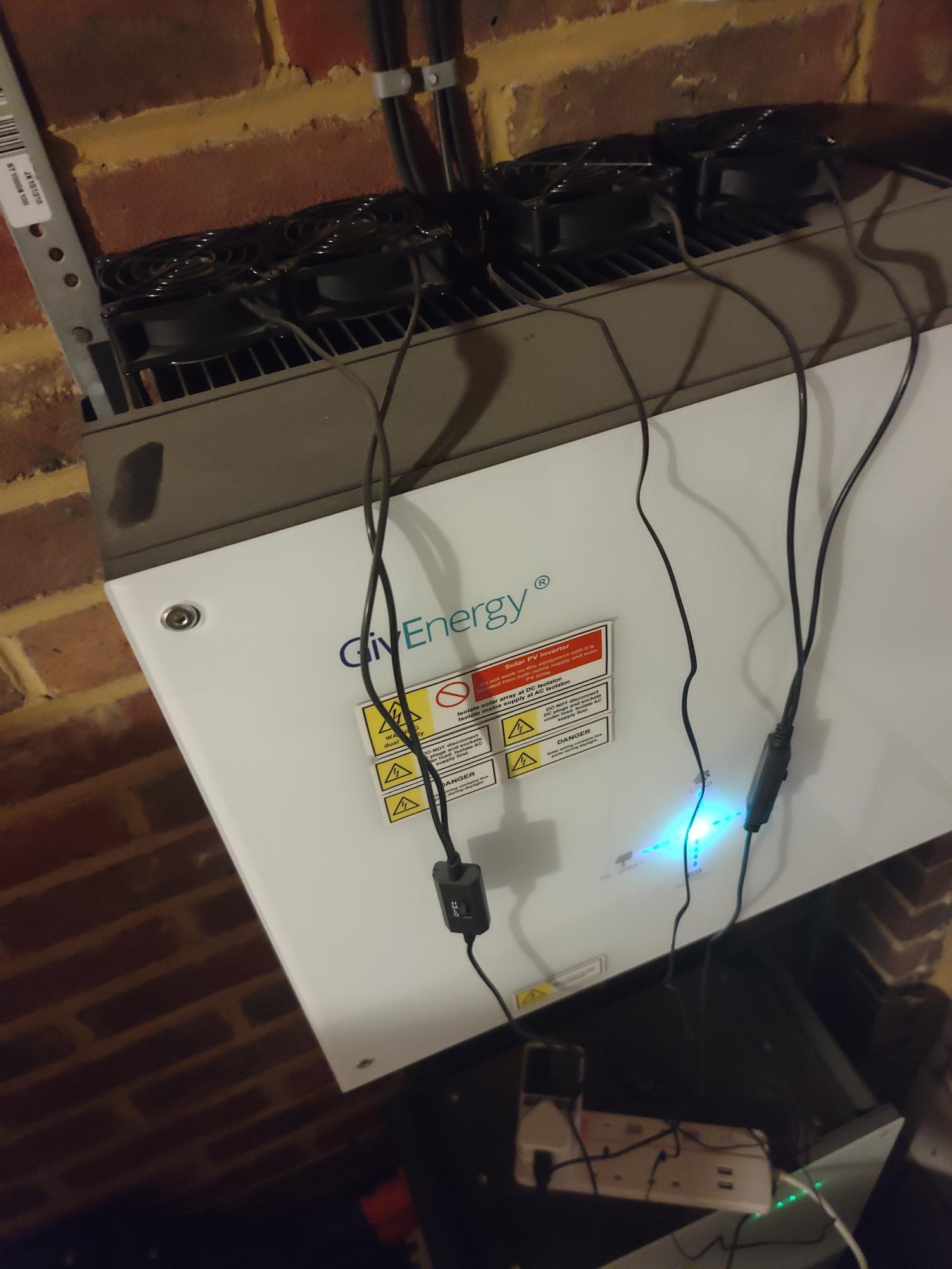
My inverter was struggling with heat, being inside. It was hitting 75 degrees according to the inverter data. So I bought some heat sinks, thermally taped and used thermal compound as you would a CPU in a PC, and intermittently run a fan controlled with a smart plug
Now it never gets close to 55 degrees, according to inverter data.

#2 norse

norse

#3 norse

P
#4 Pete.J

Which inverter is that? My hybrid 5kW has a heatsink fins on the back against the wall. If you have the same model you may want to check there is room for air to flow up the back and out past your heatsinks.

Is your fan extracting upwards or blowing downwards? If it's blowing down, you may get an even lower temperature by blowing up from underneath to assist the hot air as it rises.

W
#5 wilfleek

If you do a search on "cooling" on the forum, lots of ideas pop up, some of which automate the switching of fans.

#6 norse

Pete.J
The model is GIV-HY5.0 according to the cloud, there appears to be thermal solutions, but it is really designed for outside location as far as I can make out...before the heatsinks on top were fitted, it was getting to 75 degrees during export time.... and before I introduced the fan it had improved a lot, but could still brush 62/63.
With a low fan setting it stays at under 45...
Blowing downwards is the only way - the same with cpus in PCs, the fan is there to create focused disruption...Try building a pc with the cpu heatsink fan blowing outwards....it wont stay active for long.

V
#7 Vestas

norse but it is really designed for outside location as far as I can make out

Its not. However nor is it designed to be installed in the cupboard under the stairs šŸ™‚

As an aside if you have your battery installed under the stairs then hopefully it doesn't fail - that location is specifically prohibited for installing batteries in the new building regs. If the battery requires replacement after the regs come into effect then a replacement can't be fitted in the same location. Same goes for lofts and most other internal locations. Just a heads up in case you aren't aware....

S
#8 SteveCook

I thought that PAS 63100:2024, focuses on enhancing fire safety for battery energy storage systems (BESS) in dwellings is guidance, while not mandatory, is considered best practice and should be followed during installation.

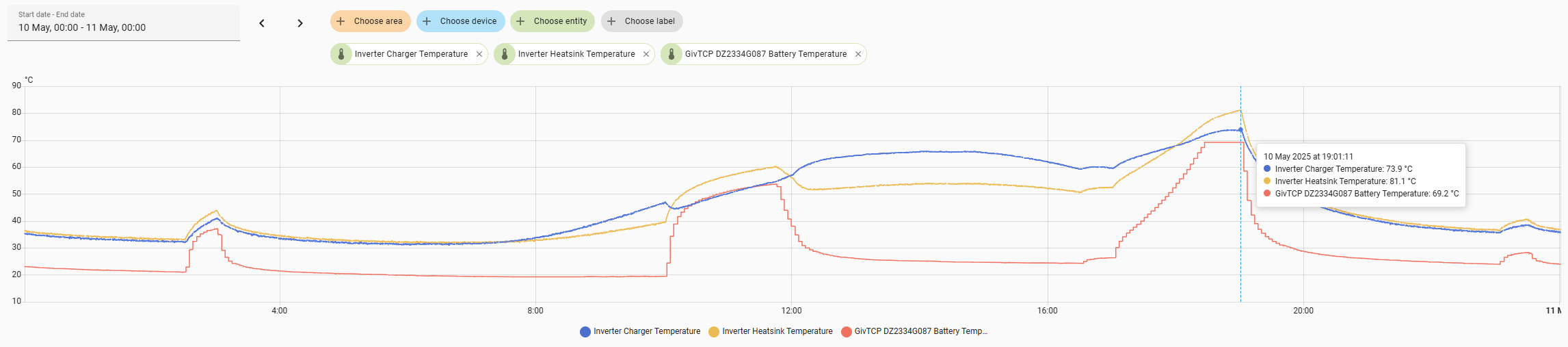
How are people in terraced houses (most of UK?) expected to ever be able to do anything if they cant have a battery in the house.
Bit like "buy an EV car, but you cant have a charging cable"

K
#9 killythebid

SteveCook
You are correct it is a guideline not a Standard/regulation installing inside a dwelling or indeed in the loft is not prohibited.

It also talks about mitgation if you need to install in a less than best practice place.

S
#10 SteveCook

Thanks. My 3 year old 9.5 is in a very big space above a bedroom and bathroom (bungalow roof void).
The floor is fully insulated (about 300mm of Kingspan) and then boarded. It is fully lit and I fitted a smoke/heat detector above the battery to the whole house fire alarm system (that all sound alarm if any one goes "off".
The battery and inverter are bolted to a 10" thick solid stone wall.

I guess I could create a fireboard box around it , but that then creates a cooling problem.

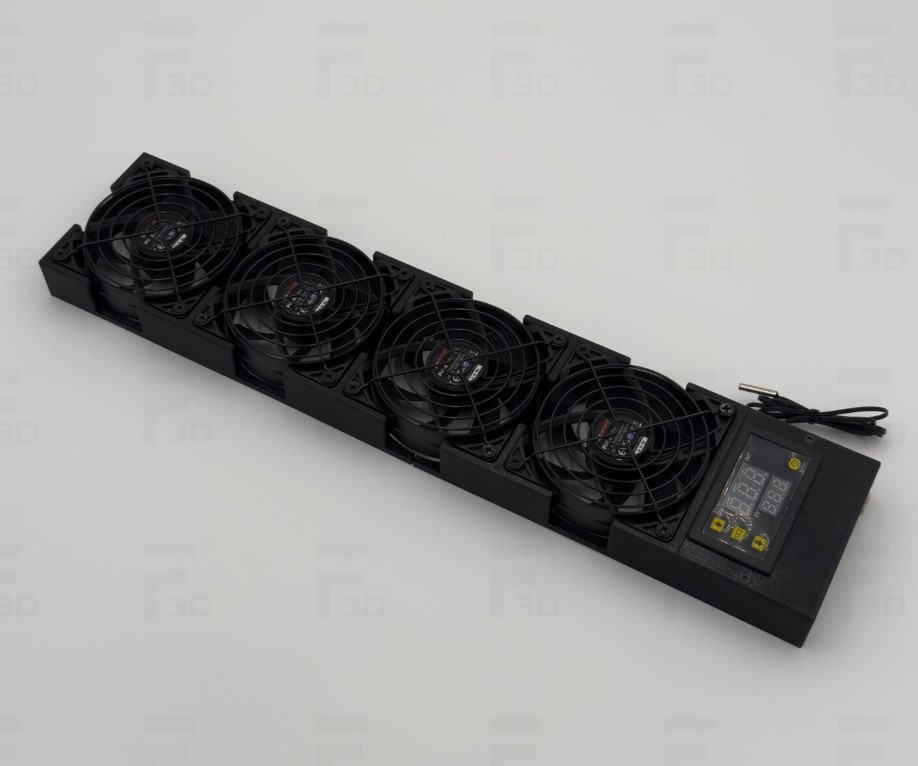
W
#11 wrighar

This was my battery and inverter yesterday, it's in my garage.
Toasty.

D
#12 DreadorUK

SteveCook I guess they just fit them outside the house.

S
#13 SteveCook

DreadorUK
Are they suitably IP rated, and does that then lead to cooling problems.
Not sure I would want a £4k battery in my front (6ft garden when I lived in Balham), as I think it would be gone by the morning

#14 Midlands_Solar

Mine's in the garage I have two of these fans bought from Argos they are on from 23:30 - 18:00 daily, inverter temp gets to a max of about 48deg (when charging the battery) and runs at about 34deg in the day on high export times and at all other times

I'd recommend removing the heatsink, as this ill be inhibiting heat loss as the inverter has some inbuilt and also recommend placing fan at the bottom, blowing cool air up behind the inverter across the inbuilt heat sinks

V
#15 Vestas

SteveCook Its going to be mandatory for MCS certification & given you can't get on most suppliers "smart" tariffs without a MCS cert then that's more or less game over for internal installs.

IMHO MCS shouldn't have the influence they have (most councils insist you use MCS approved contractors as a "competent person") but we are where we are. Edit - it may be HETAS which is the competent persons scheme for PV.

We've also had this discussion about terraced houses a few times now šŸ™‚

T
#16 TX200

Does MCS cover batteries? I thought it was just solar and other microgeneration stuff.

V
#17 Vestas

TX200 Battery storage comes under the same rules/regime. Eg - you're supposed to notify the DNO if you add another battery to an existing system. Quite why is beyond me as it makes no difference to your export limit & they're not going to check when you eventually remove it.

Frankly I think the regulations need a thorough update rather than piecemeal amendments to non-relevant regs but you could say that about most things in the UK these days....

P
#18 Pete.J

norse Coming back on topic... My inverter and battery are indoors (garage). The installation regs require a minimum space around the units to allow for air flow. If you obstruct the airflow over the rear fins then you will restrict the cooling the unit is designed with - I'm not sure if this might affect your warranty or home insurance.

While I understand your reference to blowing air down over a CPU cooler, I would still recommend using your fan to blow air up from underneath the unit to boost the existing cooling, and maybe move your heatsinks to the sides of the inverter where they can provide additional cooling support.

FYI: my hybrid 5 has four 80mm PC fans across the bottom blowing up the back of the unit to provide extra cooling. The fans are turned on automatically at 45C and off at 40C. This works well although the inverter can still reach as high as 50C in a long full rate export. I don't have any extra heatsinks attached as this method works well enough for me.

As @wilfleek said, if you search for cooling on this forum you will find several threads that discuss this topic and have pictures, temperature graphs and plenty of advice on automations etc. I'm happy to post pictures of my set up if this helps.

G
#19 geoffreycoan

Pete.J Agree with your comments.

As posted on other thread, I have 4x PC CPU fans (55mm I think) mounted in a row underneath the inverter that blow air up the back of my inverter.

They're likewise automated to come on when the temperature goes above 40 degrees; pretty much on all day at the moment but the inverter temperature never gets above 42 degrees C

W
#20 wrighar

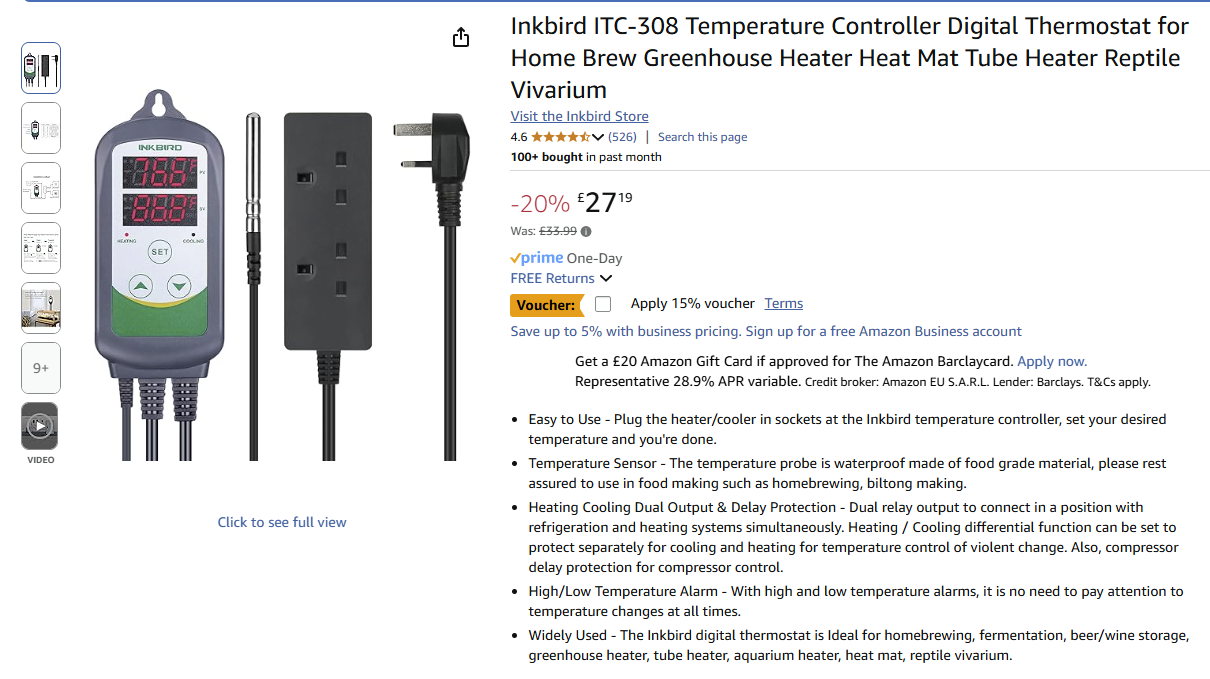
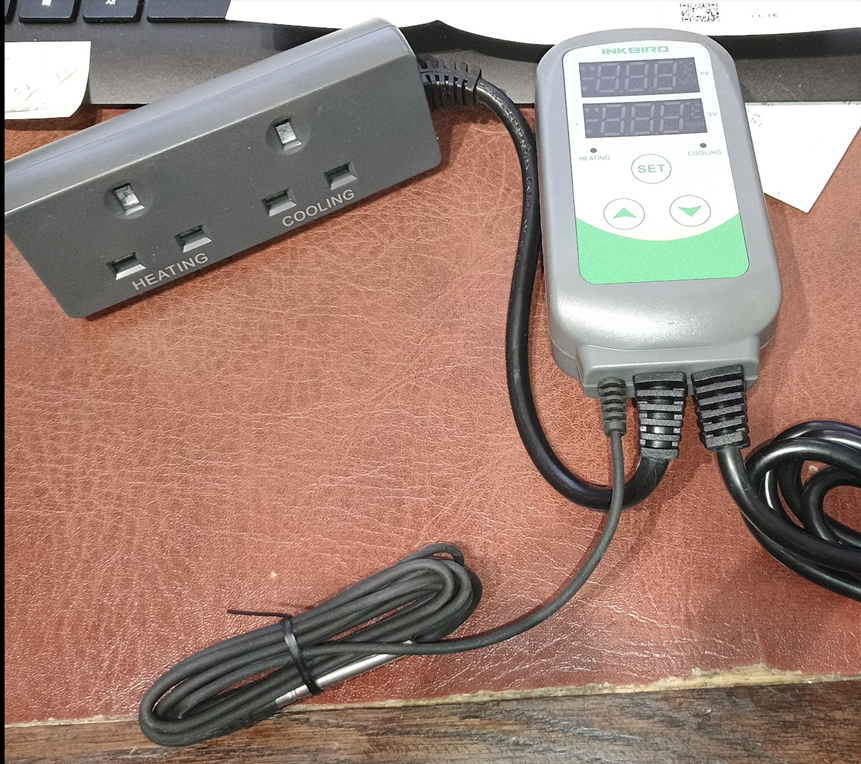
Hmm, I have an old Inkbird heat/cold double plug kicking around, all I need to do now I find a fan or two.

#21 miffy

What are you guys using to turn the fans on and off automatically? I have home assistant, but am having trouble finding a compatible switch..

L
#23 Leeshore

I use a tp-link tapo smart plug via home assistant and use the climate integration

G
#24 geoffreycoan

Leeshore Any kind of HA addressable plug/switch will do, I started off with plugging a 240V to 12V power adapter into a socket which had a smart plug in it (I use the MyLocalBytes Tasmota plugs but have some TP Link Tapo P110 ones as well). Smart plugs with power monitors are for this application not worth it, the power draw is absolutely negligible.

Then when I moved to a more permanent solution I used a Shelly 2PM device to control two sockets (two inverters, 2 sets of fans).

You can use an automation to turn the fans on and off based on inverter temperature but its a lot easier to use a Climate control in HA to do this automatically. In configuration.yaml:

# climate control sensors
climate:
  # Thermostat control for inverter fans
  - platform: generic_thermostat
    name: G Fans Control
    unique_id: g_inverter_1_fan
    heater: switch.inverter_1_fan
    target_sensor: sensor.givtcp_xxx_invertor_temperature
    ac_mode: true
    max_temp: 50
    target_temp: 40
    initial_hvac_mode: "cool"
    hot_tolerance: 0.2
    cold_tolerance: 2
    min_cycle_duration:
      minutes: 2

You can also create a history stats sensor to measure how long the fans have been on today:

# Custom sensors
sensor:
  # Calculate total time the inverter fans were on today
  - platform: history_stats
    name: "G Fans On Today"
    unique_id: g_inverter_fans_on_today
    entity_id: switch.inverter_1_fan
    state: "on"
    type: time
    start: "{{ now().replace(hour=0, minute=0, second=0) }}"
    end: "{{ now() }}"
    # Optionally, you can adjust the time window for calculation
    # scan_interval:
    #   hours: 1
#26 miffy

Thanks so much! I'll look into all those. šŸ™‚

S
#27 SteveClubley

I also use a TP-Link Tapo smart plug and HA automation using the inverter sensor temp entity. Have set the automation to turn the Tapo on at 42C and off when drops below 40C. It’s on most of the day recently with all of the sunshine.

W
#28 wrighar

This is what I have for brewing, this It could be used in the summer for cooling, and winter for warming .

P
#29 Pete UK

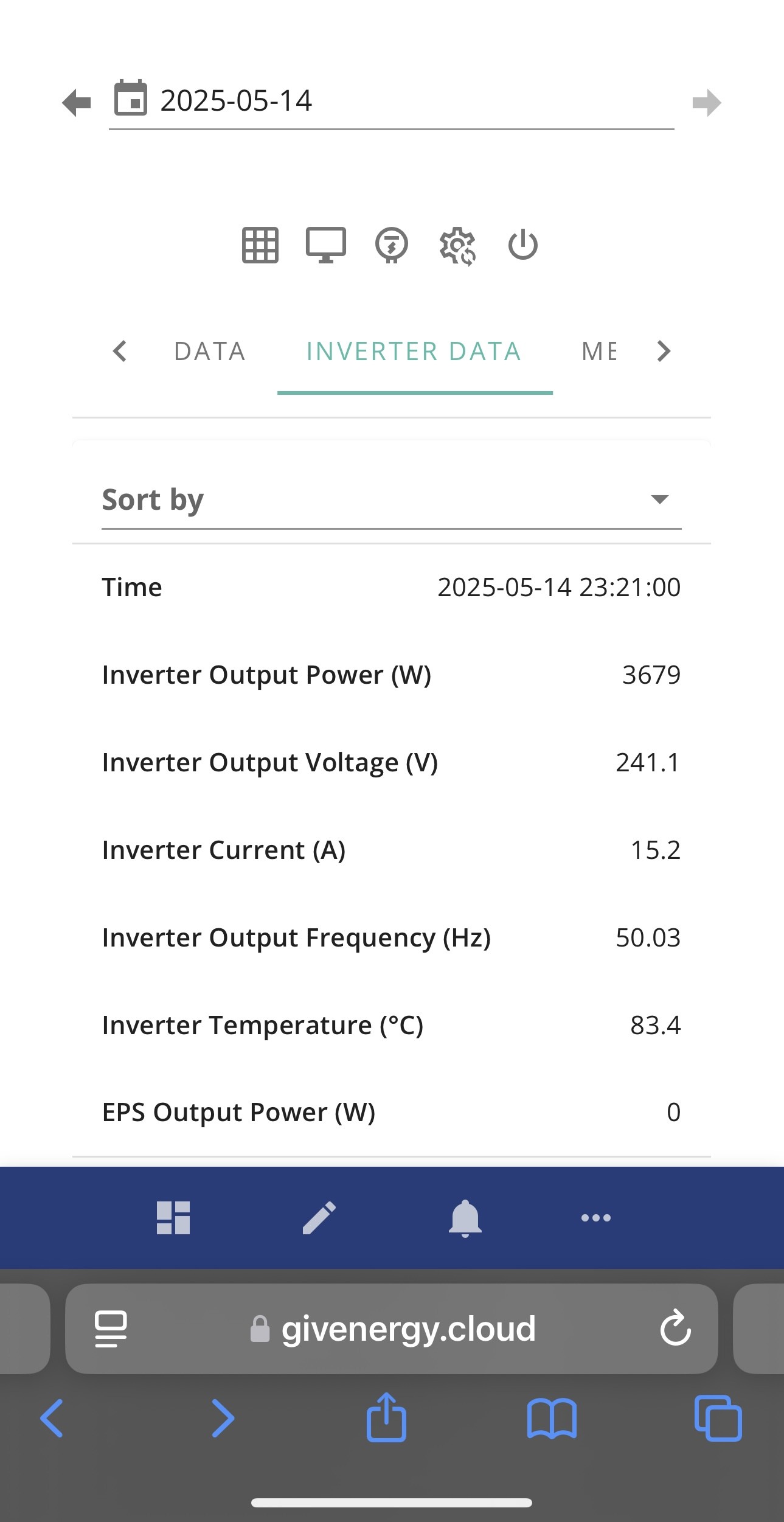
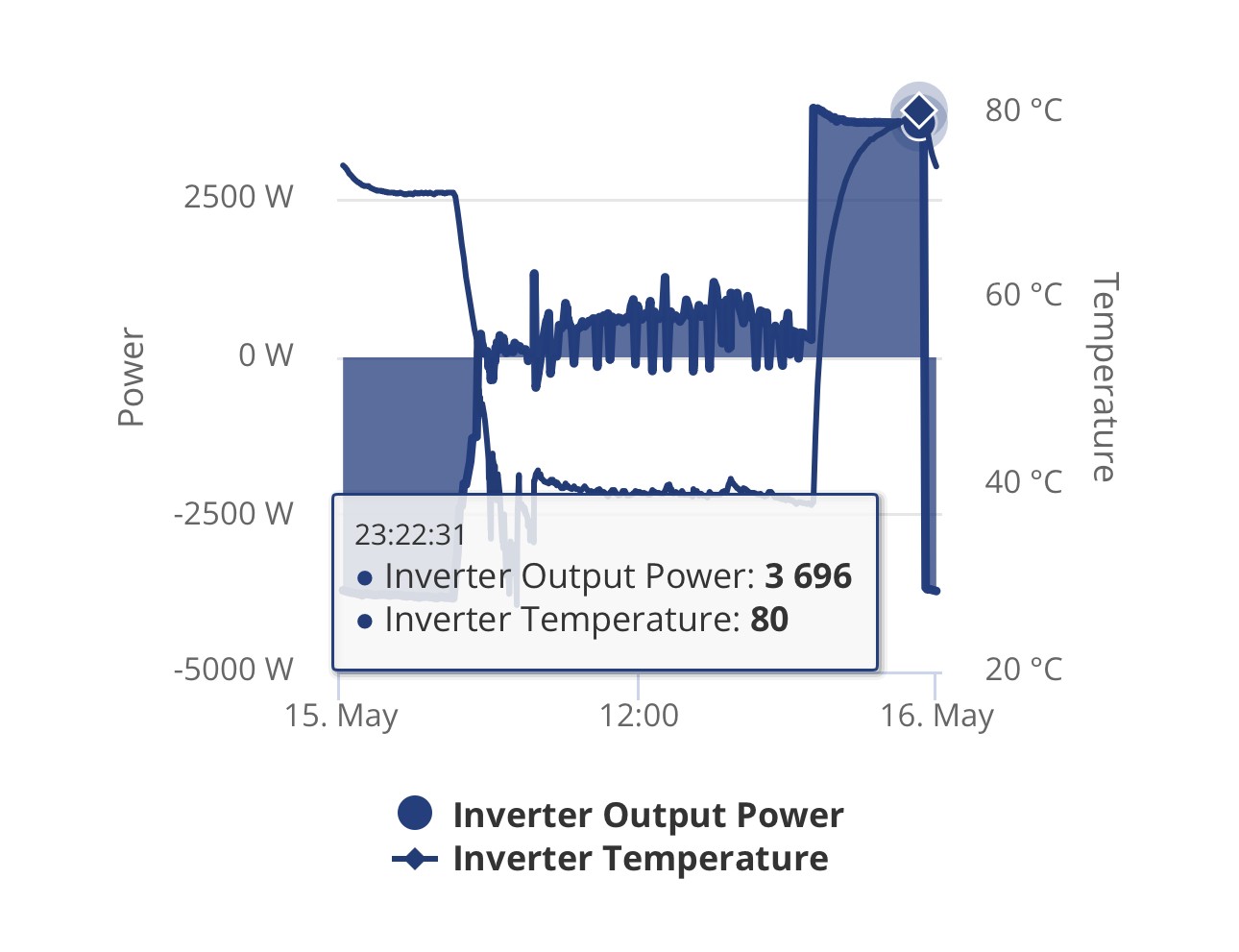
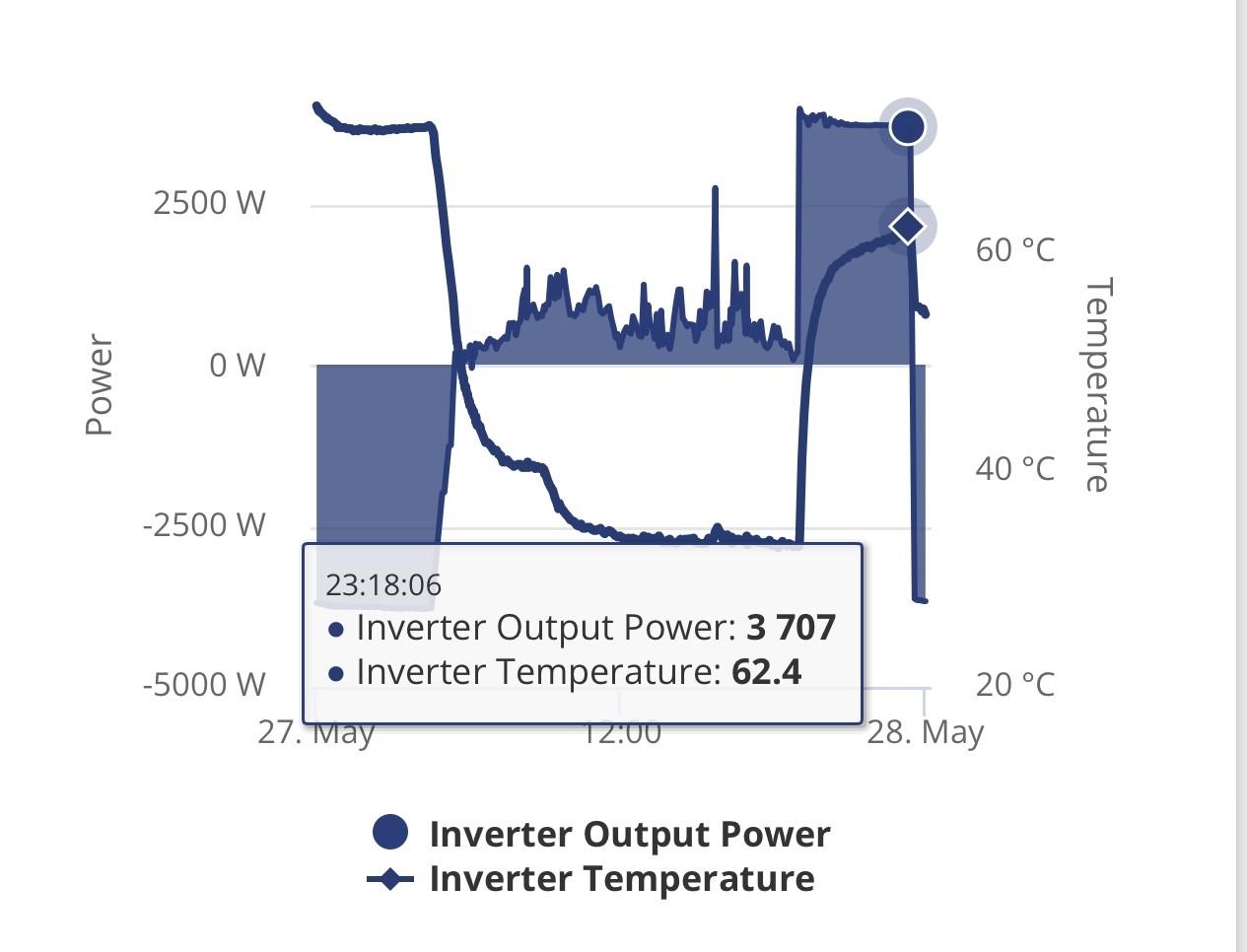
This was one of my Gen3 HY5 inverters after a 4.5hr dump to the grid at 4kW…. (It’s in the cellar)

P
#31 Pete UK

geoffreycoan

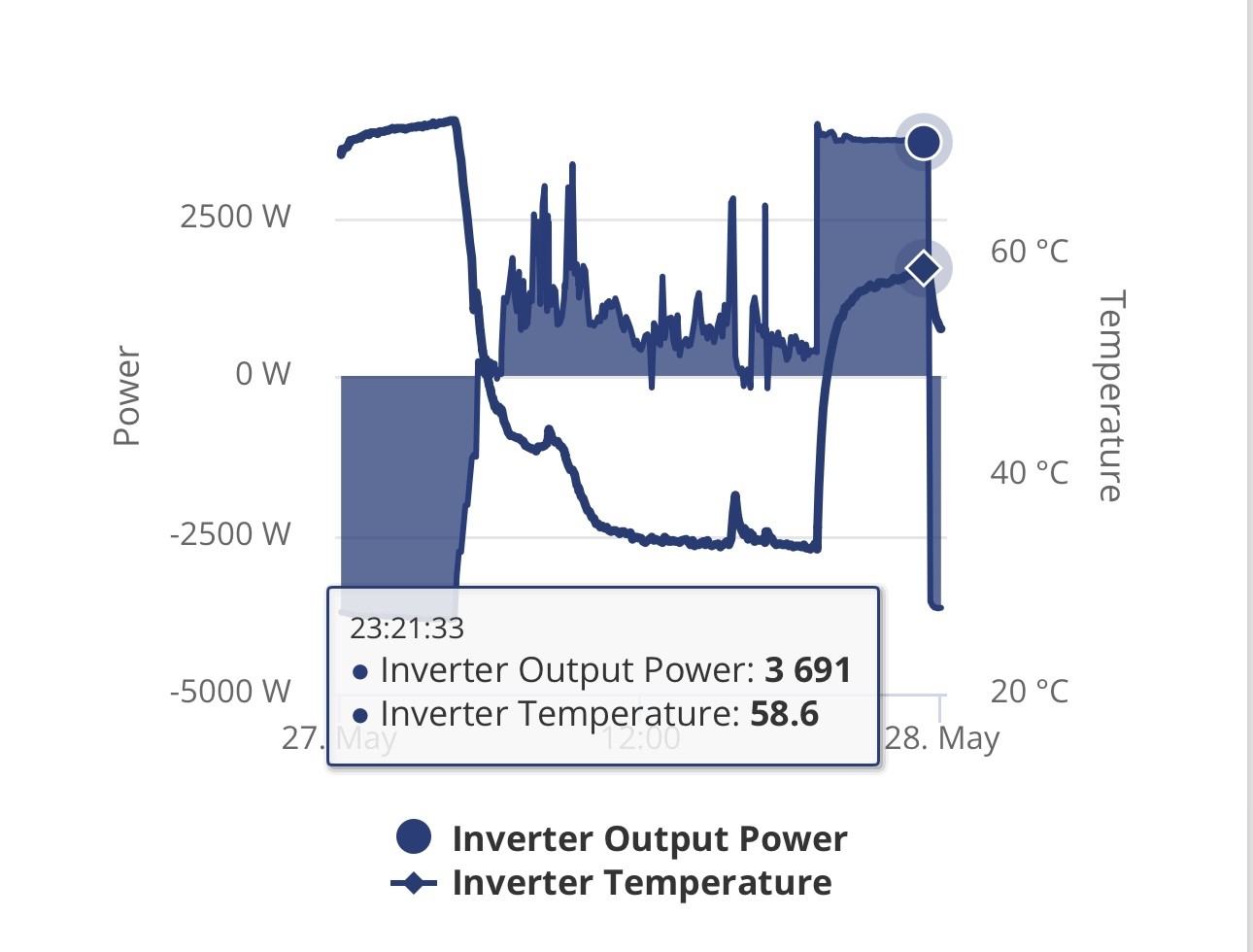
What’s the max specified operating temp? The other inverter was almost the same; 81.4c by 23:29. Then during grid charging a minute later at 23:30 they both seemed to drop off to a rather chilly 74c or so, slowly decreasing to 55.6c at 05:30.

They are both well spaced out, as are the four batteries - according to the recommended installation guidelines.

They’ve both been working fine like that for the last 2 years now. Surely they’d shut themselves down if they didn’t like it? I guess I’ve given them both a good bit of battle testing anyway. Glad (not glad) that I paid to extend the warranty to 10 years.

There must be an upper operating temperature limit but what and where is it specified?

S
#32 SimonClarke

wrighar I just got a plug in stat with the sensor on the hottest bit on top of the inverter which switches a ducted extractor fan and another blowing air over the inverter( all in a cupboard). Cheapest stuff I could get off Amazon. Requires no wiring, software etc.

G
#33 geoffreycoan

Pete UK according to the gen 3 datasheet https://givenergy.co.uk/wp-content/uploads/UK-Datasheet-Hybrid-Gen-3-5.0.pdf, ā€œOperational Temperature -20°C - 60°C with derating at 50°Cā€

Plus running at a high temperature will shorten its life

I’d definitely get some fans. The inverter entirely relies on passive cooling (heat sinks), no built in active cooling (such as fans)

P
#34 Pete UK

geoffreycoan

Ah, thanks - missed that. I’ll get some on the shopping list sharpish.

Don’t think I’ve been seeing any de-rating though. Interesting.

P
#36 Pete UK

@wilfleek

Yes, I saw that on the other thread. Thank you.

How many fans are you using? Just the two, or four?

And also I’m interested to see how much space there is for them underneath the inverter and between the wall for those 80mm fans. Would 4x 80mm fit in nicely? Would 100mm or 120mm fit also?
(I’m not back home for a while so can’t measure up).

Do you have a pic of your setup? Thanks

P
#37 Pete UK

I forgot to add it’s the space underneath a Gen3 HY5 I’m interested in. Looks like these temps have been pretty consistent over the last 2 years. 3c cooler in winter months.

Let’s see what impact I can achieve….

It’s going to take a while, stay tuned….

#38 Midlands_Solar

Pete UK 80 deg C wow! I get concerned if mine hits 48deg C

W
#39 wilfleek

[unknown] Four fans, and sorry, no pic.

W
#41 wilfleek

And they sit on top of the inverter, drawing air up over the heatsink fins.

C
#42 CGoode

[unknown] I went with one of these radiator fan sets. Fairly cheap solution. Mine's in the garage.

https://www.amazon.co.uk/Warmfay-Ventilator-Thermostat-Controller-Efficiency/dp/B0DJ8V8XD1/ref=sr_1_7?dib=eyJ2IjoiMSJ9.HYEuKREQ0mPtmt_tSMP8zcyRM1jfWSWLY4Blt4DtWnu3Hm4gRa2mlj5c1uaqlamK_-UbPJDe8WQtgfUQIBB1616oqLyfobEbFgcNCWUMXjLSdtAaz5a5KP3znVmjcxDun87M-Bud7CxwmtpoAAOD0lpawHWWZyc08KeLsAV6AcFVSe4nOaASWpQSHstnkc84-e5w2sD-YbhAC1xKHyzdBmsUitETh9Ckti1SGkpJVYpCLpnBjI0KjIgD1FMpCzr9CoDuVYC7sFN-JlLi2gpNlHIGQhJBDCOMti7no1vHFV8.Oq3ZtfxsGlnO7g7LNlIwvRxhhP7Q1uHGItpYCXLqu7Q&dib_tag=se&keywords=radiator%2Bfan%2Bbooster&qid=1747639407&sr=8-7&th=1

#43 nophead

geoffreycoan

geoffreycoan ā€œOperational Temperature -20°C - 60°C with derating at 50°Cā€

I think that would be the ambient temperature of it surroundings though, not its internal temperature.

G
#44 geoffreycoan

nophead true but that’s all that is published. I think Paul L has said before that it starts derating when the internal inverter temperature gets above 60 degrees, but I may be wrong on the precise level

P
#45 Pete UK

[unknown]

šŸ˜®ā€šŸ’Ø

P
#46 Pete.J

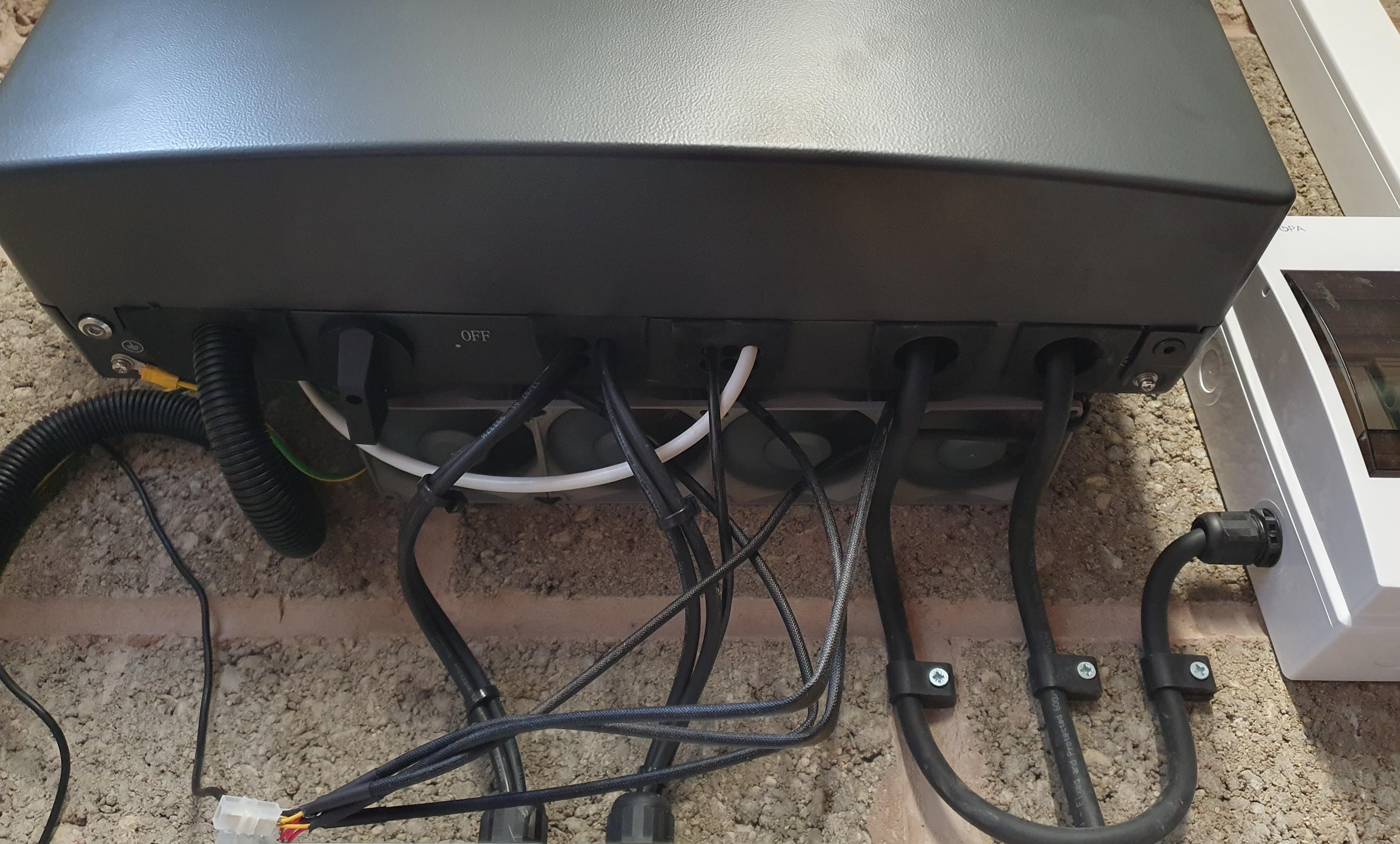
Pete UK Sorry for the delay with pictures: you wanted to know about space under a hybrid 5....
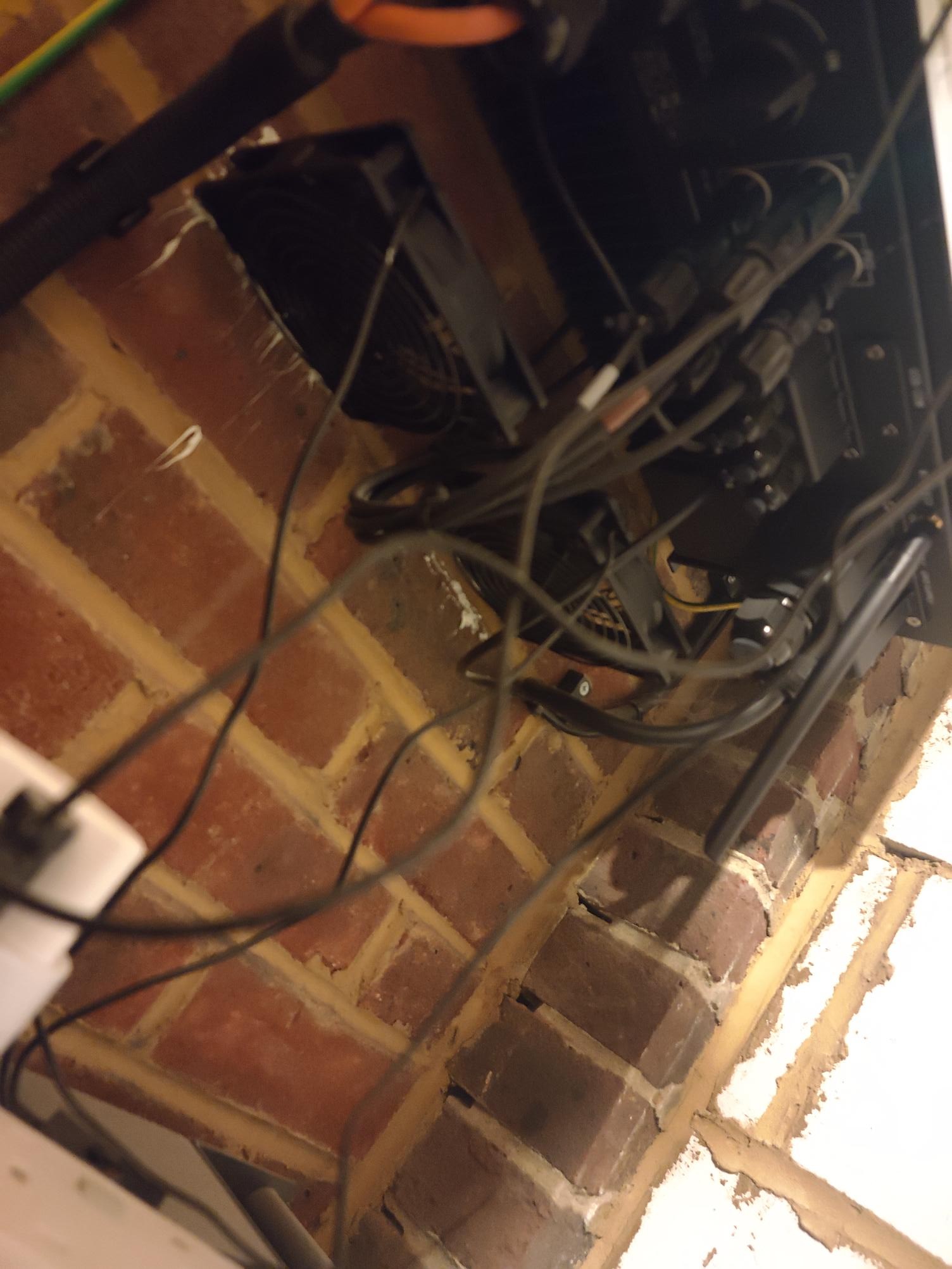
For my Gen 3 Hybrid 5 inverter, I found that 80mm PC fans sit exactly between the bottom of the inverter and the wall. The fans are cable tied together and run from a 12V supply switched by a Sonof switch called from an automation in HA that monitors the GivTCP inverter temperature value. They blow upwards to assist the natural convection.

The fans are a push fit, with a dab of silicon in the corners as an anti-vibration mounting to ensure they don't drop out:

P
#47 Pete.J

Seems to work well enough:

FYI: The sharp drops are not real and are, I think, short data drop-outs which started to occur after I upgraded to GivTCP 3 (but that's a different thread).

L
#48 Leeshore

I bought one of these https://www.amazon.co.uk/dp/B08GP622YS?ref_=ppx_hzsearch_conn_dt_b_fed_asin_title_1&th=1

I placed the fan at the top on my Gen 3 hybrid inverter to suck air up as there isn't a lot of room below
Then plugged it into a tapo P110 plug and then use a climate template on home assistant that comes on at 40C.

Before I had spikes up to 70C but now doesn't go above 45C.

It was a bit expensive but easy to do

Code in climate.yaml:

#Fan to cool inverter#

  • platform: generic_thermostat
    name: Inverter Fan
    heater: switch.inverter_fan
    target_sensor: sensor.givtcp_xxxxxxxx_invertor_temperature
    ac_mode: true
    max_temp: 60
    target_temp: 40
    initial_hvac_mode: "cool"
P
#49 Pete UK

@Pete.J @Leeshore

Thanks for that. Much appreciated. Both look like good solutions.

P
#50 Pete UK

Hi all,

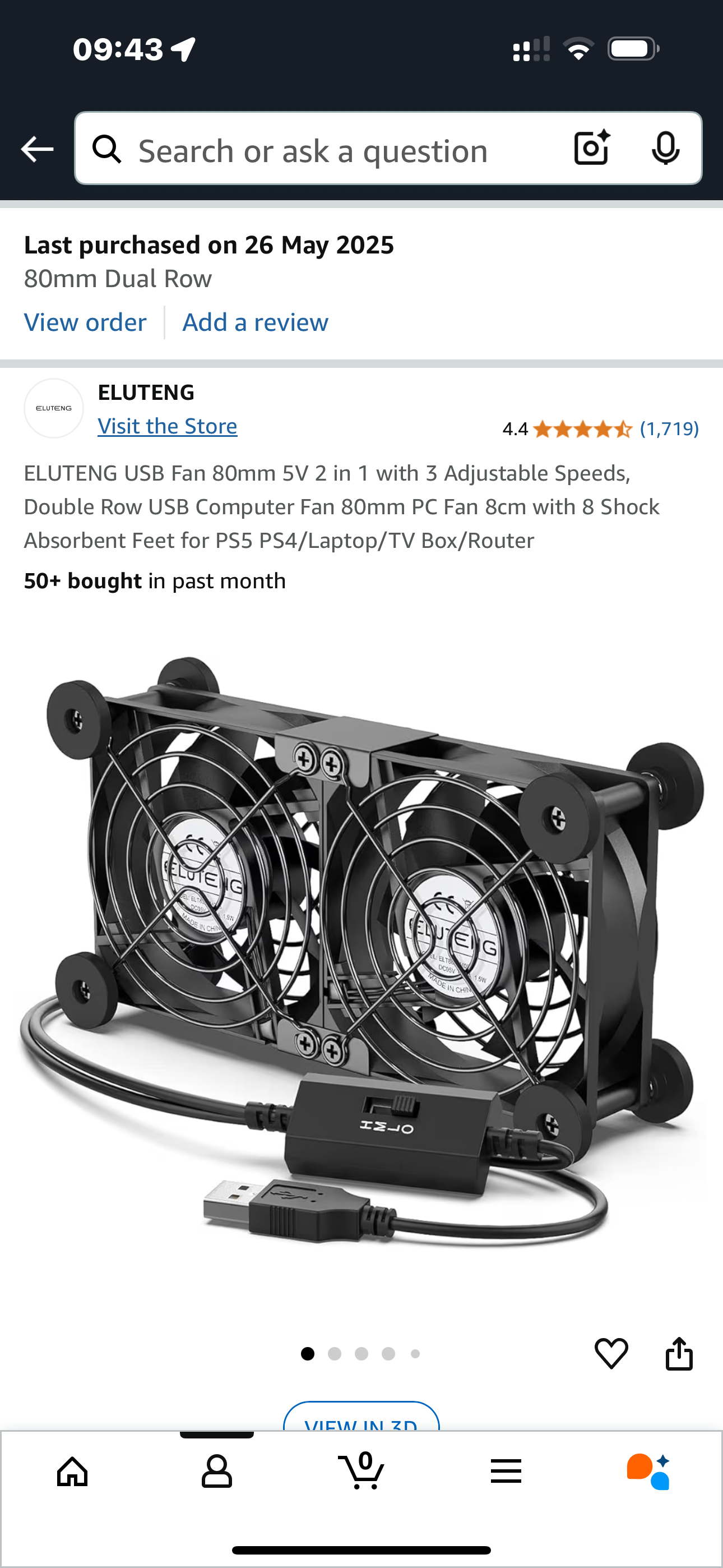
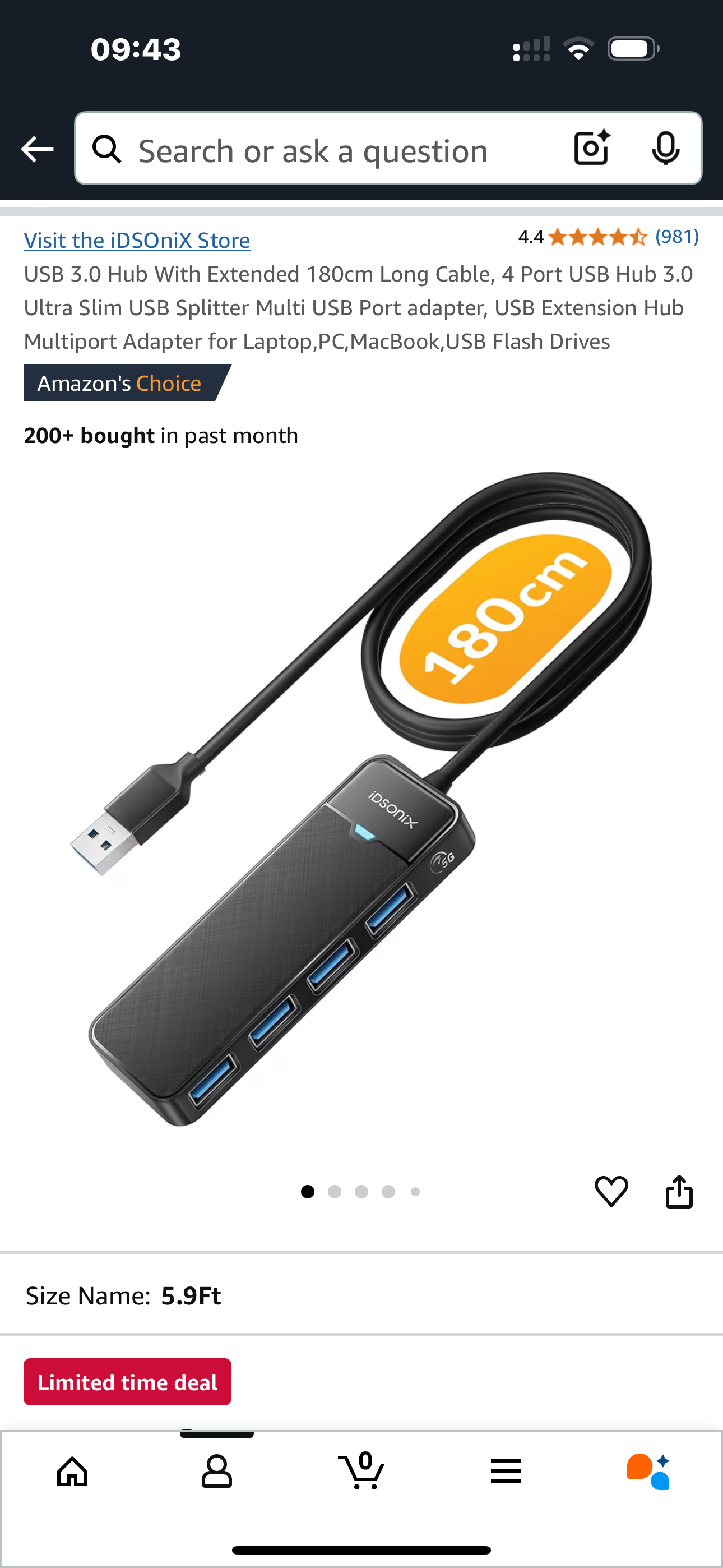
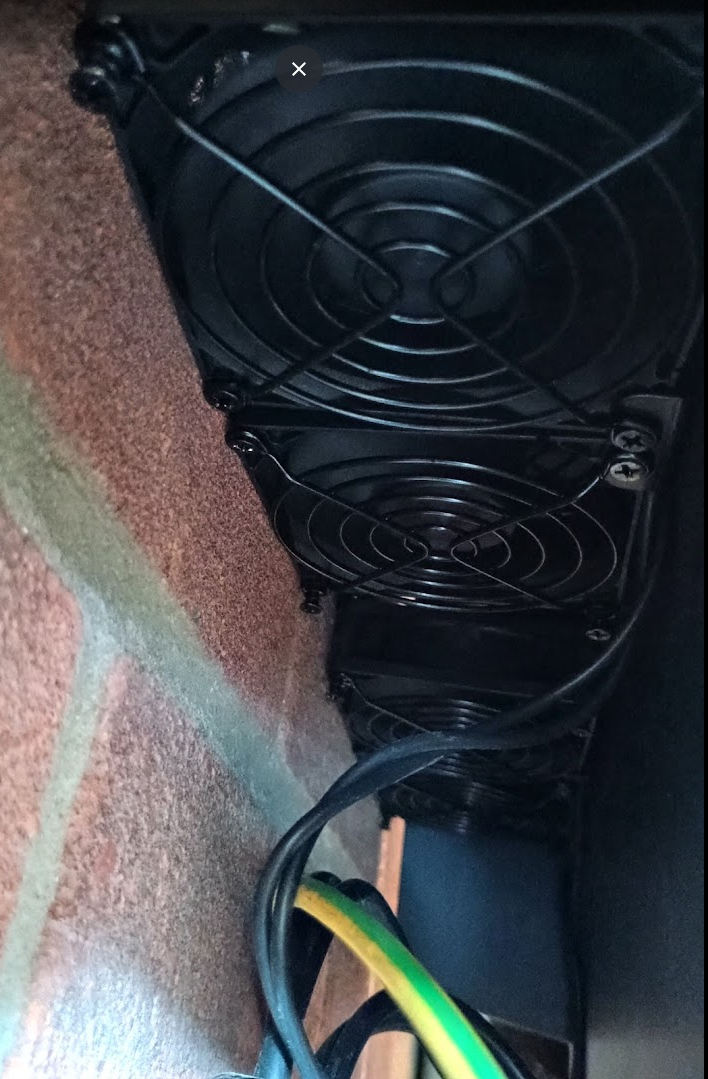
So I went for these in the end: Four of the double 80mm fans, (8 fans in total). With a 4x USB splitter (mainly for the extra length of lead) as none of them seem to come with a long power lead. I’ve now split them into just 2 sets on the USB splitter (for one inverter) and 2 into another USB plug (for the other) because the splitter wasn’t quite powerful enough to power all 4 on the high setting. (It would power them ok on the low or medium setting, although it struggled a bit on medium).

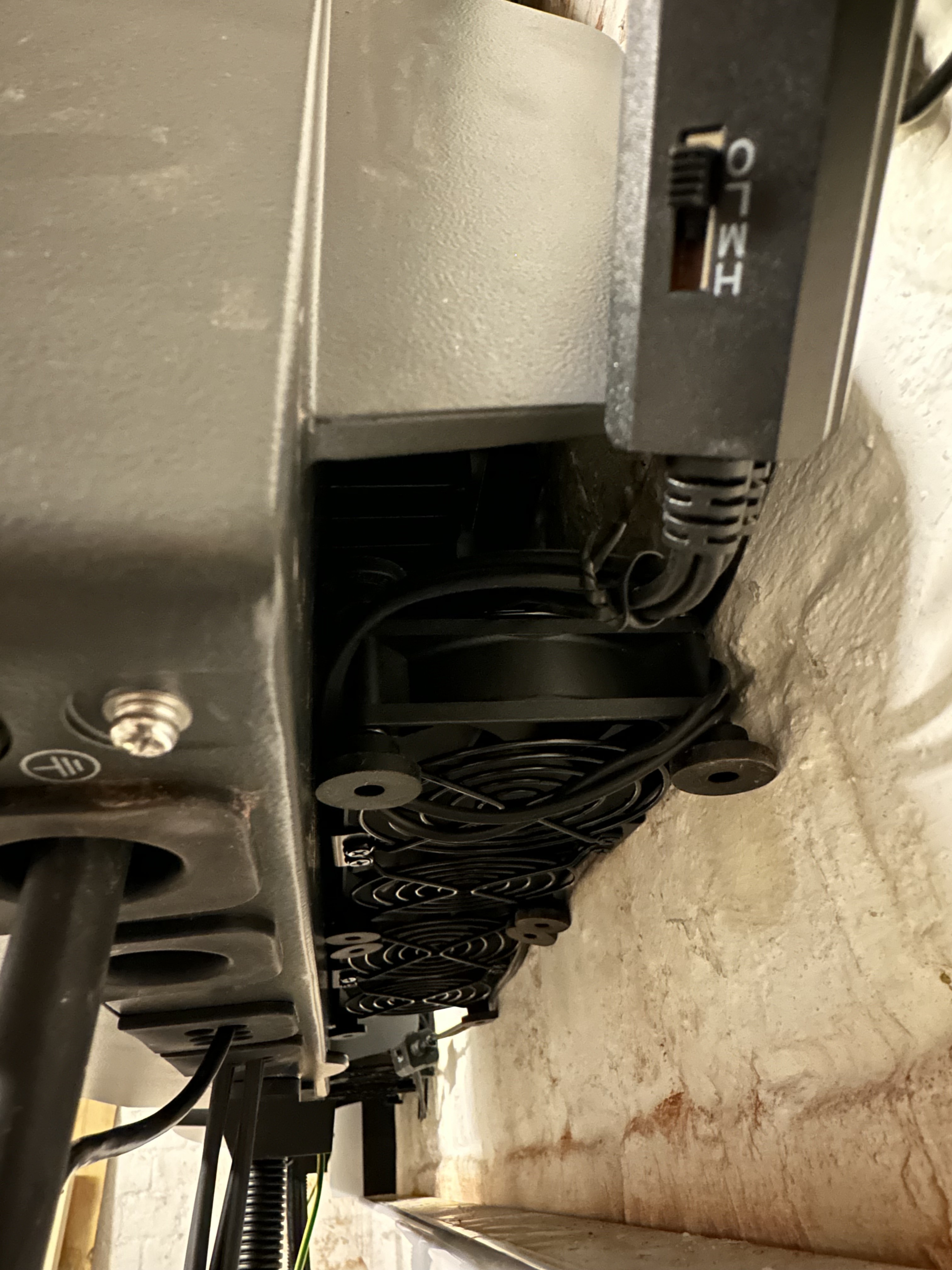
I would say that these ones; having the anti-vibration rubber feet, wedge very snugly between the wall and the inverter, taking out any bumps in the brick wall. Which by pure luck meant that I avoided any extra fabrication. A perfect fit! Whether they stay there or not I’ll report back. I’ll also report back on the temp reduction especially during forced discharge in the evenings. It’s trial and error regarding the fan speeds but I’ve just got them all on full for now. I plan to install a smart plug with a 2 or 4 way USB plug for adding a timer eventually.

Thanks for all the info. Much appreciated.

Here’s what I bought. The fans were about Ā£15 each, so Ā£60 total and about Ā£10 for the splitter.


G
#52 geoffreycoan

What power rating USB mains adapter are you using for the splitter? Make sure its a decent output one, not 500mA or 1A, try to get an adapter suitable for charging an iPad or similar, something like 2-5A output.

Looks near installation with the rubber feet pushing against the wall, almost as if it were designed for it !

If they do slip down then you can do what I did which was to tie the fans in position with a piece of elastic wrapped around the back of the inverter

P
#53 Pete UK

geoffreycoan

Good idea. Makes sense. I didn’t think too deeply about the power requirement when ordering! I just used what I had lying around; a standard ā€˜slim’ single USB iPhone plug for all 4 on the splitter, which was obviously too weak - but is ok for just two on the splitter at the moment. The other two are plugged into a travel adaptor now with 2 USB slots. A single higher output plug sounds more sensible. I’ll try all 4 on the splitter again, plugged into an old iPad charger later today. Hopefully that should work fine and overall be neater.

So far the fans haven’t moved. The rubber pads are wedged in pretty tight against the wall. I was originally looking to try and attach two of these dual fans together to make a block of 4 fans. But I couldn’t find the extra clips they used on the dual ones. Anyway, glad I didn’t because I don’t think I’d have been able to slot a block of four into the gap.
Too little manoeuvring space !

I did try to upload a couple more pics but for some reason keep getting an error.

  • As for the results. I’m getting about 21c reduction in temperature at the end of a 4.5hr max discharge to the grid. It’s now about 60c max instead of 80c max. (One was 62.4c vs 83c and the other 58.6c vs 80c). Similar reduction for max charging. So overall results seem good.


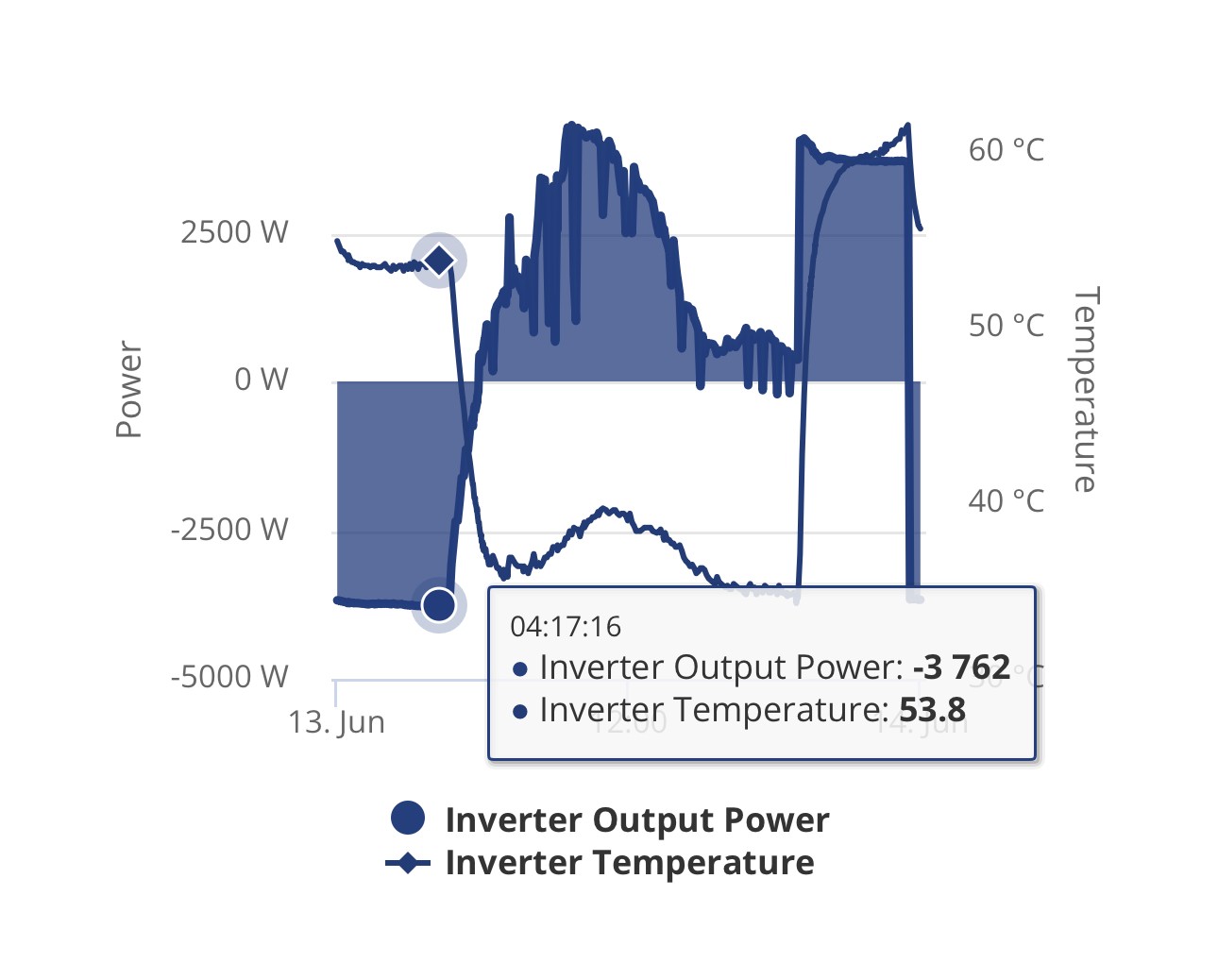
Above, you can see when the fans were turned on (about 09:30)

#54 miffy

I’d been following all the inverter cooling posts for a while, trying to figure out how to attach fans underneath my Gen 2 hybrid inverter… and then I had a brainwave - bulldog clips and magnetic hooks! šŸ˜„
[I have a photo ready but even after 50+ tries it won't let me add any images. It's in my Dropbox at https://www.dropbox.com/scl/fi/rg99bswi09w2a6iavjh2r/hooks-and-clips-IMG_0970.jpg?rlkey=ukiee2234oeuka1nnltezxd6r&dl=0]

I’m using the "ELUTENG Computer Fan 120mm Dual Row 2 in 1 with 3 Adjustable Speed USB PC Fans 5V", and I’ve mounted them using "Neosmuk Magnetic Hooks, 10kg Heavy Duty Earth Magnets with Hook" and "60pcs Colored Metal Binder Clips, 15mm Small Bulldog Foldback Clips". It’s surprisingly secure and took no time to set up!

We don’t (yet) have a power socket near the inverter, although I’ve asked my installer for a quote to fit a UPS socket. In the meantime, I used an old mobile phone power bank I had lying around. It worked well enough for an always-on solution, but I wanted something smarter.

Since we already use Home Assistant to manage our GivEnergy setup, I thought it made sense to automate the fans based on the inverter’s temperature. So I picked up a "SONOFF Universal Zigbee 3.0 USB Dongle Plus Gateway with Antenna" and a "SONOFF ZigBee 3.0 Micro USB Adaptor, Smart USB Switch 5V-22V" and got them set up in Home Assistant. I won’t lie - the setup process was a bit of a nightmare! If you're curious, I’ve reviewed both on Amazon (look for the two-star reviews...).

Eventually, I got Home Assistant to recognise both Zigbee devices, and created a rule to turn the fan on and off based on the inverter heatsink temperature. I plugged the Zigbee USB switch into the top of the battery bank, then plugged the USB fans into that. Success! šŸŽ‰

...Except it didn’t last.

After the fan had been off for a bit, the power bank turned itself off - and stayed off - which also disabled the Zigbee switch, stopping the fans entirely. Not exactly what you want when you're not home to manually turn it back on!

After a bit of reading, I learned that most battery banks switch off automatically if they’re drawing very little current. What I really needed was one that stays on no matter what. These are oddly rare, but I eventually found the "Voltaic Systems V50 Always On External Battery Pack with Dual USB Ports - 12,800mAh". So far, it’s working brilliantly - it stays on, powers the Zigbee switch, and the fans turn on and off reliably based on the inverter temperature.

Hopefully this saves someone else a bit of trial and error!

P
#57 Pete UK

miffy

Looks good. What sort of temp reduction are you getting with those 120mm fans ?

I was contemplating the 100mm or 120mm ones but went for the 4x80mm dual ones instead for my dual inverter setup. They are still jammed in there snugly and haven’t moved yet. The old (18w?) iPad USB charger is suppling power to all 8 fans nicely. I haven’t got a smart plug yet and they’ve been running constantly. I think I’ll just leave them like that TBH. Power consumption is minimal, just a few watts. Just to clarify what I previously posted above; it was the old USB plug I used that was the problem and not the USB splitter that was limiting the power to the fans.

61c max now compared to 81c max before is my reduction in temp after a max discharge at 8kW for 4.5 hours. That’s the highest bashing they’ll get (in summer discharging to grid at 8kW+).

55c compared to 75c after max charging for 5hrs (after that the charge rate drops off).

Here’s one of my inverters after yesterday’s fantastic solar day (the other inverter is very similar)

#58 miffy

It looks like we're seeing a temperature drop of around 12-15°C. Yesterday, the inverter peaked at nearly 48°C, whereas previously it had reached up to 62°C. We've only had the fans in place for two days so far, so we'll need more data to confirm the results.

The fans are set to turn on when the 'inverter heatsink temperature' (as listed in Home Assistant, which aligns with the 'inverter temperature' shown on the GivEnergy portal) rises above 40°C, and they turn off when it drops below 40°C.

I initially bought 80mm fans, but they felt too small and underpowered. I could have installed them alongside the 120mm fans beneath the inverter, but my husband ended up repurposing them to cool the cable modem instead!

W
#59 wrighar

Just done similar, had to ditch the rubber feet, and one of the 2 'joiners' to get them in (Gen3 hybrid).
from a 55c start,
Low gets about 6c drop
Med about 10c drop.

D
#60 Domo

I'm new to this PV - I had a GE Gen3 5kw inverter 9.5 Gen3 battery plus 6.5Kw array installed on Monday last, today though logs show the inverter hit 58.5 degrees, I'm a little worried so bought one of these plus a temp socket with a probe..
any advice would be appreciated of course.

https://www.amazon.co.uk/dp/B0C33NKD5M?ref=ppx_yo2ov_dt_b_fed_asin_title&th=1

P
#61 Pete UK

Domo

I wouldn’t panic too much. My pair of 5.0 Gen 3 inverters ran up to a max of 80c+ during 4.5 hours of discharging every day (at continuous 8kW) for 2 years before I installed my fans a month or so ago. So they seem pretty robust.

Of course cooling is always a good idea for any electronic components and should help to prolong its life. Although, anything can fail at any time for a number of reasons I guess. Maybe it’s just that we can see the inverter board temp and it seems alarming. I’m sure they’ve been designed to cope without any cooling. I guess if we had a temp sensor in our TVs and it showed 80c+, we’d probably be installing fans under them as well. šŸ¤·šŸ¼ā€ā™‚ļø

D
#62 Domo

Pete UK - Hi Pete, thanks for the reply, interesting to know, Ill knock something up I think, at least I would have done my bit.. šŸ˜‰

W
#64 wrighar

And for cooling control I'm using for now my old brewing Inkbird ITC-308 until I can get a plug controllable by HA

W
#65 wrighar

And for cooling control I'm using for now my old brewing Inkbird ITC-308 until I can get a plug controllable by HA

L
#66 lam22

My solution for a gen 2 hybrid installed in an uninsulated garage.
4 80mm fans extracting and 2 repurposed PC case 120mm fans blowing air in from below (grip it glue onto the bricks).

All running off something like this https://www.amazon.co.uk/dp/B09PL58KH5?ref_=ppx_hzsearch_conn_dt_b_fed_asin_title_3

Like this for about 2 years now. Bit of a menagerie of cables but temp in this heatwave never gets about 45, even when dumping to the grid.

#68 miffy

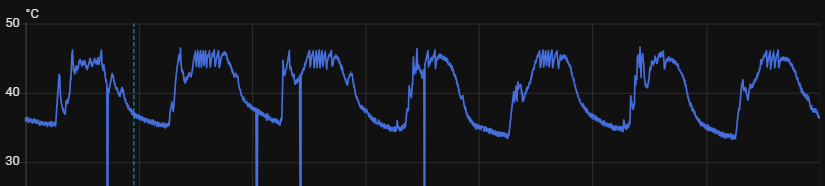
Over the past couple of months I’ve been running this cooling solution for my inverter, and I thought I’d share the results in case it helps anyone else.
I can add photos if anyone wants - let me know.

I set up two sets of fans controlled by Zigbee switches, which are themselves controlled by my Home Assistant monitoring the Inverter Heatsink Temperature. The fans on top of the inverter turn on first at 39.5°C to help hot air escape faster. The fans underneath then turn on at 40°C to push cooler air upwards. Each set turns off again when the inverter temperature drops below its own threshold. The staggered start points mean the top fans always engage before the lower ones, and it also acts as a safety net in case Home Assistant ever misses a reading.

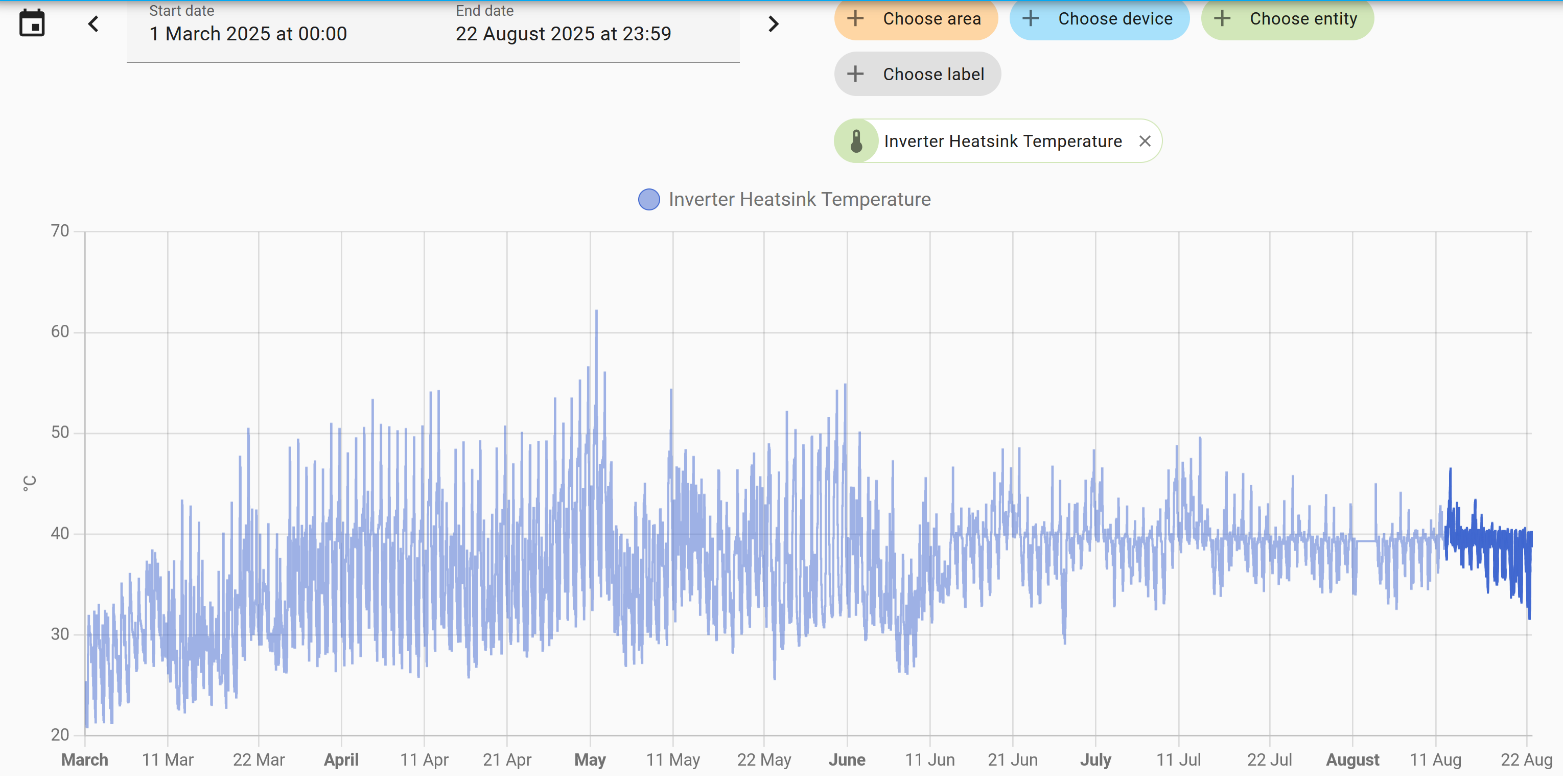
Since I implemented this in mid June, the difference has been dramatic. Before then, the inverter temperature regularly climbed well above 50°C, but since the fans have been running it has not gone past 50°C at all, and it now averages around 40°C.

The chart below, taken from Home Assistant, shows inverter heatsink temperature from March 2025 through to today (22 August). You can clearly see the change in peak temperatures after mid June when the fans were introduced. There’s a short gap in early August where no readings appear, but that was just due to Home Assistant being turned off by mistake while we were away for the weekend.

I’ve been very happy with this setup. The only limitation is that I don’t have a mains power supply in the lean-to shed where the inverter sits to power the fans. To work around this, I power the Zigbee switches and fans using a Voltaic Systems V50 (12,800mAh) ā€œAlways Onā€ external battery pack with dual USB ports. This small rechargeable unit stays in the shed and provides continuous power thanks to its always-on function.

To keep the Voltaic charged, I rotate between two Anker portable chargers (20,000mAh) which I already had. These don’t have an always-on function themselves, but they do a great job of topping up the Voltaic battery. Once a day I simply swap in a freshly charged Anker pack, and the system runs without issue.