E
Gen3 3.6 Hybrid inverter: is there a way of turning off the built-in dongle’s open SSID?
The inverter is happily connected to my WiFi, but is still broadcasting its own ‘WH24xxxxxx’ network, with no encryption…

Gen3 3.6 Hybrid inverter: is there a way of turning off the built-in dongle’s open SSID?
The inverter is happily connected to my WiFi, but is still broadcasting its own ‘WH24xxxxxx’ network, with no encryption…

One of the dongle updates does now allow this to happen (even on my scabby old Gen 1 inverter)
I forget which one (from installer resources ) so just do them all (it's the one where you update via a hidden page on the dongle - instructions in the file explain it)
ectoplasmosis you can configure the dongle to add a password and turn off SSID broadcast as an alternative, that way you can still get onto the dongle if the ethernet stops working
ectoplasmosis It was setup wrong in the first place if its entirely open with no encryption. Sadly its not uncommon.
There's a few threads on this but login to the dongle and change the encryption to WPA2-PSK is the tl;dr.
I detail how you can turn off the dongle Access Point altogether after updating firmware in these posts.
On the AP interface setting page, you should have tick box to hide the SSID
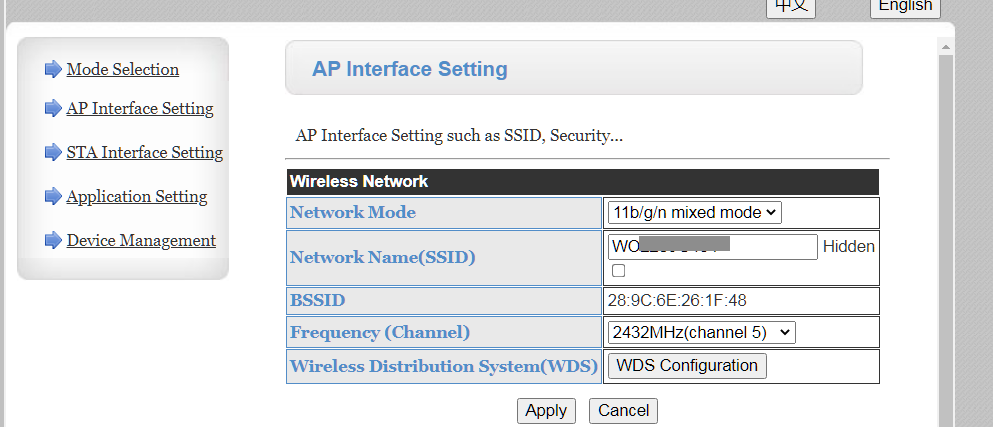
To be clear hiding the SSID is not the same as disabling it/switching it off and absolutely not enough for security. If you update the firmware it becomes possible to disable the Access Point altogether whilst connected to your WiFi.
If you hide it then not only is it still possible to connect but it will still be adding to any local WiFi congestion. If you do opt to just hide it then you must also add a password for security. Being hidden does not prevent clients from connecting, even if you do not know the SSID in advance.