Grid Voltage Fault - Bat9.5 - Lower Voltages

38 comments started 2023-09-17 last 2023-10-21
GivEnergy ProductsAC CoupledBattery
R
#1 Rich31k

Had my PV and battery (AC Coupled Inverter) system installed a month ago, and the battery/inverter hasn’t worked properly.

First problem was the battery only working as around 5kWh. A helpful engineer eventually visited and changed the firmware/BMS which fixed the capacity problem.

However, since then I’ve been getting regular grid voltage faults that won’t clear. National Grid came out and checked at the mains fuse and the voltage was not out of bounds at around 246V.

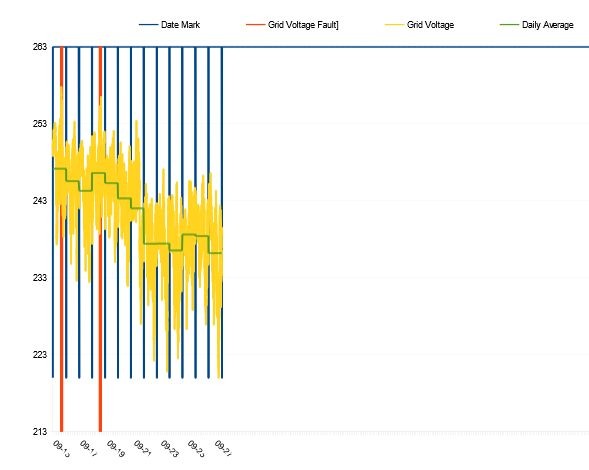
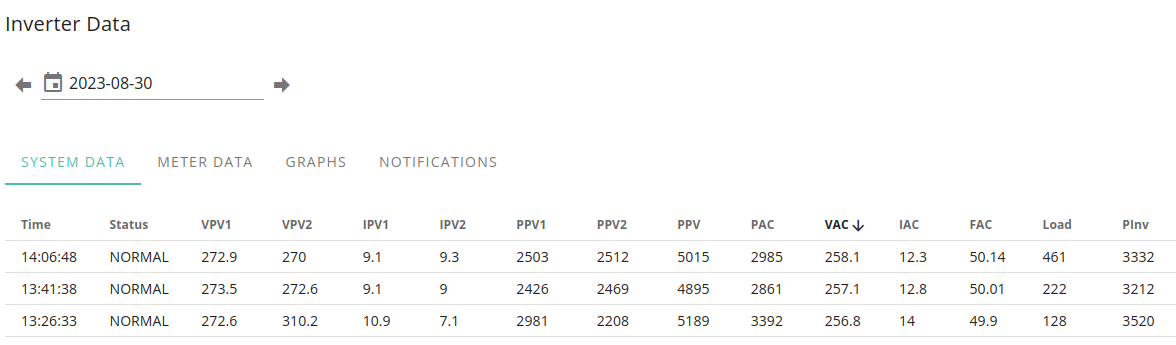
The last few grid voltage faults came when the grid voltage wasn’t particularly high at the inverter. I’ve highlighted the times of the faults and voltages below.
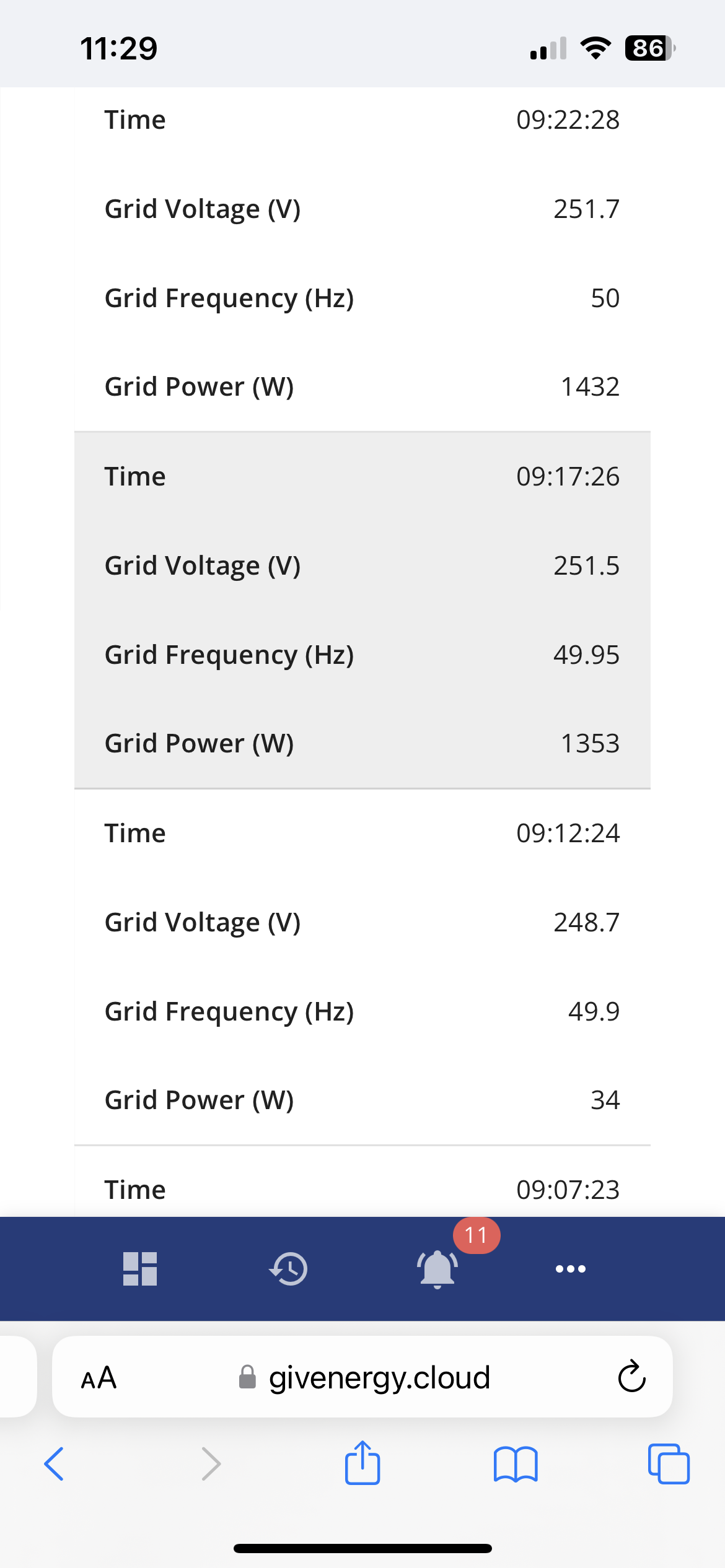
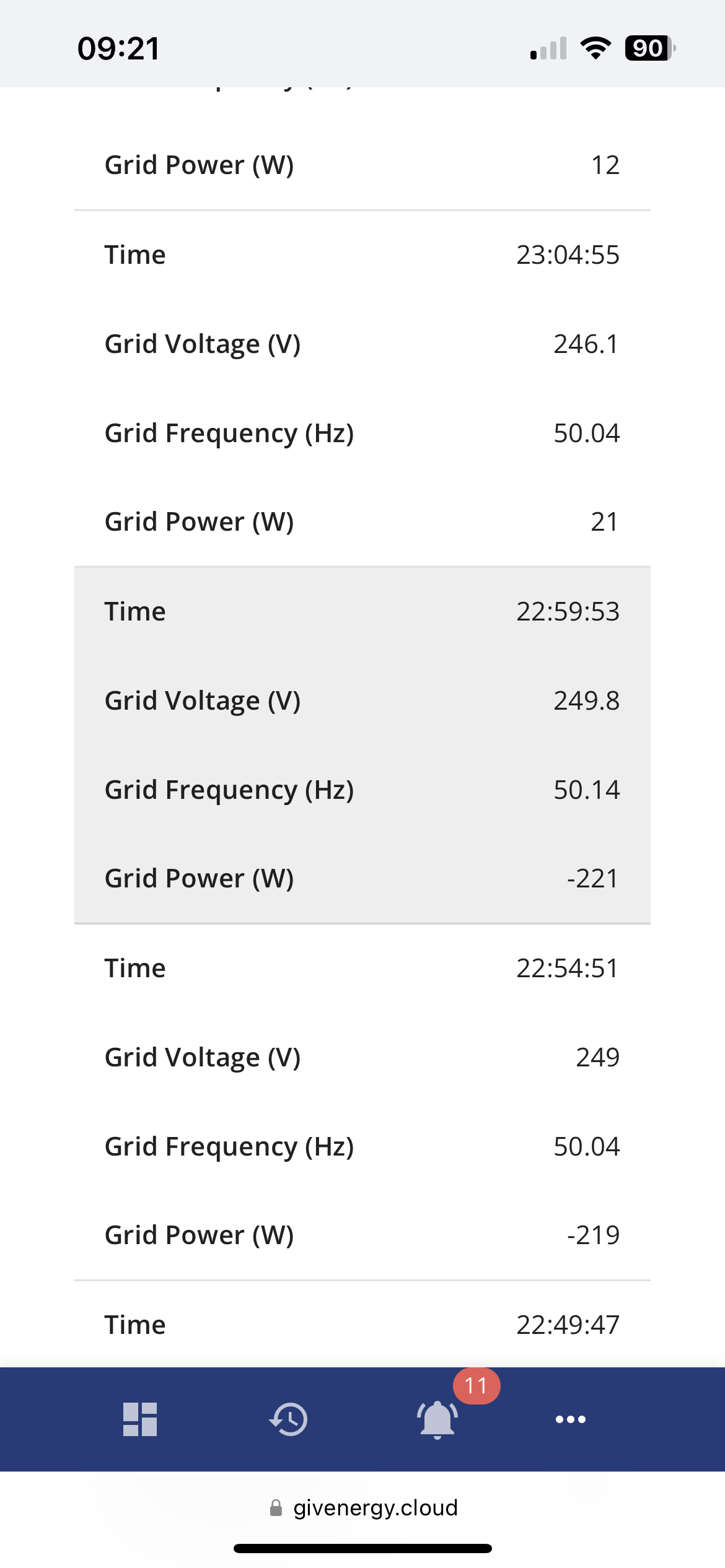
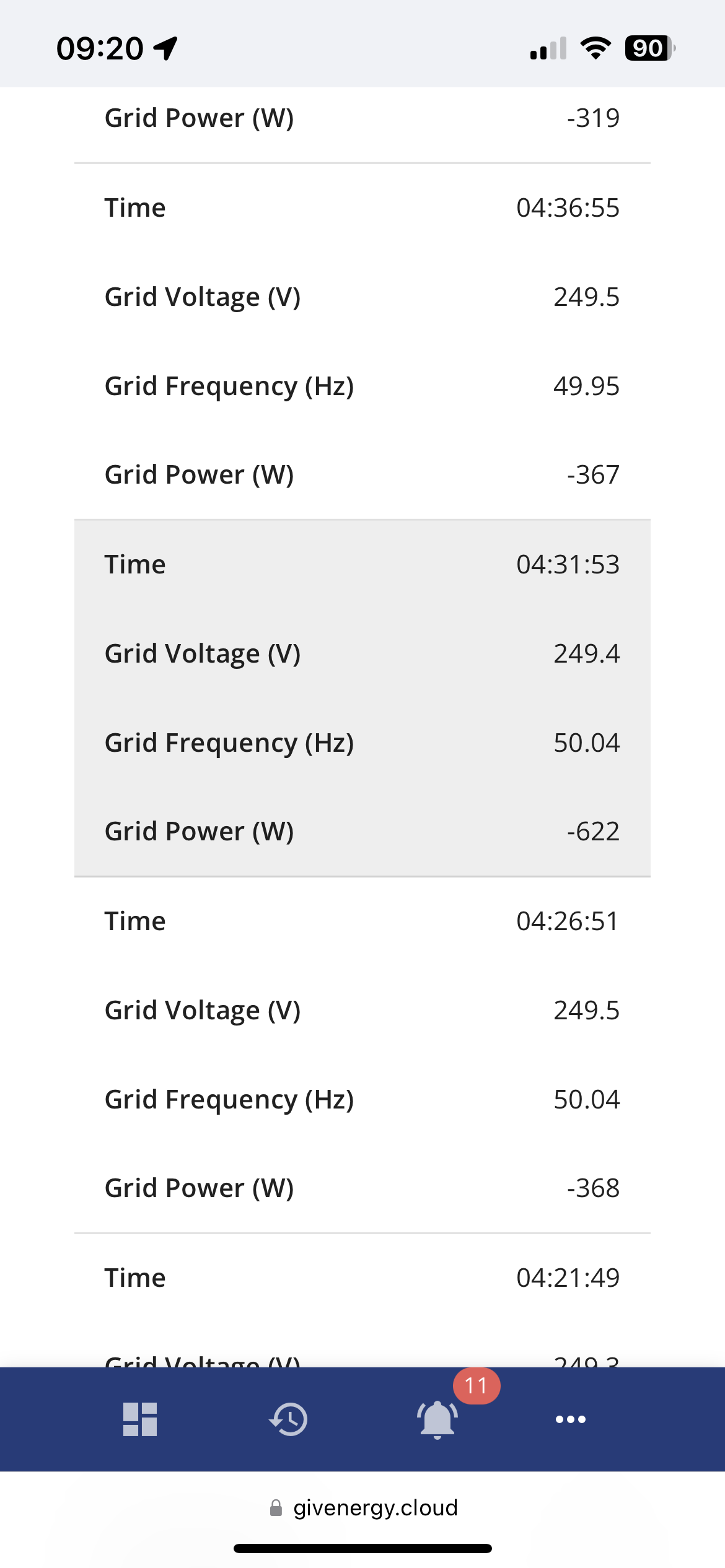
The inverter serial is CE2231G465.

Has anyone else experienced similar? Any ideas what I can do? Does anyone know what the maximum grid voltage is for GE inverters in the UK?

Thanks

L
#2 L174559

Hi Just to be clear, have you got a Gen 3 inverter and is the battery tripping out?

If not what is your grid fault?

R
#3 Rich31k

L174559 it’s the AC coupled inverter. Used alongside a SolarEdge 8kW inverter.

The inverter goes offline and the battery goes with it. The fault name on the inverter is Grid Voltage Fault. It doesn’t trip anything at the consumer unit.

It might be a DNO issue, but it seems to be tripping when voltages read lower than 250v+ sometimes.

K
#4 kram

8kW AC of solar is pretty chunky. Does the alleged spike correspond with bright days with high generation.

R
#5 Rich31k

kram

It was yesterday, but today is pretty overcast. There is quite a bit of solar around here though. I think my installer is going to try to get the DNO involved.

Maybe a voltage optimiser would sort it out

T
#6 TX200

Contact the DNO yourself. They can put a measuring device on the mains to see what it's up to.

As for voltage optimisers, think they're hocum?

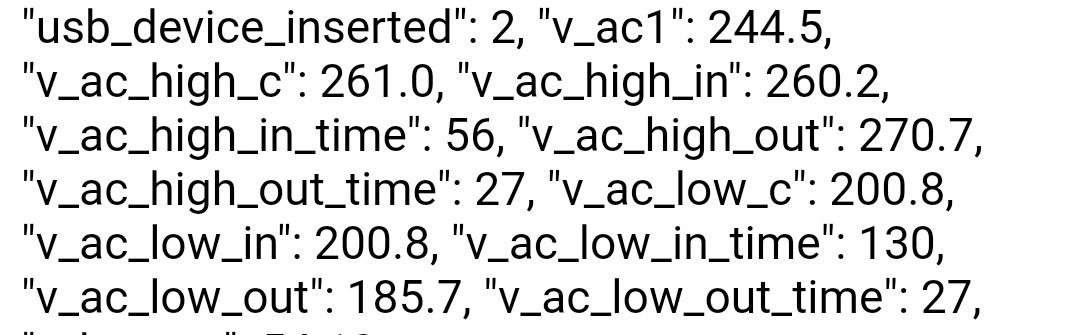
S
#7 stevelewis

TX200 @Rich31k Voltage optimisers shouldn't be used to "fix" a grid voltage error, they just make the problem worse for everyone else and bypass an important safety device in the inverter.

G
#8 geoffreycoan

Have a look at the Givenergy portal, at around the times the voltage errors are being reported, and have a look at what the voltage is, you can see it on one of the inverter tabs.

Chances are that its going above 253v, I think its usually somewhere around 258v before it alerts. The DNO doing a spot check isn’t sufficient because the voltage will go up and down all the time and if its going above 253v even occasionally then its still a problem.

I raised it direct with my DNO, phoned their emergency helpline number, reported it as an electrical problem and someone was round within a couple of hours. So suggest you do this on a sunny day when you are seeing high voltage. Show them the portal voltage logs and how they are exceeding the limits. Most of my peaks were on sunny days but I sometimes got them at weird hours of the night, so clearly not a PV issue.

They will probably check your local supply, the pole that feeds your house, etc, and then put a monitor on your house for a week. Annoyingly you have to have any PV turned off when the monitoring is done.
Then they’ll take the monitor off and analyse it, and in my case they agreed it was over limit and then on Friday just gone they turned the power off for the whole street whilst they adjusted the transformer tap to rectify the issue.

R
#9 Rich31k

geoffreycoan

Thank you. It sounds like I’ll go through a similar process then. I understand National Grid are going to install a logger and monitor it for a week.

Edit: just had a call from National Grid and the logger will be fitted tomorrow morning

S
#10 SilverArt

Rich31k Out of interest does the third party inverter complain or does it just carry on working?.

L
#11 L174559

Rich31k Hi just out of interest where about in the UK are you? When the fault happened did the battery trip out of the circuit?

R
#12 Rich31k

SilverArt

It just carried on working

R
#13 Rich31k

L174559

I'm in the East Midlands. The battery didn't trip out.

S
#14 SilverArt

Rich31k It just carried on working

That's what confuses me. As these are all appropriately certified products, in theory 'looking' at the same source data, 'grid voltage' .albeit possibly at slightly different times, Why does the AC3 error when the inverter doesn't, (I do see odd instances where they both 'see a problem' but not very often.
It strikes me that the AC3 could be crying wolf a bit too often, and that doesn't help in discussions with dno,s. Could it be detuned to make it less sensitive for example. Mine can lock up for ages until I spot it and give it a reset meaning that the battery is not charging when it should be.

Does the BMS error that appears at the same time tell anyone something useful? or is it a by product of the error being flagged

The most successful high solar period I had was where the grid voltage was two tapping levels below 253V but I get the distinct impression that the dno's don't want to do that. as standard.

R
#15 Rich31k

SilverArt I had a similar thought. There seems to be a grey area between where the AC3 shuts down and where National Grid will act on high voltage.

On a positive note, the person who fitted the logger mentioned that he was going to the transformer and substation to check the voltages. A couple of hours after he left here, the grid voltages dropped a bit, and have been lower since (only had one grid voltage fault). It might just be that the weather has been terrible though.

Regarding BMS - I had a problem with the battery from the start. The GE person who visited changed the BMS, which fixed the battery, but then the grid voltage faults started. Not sure if they were related. We'll see once we have some good weather. I haven't had any BMS errors with the grid voltage faults.

S
#16 SilverArt

Rich31k I haven't had any BMS errors with the grid voltage faults.

That's interesting, every time I get a "Grid Voltage Fault" notification I get a BMS error in the inverter log. It always used to be '536870912' but changed to '8192' on 21st August and has stayed as that whenever there is a "Grid Voltage Fault" since.

V
#17 Vestas

Off topic but back in the (early) 00s you used to be able to claim daily compensation if the 230V supply was out of limits and you'd reported it to the DNO. Doesn't appear to be the case now although you can claim for damages caused by the supply being out of limits on a regular basis.

I got a fair few quid from Western Power back then as I got email warnings from a (professional) UPS unit every time the supply went over 253V - which was multiple times a day. They couldn't fix it for over 6 months as the relevant substation was due to be replaced so I just put a claim in every calendar month until it was. Didn't actually bother any appliances other than the UPS - oh and those hideous CFL lightbulbs which went pop on a regular basis which in retrospect made perfect sense.

I can't help feeling they're trying to get their money back from me by bumping standing charges up to stupid levels 😉

#18 Windy Miller

After I contacted the DNO about the occasional Grid overvoltage conditions (I had many notifications from the inverter in June and 2 lockouts needing a manual restart) where my supply was confirmed as 248v I contacted Givenergy who admitted that their overvoltage points might be a bit too low but that it needed a new firmware to set higher limits. So I'm waiting for that. My Solaredge inverter is quite happy at 258v when generating 6kw into the grid but the GE inverter isn't happy and trips. Problem is now rare as the sun is lower in the sky and our peaks are around 4.5kw. Hopefully by next June the new firmware will have been released.

R
#19 Rich31k

Windy Miller

I fear the same outcome. I’ll find out and update next week. Getting these faults most days now, particularly with a bit of sunshine. But the Solar Edge inverter is fine.

If it can’t be fixed/the grid don’t lower the voltage, I’m likely to ask our installer to put a different brand of battery in (probably solar edge) and pay the difference.

R
#20 Rich31k

Right - I have an update.

The logger has been taken away, and National Grid have confirmed that the voltage is going higher than 253V but only for very short spikes. They can't tap the transformer, as they think it'll cause houses closer to the transformer to go undervoltage.

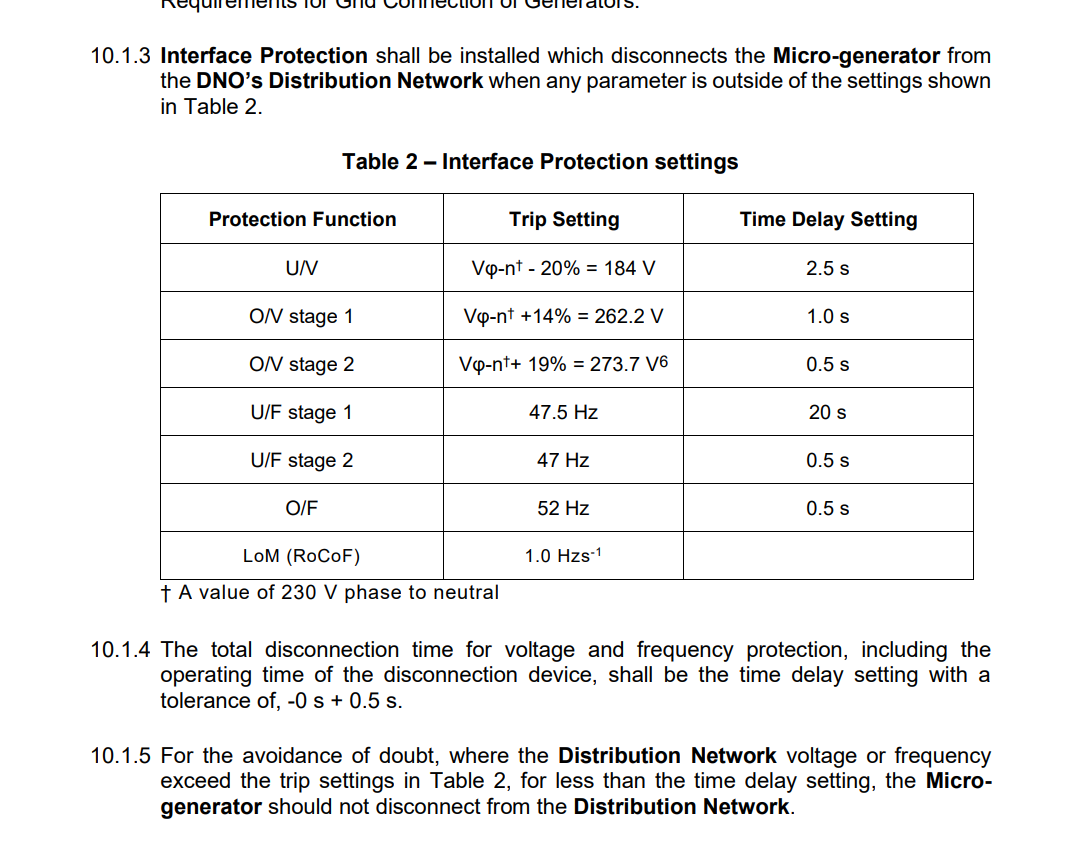
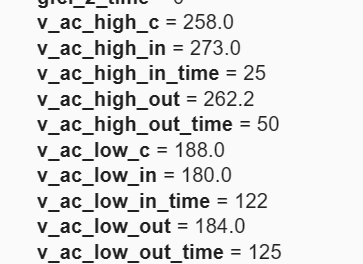
However, the person I spoke to at National Grid said that to comply with G98, the GivEnergy Inverter should be able to operate normally up to 262.2V without disconnecting. It must disconnect within 1 second over 262.2V and within 0.5 seconds over 273.7V. Presently the GivEnergy Inverter disconnects over 253V.

Presumably my Solar Edge inverter complies with G98 which is why it works normally. I've had a look at the Engineering Recommendation G98 and it seems pretty clear that National Grid are correct. Although I'm happy to be corrected.

So it sounds like GivEnergy's AC Coupled Inverter doesn't work in accordance with G98 as it stands. National Grid have been in touch with GivEnergy about it, but I can't imagine its going to be a quick fix.

I'm pretty novice in all this, so happy to hear alternative takes on G98 or inverter operation.

Here's the extract from G98 regarding disconnection for high voltage.

#21 hoggy

Rich31k I've been through this before: https://community.givenergy.cloud/d/1703-exporting-to-the-grid-not-charging-the-battery/55
It depends entirely on what the DNO are classing as "very short spikes" as you've only got seconds really. Its to do with ride through of very very short duration voltage swings.
That same G98 doc should have more about the timings on page 62 - "A1.2.2 Over/Under Voltage"
You can see on that thread I've pulled the specific settings from the inverter using GivTCP which you can do as well to check if you have it installed.

S
#22 SilverArt

Rich31k That's good feedback from the National Grid, interesting that they are feeding back to Giv.
Perhaps to show the challenge they have: They have actually 'fixed; it for me, (Mind you, haven't really had enough sun to really show it) I don't know whether this is by mistake, short term fix for something else,
or conveniently fortuitous.
I've attached how I track the problem and the 'tapping' change is rather obvious, however it does show the challenge the dno has, yesterday the grid voltage went down to 220V according to the AC3 at 18:36... and I know that the AC3 reads a little high compared to my meter.
I just hope that Giv. can desensitise the AC3 before next year.

R
#23 Rich31k

SilverArt
I’m glad to hear your problem seems to be solved.

But of an update. Apparently my inverter was incorrectly set to shut down at anything over 253V rather than 262V. I’ve been told it should be fixed by the end of Monday.

R
#24 Rich31k

hoggy

This looks like a very useful tool. Apologies if I’ve missed it on the forum, but is there a guide to setting it up anywhere?

S
#25 SilverArt

Rich31k incorrectly set to shut down at anything over 253V rather than 262V.

That 'may' explain why you didn't get the BMS errors that I saw at the same time as the 'Grid Voltage Errors' so it will be interesting to see if you still get a problem on a very sunny day.

S
#26 SilverArt

Rich31k Wouldn't it be good if critical settings like this were shown on the 'Software' page of the Inverter Tab just for reference? (Or on their own tab in 'My Inverter')

R
#27 Rubikcube

In my opinion, the message "Grid Voltage Fault" does NOT indicate a problem with the grid voltage.

I base this on 3 things:
1) The original post said the grid voltage wasn't high when the messages occurred.
2) Grid voltage at my inverter has often exceeded 253V and I have never had this message
3) Short periods of over-voltage are quite common, and there would be many more posts here about this.

I don't know what the message means, but my best guess is that it occurs when you have two (or more) energy meters (em115/gem120) and the voltage reading from the meters differs significantly.

In a standard AC3 installation the 2 voltages should show on the portal as VPV1 and VAC. Does the message occur when these readings differ? A difference would indicate a wiring error in the consumer unit(s).

G
#28 geoffreycoan

Rubikcube grid voltage fault on my gen 1 hybrid did correspond to high voltage, could see it under the VAC column on the portal. I couldn’t see exactly what the threshold was but somewhere around 258v. I used to see spikes up to 263v and they’d correspond to this error and the inverter shutting off for a period of time.
Sometimes I had to power the inverter off to get it to start working again which made me feel that the “voltage has now dropped” logic was at a lower threshold tha the “voltage too high” test

R
#29 Rubikcube

I revise my opinion, the message MAY NOT indicate a problem with grid voltage. This issue seems more complex than it first appears.

Where is this "Grid Voltage Fault" message seen? Can anyone post a screenshot image of the "Grid Voltage Fault" message?

#31 hoggy

Rubikcube guess it depends on what your OV thresholds are set to:

#32 hoggy

Rich31k it's just GivTCP, if you search on here there's a bunch of ways of getting it to work, either standalone or via Home Assistant.

R
#33 Rubikcube

hoggy

My inverter has v_ac_high_in = 262.0V and v_ac_high_out =274.0V which differs from yours.

I would have expected all the inverters to leave the factory with the same settings, but maybe not.

Then the solution to "Grid Voltage Fault" is to call GE and get the settings corrected, as per this discussion
https://community.givenergy.cloud/d/769-grid-voltage-fault/9

G
#34 geoffreycoan

for others curious in their own inverter voltage settings, you need to install mqtt explorer add on (custom repository)

https://community.home-assistant.io/t/addon-mqtt-explorer-new-version/603739

My settings (gen 1 5kW hybrid inverter) are the same as @hoggy

Since I reported high voltage errors, the DNO fitted a monitor for a week, and they agreed there was an issue and needed to do work on the transformer, I’ve just checked and in 3 weeks not a single high voltage error

S
#35 SilverArt

Rubikcube Could these be displayed by your app?... please.

R
#36 Rubikcube

SilverArt I will look into doing that. Although high voltage issues are more of a summer thing, so not urgent.

R
#37 Rich31k

hoggy

Right - Home Assistant up and running. My OV thresholds are a bit different.

It's a shame I can't see what they were before GE corrected them. No problems to report since they were fixed.