Unexpected Battery Consumption: Need Assistance

49 comments started 2025-02-27 last 2025-04-08
CommisioningHome AutomationGivEnergy ProductsHybridBatteryHome Assistant
O
#1 olakunleoj

I think something is wrong. Either my app setup is incorrect, my installation was faulty, or my battery is not functioning properly. Here’s why I think so:

The installation was completed on February 25, 2025.
I let the inverter run throughout the 25th.
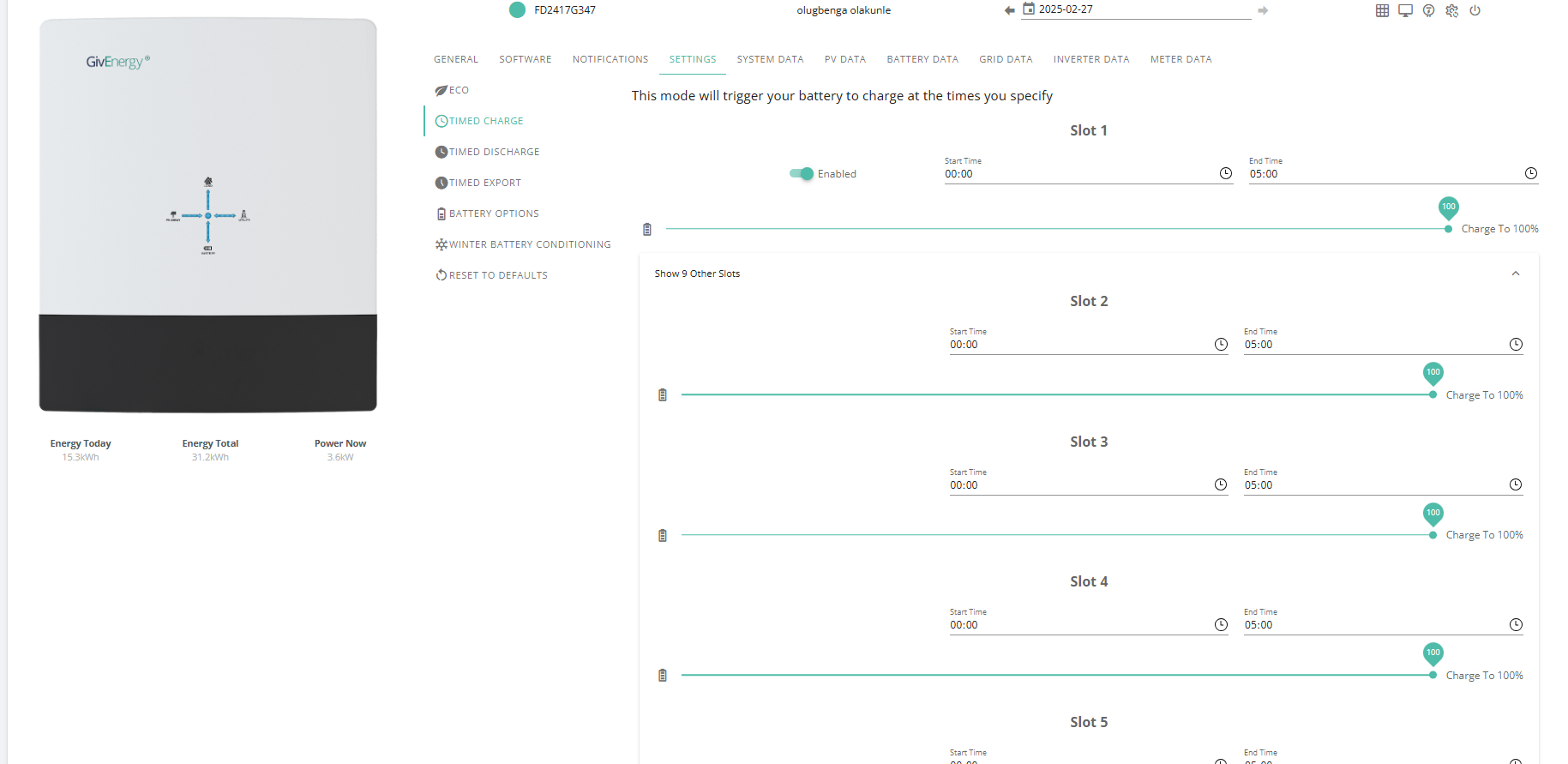
I enabled the feature to charge the battery from 00:00 to 05:00 on the 27th.
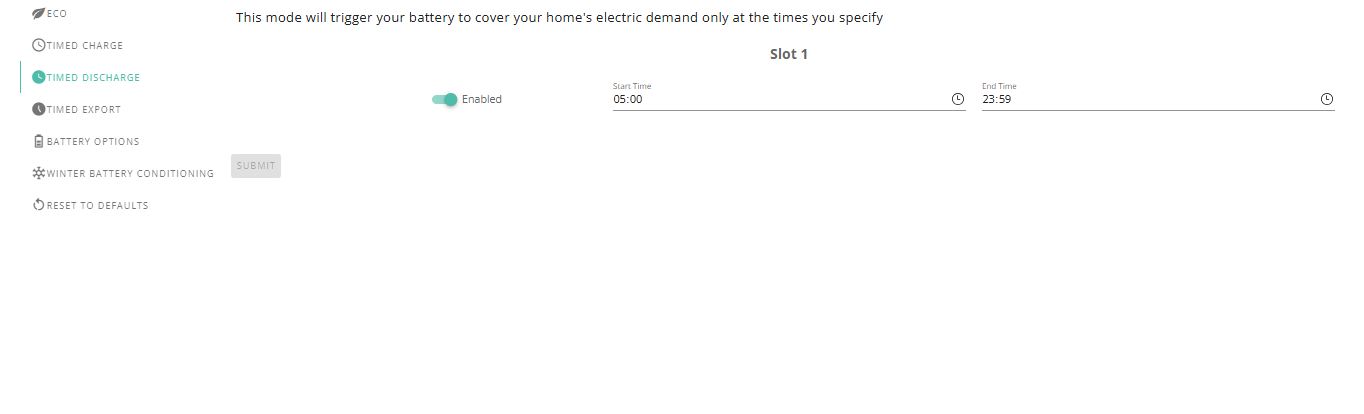
I also enabled the feature to discharge the battery from 05:00 to 23:59 on the 27th.
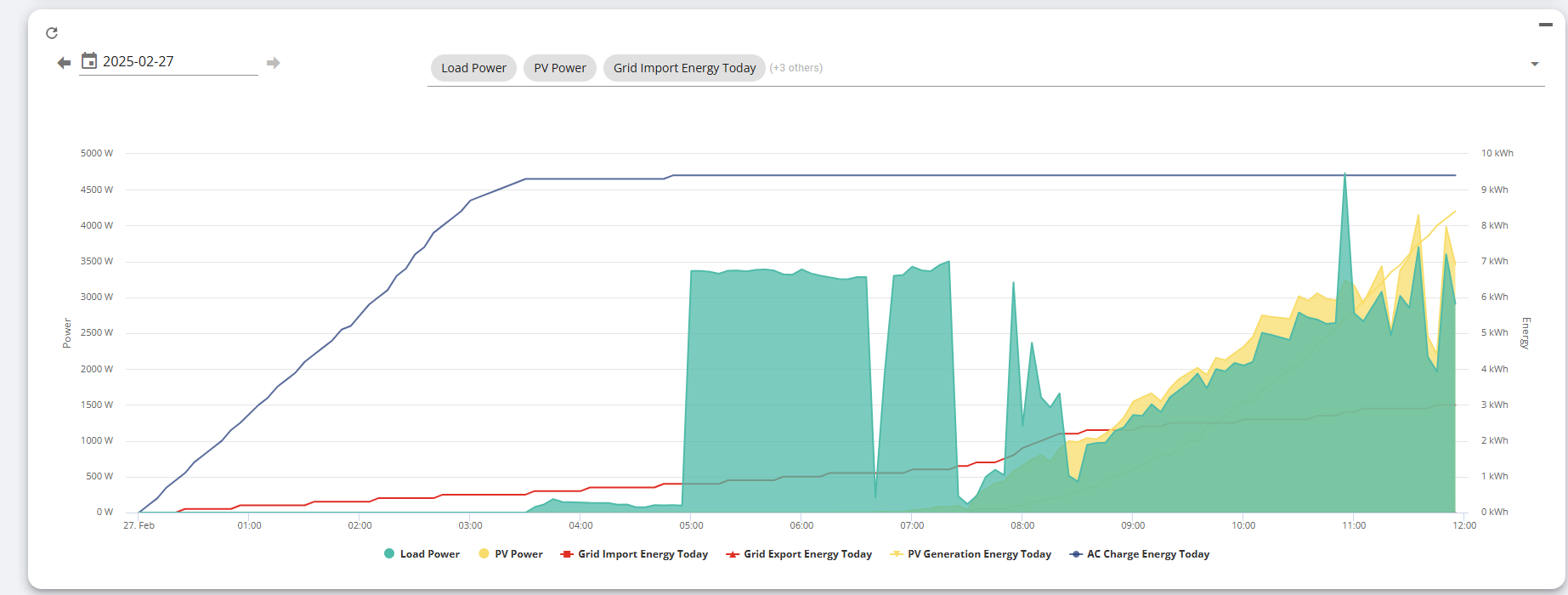
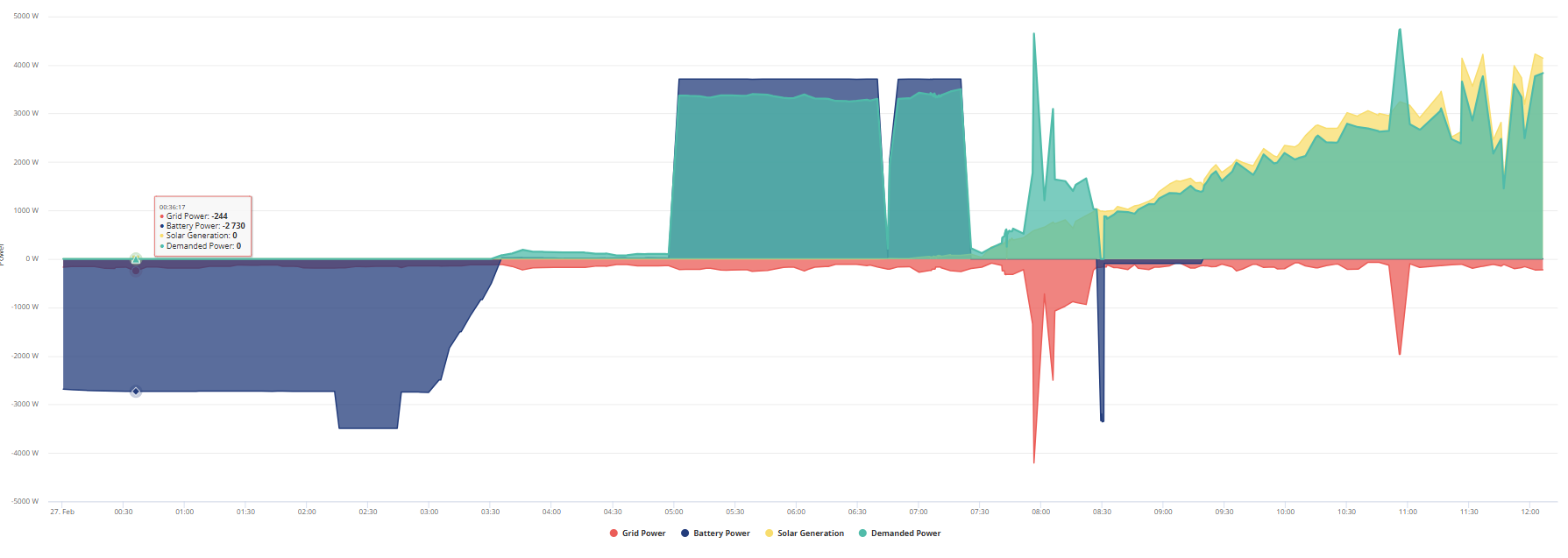
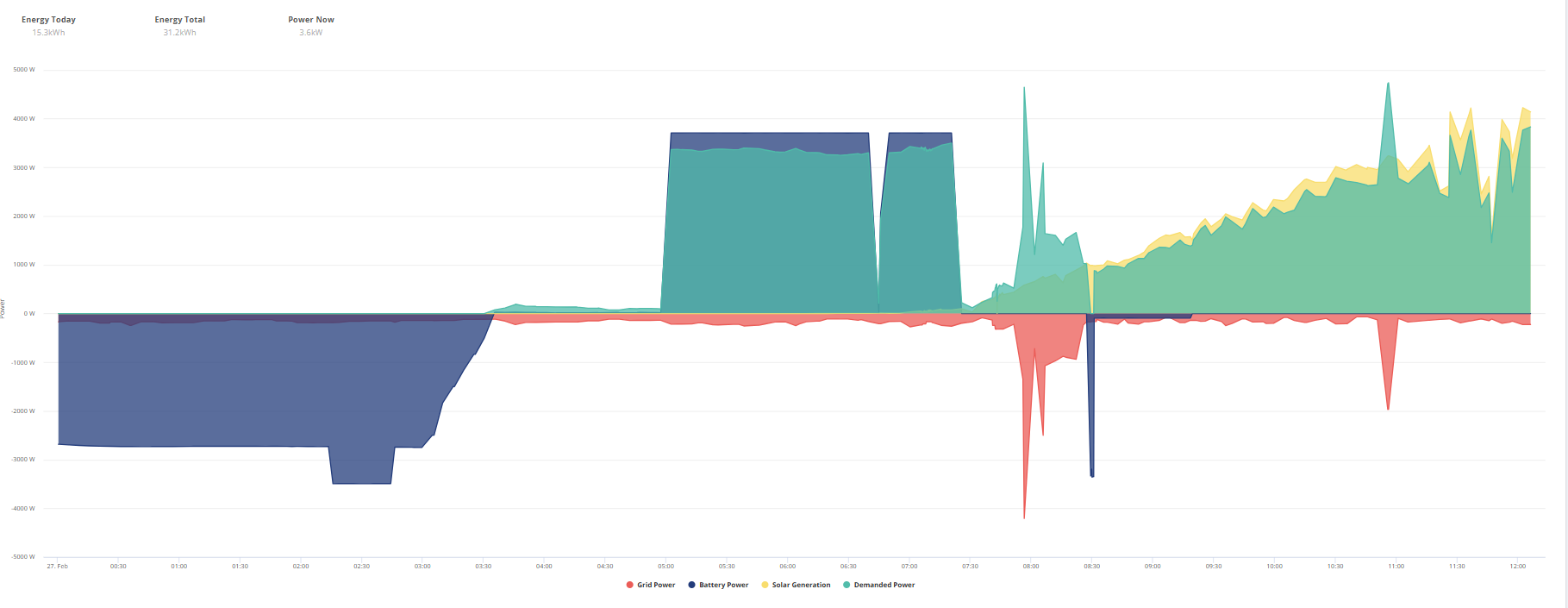
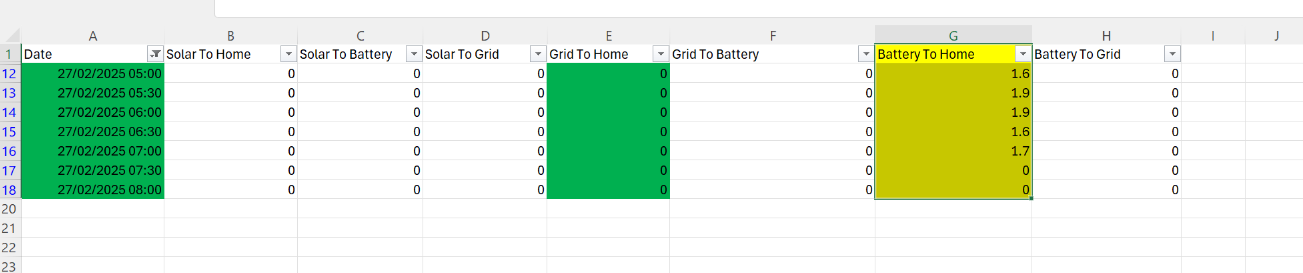
On the morning of the 27th, I woke up at 9 AM and discovered that my battery had fully charged overnight but discharged within 3 hours. I compared the data from the grid to home on the 26th and the battery to home on the 27th. I noticed that my consumption was higher when using the battery between 05:00 and 08:00 compared to when I powered my home from the grid.
All other variables are constant.
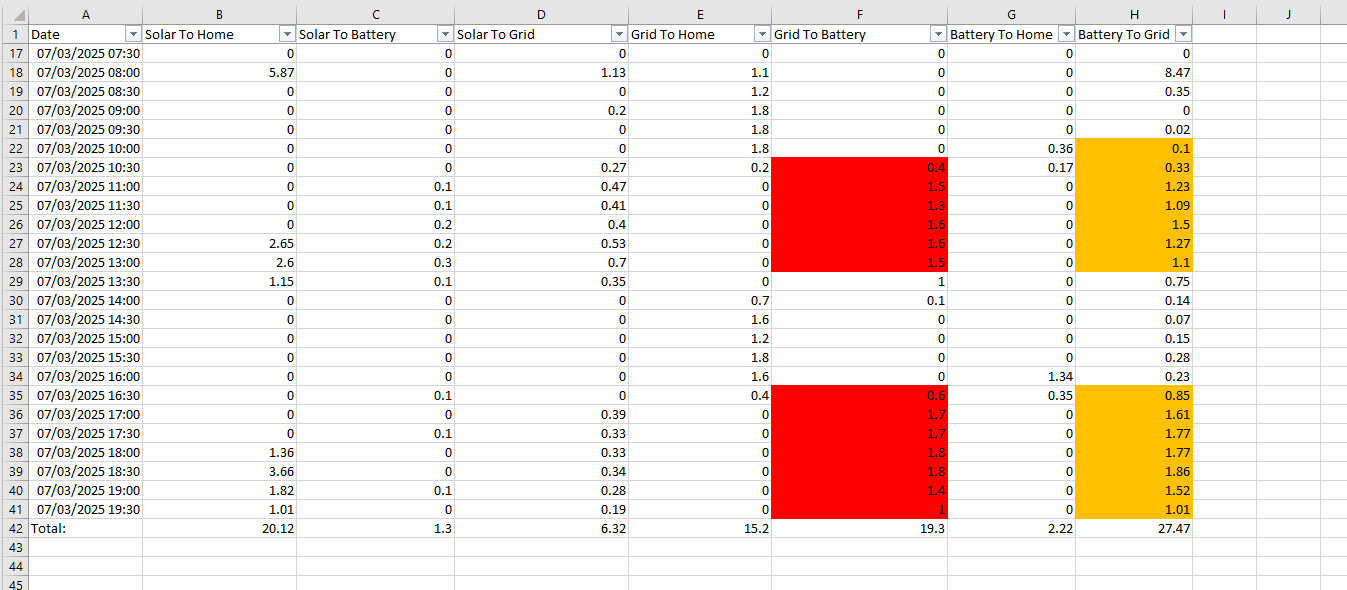
This seems strange to me, and I need someone to help explain how this works. I have attached images of the two data sets.

H
#2 Hopeful

Are you able to post a picture of the graph from the Giv Energy Portal? When you say you enabled discharge 05:00 - 23:59 I suspect you did a timed discharge which would have sent the excess to the grid (although its not showing that on the spreadsheet!)
Normal practice would be to have the ECO mode turned on to allow the battery to meet house demand if there is not enough solar. Charging sounds fine.

H
#3 Hopeful

Also some more detail on your setup would be useful, do you have multiple batteries, a car charger, which GE kit etc

O
#4 olakunleoj

Hopeful
I have one 9.5 kwh and I have a Hive car charger, the charger also set up to charged between 00:00 to 05:00

O
#5 olakunleoj

Hopeful
which graph you want to see?

O
#6 olakunleoj

Charge setting

O
#7 olakunleoj

discharge setting

D
#8 DD

Hopeful I suspect you did a timed discharge which would have sent the excess to the grid

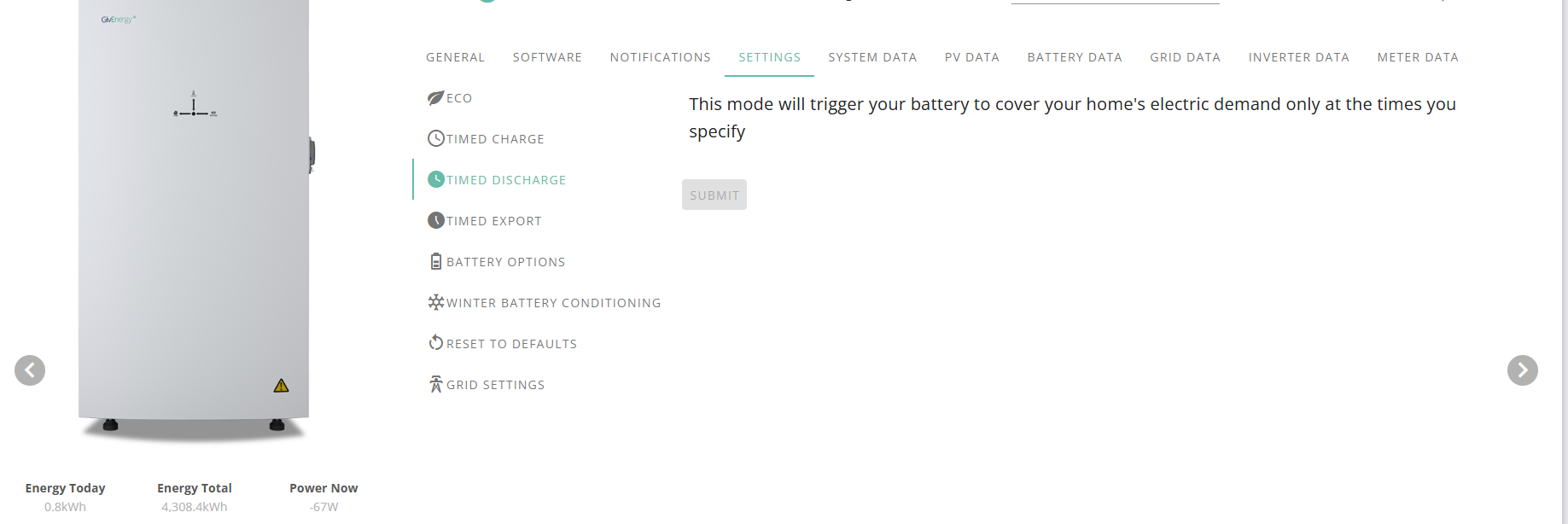
No, a timed discharge just covers the house consumption ; it's timed export that sends power to grid.

A timed discharge should be harmless here, but unnecessary - it's just inhibiting any battery discharge overnight, but having a timed charge configured for that period is sufficient to do that.

D
#9 DD

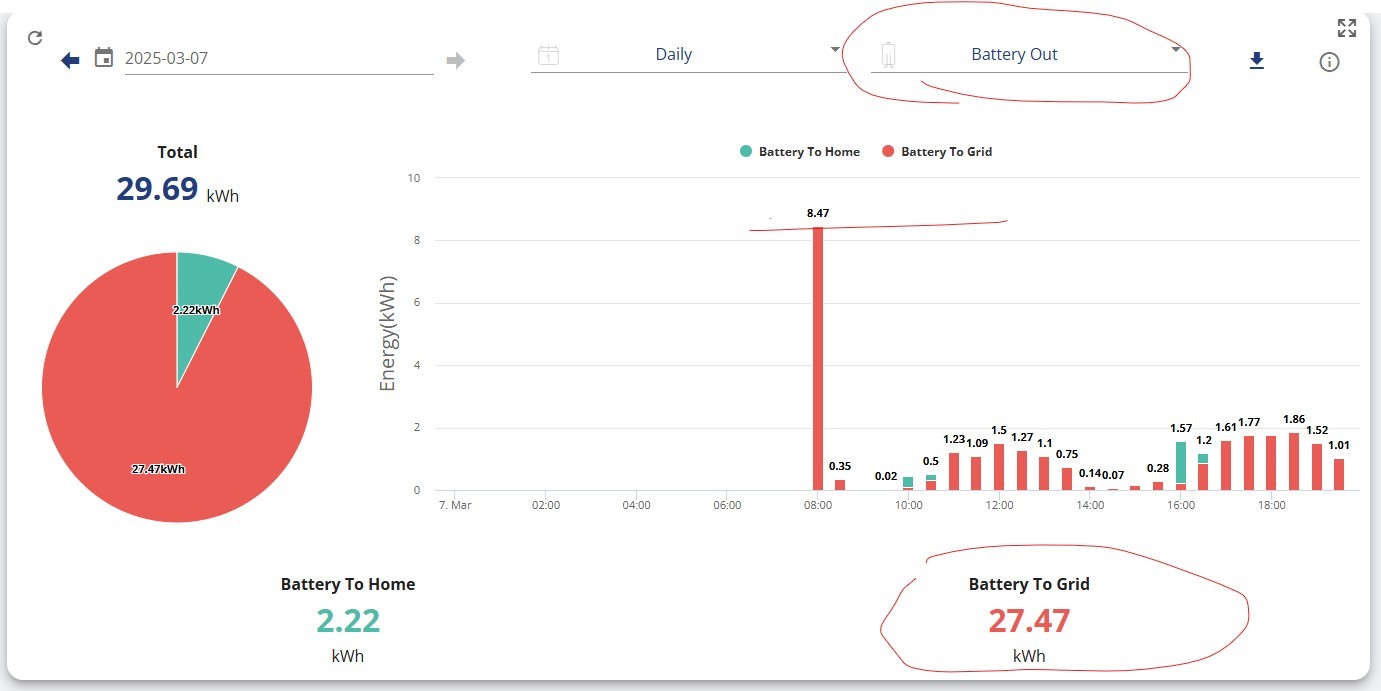
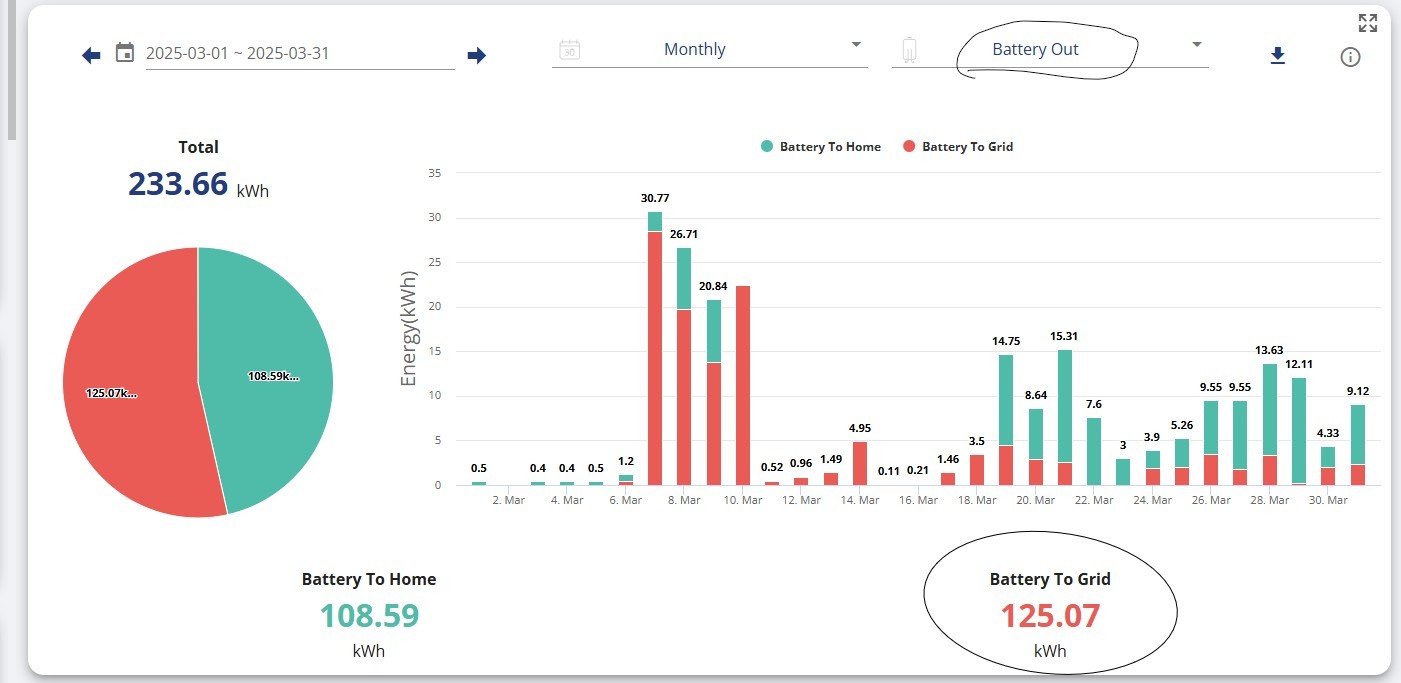
olakunleoj On that graph, the home consumption exactly tracks the solar generation, which is surely too much of a coincidence, unless you have some specific device such as an Eddi which consumes excess solar.

My hypothesis is to get your installer to check the CT clamp. The house consumption is not measured directly - it is inferred from what the inverter is doing and what the grid is doing. The inverter is turning all the solar into AC, but it's not seeing it going out onto the grid, and therefore it infers that it is being consumed.

This could also explain the discharge - the inverter turns a little bit of battery power into AC to cover the consumption. It still sees a little import, so does a little more. It continues increasing the generation, but never sees it going out onto the grid, so again assumes that it is being consumed, and so it continues to generate power.

Even while it was charging from the grid, it was showing very little grid activity.

(It is measuring some import around 8am, however, which is not consistent with this hypothesis.)

O
#10 olakunleoj

Thanks DD
I purchased this system from EON Energy, but the installer didn't seem very knowledgeable about how it works. They appeared to only understand the installation process, and most of my questions during the installation were not answered satisfactorily. I have already emailed support@givnergy.com. Any advice on what I can do next would be greatly appreciated.

D
#11 DD

olakunleoj Unfortunately, the GE model is that the installer is the first port of call.

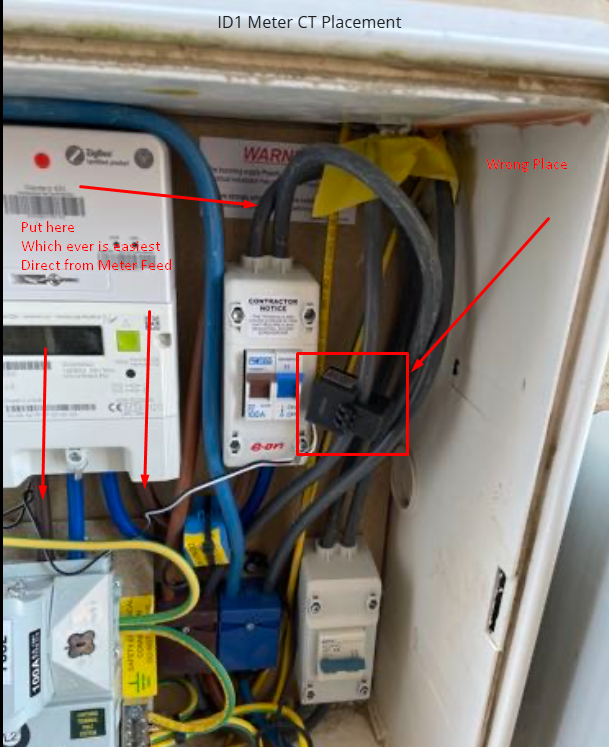
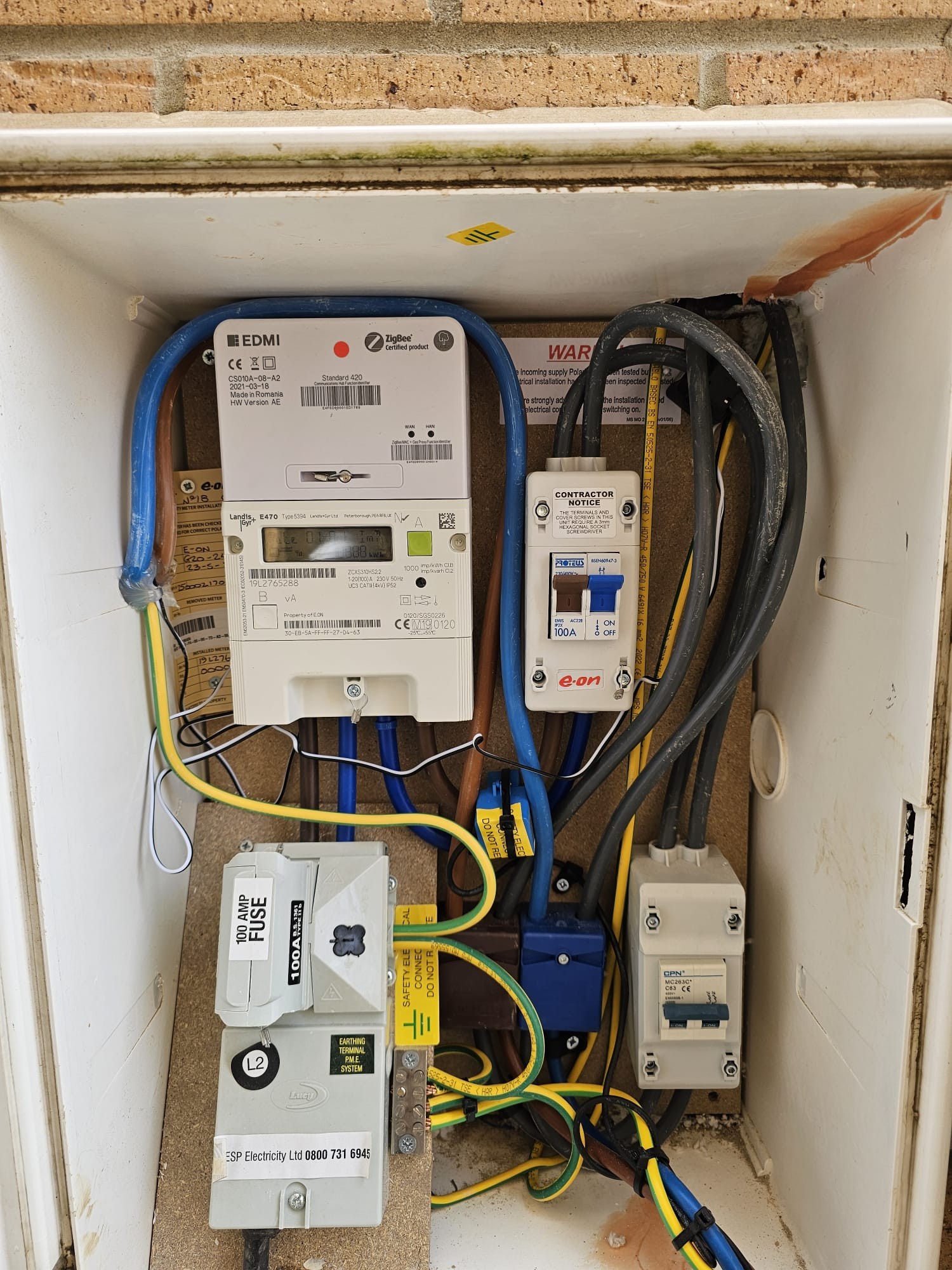
Not to worry, it's not too hard to check for yourself. A CT clamp is a little block of plastic that is clipped around an AC cable.
https://sunsynk.freshdesk.com/support/solutions/articles/103000285210-ct-clamp-guide
(though GE ones tend to be black).

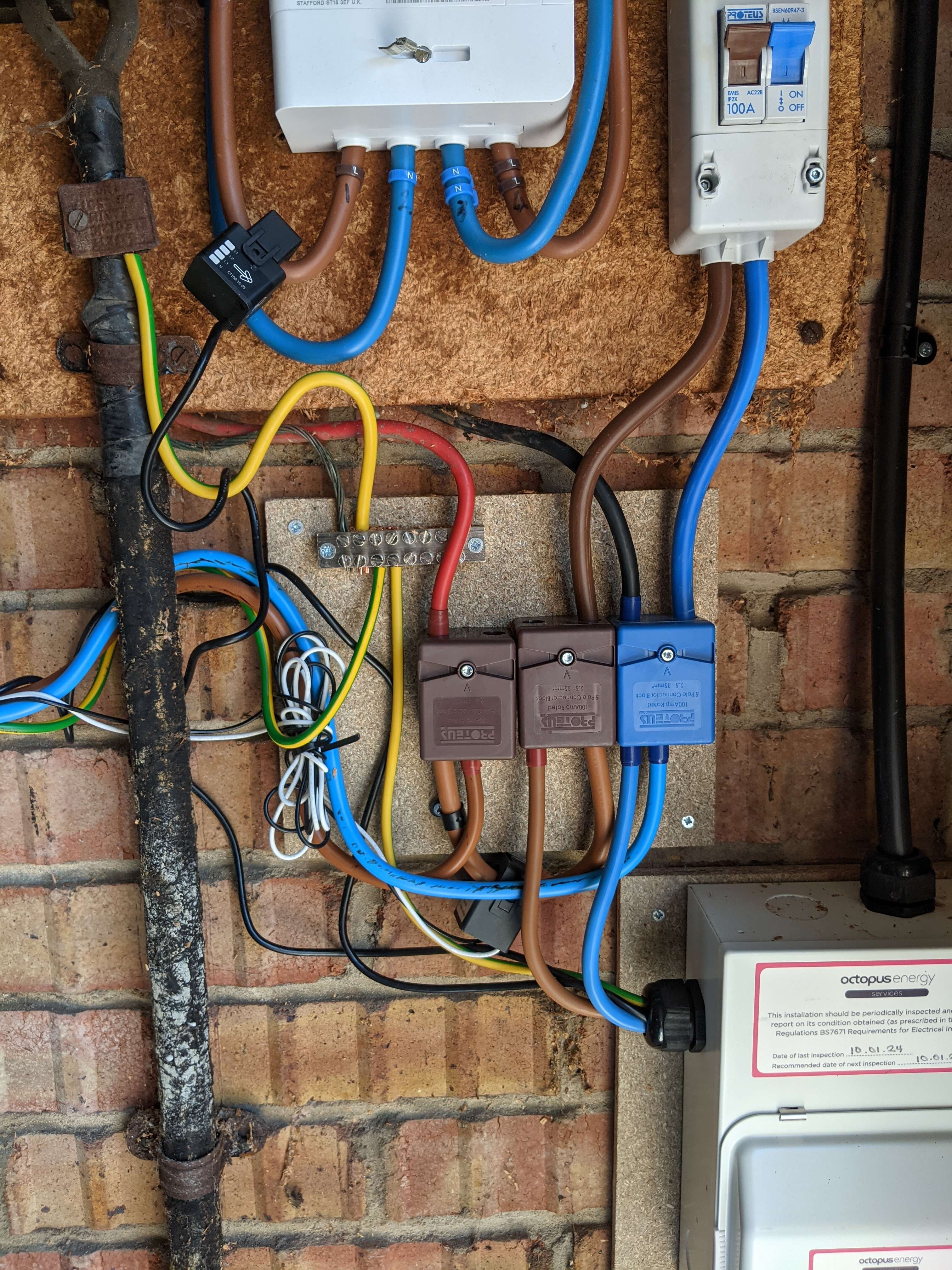
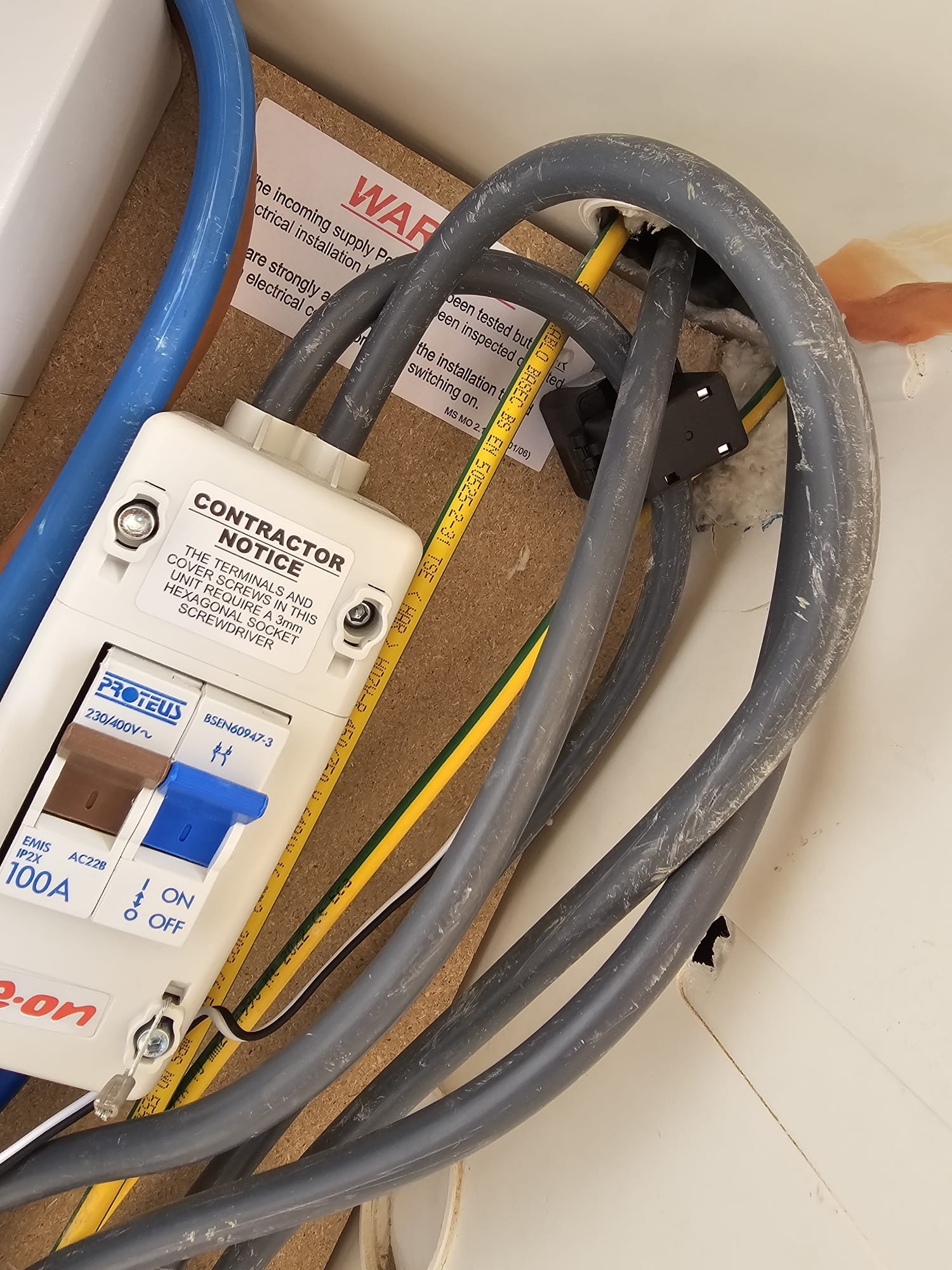
My installation looks like this:

with two CT clamps (I have a couple more these days) - one at the top left, on the cable into the meter, and another under the two brown blocks in the middle. You just need to check that it is securely fastened around the cable.

The thin wires should lead into a mini consumer unit which contains a little meter, perhaps like this:
https://midsummerwholesale.co.uk/buy/giv-energy/giv-meter-em115
That makes the raw data from the CT clamp available to the inverter. It should also be glowing and cycling through various numbers.

J
#12 Jellybaby

DD Both send power to the grid, one just covers house load before and after the set time and the other holds the battery until that time period.

Unless you want to export DO NOT set up any discharge times at all.

J
#13 Jellybaby

olakunleoj Do not under any circumstances set a discharge time, the battery will automatically discharge to home after the charge period has ended.

The ONLY reason to set a discharge is to export to grid.

Timed Discharge = Battery will cover home before AND after the time set if there is any battery left.
Timed Export = Battery will NOT cover the home at all and will start discharging when the time you specified is reached.

Regarding the solar + home usage part of teh graph that as some have said seems like a ct clamp issue that installer will have to rectify and if they don't know how then id lodge a complain against who hired them for hiring people to install systems they do not know anything about.

Edit
Something is definitely up as well as its saying home consumption is a lot when discharging to grid, this is how it should look, IF I CAN GET THIS STUPID IMAGE TO PASTE IN, forums are as unreliable as the AIO.

H
#14 Hopeful

Jellybaby Exactly, glad we are on the same page. Essentially Timed discharge leave ECO on but forces discharge from the battery at the rate set, anything not being consumed goes to the grid, anything left at the end of the timeslot is sent to the house as required. Timed export does the same but turns off ECO so outside the export time slot the battery would no longer supply the house.

totally agree the CT clamps not right!

D
#15 DD

Jellybaby Both send power to the grid, one just covers house load before and after the set time and the other holds the battery until that time period.

No... that's how it used to behave. They changed it a while back so that the timed discharge, as documented, holds the battery charge outside of the timed period. (Implemented as a timed pause-discharge.)

Jellybaby Timed Export = Battery will NOT cover the home at all and will start discharging when the time you specified is reached.

No. Timed export will cover home outside the timed period (as long as you leave eco flag on). (On old gen-1 systems, it would turn off eco flag.)

It changed in summer last year:
https://community.givenergy.cloud/d/4569-givenergy-messing-with-timed-pause-timed-discharge-settings

https://community.givenergy.cloud/d/4549-timed-export-settings describes how it used to work. But please disregard the advice in there - it has all changed now. It was the user interface that turned off the eco flag when configuring a timed export - when using the lower-level remote control interface, you could configure timed export without chaging the eco flag.

(I guess it's possible AIO behaves the old way, but modern hybrids have definitely changed.)

G
#16 geoffreycoan

Regardless of all this discussion of modes, etc, olakunleoj you need to call Eon and get them to send an engineer to check over the system and explain to your satisfaction how to operate and control it. They are responsible for the installation, not GivEnergy.

GivEnergy will try to help but they will refer any such issues back to the installer, especially as its been installed only days ago

J
#17 Jellybaby

DD oh for the love of pete, why mess with timed discharge/export when ECO basically takes over house outside of charge slots.

I have not updated app in a very long time, I am on 3.3.6

P
#18 PaDav6

DD I had a similar issue with house matching solar and then nothing - when my system was installed. The inverter was set to the wrong type of CT meter in the invertor firmware. Required GE to change a register. Since then it has worked fine.

D
#19 DD

olakunleoj not sure if this is a useful suggestion... While waiting to resolve this, I wonder if reducing the max discharge rate might be helpful. Maybe even as low as 500W. Probably won't cover all your usage, but perhaps better than just quickly dumping it all to the grid.
And/or just to cancel the overnight charge for now, if it's just going to get dumped to the grid anyway.

O
#21 olakunleoj

I will disable the Timed Discharge and update you. I tried to record my interface before disabling it, but I was unable to upload the video here. I also noticed that the grid stopped supplying power to my home when the battery started charging.

If there is anyone who can help audit my installation and recommend the necessary adjustments, I would greatly appreciate it—even if it requires payment. I need this help because I am a novice and have little knowledge about electricity.
Videos link are below
https://drive.google.com/file/d/1AyRGtslvf-kvwiXENKZ0mQxAyQM_Nek6/view?usp=sharing
https://drive.google.com/file/d/1Wetvm5Ual4psb8PUOXorCbx8I4MjBXDt/view?usp=sharing

D
#22 DD

olakunleoj If there is anyone who can help audit my installation and recommend the necessary adjustments, I would greatly appreciate it—even if it requires payment

You've already paid EON to provide you with a working system - don't let them fob you off. Even if their installers are minimally trained, they should have a level of support engineers who do actually understand what they're doing.

C
#23 CW

Just jumping in, but one thing I did notice wtching the video is that you are set all the timed slots (on charge) to 00:00-05:00. You only need to set one of these and all the others should be rmoved/set to 00:00-00:00

Have you tried resetting to defaults and seeing what happens? For me (I have an AIO) The only changes I have ever made to the inverter settings after it being installed was:

  1. Set a charge start/end time (00:00 - 07:00)
  2. Enable AC Charge

That sorts out the battery overnight charge

  1. Set a discharge start/end time
  2. Toggle enable dc discharge via the Andriod Monitor app based on SOC values

And that was it.

D
#24 DD

olakunleoj I also noticed that the grid stopped supplying power to my home when the battery started charging.

I think that's still just a consequence of its inability to measure grid usage correctly... It measures a small grid input, it knows there's lots going into the battery, so there's nothing left over to allocate to consumption.

H
#25 Hopeful

DD

DD No... that's how it used to behave. They changed it a while back so that the timed discharge, as documented, holds the battery charge outside of the timed period. (Implemented as a timed pause-discharge.)

Thanks, learn something new every day! TBF I always use the underlying registers in the remote control page as the settings in the portal dont even render!

D
#26 DD

Hopeful that's odd - I thought the portal only hid features that weren't available on your hardware, but I think you have AIO, and that ought to have a pause timer.

(But I find it easier to go through the lower level settings too, though usually the API with local scripts, rather than the portal/app.)

O
#27 olakunleoj

CW
I have watched the video on AIO and is very simple, this one is too complex

H
#28 Hopeful

DD Yea its something to do with rendering it within the dashboard. Its not just the pause, none of the controls show for any option down the left so submit is always grey'd out. If I open up invertor information from the icon on this page it loads a full screen page of that screenshot and controls are visible. Needless to say I have never really trusted the simple control options and like to see exactly what its doing under the hood. I'm actually on IOF and monitor with HA so my interaction with the portal is pretty minimal now unless somethings not looking right

H
#29 Hopeful

olakunleoj I think if you get your CT clamp working you will find things look a lot better. I think the installer has an option to flip its direction remotely. That might be the first thing to try as they could do that whilst you are bending their ear on the phone 🙂

#30 TheDragon (GivEnergy)

I suspect your CT is in the wrong place
From your commissioning photo, it looks like the CT is not on the grid feed BEFORE it splits up in those Henly blocks
Its tight in there, the existing Blue one looks right place
YOur black one does not
Installer should come and correct this

O
#31 olakunleoj

[unknown]
Thanks you for you support.

O
#32 olakunleoj

@Givenergy , please help me call out EON. They haven't responded to my issue or even acknowledged the email I sent them. My home is in a newly developed area, and many of my neighbors have approached me to ask about my solar system’s performance. Unfortunately, I have nothing positive to share because I haven’t seen any real benefits from this investment.
Right now, I regret getting into this project because EON has not been supportive, and I don’t think they are the right provider to work with on a solar project.

S
#33 SteveCook

Complain to Eon and tell them you will go to the ombudsman (you can do it all online).
Was Eon the installer, or was it someone on behalf of Eon. If so, chase them down as well

D
#34 DD

olakunleoj if you paid any part of it on credit card, you may be able to get them involved too.

G
#36 GeoffEvans

[unknown]
NEVER set the "Timed Export" - leave it Disabled. If it is on then the system discharges BACK TO THE GRID at it's maximum rate for the time period that has been set.

D
#38 DD

GeoffEvans NEVER set the "Timed Export" - leave it Disabled. If it is on then the system discharges BACK TO THE GRID at it's maximum rate for the time period that has been set.

"NEVER" seems a little strong - what if someone wants to discharge BACK TO THE GRID at the maximum rate for a set time period ?

O
#39 olakunleoj

An update regarding my issue. The engineer came yesterday to repositions the CT clamp, also Givenergey also discovered that my battery was not calibrated after firmware upgrade which is the reason why my battery is discharging. so calibration was done yesterday but the issue now is that my inverter keep charging my battery from the grid and discharge it back to grid.
Note: Time charge =disable and time discharge = disable

P
#40 pwdst

FWIW EON were dreadful when we had solar installed and we are still theoretically expecting a response to a query we raised on the 30th March 2023. I am very happy with the choice to have solar and batteries installed, less so with the choice of installer. Local firms simply were not responding in the summer of 2022 though.

D
#41 DD

olakunleoj if I'm interpreting the battery-out chart, it exported 8.47kWh in 30 minutes, which seems unfeasible.
And in the spreadsheet, yellow and red are happening at the same time, which must be quite a lot of switching between charge and discharge.

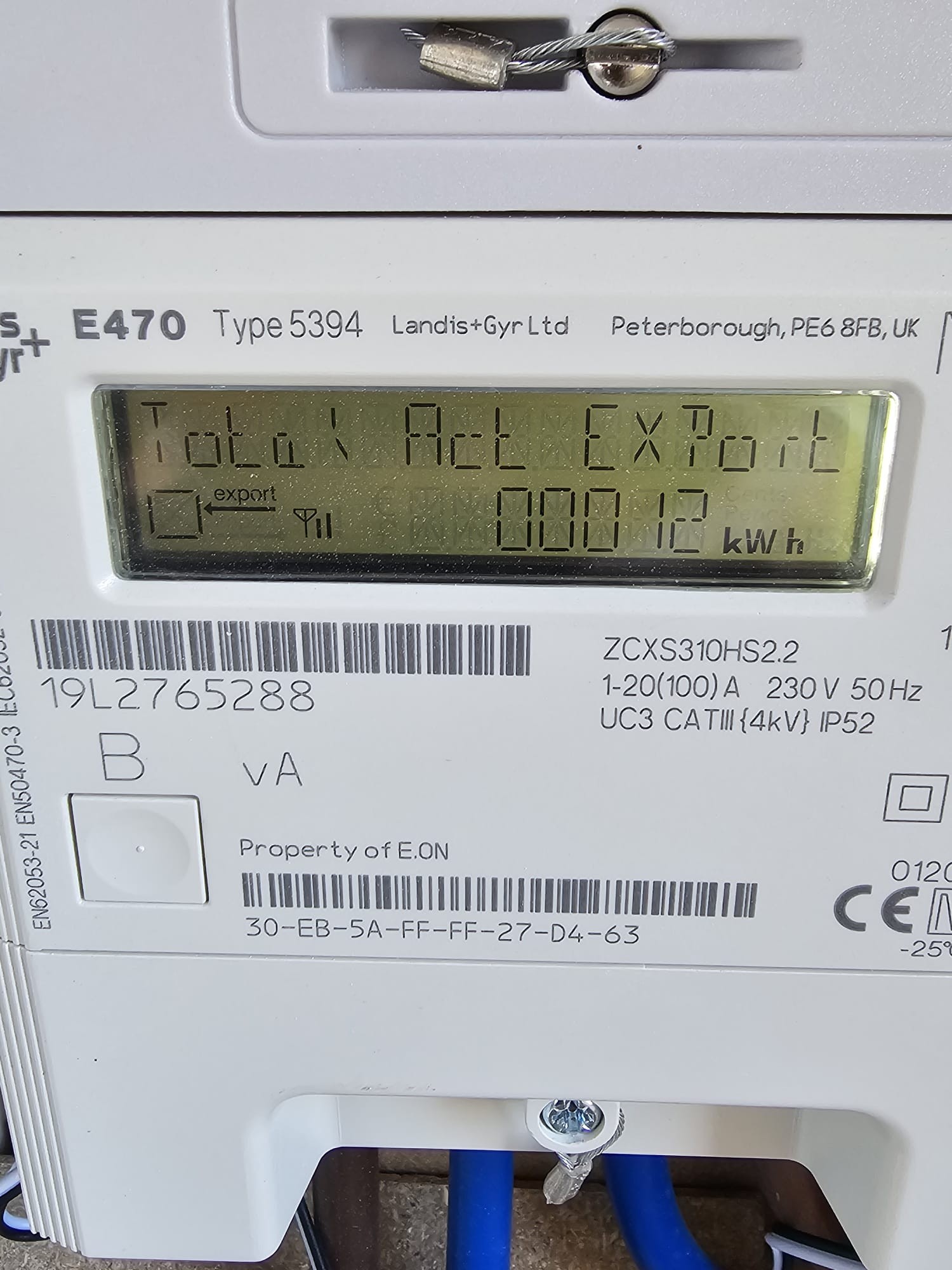
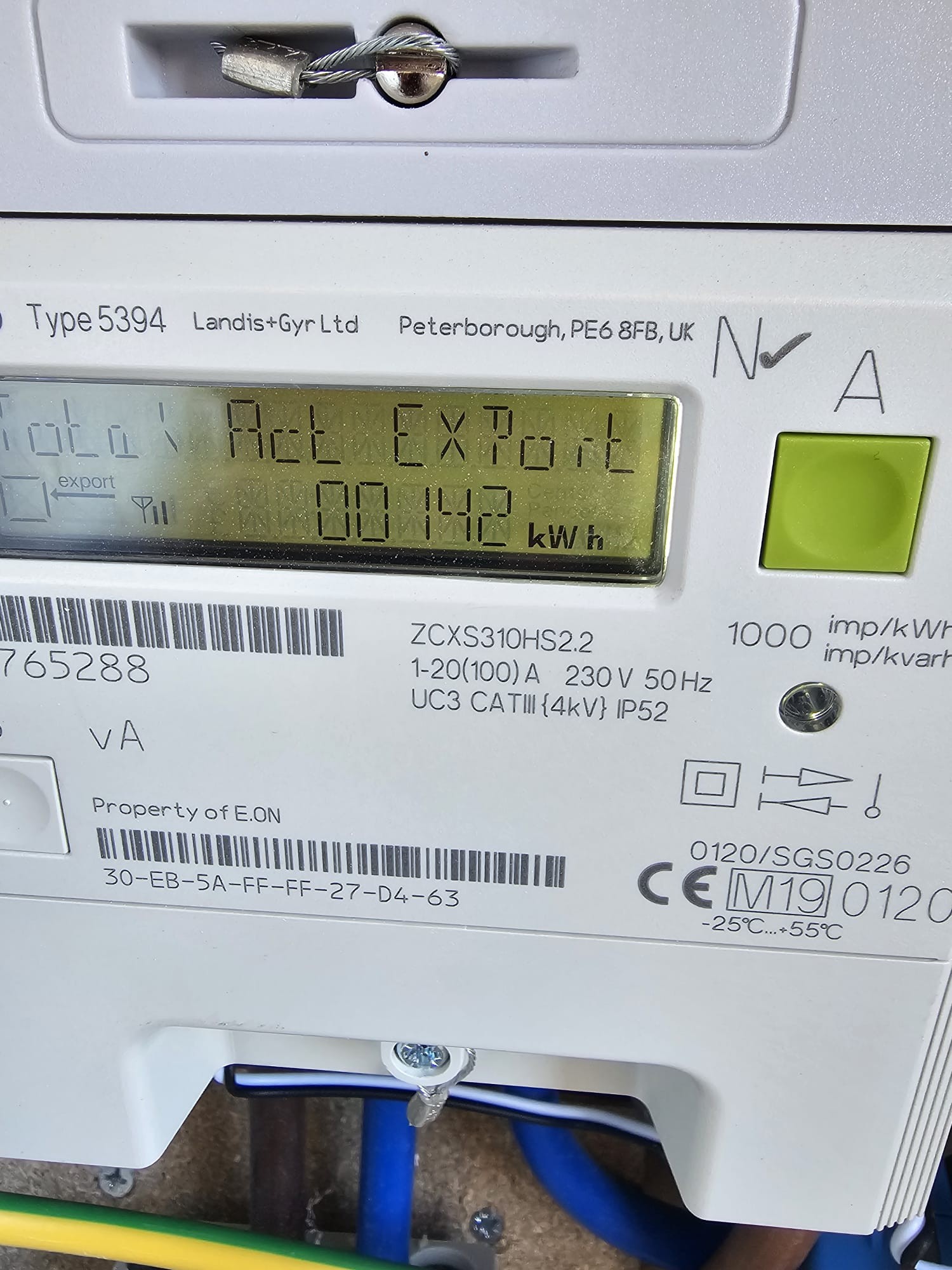
If you still have your smartmeter IHD, does it show similar grid activity? Or if you can access readings from your energy supplier account.

O
#42 olakunleoj

DD
This is my export reading 26th Feb

Export meter reading today 8th of March

O
#43 olakunleoj

pwdst
How do you manage them? My is still new just installed 25th of Feb and I'm yet to pay them as my credit company have not release the money to them.

D
#45 DD

olakunleoj ideally you'd want to compare live usage via IHD, or half-hourly readings from your energy supplier.

P
#46 pwdst

olakunleoj I don't manage them per say. I use the GivEnergy app and not the EON one they tried to push on me, I use a different supplier for both import and export and I pay Creation not EON for the 0% finance which is almost paid off.
If I need any changes to the system I have found a local company.

#47 TheDragon (GivEnergy)

Looks like the CT was moved but positioned backwards. (Pointing the wrong way)

Do you have access to the CT location? Can you flip it around?

You have import registering as export and vice versa. I have flipped in software as a test and the data looks better so this is a good indication the CT is pointing the wrong way

Any photos of now where the CT is located.

O
#48 olakunleoj

TheDragon (GivEnergy)
Unfortunately, I don’t have any technical knowledge of electricity, so I will need to ask E.ON to send an engineer out again to flip it.
That said, since this is a GivEnergy product, would it be possible for you to step in and coordinate with E.ON to inspect the installation and correct any issues? This would save me a lot of stress, as I have lost confidence in the work done by the installer.
Their approach has shown that they are not well-trained and lack the necessary expertise. When I asked them to guide me through the app and web interface, they simply stated that they don’t offer that service, which is highly concerning.
I would appreciate any support you can provide to ensure my system is functioning as intended.

S
#49 SteveCook

I think you should be screaming at Eon saying you think it is wrongly installed and that they better send someone PDQ before you tell the HSE and/or someone gets injured. GivEnergy manufactured the kit, but that's a bit like moaning at Ford or Pirelli when Kwik Fit put the tyres on back to front - moan at Kwik Fit

O
#50 olakunleoj

I just want to take a moment to really appreciate everyone who has contributed to my issue here in the community. Your input has helped me better understand and navigate the system, and it's led me to some useful conclusions—so thank you all!
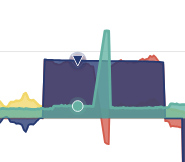
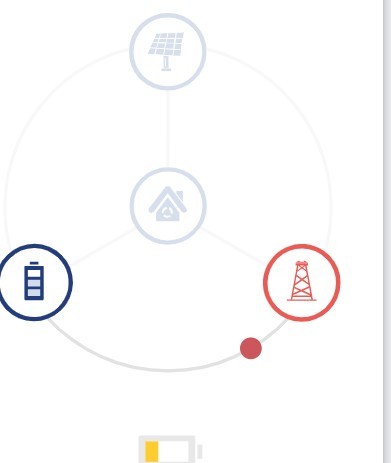
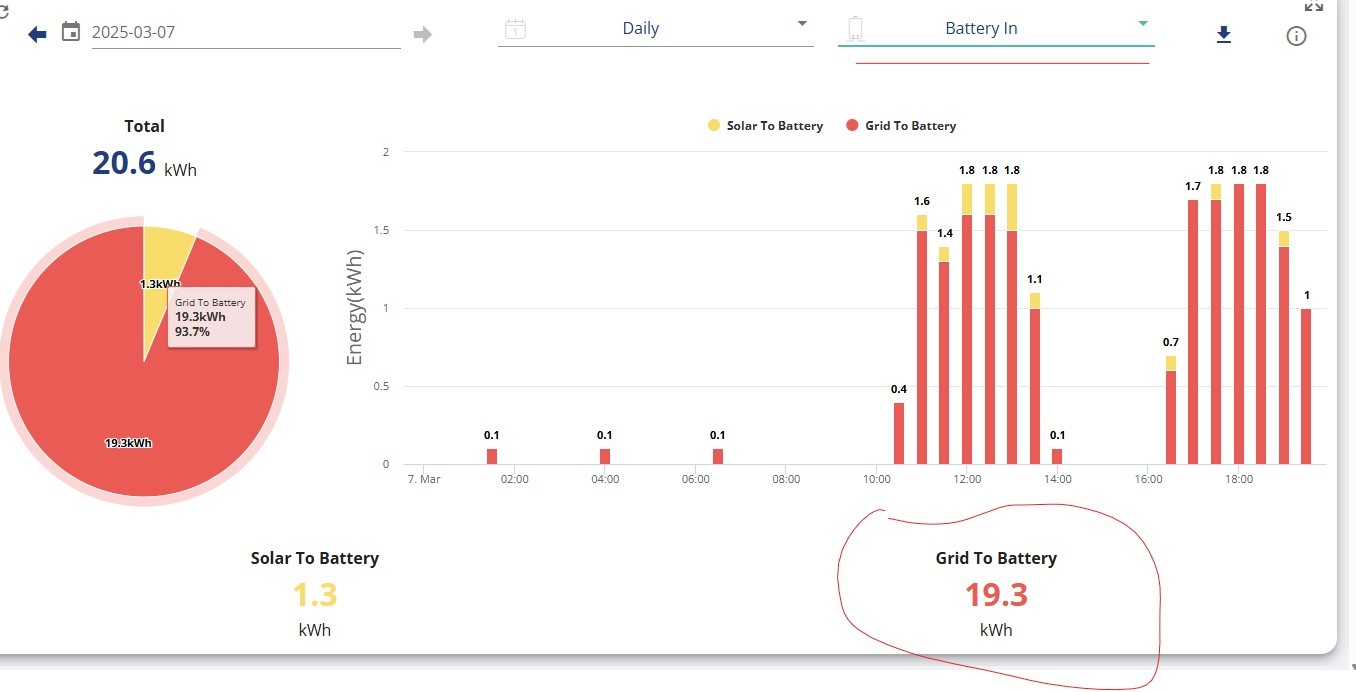
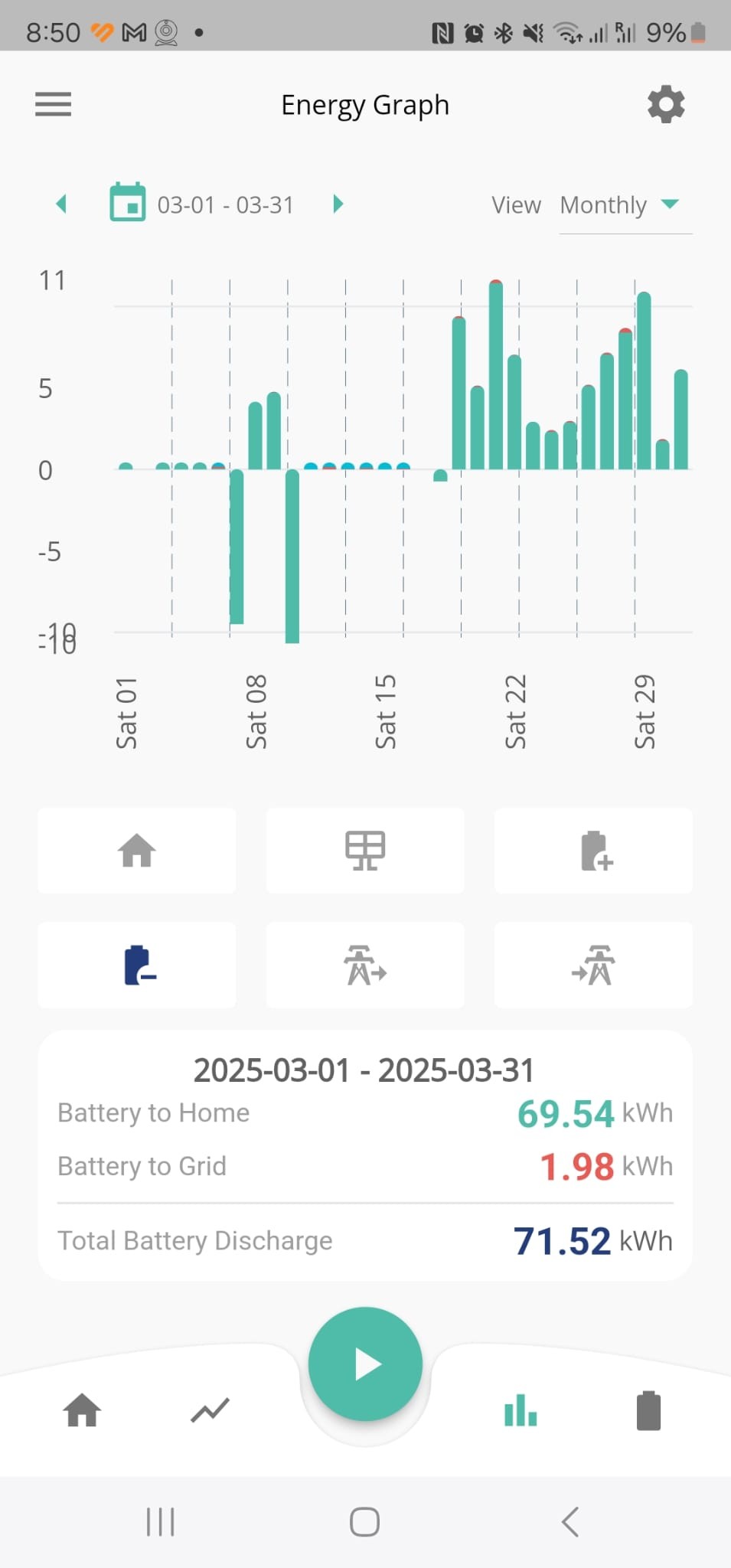
That said, I’ve noticed something strange: there are two different values showing for my battery export—one on the app and another on the web portal.
More interestingly, I discovered that on average, about 3 kWh of energy from my battery is being exported to the grid each day, even though timed discharge and timed export are both disabled. This export value only appears on the web portal and not in the app.
I reached out to GivEnergy support, and they said this is expected behavior. Below is the response I received from them (see quoted message).
I’m curious—has anyone else experienced the same thing? Would love to know if this is common or if it’s just my setup behaving oddly.
Hi,
Thanks for the conversation we had about your grid import and export, let me know if the below explanation helps with the issue you spoke to me about.
Imagine your energy system works like a car’s speedometer. It’s constantly checking and adjusting how energy flows in your home, but it only takes a “snapshot” of this activity every 5 minutes to show on your graph.
Because the system is always adjusting—just like a car speeding up or slowing down—you might see very short bursts of energy being imported or exported. For instance, if you turn on the kettle right after a snapshot is taken, the battery will quickly change its rate to handle the extra load. That quick spike (lasting only a few seconds) might not appear on the graph since it happens between snapshots.
Additionally, you might see a small amount of grid import or export because the battery is continuously fine-tuning its operation. Even if nothing major is happening in your home, the system makes micro adjustments to keep the energy flow balanced. These tiny fluctuations—caused by the battery ramping up or down—can show up as brief moments of import or export, even though overall energy use appears steady.
For the most accurate details on what you’re importing or exporting, check the “Meter Data,” which shows the actual energy measurements.

Here is the image from the web

Here is the image from the app

T
#51 TX200

Strange how those two values don't match.

They do on my system, identical values for battery to grid in the app and website.

Could you try clearing the cache in the phone app settings to see if it's an app issue?